
解决git报错:fatal: unable to access ‘https://github.com/...‘: Failed to connect to github.com port 443 a
想要从github上下载代码,使用git clone url远程克隆仓库到本地,但是报错了,说我不能连接服务器。打开“编辑代理服务器”————手动设置代理————打开————直接保存,然后到终端中配置一下这个刚刚开启的手动代理。要么就临时修改非法字符的系统保护,然后下载,下载后恢复保护,看下面的方法1。这样就可以清除 Git 的代理设置,让其直接连接网络进行操作。要么自己手动下载zip文件到对应的
·
原因
想要从github上下载代码,使用git clone url 远程克隆仓库到本地,但是报错了,说我不能连接服务器
报错内容:
fatal: unable to access ‘https://github.com/…’: Failed to connect to github.com port 443 after 21107 ms: Couldn’t connect to server
解决办法1:清空代理,使用本地网络
清空代理设置:在终端中输入下面的命令
git config --global --unset http.proxy
git config --global --unset https.proxy
这样就可以清除 Git 的代理设置,让其直接连接网络进行操作。
解决办法2:手动配置代理
在window搜索:代理,
打开“编辑代理服务器”————手动设置代理————打开————直接保存,然后到终端中配置一下这个刚刚开启的手动代理
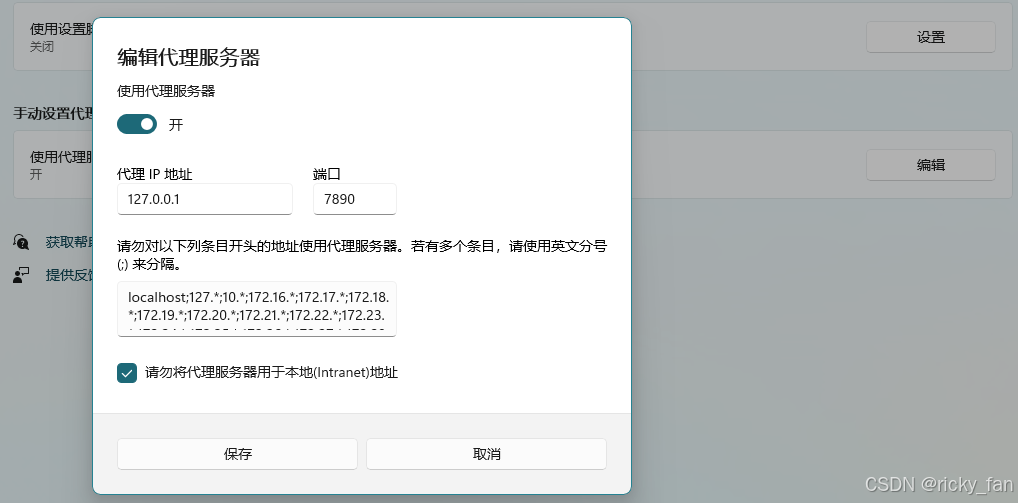
终端中输入:
git config --global http.proxy http://127.0.0.1:7890
然后再次 git clone
就可以出现github认证的界面啦!
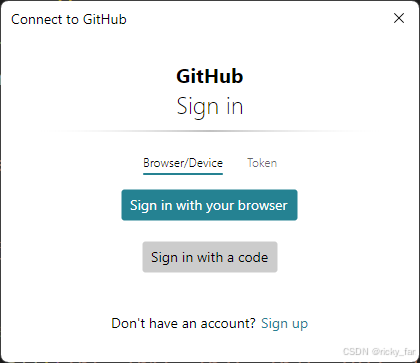
但是 我又报错其他内容:
Cloning into 'lceda-docs'...
remote: Enumerating objects: 5582, done.
remote: Counting objects: 100% (4839/4839), done.
remote: Compressing objects: 100% (1623/1623), done.
remote: Total 5582 (delta 2971), reused 4817 (delta 2949), pack-reused 743 (from 2)
Receiving objects: 100% (5582/5582), 48.24 MiB | 2.84 MiB/s, done.
Resolving deltas: 100% (3158/3158), done.
**error: invalid path 'oshwhub.com/_next/image?url=%2F_next%2Fstatic%2Fmedia%2Factivity-icon.b44c1795.png&w=32&q=75'**
**fatal: unable to checkout working tree**
**warning: Clone succeeded, but checkout failed.**
**You can inspect what was checked out with 'git status'**
**and retry with 'git restore --source=HEAD :/'**
这个说明仓库路径存在非法路径,解决方法:
要么自己手动下载zip文件到对应的地址
要么就临时修改非法字符的系统保护,然后下载,下载后恢复保护,看下面的方法1
方法 1:临时禁用路径保护
-
关闭 Git 的路径保护
在命令行中运行以下命令,临时允许非法路径字符:git config --global core.protectNTFS false -
重新克隆仓库
再次尝试克隆仓库:git clone https://your-repo-url/lceda-docs.git -
恢复保护(可选)
克隆完成后,建议恢复默认保护:git config --global core.protectNTFS true

一站式 AI 云服务平台
更多推荐



 14
14 0
0- 0


 已为社区贡献2条内容

所有评论(0)