
org.junit.platform.commons.JUnitException: Failed to parse version of junit:junit: 4.13.1
第一种情况:解决方法:可能是pom.xml的文件有问题</dependency><groupId>org.springframework.boot</groupId><artifactId>spring-boot-starter-test</artifactId><scope>test</scope><exc
·
第一种情况:
解决方法:可能是pom.xml的文件有问题
</dependency>
   <groupId>org.springframework.boot</groupId>
            <artifactId>spring-boot-starter-test</artifactId>
            <scope>test</scope>
            <exclusions>
                <exclusion>
                    <groupId>org.junit.vintage</groupId>
                    <artifactId>junit-vintage-engine</artifactId>
                </exclusion>
            </exclusions>
        </dependency>
        <dependency>
            <groupId>org.junit.jupiter</groupId>
            <artifactId>junit-jupiter-api</artifactId>
            <version>RELEASE</version>
            <scope>test</scope>
 </dependency>
将pom文件改成这样
</dependency>
       <groupId>org.springframework.boot</groupId>
       <artifactId>spring-boot-starter-test</artifactId>
       <scope>test</scope>
</dependency>
第二种情况:
在 Spring 项目中运行测试的时候,得到错误:
TestEngine with ID 'junit-vintage' failed to discover tests” with Spring
这个错误的原因是 JUnit 的引擎,使用了 junit-vintage 引擎。
junit-vintage 是 Junit 4 中使用的引擎,如果你的项目使用了 Junit 5 的话,你需要在 spring-boot-starter-test 中将 JUnit 4 的引擎从测试中删除。
        <dependency>
        <groupId>org.springframework.boot</groupId>
        <artifactId>spring-boot-starter-test</artifactId>
        <scope>test</scope>
        <exclusions>
            <exclusion>
                <groupId>org.junit.vintage</groupId>
                <artifactId>junit-vintage-engine</artifactId>
            </exclusion>
        </exclusions>
    </dependency>
junit-vintage-engine 和 junit-jupiter-engine 有什么不同
junit-vintage-engine 是 JUnit 4 中使用的测试引擎。junit-jupiter-engine 是 JUnit 5 中使用的测试引擎。
如果你的 Spring 项目使用的新的 Spring Boot 版本的话,你应该默认使用了 JUnit 5 的引擎,因此为了兼容性,你需要在 spring-boot-starter-test 这个 POM 引用的时候将 JUnit 4 的引擎去除掉。

第三种情况:

看看自己是不是导错包了。。。
实战情况:
pom的设置是
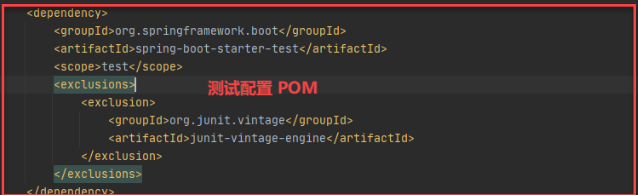
出现了标题问题,是因为导错包了:

一站式 AI 云服务平台
更多推荐



 13
13 0
0- 0


 已为社区贡献1条内容

所有评论(0)