
Android studio 不能运行main方法
更新android studio后运行java中的main方法报错* What went wrong:A problem occurred configuring project ':app'.> Could not create task ':app:TestMain.main()'.> SourceSet with name 'main' not found.有两种解决办法一 .在
·
更新android studio后运行java中的main方法报错
* What went wrong:
A problem occurred configuring project ':app'.
> Could not create task ':app:TestMain.main()'.
   > SourceSet with name 'main' not found.
有两种解决办法
一 .在.idea包中的gradle.xml 添加一行属性
<option name="delegatedBuild" value="false"/>
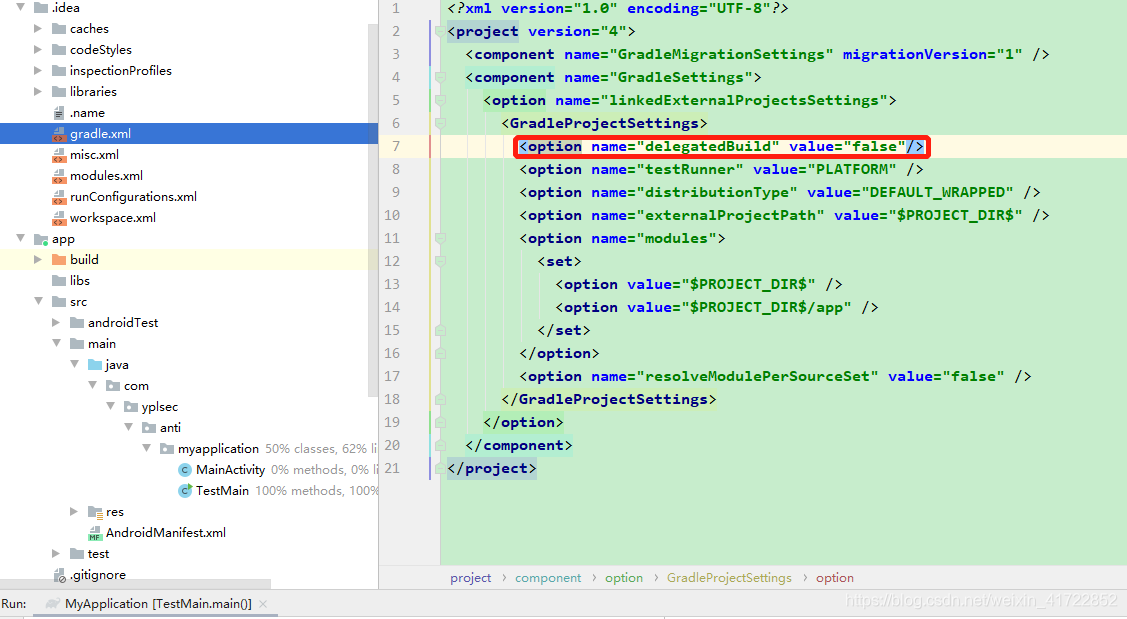
二.在运行时选择第三个选项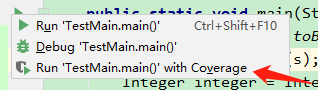

一站式 AI 云服务平台
更多推荐



 1
1 0
0- 0


 已为社区贡献1条内容

所有评论(0)