
ConstraintLayout内的控件填充满空间
如下图,ConstraintLayout内共有三个控件,下面两个一左一右都是RecyclerView关键点设置成 0dp , 然后将控件上的小圆圈拉到边界即可<androidx.recyclerview.widget.RecyclerViewandroid:id="@+id/rv_pick_type_list"android:layout_width="100dp"android:layou
·
如下图,ConstraintLayout内共有三个控件,下面两个一左一右都是RecyclerView
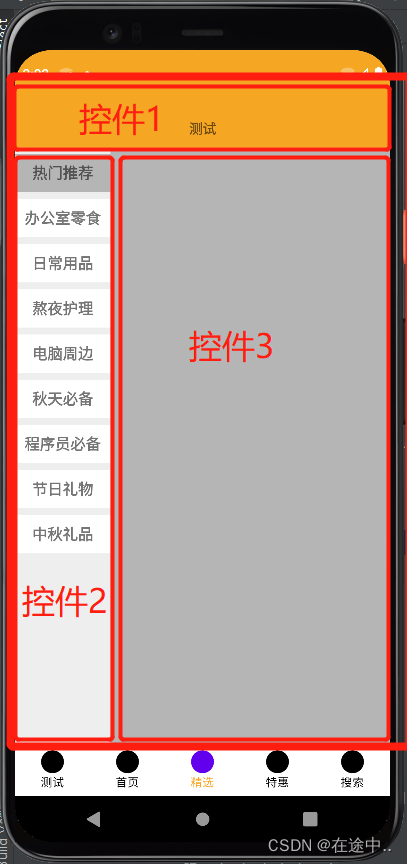
关键点设置成 0dp , 然后将控件上的小圆圈拉到边界即可
 <androidx.recyclerview.widget.RecyclerView
        android:id="@+id/rv_pick_type_list"
        android:layout_width="100dp"
        android:layout_height="0dp"
        android:overScrollMode="never"
        app:layout_constraintBottom_toBottomOf="parent"
        app:layout_constraintTop_toBottomOf="@+id/view2"
        tools:layout_editor_absoluteX="0dp" />

    <androidx.recyclerview.widget.RecyclerView
        android:id="@+id/rv_pick_content_list"
        android:layout_width="0dp"
        android:layout_height="0dp"
        android:background="@color/colorAccent"
        app:layout_constraintBottom_toBottomOf="parent"
        app:layout_constraintEnd_toEndOf="parent"
        app:layout_constraintStart_toEndOf="@+id/rv_pick_type_list"
        app:layout_constraintTop_toBottomOf="@+id/view2" />

一站式 AI 云服务平台
更多推荐



 1
1 0
0- 0


 已为社区贡献1条内容

所有评论(0)