
使用JetBrains Rider更快的C#脚本编写
From time to time, we spotlight a tool from an Asset Store Partner that we believe some Unity developers might like to know more about. In this post, we feature JetBrains Rider, a C# script editor.我..
From time to time, we spotlight a tool from an Asset Store Partner that we believe some Unity developers might like to know more about. In this post, we feature JetBrains Rider, a C# script editor.
我们会不时地从资产商店合作伙伴那里突出一种工具,我们相信某些Unity开发人员可能希望了解更多信息。 在本文中,我们将介绍C#脚本编辑器JetBrains Rider。
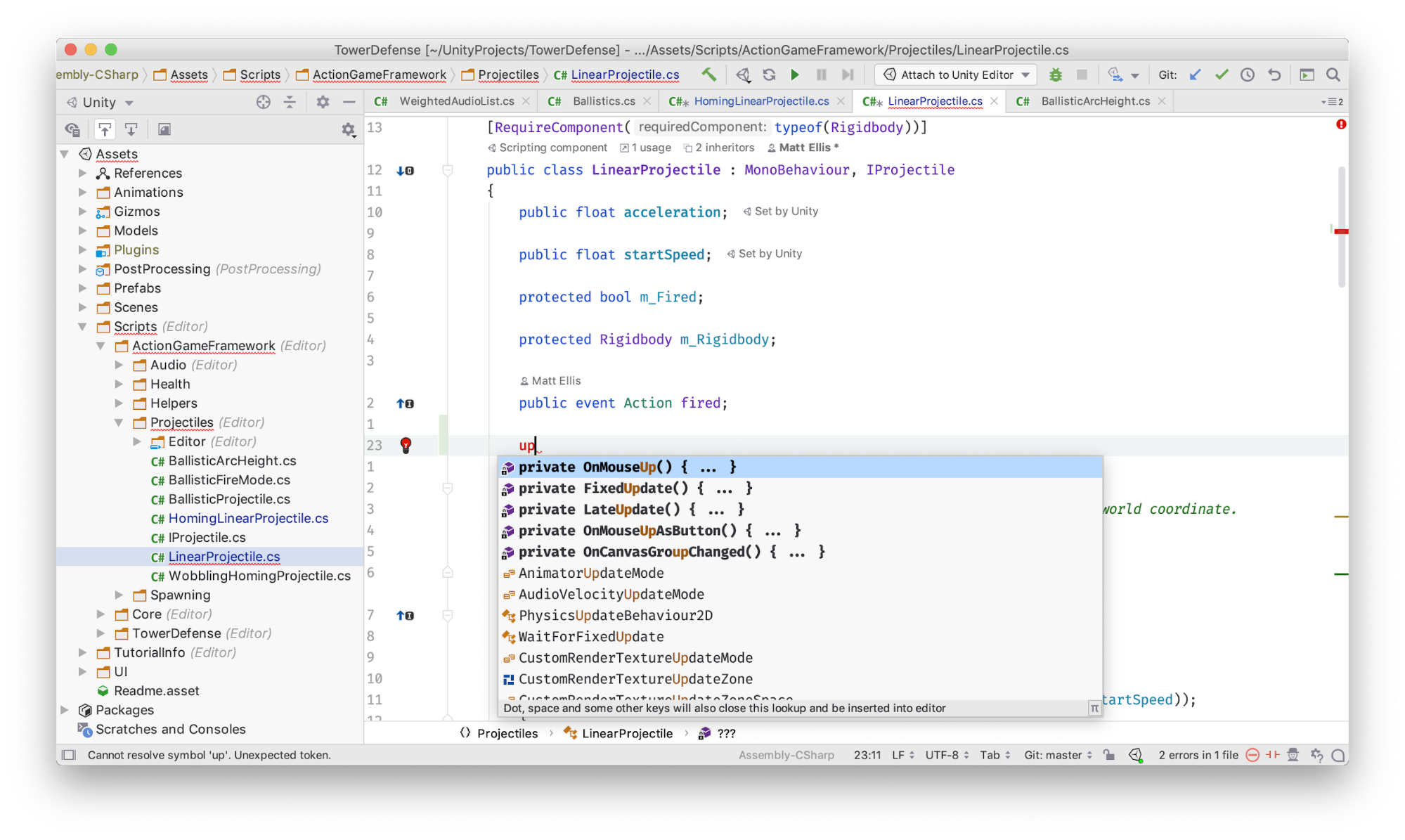
Rider provides a view of assets and packages, rich code editor with integrated source control, inspections and code completion.
Rider提供资产和包的视图,具有集成源代码控制,检查和代码完成功能的丰富代码编辑器。
使用C#可以更快地工作 (Work faster with C#)
As a developer, you know how frustrating it is to keep switching between Unity and your script editor. You’d rather focus on your game instead of being bogged down in your code. JetBrains developed Rider, an integrated development environment (IDE), to help C# programmers navigate Unity, so you don’t waste time looking for files or performing detail work that could be automated. See if some of the features described below might make your workflow more efficient and productive.
作为开发人员,您知道在Unity和脚本编辑器之间不断切换是多么令人沮丧。 您宁愿专注于自己的游戏,也不愿陷入代码混乱之中。 JetBrains开发了集成开发环境(IDE)的Rider,以帮助C#程序员导航Unity,因此您不必浪费时间寻找文件或执行可以自动执行的详细工作。 查看下面描述的某些功能是否可以使您的工作流程更高效和高效。
快速找到您需要的东西 (Find what you need fast)
The Shift+Shift keyboard shortcut activates the tool’s Search Everywhere feature, which helps you navigate your project as efficiently as possible. You can hit Shift+Shift and start typing to find your classes, files or symbols. Rider uses a “smart” algorithm, so you can even use the initial letters of the words that make up a class or method name.
Shift + Shift键盘快捷键可激活该工具的“随处搜索”功能,该功能可帮助您尽可能高效地浏览项目。 您可以按Shift + Shift并开始输入以查找您的类,文件或符号。 Rider使用“智能”算法,因此您甚至可以使用组成类或方法名称的单词的首字母。
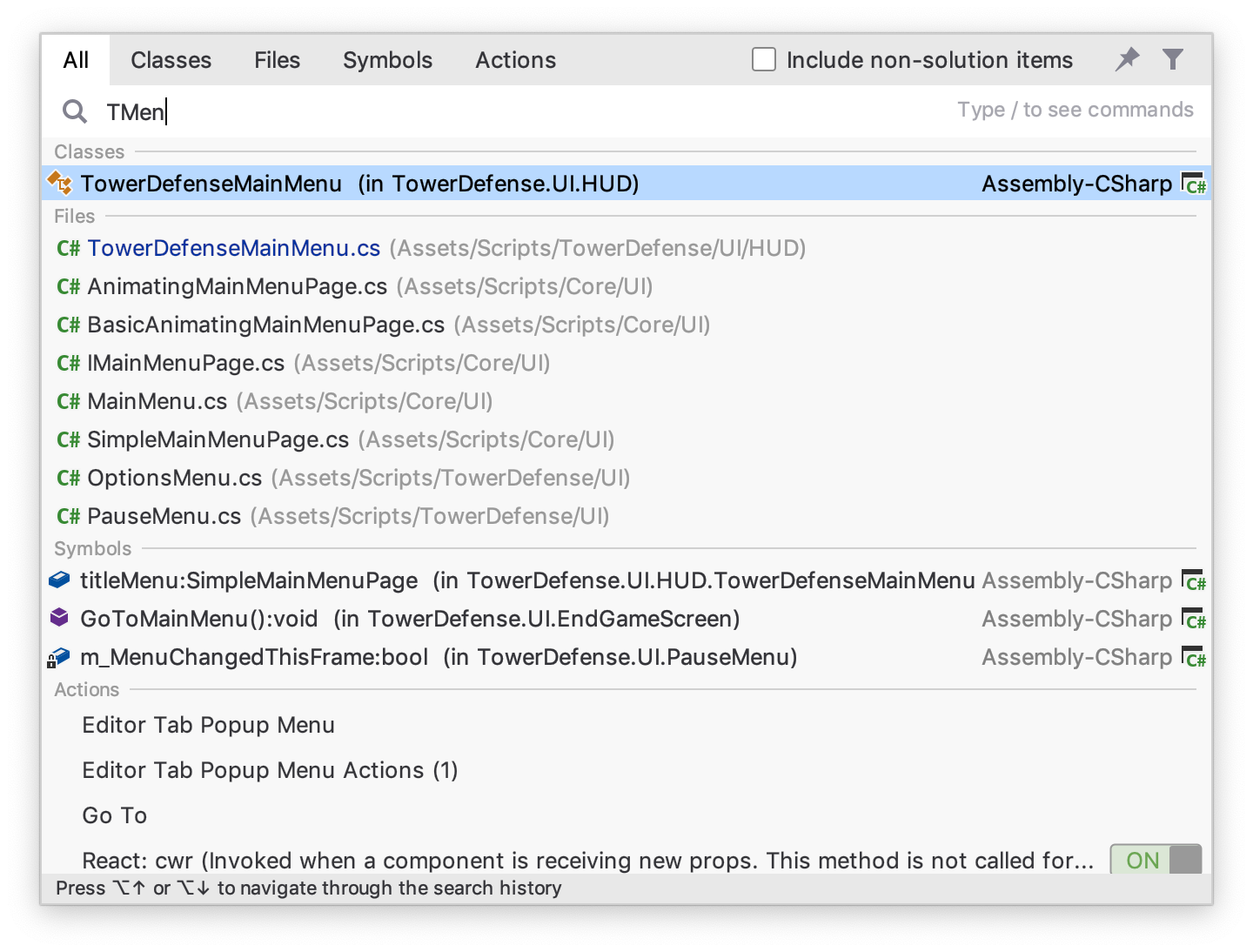
The Search Everywhere dialog quickly allows searching for project classes, files, symbols and even menu items and preferences in the editor itself
随处搜索对话框可快速在编辑器本身中搜索项目类,文件,符号甚至菜单项和首选项
更快地下载代码 (Get your code down quicker)
Rider can also help you write code faster by suggesting and completing all of the event functions in Unity classes. The application has full knowledge of the Unity API, from Unity 5.0 to 2019.2.
骑士还可以通过建议并完成Unity类中的所有事件函数来帮助您更快地编写代码。 该应用程序具有从Unity 5.0到2019.2。的Unity API的全部知识。
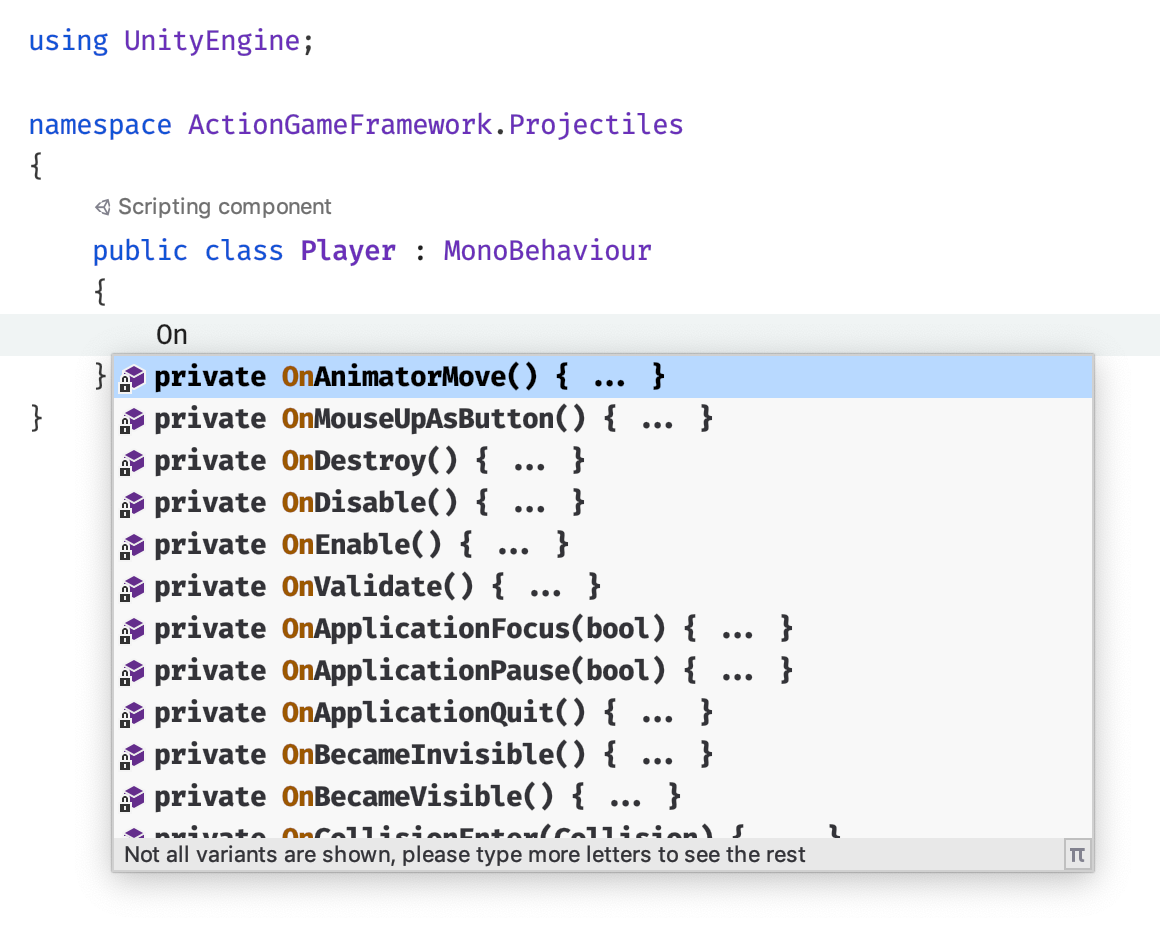
Start typing a Unity event function and Rider will show all functions in a code completion list, and generate the method when selected
开始输入Unity事件函数,Rider将在代码完成列表中显示所有函数,并在选定时生成方法
查明脚本中的问题 (Pinpoint problems in your script)
It doesn’t matter how fast you get the code written if it doesn’t work. Rider analyzes your code as you type, looking for common issues. From possible null reference exceptions to suggestions on new C# language features (anyone migrating to C# 7?), the IDE highlights any issues it finds in your code. Hit Alt+Enter and the software will safely rewrite your code to fix the issue. Rider has over 2,200 inspections, 450 quick fixes and more than 50 refactorings such as rename and extract class to contribute to improving the quality of your code.
如果不起作用,那么多快就可以编写代码了。 键入时,Rider会分析您的代码,以查找常见问题。 从可能的空引用异常到有关新的C#语言功能的建议(是否有人迁移到C#7?),IDE都会突出显示它在代码中发现的所有问题。 按Alt + Enter,软件将安全地重写您的代码以解决此问题。 Rider进行了2200多次检查,450项快速修复以及50多种重构(例如重命名和提取类),以帮助提高代码质量。
Rider’s inspections will suggest places where your code can be improved, and pressing Alt+Enter will show a menu of quick fixes to automatically rewrite the code
骑士的检查将建议您可以改进代码的地方,按Alt + Enter将显示快速修复菜单,以自动重写代码
尽早发现Unity问题 (Discover Unity issues early)
In addition to understanding C#, this IDE has deep knowledge of Unity. It highlights script components, serialized fields and even event handlers registered in scenes and Prefabs in the Editor. (And yes, renaming an event handler in C# will also update the usages in scenes and prefabs.)
除了了解C#,此IDE还具有Unity的深厚知识。 它突出显示了在编辑器中的场景和预制件中注册的脚本组件,序列化字段,甚至事件处理程序。 (是的,在C#中重命名事件处理程序还将更新场景和预制件中的用法。)
More importantly, the tool can save you time by highlighting Unity-specific issues as you type. It can find issues that would normally be found only at runtime – after switching back to Unity, starting play mode and playing the game through to the right place – and fix them automatically.
更重要的是,该工具可以通过在键入时突出显示特定于Unity的问题来节省您的时间。 它可以找到通常仅在运行时才能发现的问题-切换回Unity,启动游戏模式并将游戏玩到正确的位置之后-并自动修复它们。
For example, Rider can find:
例如,Rider可以找到:
-
typos in the string-literal arguments for Invoke or StartCoroutine
Invoke或StartCoroutine的字符串文字参数中的拼写错误
-
incorrect signatures for methods marked with Unity attributes
用Unity属性标记的方法的签名不正确
-
unintended bypass of the lifetime check of the underlying object (in C# 6) when null coalescing or conditional access operators don’t correspond to an explicit null check
-
why your script won’t serialize when you applied the SerializeField attribute, for example, if you applied it to a property (something easy to miss)
为什么您的脚本在应用SerializeField属性时不进行序列化,例如,如果将其应用于属性(某些内容很容易遗漏)
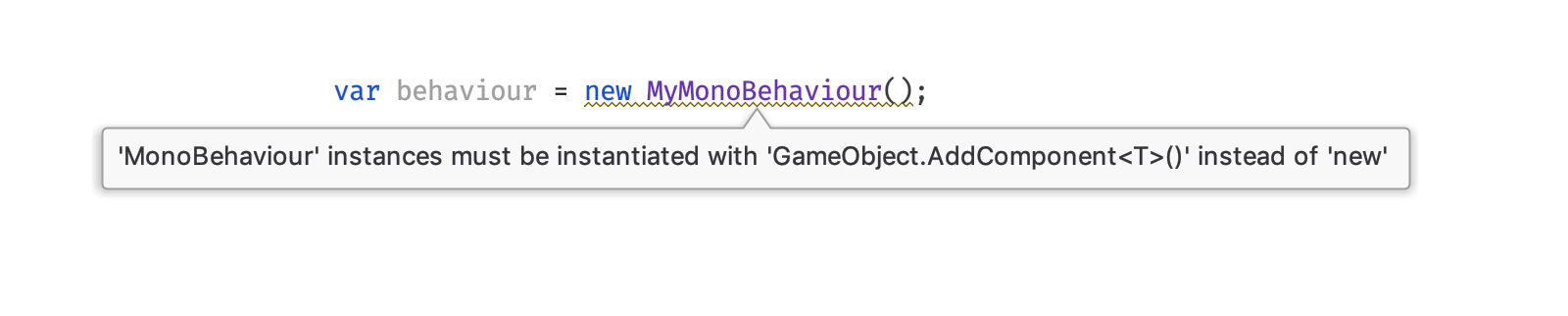
Rider understands how Unity uses your code and shows warnings in the editor before you encounter them at runtime.
Rider了解Unity如何使用您的代码,并在运行时遇到警告之前在编辑器中显示警告。
编写更快的C# (Write faster C#)
This IDE helps you write your code faster, but it also helps you write faster code.
该IDE可帮助您更快地编写代码,但也可以帮助您编写更快的代码。
It has turned many of Unity’s best practices for performance into inspections. For example, the software will help you:
它已将许多Unity性能最佳实践转变为检查。 例如,该软件将帮助您:
-
remove empty event functions, to avoid the unnecessary overhead
删除空事件函数 ,以避免不必要的开销
-
use CompareTag instead of comparing the tag property to a string literal
使用CompareTag而不是将tag属性与字符串文字进行比较
-
identify unnecessarily expensive operations, such as creating an object and setting its parent separately, among others
确定不必要的昂贵操作,例如创建对象和单独设置其父对象
Rider highlights Unity’s performance best practices directly in the editor, with Alt+Enter quick fixes to automatically rewrite the code.
Rider通过Alt + Enter快速修复程序自动重写代码,直接在编辑器中突出显示Unity的性能最佳实践。
These inspections all have simple fixes, and you can use the Alt+Enter shortcut to quickly rewrite the code and fix them.
这些检查都具有简单的修复程序 ,您可以使用Alt + Enter快捷方式快速重写代码并进行修复。
Rider can help with some less obvious issues too. It understands how Unity calls your code, and knows that your Update methods will be called frequently, essentially every frame. It knows they need to be optimized. The editor adds indicators to these methods, and to any time-consuming API calls made inside them, based on Unity’s best practices, such as calls to GetComponent or SendMessage. These indicators are meant to guide you, to inform you that these calls have a cost and you should be careful about using them, but it’s also important to know that using them isn’t wrong.
骑士也可以帮助解决一些不太明显的问题。 它了解Unity如何调用您的代码,并且知道您的Update方法将被频繁调用,基本上是在每一帧中。 它知道需要对其进行优化。 编辑器会根据Unity的最佳做法,向这些方法以及其中进行的所有耗时的API调用添加指示器,例如对GetComponent或SendMessage的调用。 这些指标旨在指导您,告知您这些通话是有代价的,因此您在使用它们时应格外小心,但了解使用它们的正确性也很重要。
For example, calling GetComponent inside Update is an expensive operation, and it is usually always best to move that call to Start or Awake, and the software can automate this. As another example, a call to SendMessage is also resource-intensive, and requires significant work to fix; Rider doesn’t show this as a warning, but uses the indicator to show that this method is a good target for profiling.
例如,在Update中调用GetComponent是一项昂贵的操作,通常总是最好将该调用移至Start或Awake,并且软件可以自动执行此操作。 再举一个例子,对SendMessage的调用也占用大量资源,并且需要大量工作来解决。 Rider不会将其显示为警告,而是使用指示器来表明此方法是进行概要分析的良好目标。
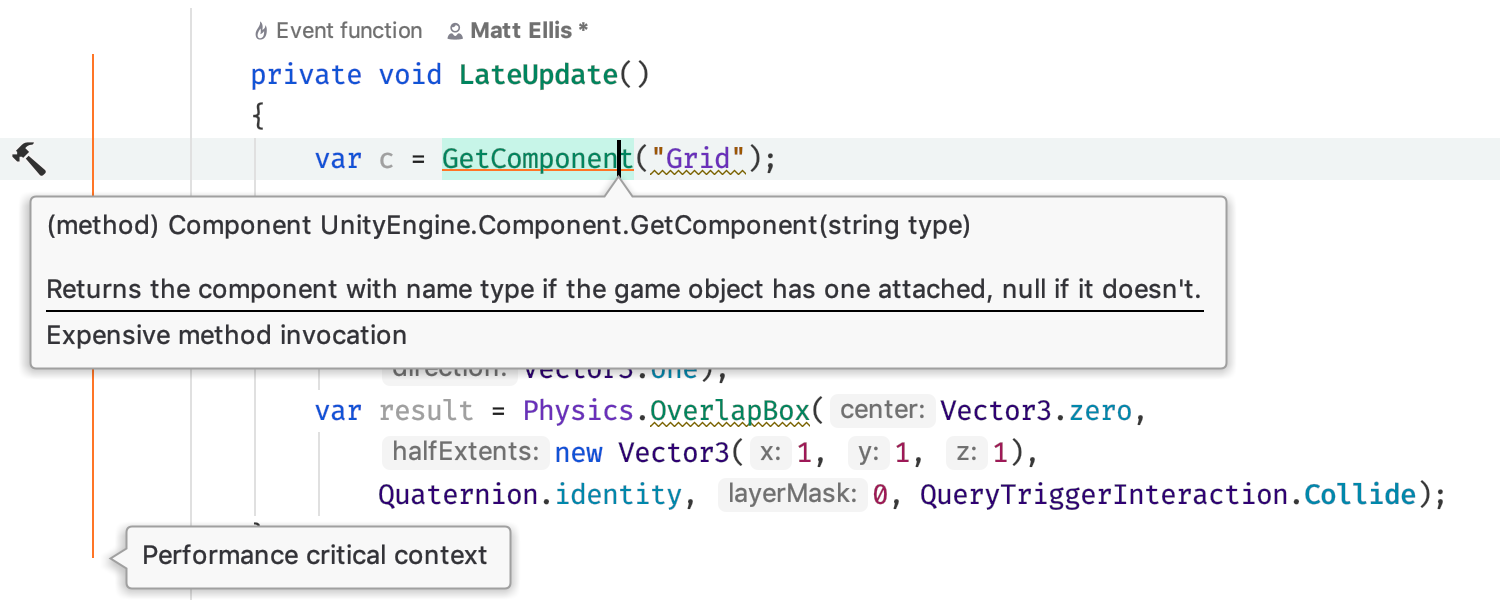
Update methods are marked as a performance critical context, enabling more inspections and highlights to avoid known expensive methods.
更新方法被标记为对性能至关重要的上下文,从而可以进行更多检查和突出显示以避免已知的昂贵方法。
Rider has a built-in code profiler that can attach to the Unity Editor and provide profiling results to establish exactly what your code is doing, in the same editor you use to write your code.
Rider具有一个内置的代码探查器,该探查器可以附加到Unity Editor,并提供概要分析结果,以在您用来编写代码的同一编辑器中准确确定您的代码在做什么。
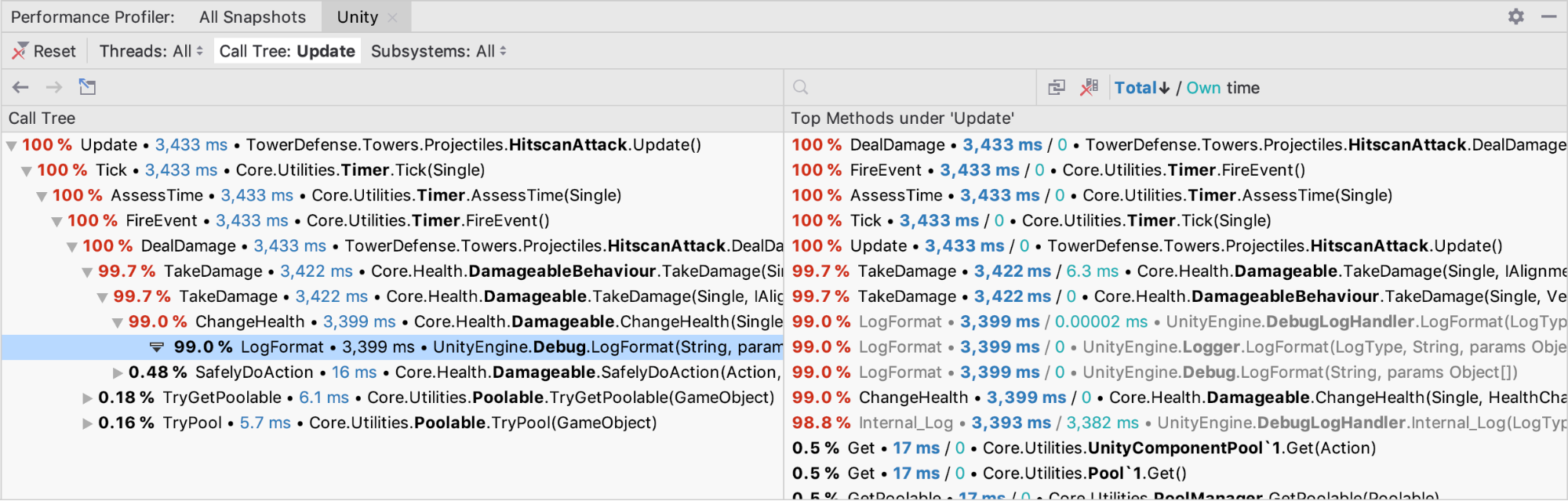
Integrated code focussed profiling shows how much time is spent in each method.
以集成代码为中心的性能分析显示了每种方法花费了多少时间。
JetBrains Rider is a smart C# editor for Unity scripting and offers many ways to improve your productivity, as well as the performance of your code. Watch this video to see how it works. You can check out JetBrains Rider on the Unity Asset Store, find out more details on JetBrains’ website, and keep up-to-date with the latest features on the JetBrains blog.
JetBrains Rider是一个用于Unity脚本的智能C#编辑器,并提供了许多提高生产率和代码性能的方法。 观看此 视频 以了解其工作原理。 您可以 在Unity Asset Store上 查看 JetBrains Rider ,在 JetBrains的网站 上找到更多详细信息 ,并 在JetBrains博客 上 了解 最新功能 。
翻译自: https://blogs.unity3d.com/2019/08/13/faster-c-scripting-with-jetbrains-rider/

一站式 AI 云服务平台
更多推荐



 0
0 0
0- 0


 已为社区贡献3条内容

所有评论(0)