
python install packages failed_人人开源项目:npm install出现的问题解决思路
错误实例:p ERR! stack Error: Command failed: F:\Python\python.EXE -c import sys; print “%s.%s.%s” % sys.version_info[:3];gyp ERR! stack File “”, line 1gyp ERR! stack import sys; print “%s.%s.%s” % sys.ver
错误实例:
p ERR! stack Error: Command failed: F:\Python\python.EXE -c import sys; print “%s.%s.%s” % sys.version_info[:3];
gyp ERR! stack File “”, line 1
gyp ERR! stack import sys; print “%s.%s.%s” % sys.version_info[:3];
gyp ERR! stack ^
gyp ERR! stack SyntaxError: invalid syntax
UnicodeEncodeError: ‘charmap’ codec can’t encode characters in position 509-510: character maps to
gyp ERR! configure error
gyp ERR! stack Error: gyp failed with exit code: 1
gyp ERR! stack at ChildProcess.onCpExit
Warning: unrecognized setting VCCLCompilerTool/MultiProcessorCompilation
Traceback (most recent call last):
File “F:\Code\renren-fast-vue\node_modules_node-gyp@3.8.0@node-gyp\gyp\gyp_main.py”, line 16, in
问题发现:
1.Python27环境问题:
2.问题原因: node版本与sass版本不对应问题:
解决方法:
1.python环境问题:
renren开源里面的代码使用的是python2.7版本的代码,因此只3.0以上的版本不适用在C盘下安装C:/Python27 或自行安装添加环境配置.
至此python环境问题解决.
2.node环境与sass不兼容问题:
node-sass的github标注sass版本问题:
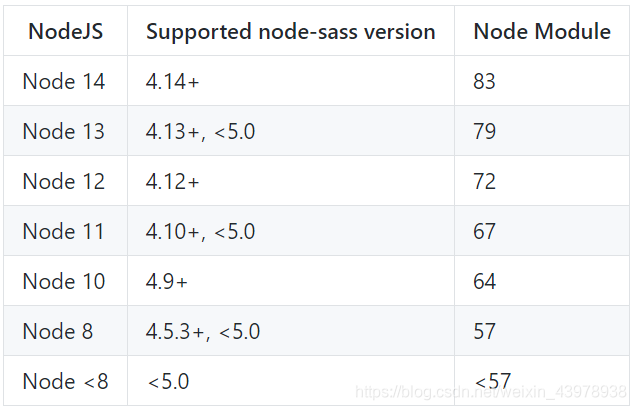
详情查询:https://github.com/sass/node-sass
解决思路
1).更换node环境
下载12.19.0推荐版本版本
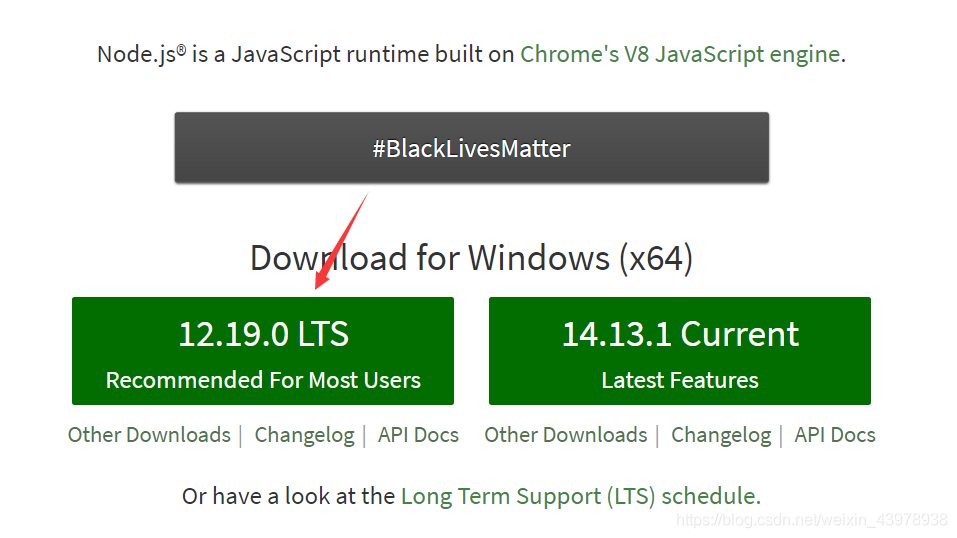
node官网: https://nodejs.org/en/
配置环境好之后在DOS中查询版本:
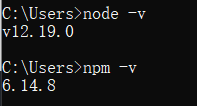
删除node-modules
在此执行 npm -install 成功下载
2).配置package.json文件找到适配自己的版本
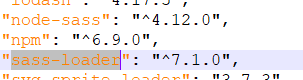
"lodash": "4.17.5",
"node-sass": "^4.14.0",
"npm": "^6.9.0",
"sass-loader": "^7.1.0",
删除node-modules
在此执行 npm -install 成功下载

一站式 AI 云服务平台
更多推荐



 0
0 0
0- 0


 已为社区贡献1条内容

所有评论(0)