
Vue3对接deepseek实现ai对话
创建deepseek.js封装deepseek请求接口。编写前端,调用deepseek.js。
·
1.第一步
申请deepseek API,详细教程参考下面视频:
DeepSeek API的申请方式_哔哩哔哩_bilibili
2.第二步
创建Vue3项目
【带小白做毕设】01. 前端Vue3 框架的快速搭建以及项目工程的讲解_哔哩哔哩_bilibili
3.第三步
创建deepseek.js封装deepseek请求接口
import axios from 'axios';

const DEEPSEEK_API_URL = 'https://api.deepseek.com'; // DeepSeek API端点
const API_KEY = '你的密钥'; //DeepSeek API密钥

const deepseekApi = axios.create({
    baseURL: DEEPSEEK_API_URL,
    headers: {
        'Authorization': `Bearer ${API_KEY}`,
        'Content-Type': 'application/json'
    }
});

export default {
    async chatCompletion(prompt, model = 'deepseek-chat', maxTokens = 2048) {
        try {
            const response = await deepseekApi.post('/chat/completions', {
                model,
                messages: [{ role: 'user', content: prompt }],
                max_tokens: maxTokens
            });
            return response.data;
        } catch (error) {
            console.error('调用 DeepSeek API 时出错', error);
            throw error;
        }
    }

};
4.第四步
编写前端,调用deepseek.js
<template>
  <div class="deepseek-container">
    <!-- 回答展示区域 -->
    <div class="response-area" v-if="response || isLoading">
      <div class="message-container">
        <!-- 头像区域 -->
        <div class="message-avatar">
          <img src="@/assets/imgs/chat.png" alt="DeepSeek" class="avatar-img" />
        </div>
        <!-- 消息内容区域 -->
        <div class="message-content">
          <!-- 加载状态显示动画 -->
          <div v-if="isLoading" class="loading-animation">
            <div class="loading-dot"></div>
            <div class="loading-dot"></div>
            <div class="loading-dot"></div>
            <span class="loading-text">加载时间较长,请耐心等待</span>
          </div>
          <!-- 正常状态下显示格式化后的响应内容 -->
          <div v-else class="markdown-content" v-html="formatResponse(response)"></div>
        </div>
      </div>
    </div>

    <!-- 输入区域 -->
    <div class="input-container">
      <div class="input-box">
        <!-- 文本输入框 -->
        <textarea
            v-model="userInput"
            placeholder="有什么我可以帮助你的吗?"
            @keydown.enter.exact.prevent="askDeepSeek"
            :disabled="isLoading"
        ></textarea>
        <!-- 发送按钮 -->
        <button
            @click="askDeepSeek"
            :disabled="isLoading || !userInput.trim()"
            class="send-button"
            :class="{ 'button-loading': isLoading }"
        >
        <span v-if="!isLoading">
            <!-- 发送图标 -->
            <svg xmlns="http://www.w3.org/2000/svg" width="16" height="16" viewBox="0 0 24 24" fill="none" stroke="currentColor" stroke-width="2" stroke-linecap="round" stroke-linejoin="round">
              <line x1="22" y1="2" x2="11" y2="13"></line>
              <polygon points="22 2 15 22 11 13 2 9 22 2"></polygon>
            </svg>
          </span>
          <!-- 加载时显示旋转动画 -->
          <span v-else class="loading-spinner"></span>
        </button>
      </div>
      <!-- 底部提示信息 -->
      <div class="footer-note">
        AI小助手 可能会产生不准确的信息,请谨慎验证
      </div>
    </div>
  </div>
</template>

<script>
import { ref } from 'vue';
import deepseekService from '@/api/deepseek'; // 引入DeepSeek API服务
import { marked } from 'marked'; // Markdown解析库

export default {
  setup() {
    // 定义响应式变量
    const userInput = ref(''); // 用户输入
    const response = ref(''); // API响应
    const isLoading = ref(false); // 加载状态

    /**
     * 格式化响应文本
     * @param {string} text - 原始文本
     * @returns {string} 格式化后的HTML
     */
    const formatResponse = (text) => {
      if (!text) return '';

      // 1. 先处理Markdown的特殊结构(标题、列表等)
      // 2. 去除多余空行,但保留列表项和段落间的必要间距
      const cleanedText = text
          .replace(/^\s+|\s+$/g, '') // 去除首尾空白
          .replace(/\n{1,}/g, '\n') // 3个以上换行替换为2个
          .replace(/(\n\s*){2,}(\*|\-|\d+\.)/g, '\n$1') // 列表项前的多余空行
          .replace(/(#+)\s+\n/g, '$0 ') // 标题后的空行
          .replace(/\n{1,}/g, '\n'); // 最终确保最多连续2个换行

      return marked.parse(cleanedText);
    };

    /**
     * 向DeepSeek API提问
     */
    const askDeepSeek = async () => {
      // 空输入或正在加载时不做处理
      if (!userInput.value.trim() || isLoading.value) return;

      isLoading.value = true; // 开始加载
      response.value = ''; // 清空之前的响应

      try {
        // 调用API获取响应
        const result = await deepseekService.chatCompletion(userInput.value);
        response.value = result.choices[0].message.content; // 获取响应内容
      } catch (error) {
        // 错误处理
        response.value = '**出错啦**\n\n抱歉,获取回答时出现问题,请稍后再试。';
        console.error('API调用错误:', error);
      } finally {
        isLoading.value = false; // 结束加载
      }
    };

    // 暴露给模板使用的变量和方法
    return {
      userInput,
      response,
      isLoading,
      askDeepSeek,
      formatResponse,
    };
  },
};
</script>

<style scoped>
/* 主容器样式 */
.deepseek-container {
  max-width: 800px;
  margin: 0 auto;
  padding: 20px;
  font-family: 'Segoe UI', system-ui, -apple-system, sans-serif;
  color: #333;
}

/* 响应区域样式 */
.response-area {
  margin-bottom: 20px;
  border-radius: 8px;
  background-color: #f9f9f9; /* 浅背景以提高可读性 */
  padding: 15px; /* 增加内边距 */
  box-shadow: 0 2px 8px rgba(0, 0, 0, 0.1); /* 加深阴影 */
}

/* 消息容器布局 */
.message-container {
  display: flex;
  padding: 0; /* 移除默认填充 */
  gap: 12px; /* 元素间距 */
}

/* 头像样式 */
.message-avatar {
  flex-shrink: 0; /* 防止头像被压缩 */
}

.avatar-img {
  width: 40px; /* 增大头像 */
  height: 40px;
  border-radius: 50%;
  object-fit: cover; /* 确保适配 */
}

/* 消息内容样式 */
.message-content {
  flex-grow: 1; /* 占据剩余空间 */
  line-height: 1.5; /* 提高可读性 */
  text-align: left;
}

/* Markdown内容样式 */
.markdown-content {
  white-space: normal; /* 不保留换行 */
  word-break: break-word; /* 长单词换行 */
  text-align: left;
  font-size: 14px; /* 调整字体大小 */
}

/* 段落样式 */
.markdown-content :deep(p) {
  margin: 0.2em 0;
  line-height: 1.5;
}

/* 列表样式 */
.markdown-content :deep(ul),
.markdown-content :deep(ol) {
  padding-left: 1.5em;
  margin: 0.5em 0;
}

/* 行内代码样式 */
.markdown-content :deep(code) {
  background-color: #f0f0f0; /* 代码背景 */
  padding: 2px 4px;
  border-radius: 4px;
  font-family: monospace; /* 等宽字体 */
}

/* 代码块样式 */
.markdown-content :deep(pre) {
  background-color: #f8f8f8; /* 代码块背景 */
  padding: 12px;
  border-radius: 6px;
  overflow-x: auto; /* 水平滚动 */
  margin: 0.75em 0; /* 代码块周围的边距 */
}

/* 引用块样式 */
.markdown-content :deep(blockquote) {
  border-left: 3px solid #ddd; /* 引用块 */
  padding-left: 12px;
  margin: 0.75em 0;
  color: #666; /* 引用文本颜色 */
}

/* 输入容器样式 */
.input-container {
  position: relative;
}

/* 输入框样式 */
.input-box {
  position: relative;
  border: 1px solid #ddd;
  border-radius: 8px;
  padding: 8px;
  background-color: white;
  box-shadow: 0 2px 8px rgba(0, 0, 0, 0.05);
}

/* 文本输入框样式 */
textarea {
  width: 100%;
  min-height: 80px;
  border: none;
  resize: none; /* 禁止调整大小 */
  outline: none; /* 去除轮廓 */
  padding: 8px 40px 8px -40px; /* 右侧留出按钮空间 */
  font-size: 16px;
  line-height: 1.5;
}

/* 发送按钮样式 */
.send-button {
  position: absolute;
  right: 12px;
  bottom: 12px;
  width: 36px;
  height: 36px;
  border-radius: 50%;
  background-color: #1a73e8;
  color: white;
  border: none;
  cursor: pointer;
  display: flex;
  align-items: center;
  justify-content: center;
  transition: all 0.2s; /* 过渡效果 */
}

/* 禁用状态按钮样式 */
.send-button:disabled {
  background-color: #ccc;
  cursor: not-allowed;
}

/* 悬停状态按钮样式 */
.send-button:not(:disabled):hover {
  background-color: #0d5bba;
}

/* 加载状态按钮样式 */
.button-loading {
  background-color: #0d5bba;
}

/* 加载旋转动画 */
.loading-spinner {
  width: 20px;
  height: 20px;
  border: 2px solid rgba(255, 255, 255, 0.3);
  border-radius: 50%;
  border-top-color: white;
  animation: spin 1s ease-in-out infinite; /* 旋转动画 */
}

/* 加载点动画容器 */
.loading-animation {
  display: flex;
  gap: 6px; /* 加载点之间的间隔 */
  padding: 8px 0;
}

/* 单个加载点样式 */
.loading-dot {
  width: 8px;
  height: 8px;
  background-color: #aaa;
  border-radius: 50%;
  animation: bounce 1.4s infinite ease-in-out; /* 弹跳动画 */
}

/* 第二个加载点延迟 */
.loading-dot:nth-child(2) {
  animation-delay: 0.2s;
}
.loading-text {
  margin-left: 10px; /* 与加载动画保持间隔 */
  font-size: 14px; /* 文本大小 */
  color: #aaaaaa; /* 文本颜色,可根据需要调整 */
  align-self: center; /* 垂直居中 */
}
/* 第三个加载点延迟 */
.loading-dot:nth-child(3) {
  animation-delay: 0.4s;
}

/* 底部提示样式 */
.footer-note {
  margin-top: 8px;
  font-size: 12px;
  color: #b4d5ff;
  text-align: center;
}
.footer-note:hover {
  color:#0742b1;
}
/* 旋转动画定义 */
@keyframes spin {
  to {
    transform: rotate(360deg);
  }
}

/* 弹跳动画定义 */
@keyframes bounce {
  0%, 80%, 100% {
    transform: translateY(0);
  }
  40% {
    transform: translateY(-8px);
  }
}
</style>
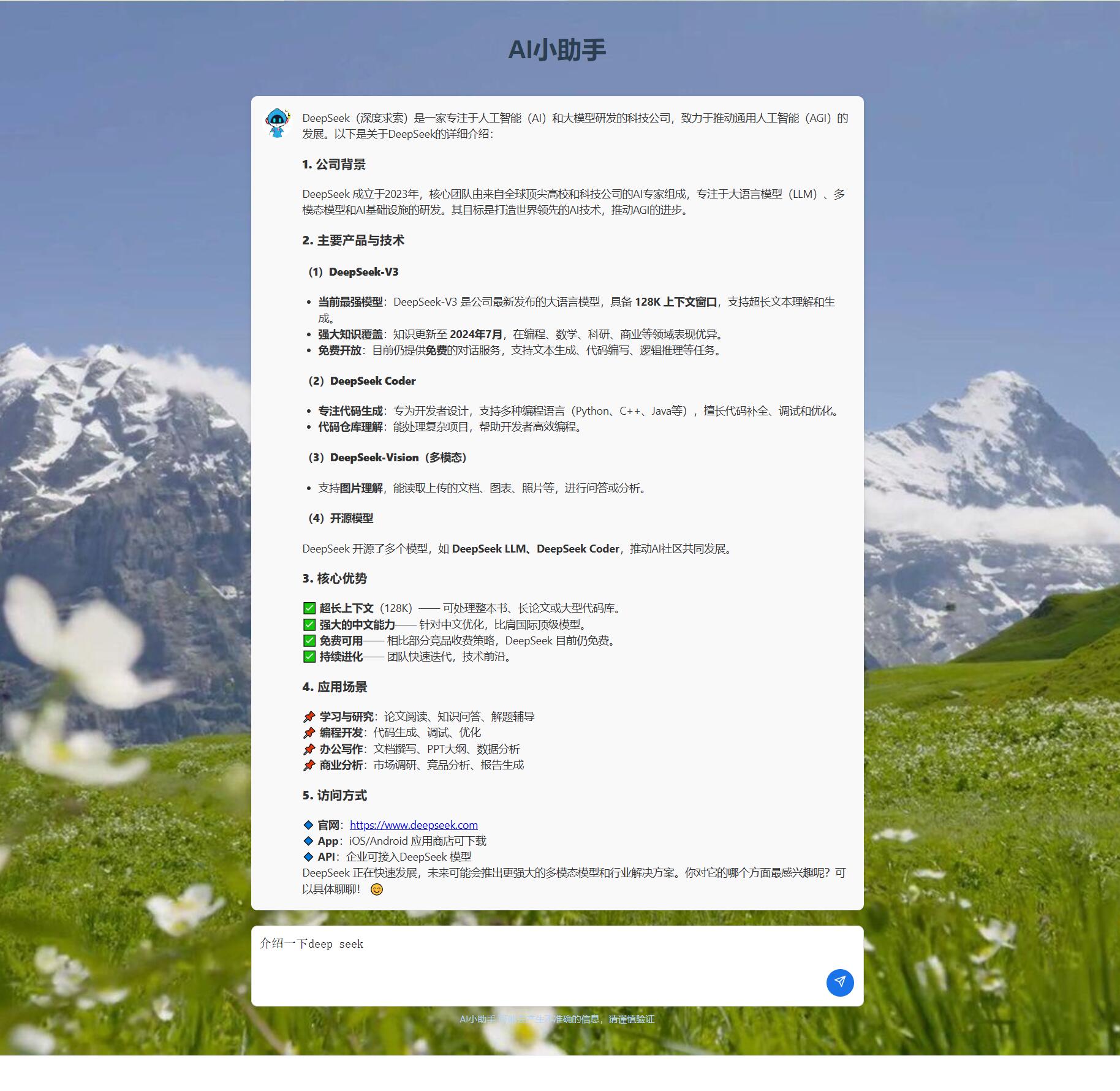
效果展示

一站式 AI 云服务平台
更多推荐



 4
4 0
0- 0


 已为社区贡献1条内容

所有评论(0)