
Docker--Docker consul的容器服务更新与发现
文章目录一、Docker consul理论基础二、Docker consul自动发现服务架构的构建2.1 实验环境2.2 consul服务器部署2.3 nginx服务器部署一、Docker consul理论基础consul是HashiCorp公司推出使用go语言编写的开源工具,用于实现分布式系统的服务发现与配置具有如下特性:●consul支持健康检查,允许存储键值对●一致性协议采用Raft算法,用
文章目录
一、Docker consul理论基础
consul是HashiCorp公司推出使用go语言编写的开源工具,用于实现分布式系统的服务发现与配置
具有如下特性:
●consul支持健康检查,允许存储键值对
●一致性协议采用Raft算法,用来保证服务的高可用
●成员管理和消息广播采用GOSSIP协议,支持ACL访问控制
●方便部署,与Docker等轻量级容器可无缝配合
●基于nginx和consul构建高可用及自动发现的Docker服务架构
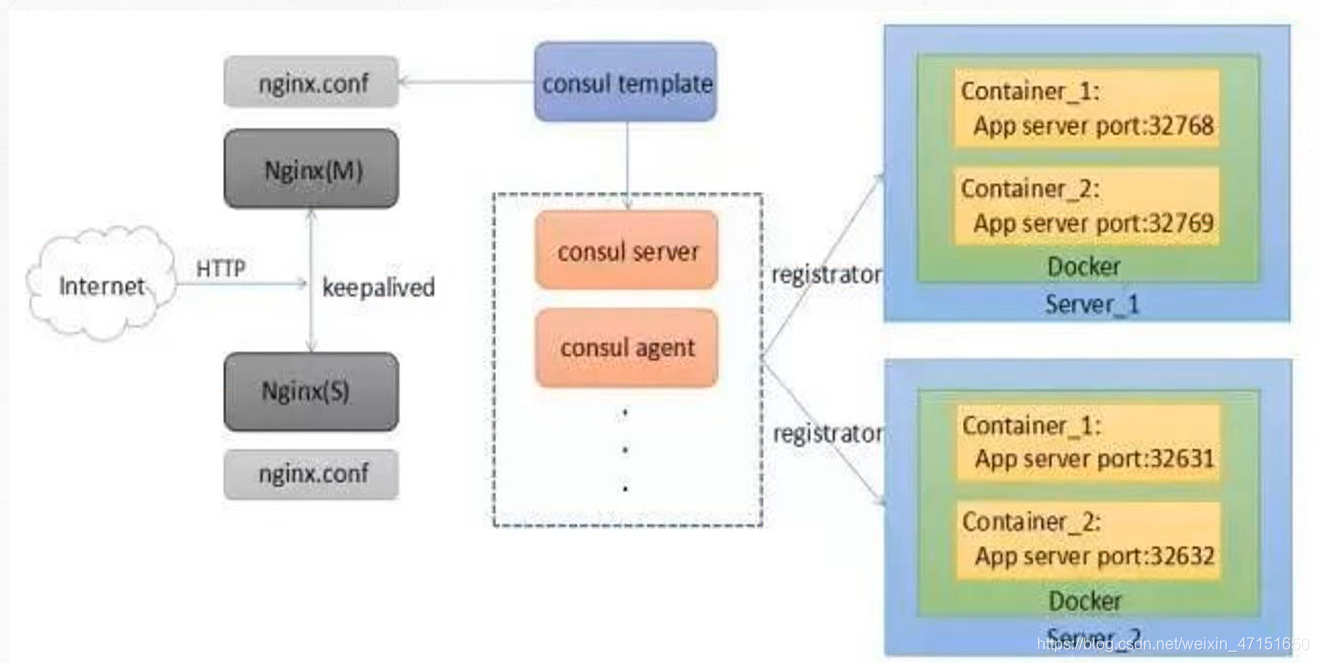
上方拓扑图是基于Docker完成的,然后将consul、consul template、registrator和nginx组装成一个值得信任且可扩展的服务框架,此架构可以灵活的、不需要重启任何服务、不需要重写任何配置的添加和移除服务
●consul template:配置文件模板
●registrator:注册机制
●consul server:consul服务
例如:当后方增加了一个容器时,容器会注册registrator,registrator发现增加了一个容器的时候,会通知consul server要更新,consul server使用consul template模板更新
●每个提供服务的节点上都要部署和运行consul的agent
●consul agent有两种运行模式:server和client
●server和client只是consul集群层面的区分,与搭建在cluster之上的应用服务无关
二、Docker consul自动发现服务架构的构建
2.1 实验环境
两台服务器:
192.168.100.128 Docker-ce、Compose 、Consul、Consul-template
192.168.100.129 Docker-ce、registrator
2.2 consul服务器部署
[root@docker ~]# chmod +x docker-compose
[root@docker ~]# mv docker-compose /usr/local/bin/
[root@docker ~]# mkdir /root/consul
[root@docker ~]# cp consul_0.9.2_linux_amd64.zip /root/consul
[root@docker ~]# cd /root/consul/
[root@docker consul]# unzip consul_0.9.2_linux_amd64.zip
[root@docker consul]# mv consul /usr/bin/
[root@docker consul]# consul agent \   '设置代理'
> -server \     '服务功能'
> -bootstrap \  '参与选举'
> -ui \         '提供web界面'
> -data-dir=/var/lib/consul-data \   '提供一个代理存储数据目录'
> -bind=192.168.179.121 \    '绑定本地地址'
> -client=0.0.0.0 \     '面对的客户端地址'
> -node=consul-server01 &> /var/log/consul.log& ' 定义节点名称,日志混合输出到log,并且放到后台运行'
[1] 90071
[root@localhost consul]# consul members   '查看集群信息'
Node             Address               Status  Type    Build  Protocol  DC
consul-server01  192.168.100.128:8301  alive   server  0.9.2  2         dc1

[root@localhost consul]# consul info | grep leader
	leader = true
	leader_addr = 192.168.100.128:8300
通过HTTP api获取集群信息
curl 127.0.0.1:8500/v1/status/peers   '查看集群server成员'

curl 127.0.0.1:8500/v1/status/leaders  '查看集群Raf leader'

curl 127.0.0.1:8500/v1/catalog/services '查看注册的所有服务'

curl 127.0.0.1:8500/v1/catalog/nginx   '查看nginx服务的信息'

curl 127.0.0.1:8500/v1/catalog/nodes   '集群节点详细信息'
通过web查看集群的详细信息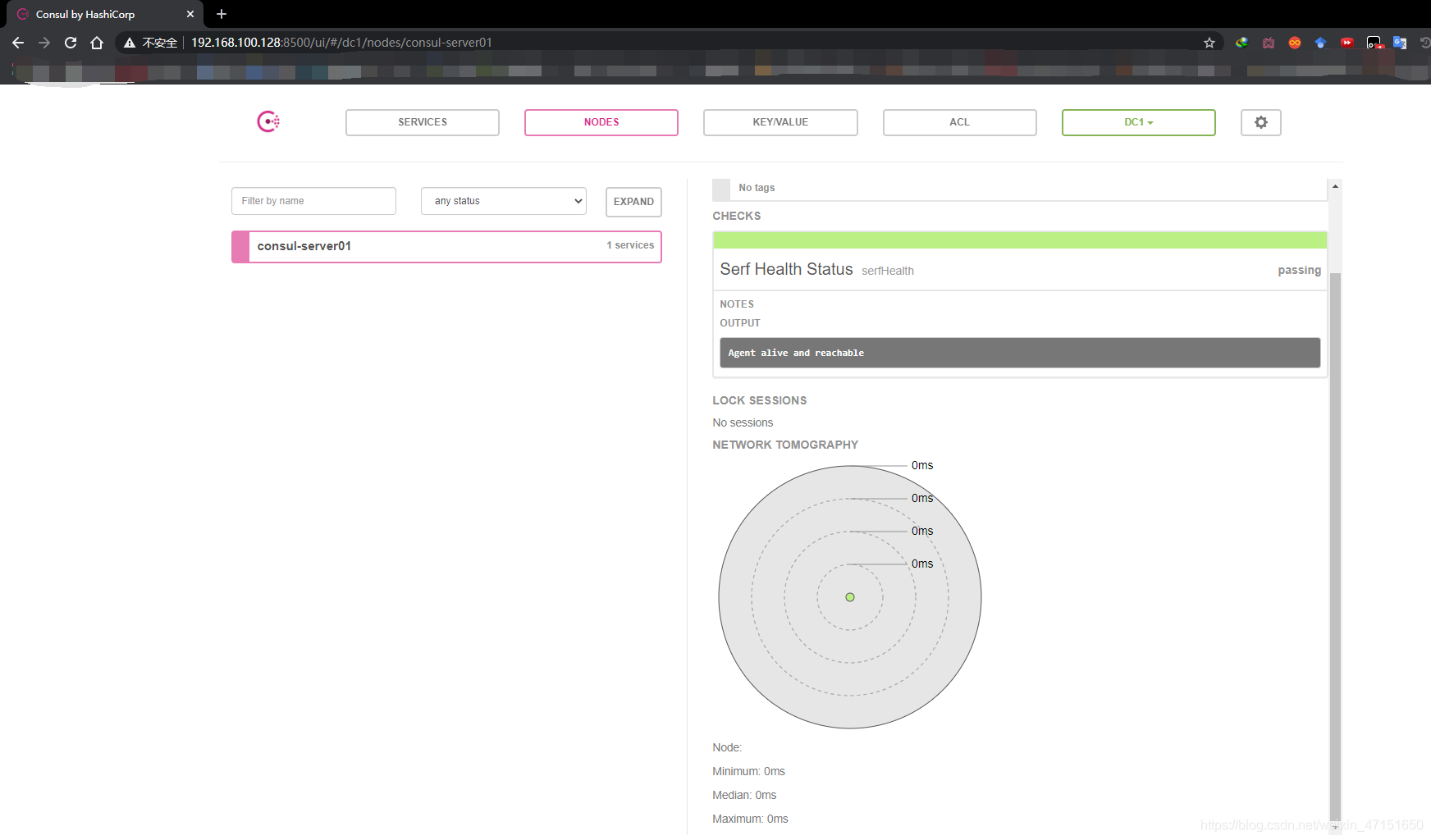
2.3 nginx服务器部署
安装Gliderlabs/Registrator Gliderlabs/Registrator
可检查容器运行状态自动注册,还可注销docker容器的服务到服务配置中心
目前支持Consul、Etcd和SkyDNS2。
[root@localhost ~]# docker run -d \
> --name=registrator \     '定义容器名称'
> --net=host \             '定义网络'
> -v /var/run/docker.sock:/tmp/docker.sock \   '指定数据卷,存储信息'
> --restart=always \               '容器关闭后一直重启'
> gliderlabs/registrator:latest \      '定义镜像'
> -ip=192.168.100.128 \               '指定本地地址'
> consul://192.168.100.128:8500        '指定consul管理节点地址、端口'
[root@localhost ~]# docker ps -a
CONTAINER ID        IMAGE                           COMMAND                  CREATED             STATUS              PORTS               NAMES
f140574d5b3f        gliderlabs/registrator:latest   "/bin/registrator -i…"   2 minutes ago       Up 2 minutes                            registrator
安装nginx服务和httpd服务进行测试
[root@localhost ~]# docker run -itd -p:9527:80 --name test-01 -h test01 nginx
847ad31c81602215d88a57f75b6626bd1b7f36a4bbea2bf57f0fbfa3bbe126ca
[root@localhost ~]# docker run -itd -p:9528:80 --name test-02 -h test02 nginx
f71670b5fcf0b94cd133d8b10a5c4d07f05abb0d5404ee2382f6a676106a3408
[root@localhost ~]# docker ps -a
CONTAINER ID        IMAGE                           COMMAND                  CREATED             STATUS              PORTS                  NAMES
f71670b5fcf0        nginx                           "/docker-entrypoint.…"   9 seconds ago       Up 8 seconds        0.0.0.0:9528->80/tcp   test-02
847ad31c8160        nginx                           "/docker-entrypoint.…"   23 seconds ago      Up 21 seconds       0.0.0.0:9527->80/tcp   test-01
e4bb62743327        gliderlabs/registrator:latest   "/bin/registrator -i…"   2 minutes ago       Up 2 minutes                               registrator
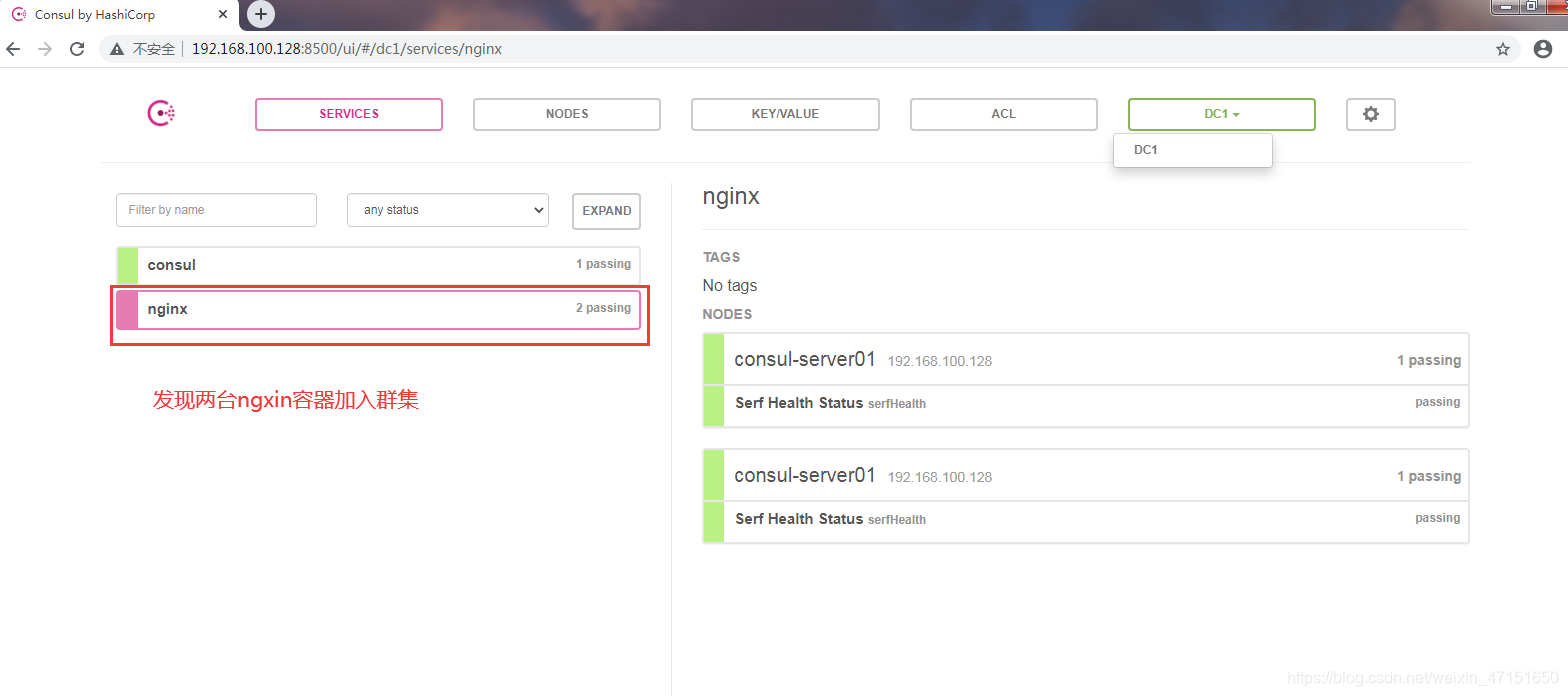
[root@localhost ~]# docker run -itd -p:9529:80 --name test-03 -h test03 httpd
[root@localhost ~]# docker run -itd -p:9530:80 --name test-04 -h test04 httpd
[root@localhost ~]# docker ps -a
CONTAINER ID        IMAGE                           COMMAND                  CREATED              STATUS              PORTS                  NAMES
6395efacf20c        httpd                           "httpd-foreground"       3 seconds ago        Up 2 seconds        0.0.0.0:9530->80/tcp   test-04
44144a2253f6        httpd                           "httpd-foreground"       14 seconds ago       Up 13 seconds       0.0.0.0:9529->80/tcp   test-03
f71670b5fcf0        nginx                           "/docker-entrypoint.…"   About a minute ago   Up About a minute   0.0.0.0:9528->80/tcp   test-02
847ad31c8160        nginx                           "/docker-entrypoint.…"   About a minute ago   Up About a minute   0.0.0.0:9527->80/tcp   test-01
e4bb62743327        gliderlabs/registrator:latest   "/bin/registrator -i…"   3 minutes ago        Up 3 minutes                               registrator
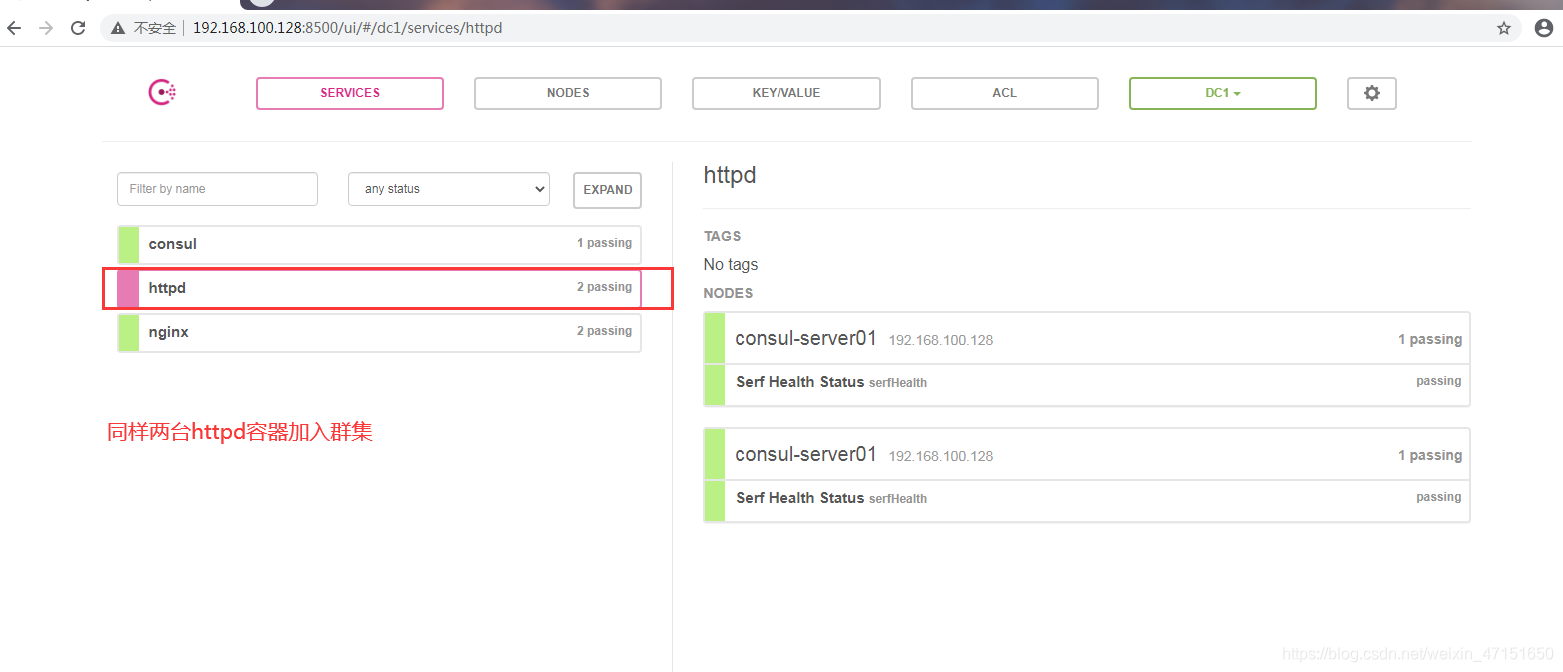
验证httpd和nginx服务是否注册到consul
[root@docker consul]# curl 127.0.0.1:8500/v1/catalog/services
{"consul":[],"httpd":[],"nginx":[]}
2.4 安装consul-template
●Consul-Template是一个守护进程,用于实时查询Consul集群信息,并更新文件系统上任意数量的指定模板,生成配置文件。更新完成以后,可以选择运行shell命令执行更新操作,重新加载 Nginx。Consul-Template可以查询Consul中的服务目录、Key、Key-values等。
●这种强大的抽象功能和查询语言模板可以使Consul-Template特别适合动态的创建配置文件。
例如:创建Apache/Nginx Proxy Balancers、Haproxy Backends
准备template nginx模板文件
[root@docker ~]# vim /root/consul/nginx.ctmpl
upstream http_backend {
   {{range service "nginx"}}
    server {{.Address}}:{{.Port}};
     {{end}}
}

server {
  listen 1111;
  server_name localhost 192.168.100.128;
  access_log /var/log/nginx/cllt.cn-access.log;
  index index.html index.php;
  location / {
    proxy_set_header HOST $host;
    proxy_set_header X-Real-IP $remote_addr;
    proxy_set_header Client-IP $remote_addr;
    proxy_set_header X-Forwarded-For $proxy_add_x_forwarded_for;
    proxy_pass http://http_backend;
  }
}
编译安装nginx
[root@docker ~]# yum install gcc pcre-devel zlib-devel -y
[root@docker ~]# tar nginx-1.12.2.tar.gz -C /opt
[root@docker ~]# cd /opt/nginx-1.12.2/
[root@docker nginx-1.12.2]# ./configure --prefix=/usr/local/nginx
[root@docker nginx-1.12.2]# make && make install
[root@docker nginx-1.12.2]# vim /usr/local/nginx/conf/nginx.conf
http {
    include       mime.types;
    include vhost/*.conf;     '添加虚拟主机目录'
    default_type  application/octet-stream;
[root@docker nginx-1.12.2]# mkdir /usr/local/nginx/conf/vhost '创建虚拟主机目录'
[root@docker nginx-1.12.2]# mkdir /var/log/nginx  '创建日志文件目录'
[root@docker nginx-1.12.2]# /usr/local/nginx/sbin/nginx  '启动nginx'
配置并启动template
[root@promote ~]# cd consul/
[root@promote consul]# unzip consul-template_0.19.3_linux_amd64.zip
Archive:  consul-template_0.19.3_linux_amd64.zip
  inflating: consul-template
[root@promote consul]# mv consul-template /usr/local/bin/
[root@promote consul]# consul-template -consul-addr 192.168.100.128:8500 \
> -template "/root/consul/nginx.ctmpl:/usr/local/nginx/conf/vhost/kgc.conf:/usr/local/nginx/sbin/nginx -s reload" \
> --log-level=info
2020/09/26 13:40:03.331557 [INFO] consul-template v0.19.3 (ebf2d3d)
2020/09/26 13:40:03.331574 [INFO] (runner) creating new runner (dry: false, once: false)
2020/09/26 13:40:03.332076 [INFO] (runner) creating watcher
2020/09/26 13:40:03.332855 [INFO] (runner) starting
2020/09/26 13:40:03.332866 [INFO] (runner) initiating run
2020/09/26 13:40:03.345747 [INFO] (runner) initiating run
2020/09/26 13:40:03.347108 [INFO] (runner) rendered "/root/consul/nginx.ctmpl" => "/usr/local/nginx/conf/vhost/kgc.conf"
2020/09/26 13:40:03.347159 [INFO] (runner) executing command "/usr/local/nginx/sbin/nginx -s reload" from "/root/consul/nginx.ctmpl" => "/usr/local/nginx/conf/vhost/kgc.conf"
2020/09/26 13:40:03.347239 [INFO] (child) spawning: /usr/local/nginx/sbin/nginx -s reload
此时映射的端口已经起来了
查看nginx配置文件
[root@promote vhost]# vim kgc.conf

upstream http_backend {

    server 192.168.100.129:83;     '两台nginx容器端口自动生成'

    server 192.168.100.129:84;

}

server {
  listen 1111;
  server_name localhost 192.168.179.121;
  access_log /var/log/nginx/cllt.cn-access.log;
  index index.html index.php;
  location / {
    proxy_set_header HOST $host;
    proxy_set_header X-Real-IP $remote_addr;
    proxy_set_header Client-IP $remote_addr;
    proxy_set_header X-Forwarded-For $proxy_add_x_forwarded_for;
    proxy_pass http://http_backend;
  }
}
2.5 测试
此时使用浏览器访问nginx服务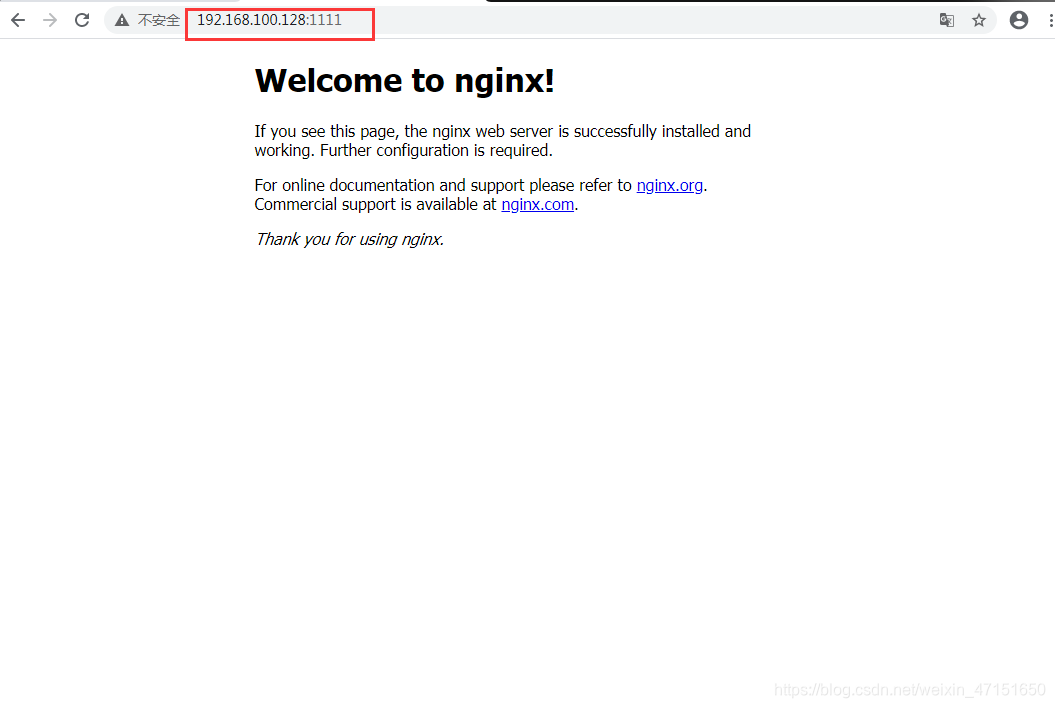
查看两个nginx容器的日志
[root@promote ~]# docker logs -f test-01
/docker-entrypoint.sh: /docker-entrypoint.d/ is not empty, will attempt to perform configuration
/docker-entrypoint.sh: Looking for shell scripts in /docker-entrypoint.d/
/docker-entrypoint.sh: Launching /docker-entrypoint.d/10-listen-on-ipv6-by-default.sh
10-listen-on-ipv6-by-default.sh: Getting the checksum of /etc/nginx/conf.d/default.conf
10-listen-on-ipv6-by-default.sh: Enabled listen on IPv6 in /etc/nginx/conf.d/default.conf
/docker-entrypoint.sh: Launching /docker-entrypoint.d/20-envsubst-on-templates.sh
/docker-entrypoint.sh: Configuration complete; ready for start up
192.168.100.128 - - [26/Sep/2020:13:45:55 +0000] "GET / HTTP/1.0" 200 612 "-" "Mozilla/5.0 (Windows NT 6.1; Win64; x64) AppleWebKit/537.36 (KHTML, like Gecko) Chrome/85.0.4183.102 Safari/537.36" "192.168.100.40"
[root@promote ~]# docker logs -f test-02
/docker-entrypoint.sh: /docker-entrypoint.d/ is not empty, will attempt to perform configuration
/docker-entrypoint.sh: Looking for shell scripts in /docker-entrypoint.d/
/docker-entrypoint.sh: Launching /docker-entrypoint.d/10-listen-on-ipv6-by-default.sh
10-listen-on-ipv6-by-default.sh: Getting the checksum of /etc/nginx/conf.d/default.conf
10-listen-on-ipv6-by-default.sh: Enabled listen on IPv6 in /etc/nginx/conf.d/default.conf
/docker-entrypoint.sh: Launching /docker-entrypoint.d/20-envsubst-on-templates.sh
/docker-entrypoint.sh: Configuration complete; ready for start up
2020/09/26 13:45:55 [error] 28#28: *1 open() "/usr/share/nginx/html/favicon.ico" failed (2: No such file or directory), client: 192.168.100.128, server: localhost, request: "GET /favicon.ico HTTP/1.0", host: "192.168.100.128", referrer: "http://192.168.100.128:1111/"
192.168.100.128 - - [26/Sep/2020:13:45:55 +0000] "GET /favicon.ico HTTP/1.0" 404 555 "http://192.168.100.128:1111/" "Mozilla/5.0 (Windows NT 6.1; Win64; x64) AppleWebKit/537.36 (KHTML, like Gecko) Chrome/85.0.4183.102 Safari/537.36" "192.168.100.40"
192.168.100.128 - - [26/Sep/2020:13:47:51 +0000] "GET / HTTP/1.0" 304 0 "-" "Mozilla/5.0 (Windows NT 6.1; Win64; x64) AppleWebKit/537.36 (KHTML, like Gecko) Chrome/85.0.4183.102 Safari/537.36" "192.168.100.40"
再次创建一台nginx容器节点,测试服务发现及配置更新功能
[root@localhost ~]# docker run -itd -p:85:80 --name test-05 -h test05 nginx
1457cf82e4d3c96451dd4555c46509840d61b4acf235f3a0818ba08d58e99be4
[root@localhost ~]# docker ps -a
CONTAINER ID        IMAGE                           COMMAND                  CREATED             STATUS              PORTS                  NAMES
1457cf82e4d3        nginx                           "/docker-entrypoint.…"   5 seconds ago       Up 5 seconds        0.0.0.0:85->80/tcp   test-05
配置文件自动更新
[root@promote vhost]# cat kgc.conf
upstream http_backend {

    server 192.168.100.129:83;

    server 192.168.100.129:84;

    server 192.168.100.129:85;

}

一站式 AI 云服务平台
更多推荐



 0
0 0
0- 0


 已为社区贡献1条内容

所有评论(0)