
玩客云刷旁路由Openwrt系统。并安装tailscale异地组网、做内网穿透。
A.tailscale安装完成启动连接后。进入openwrt后台查看设备。2、打开dos输入命令:ipconfig 默认网关. . . . . . . . . . . . . : 192.168.1.250。3、复制 默认网关. . . . . . . . . . . . . : 192.168.1.250 在浏览器打开进入后台。3、openwrt。D.防火墙--端口转发配置。配置openwrt。
一、准备工作、USB_Burning_Tool刷机工具。双弓头USB线,玩客云电源网线一套。
二、下载镜像包:
刷机参考视频:https://www.bilibili.com/video/BV1m21TY9E46
三、刷机
1、短接点新版and旧版

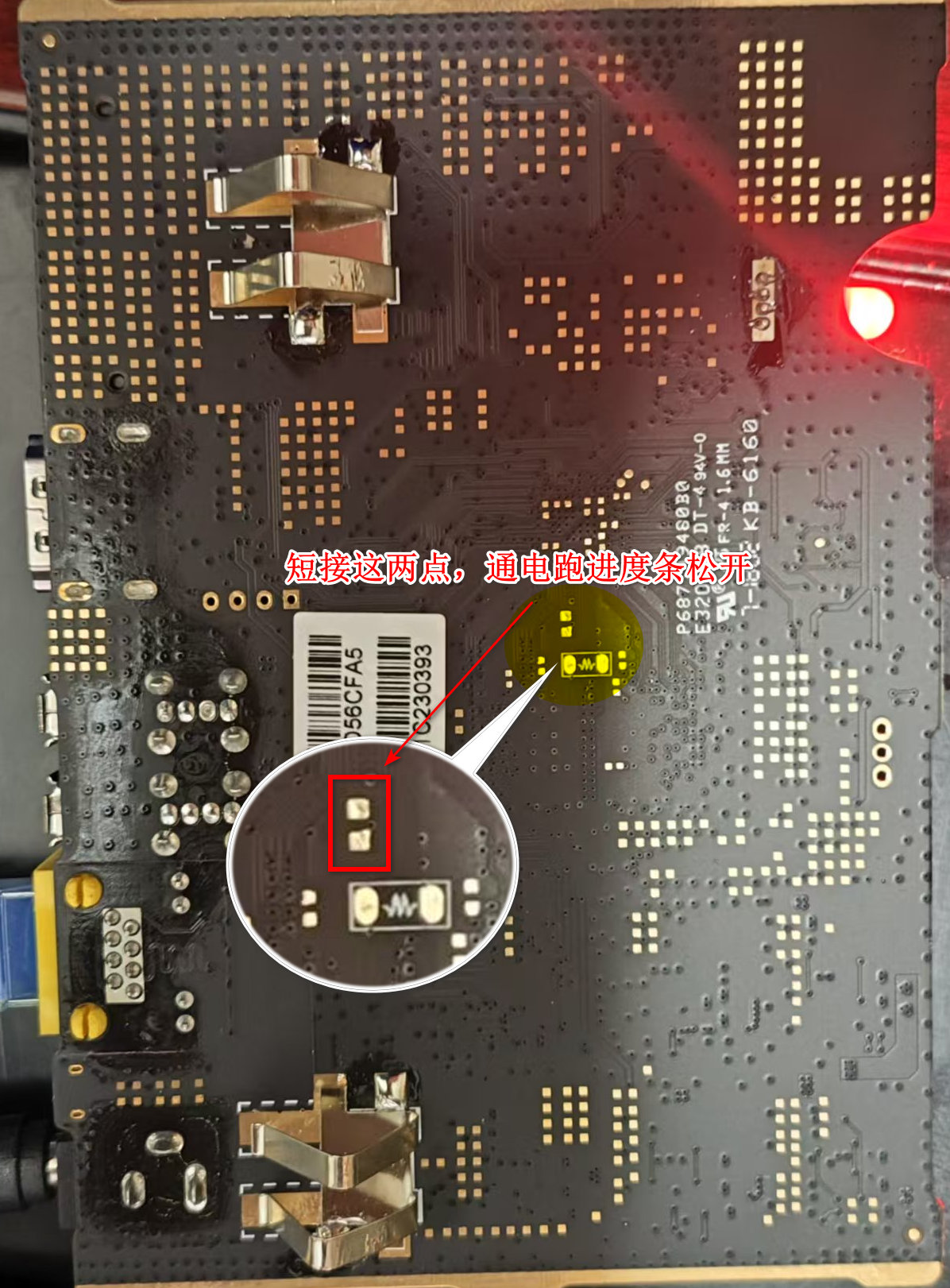
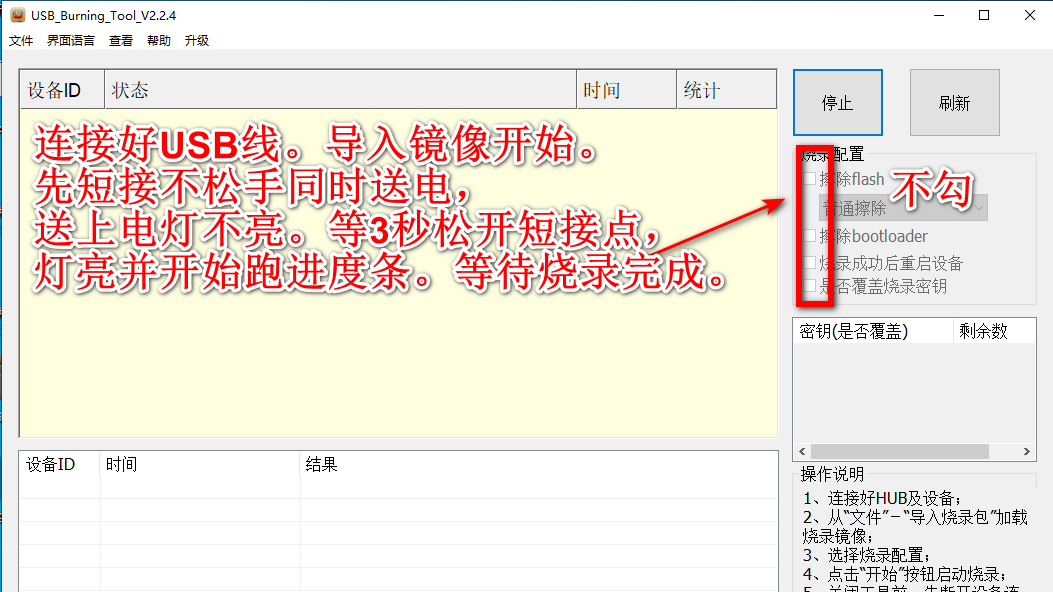
2、刷机,注意细节。网线插路由器上
3、openwrt。这版镜像默认入口IP:192.168.2.2 默认账户root 密码root
把我的电脑IP改成openwrt同段。进入openwrt管理面板修改IP和密码。
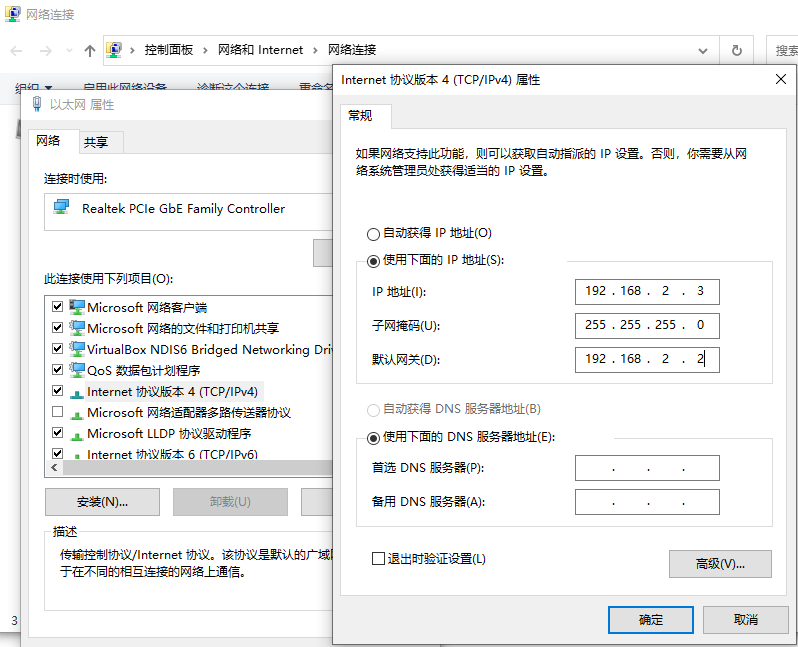
修改IP地址和密码

4、安装tailscale虚拟组网工具
参考文档:zerotier的最佳替代者tailscale - DongVPS-DongVPS
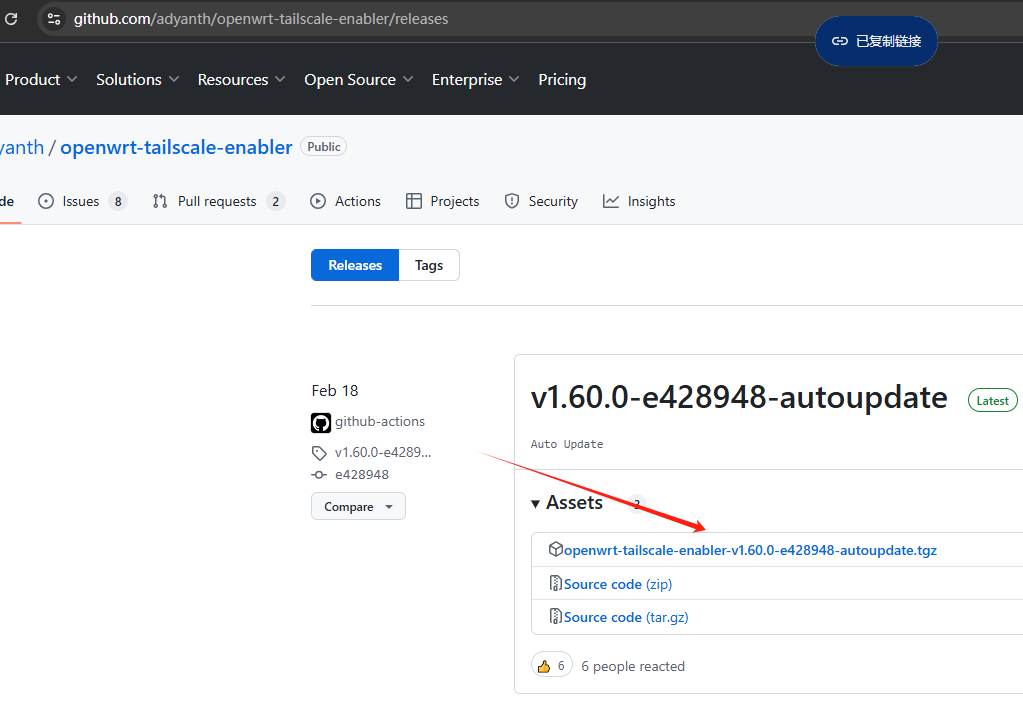
A.github安装包以及文档:https://github.com/adyanth/openwrt-tailscale-enabler
B.开启ssh

C.连接工具xshell.连接ssh 协议ssh 输入命令
输入命令

#下载
wget https://github.com/adyanth/openwrt-tailscale-enabler/releases/download/v1.60.0-e428948-autoupdate/openwrt-tailscale-enabler-v1.60.0-e428948-autoupdate.tgz
#解压
tar x -zvC / -f openwrt-tailscale-enabler-v1.60.0-e428948-autoupdate.tgz

#更新并安装依赖软件
opkg update
opkg install libustream-openssl ca-bundle kmod-tun
#启动
/etc/init.d/tailscale start
#建立子网。第一次启动,会下载 tailscale packag, 会非常慢,等待完成。完成出链接复制浏览器打开加入组网
tailscale up --accept-dns=false --advertise-routes=192.168.88.0/24

#开机启动
/etc/init.d/tailscale enable
enable
tailscale常用命令:
tailscale
  up          Connect to Tailscale, logging in if needed
  down        Disconnect from Tailscale
  set         Change specified preferences
  login       Log in to a Tailscale account
  logout      Disconnect from Tailscale and expire current node key
  switch      Switches to a different Tailscale account
  configure   [ALPHA] Configure the host to enable more Tailscale features
  netcheck    Print an analysis of local network conditions
  ip          Show Tailscale IP addresses
  dns         Diagnose the internal DNS forwarder
  status      Show state of tailscaled and its connections
  ping        Ping a host at the Tailscale layer, see how it routed
  nc          Connect to a port on a host, connected to stdin/stdout
  ssh         SSH to a Tailscale machine
  funnel      Serve content and local servers on the internet
  serve       Serve content and local servers on your tailnet
  version     Print Tailscale version
  web         Run a web server for controlling Tailscale
  file        Send or receive files
  bugreport   Print a shareable identifier to help diagnose issues
  cert        Get TLS certs
  lock        Manage tailnet lock
  licenses    Get open source license information
  exit-node   Show machines on your tailnet configured as exit nodes
  update      Update Tailscale to the latest/different version
  whois       Show the machine and user associated with a Tailscale IP (v4 or v6)
  drive       Share a directory with your tailnet
  completion  Shell tab-completion scripts
D. tailscale官网注册账户:google登录需要科学上网。免费版最低20个设备组网
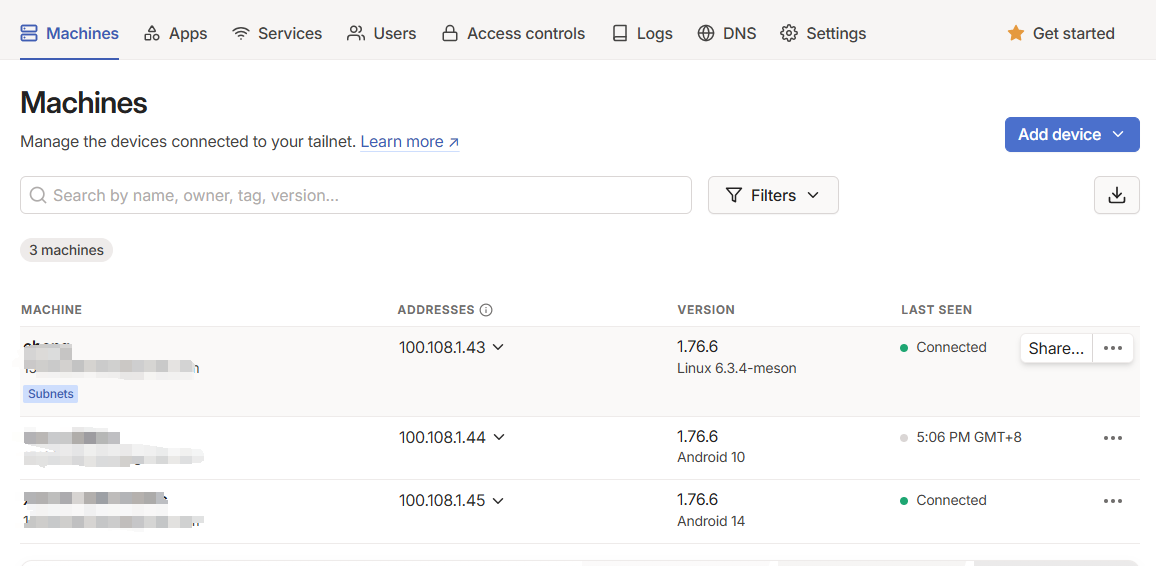
五、重点。配置openwrt。不配置端口不能用。openwrt会拒绝访问。
A.tailscale安装完成启动连接后。进入openwrt后台查看设备。会出现tailcale0设备。没有添加一个类型:网络设备。如果没有tailsale0设备。就是没有安装成功。或没启动等。
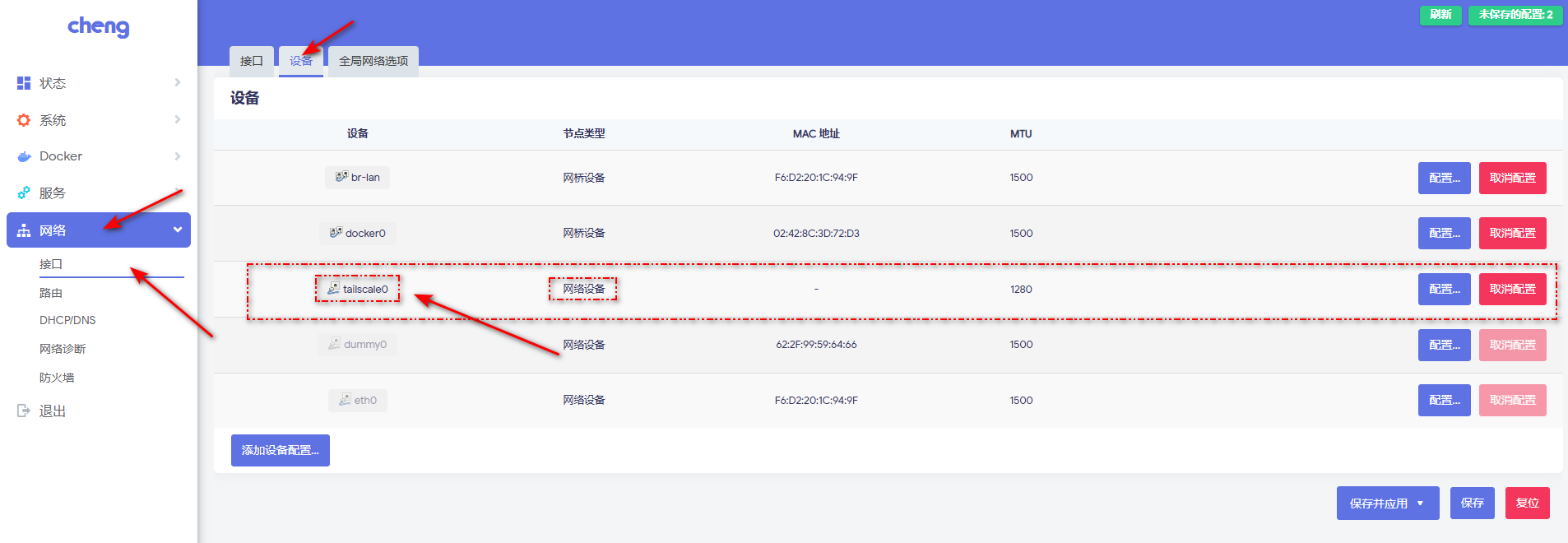
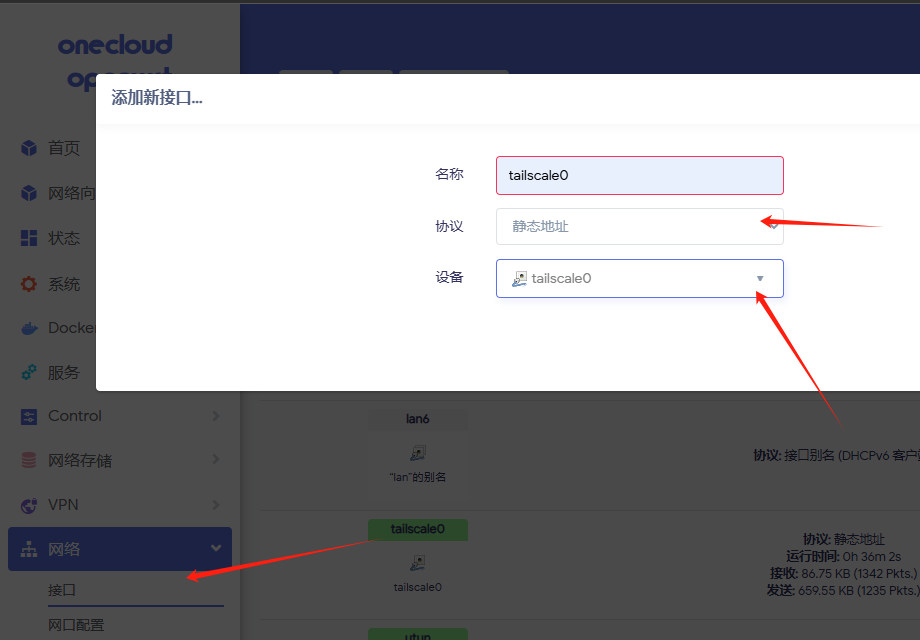
B.添加tailscale0接口
1.红圈改动部分。
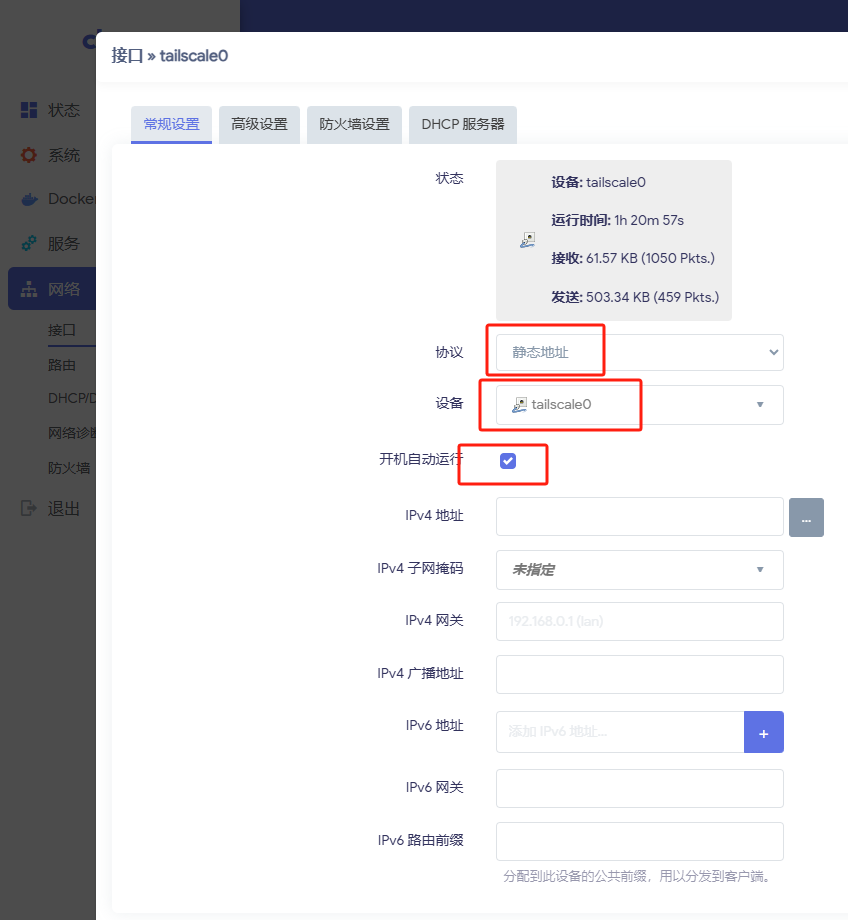
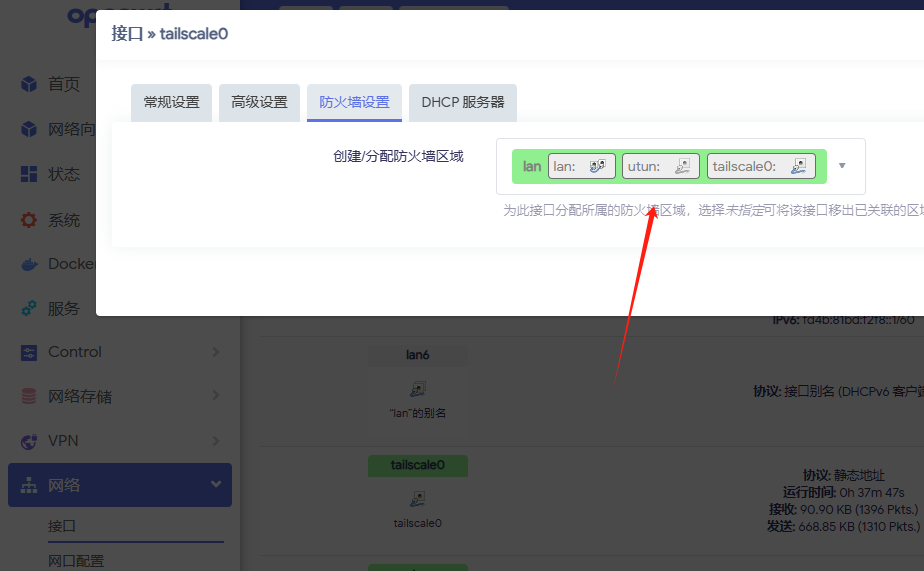
2.防火墙为LAN。保存---->应用。

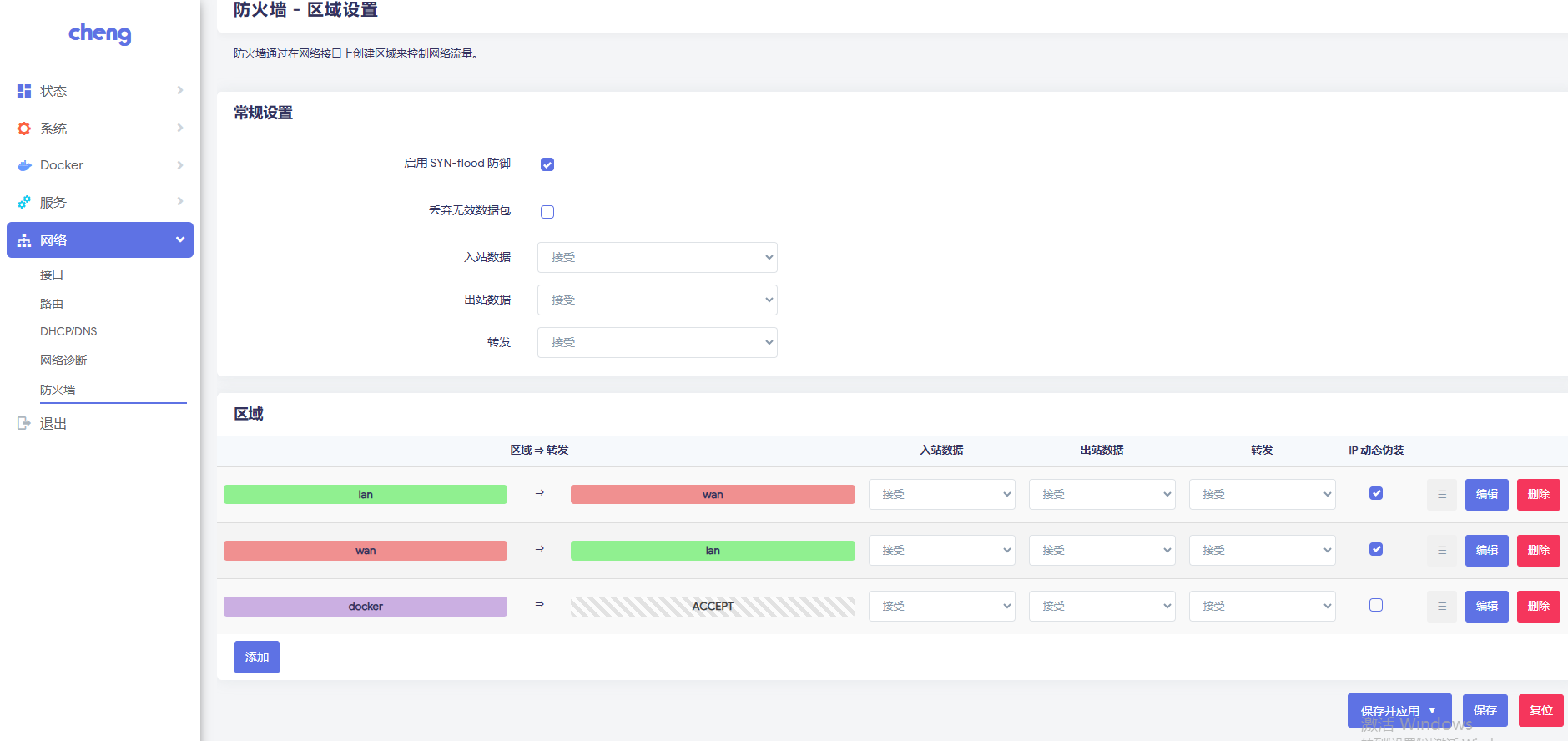
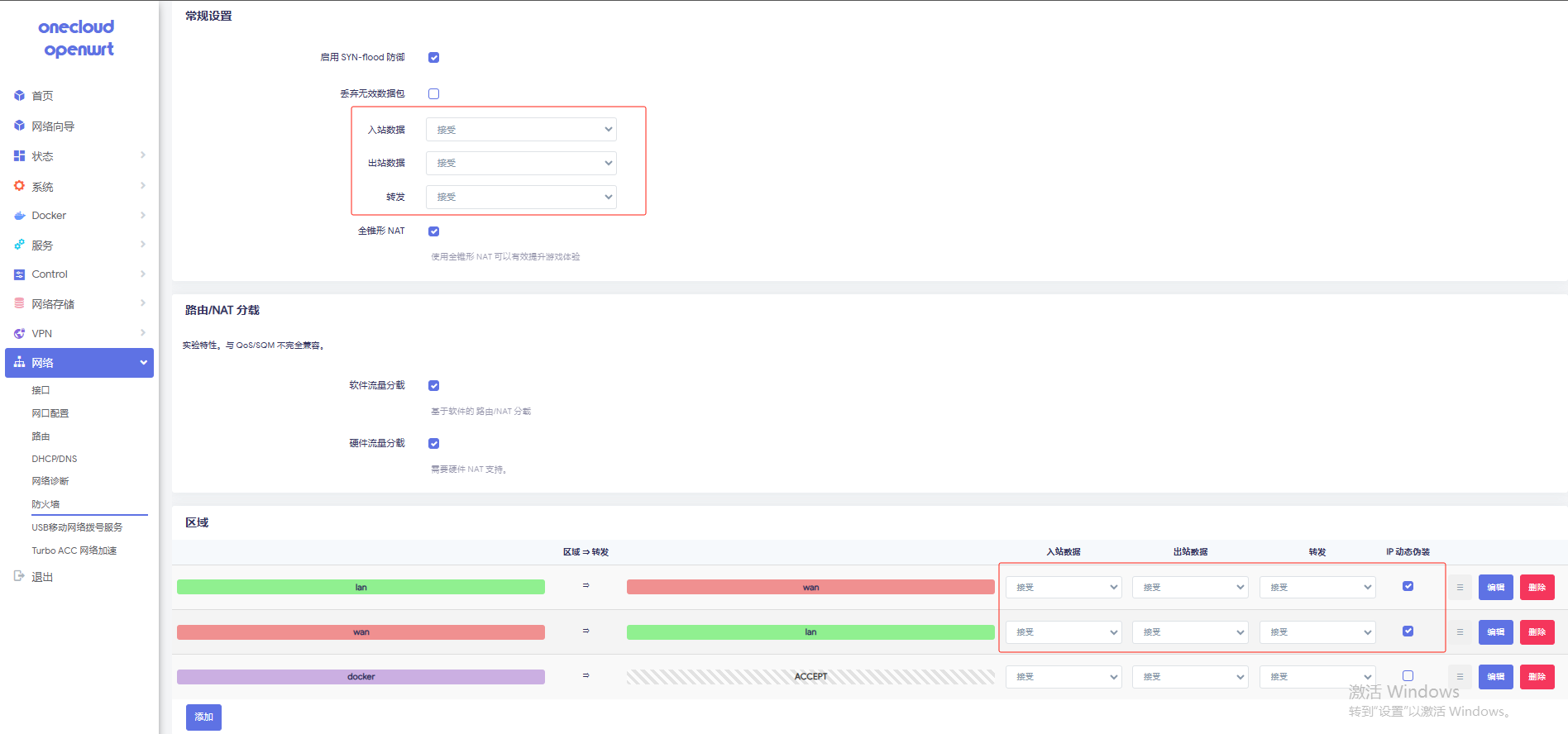
C.防火墙配置,出入站全部接受。
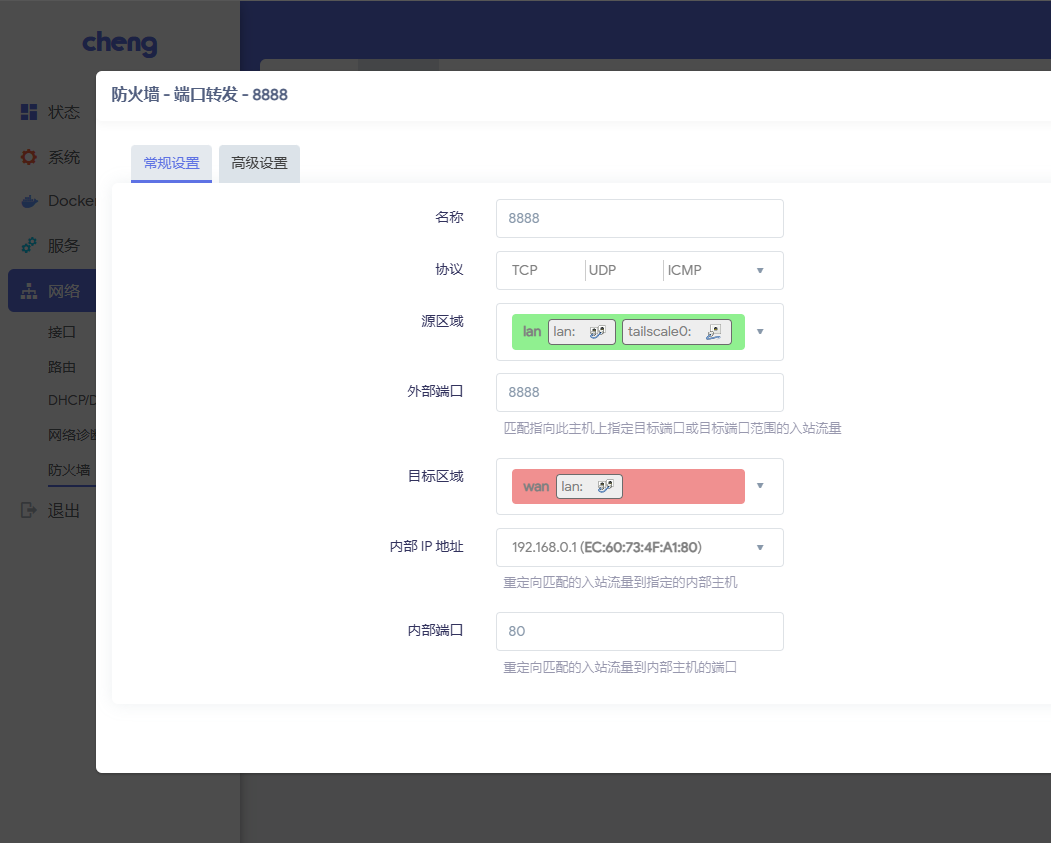
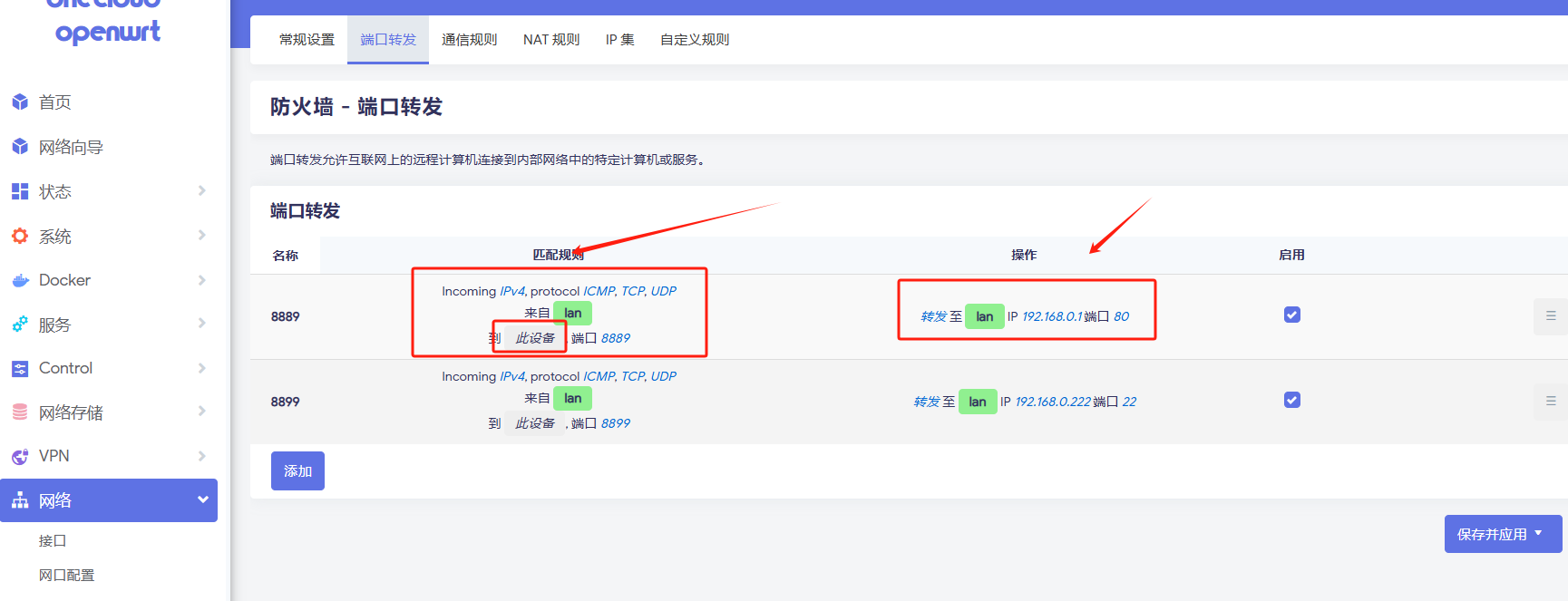
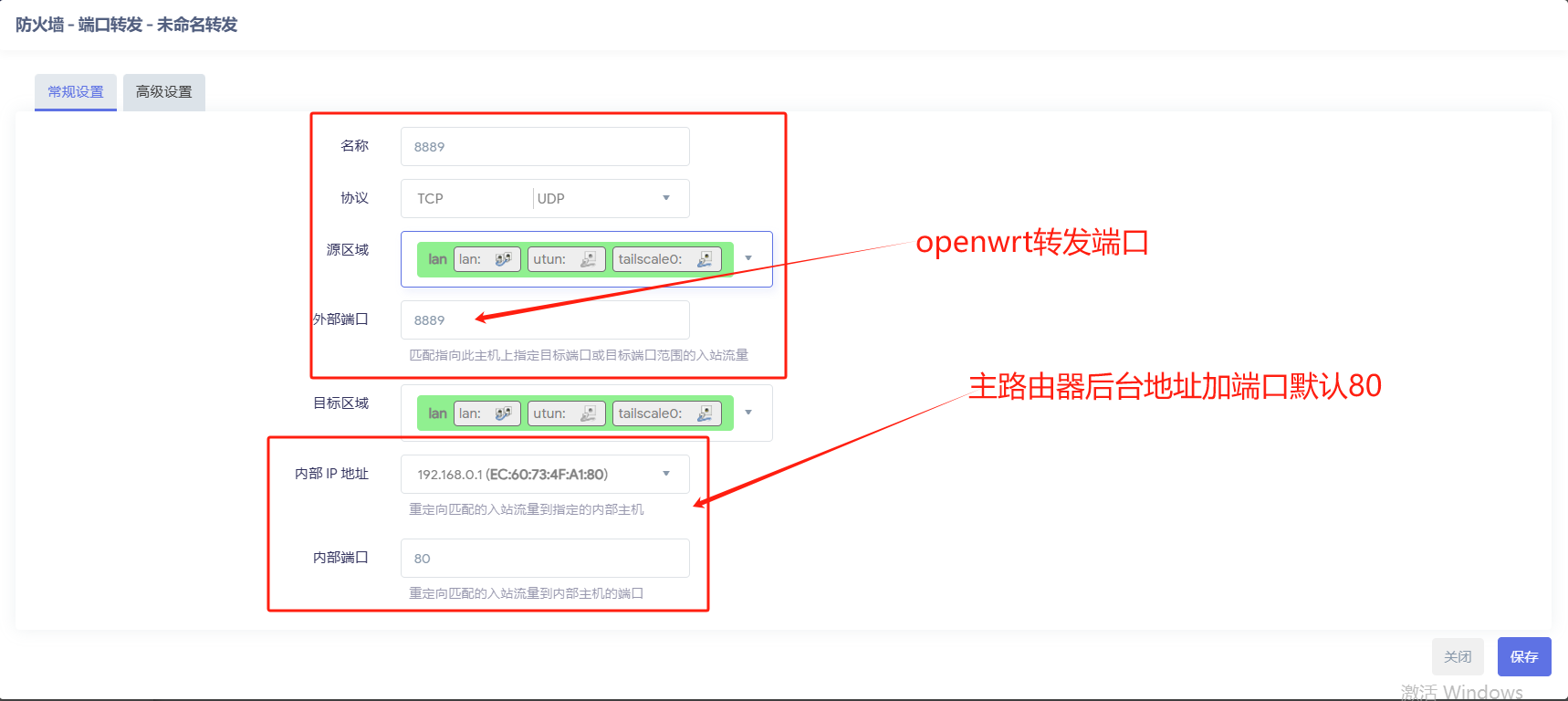
D.防火墙--端口转发配置。192.168.0.1是主路由器后台。通过8888端口转发出去。

E.番外篇。。。配置完成后连接不上重启openwrt。退出重启
#结束进程案例
[root@cheng:06:13 PM ~] # ps | grep tailscale
 4810 root      1152 S    {tailscaled} /bin/sh /usr/bin/tailscaled --port 41641 --state /etc/config/tailscaled.stat
 5189 root      541m S    /tmp/tailscaled --port 41641 --state /etc/config/tailscaled.state --statedir /etc/tailsca
 7103 root      1140 S    grep tailscale
[root@cheng:06:44 PM ~] # kill -9 4810
[root@cheng:06:44 PM ~] # kill -9 5189
[root@cheng:06:13 PM ~] # ps | grep tailscale
[root@cheng:06:44 PM ~] # /etc/init.d/tailscale start
[root@cheng:06:44 PM ~] # tailscale login
六、效果展示,以我手机为例:
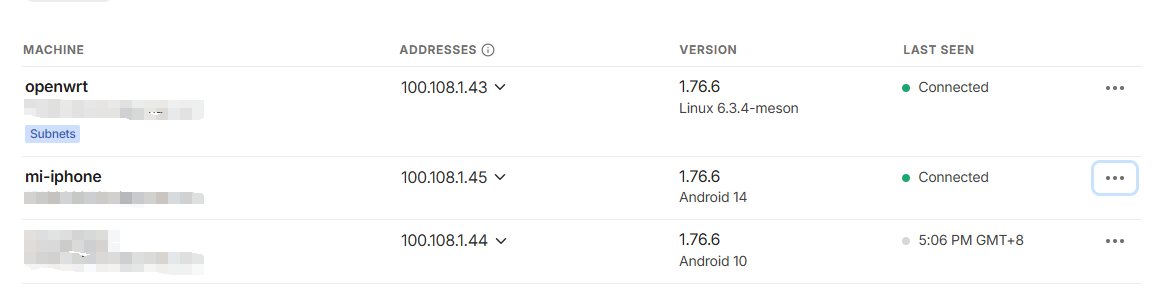
组网成功!


+++++++++++++++++++++++++++++++++++++++++++++++++++++++++++++++++++++++++++++++++++++++++++++++++++++++++++++++++++++++++++++++++++++++++++
带打印机驱动版本openwrt
镜像地址:百度网盘 请输入提取码
1、烧录完成后 网线直连电脑
2、打开dos输入命令:ipconfig 默认网关. . . . . . . . . . . . . : 192.168.1.250
3、复制 默认网关. . . . . . . . . . . . . : 192.168.1.250 在浏览器打开进入后台
4、默认用户root 密码:lanlan
后台配置
固件集成tailscale工具不用手动安装直接启动,通过xshell连接shh
#输出tailscale login 返回一串登录链接,到浏览器打开登录即可。 tailscale login
进入后台界面配置,后台tailscale0设备已存在。直接创建接口即可。
1.
2.防火墙设置改为LAN 其他不需要改动。保存 应用即可。
防火墙规则
改动红框内部分。保存 应用
防火墙端口转发,改动后必须重启生效。重启系统或重启tailscale

一站式 AI 云服务平台
更多推荐



 19
19 0
0- 0



 已为社区贡献1条内容

所有评论(0)