
解决:WARNING Memory overcommit must be enabled! Without it, a background save or replication may fail
WARNING Memory overcommit must be enabled! Without it, a background save or replication may fail under low memory condition. Being disabled, it can also cause failures without low memory condition, se
种一棵树最好的时间是10年前,其次就是现在,加油!
--by蜡笔小柯南
一、问题分析
在Linux系统中,安装好Redis后,进行启动时,出现如下的警告信息:
WARNING Memory overcommit must be enabled! Without it, a background save or replication may fail under low memory condition. Being disabled, it can also cause failures without low memory condition, see https://github.com/jemalloc/jemalloc/issues/1328. To fix this issue add ‘vm.overcommit_memory = 1’ to /etc/sysctl.conf and then reboot or run the command ‘sysctl vm.overcommit_memory=1’ for this to take effect
WARNING Memory overcommit must be enabled! Without it, a background save or replication may fail under low memory condition. Being disabled, it can also cause failures without low memory condition, see https://github.com/jemalloc/jemalloc/issues/1328. To fix this issue add 'vm.overcommit_memory = 1' to /etc/sysctl.conf and then reboot or run the command 'sysctl vm.overcommit_memory=1' for this to take effect
意思是:
必须启用内存复用!没有它,在内存不足的情况下,后台保存或复制可能会失败。如果被禁用,它也可能导致故障,但不会造成低内存条件,请参阅https://github.com/jemalloc/jemalloc/issues/1328。要解决此问题,请添加“vm.Overcommit_memory = 1”到/etc/sysctl.conf中,然后重新启动或运行命令“sysctl vm. conf”。Overcommit_memory =1’才能生效
这是一条警告信息,在不处理它的情况下,我们使用客户端连接Redis,如果可以正常连接,那么是可以使用的,既然报出了这个警告,我们怎么去解决它呢?接下来,我们一起去看看!
二、问题解决
根据给出的信息,要到/etc/sysctl.conf文件中,添加这行 vm.Overcommit_memory =1 配置
-
首先,打开
sysctl.conf文件,使用以下命令vim /etc/sysctl.conf -
按
i键进入编辑模式,在配置文件中添加以下配置vm.overcommit_memory = 1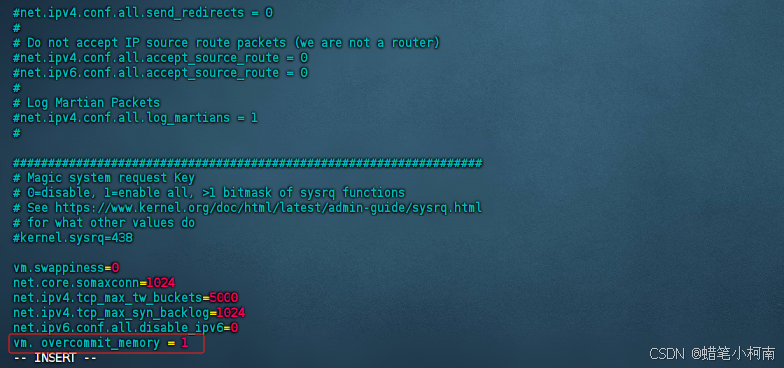
-
按
Esc键,退出编辑模式,输入:wq命令,保存退出 -
执行以下命令
sysctl vm.overcommit_memory=1 -
重启Redis,发现已经没有警告提示信息了
如果你有任何疑问或经验分享,可以在评论区留言哦~~
不管在任何时候,我希望你永远不要害怕挑战,不要畏惧失败。每一个错误都是向成功迈出的一步,每一个挑战都是成长的机会,因为每一次的努力,都会使我们离梦想更近一点。只要你行动起来,任何时候都不算晚。最后,把座右铭送给大家:种一棵树最好的时间是10年前,其次就是现在,加油!共勉 💪。


一站式 AI 云服务平台
更多推荐



 13
13 0
0- 0


 已为社区贡献4条内容

所有评论(0)