
java active directory 单点登录_教程:Azure Active Directory 单一登录 (SSO) 与 Hightail 集成...
您现在访问的是微软AZURE全球版技术文档网站,若需要访问由世纪互联运营的MICROSOFT AZURE中国区技术文档网站,请访问 https://docs.azure.cn.教程:Azure Active Directory 单一登录 (SSO) 与 Hightail 集成Tutorial: Azure Active Directory single sign-on (SSO) integrat
您现在访问的是微软AZURE全球版技术文档网站,若需要访问由世纪互联运营的MICROSOFT AZURE中国区技术文档网站,请访问 https://docs.azure.cn.
教程:Azure Active Directory 单一登录 (SSO) 与 Hightail 集成Tutorial: Azure Active Directory single sign-on (SSO) integration with Hightail
11/06/2020
本文内容
本教程介绍如何将 Hightail 与 Azure Active Directory (Azure AD) 集成。In this tutorial, you'll learn how to integrate Hightail with Azure Active Directory (Azure AD). 将 Hightail 与 Azure AD 集成后,可以:When you integrate Hightail with Azure AD, you can:
在 Azure AD 中控制谁有权访问 Hightail。Control in Azure AD who has access to Hightail.
让用户使用其 Azure AD 帐户自动登录到 Hightail。Enable your users to be automatically signed-in to Hightail with their Azure AD accounts.
在一个中心位置(Azure 门户)管理帐户。Manage your accounts in one central location - the Azure portal.
先决条件Prerequisites
若要开始操作,需备齐以下项目:To get started, you need the following items:
一个 Azure AD 订阅。An Azure AD subscription. 如果没有订阅,可以获取一个免费帐户。If you don't have a subscription, you can get a free account.
已启用 Hightail 单一登录 (SSO) 的订阅。Hightail single sign-on (SSO) enabled subscription.
方案描述Scenario description
本教程在测试环境中配置并测试 Azure AD SSO。In this tutorial, you configure and test Azure AD SSO in a test environment.
Hightail 支持 SP 和 IDP 发起的 SSOHightail supports SP and IDP initiated SSO
Hightail 支持 实时 用户预配Hightail supports Just In Time user provisioning
从库中添加 HightailAdding Hightail from the gallery
要配置 Hightail 与 Azure AD 的集成,需要从库中将 Hightail 添加到托管 SaaS 应用列表。To configure the integration of Hightail into Azure AD, you need to add Hightail from the gallery to your list of managed SaaS apps.
使用工作或学校帐户或个人 Microsoft 帐户登录到 Azure 门户。Sign in to the Azure portal using either a work or school account, or a personal Microsoft account.
在左侧导航窗格中,选择“Azure Active Directory”服务 。On the left navigation pane, select the Azure Active Directory service.
导航到“企业应用程序”,选择“所有应用程序” 。Navigate to Enterprise Applications and then select All Applications.
若要添加新的应用程序,请选择“新建应用程序” 。To add new application, select New application.
在“从库中添加”部分的搜索框中,键入“Hightail” 。In the Add from the gallery section, type Hightail in the search box.
从结果面板中选择“Hightail”,然后添加该应用 。Select Hightail from results panel and then add the app. 在该应用添加到租户时等待几秒钟。Wait a few seconds while the app is added to your tenant.
配置和测试 Hightail 的 Azure AD 单一登录Configure and test Azure AD single sign-on for Hightail
使用名为 B.Simon 的测试用户配置和测试 Hightail 的 Azure AD SSO。Configure and test Azure AD SSO with Hightail using a test user called B.Simon. 若要运行 SSO,需要在 Azure AD 用户与 Hightail 相关用户之间建立链接关系。For SSO to work, you need to establish a link relationship between an Azure AD user and the related user in Hightail.
若要配置并测试 Hightail 的 Azure AD SSO,请执行以下步骤:To configure and test Azure AD SSO with Hightail, perform the following steps:
配置 Azure AD SSOConfigure Azure AD SSO
按照下列步骤在 Azure 门户中启用 Azure AD SSO。Follow these steps to enable Azure AD SSO in the Azure portal.
在 Azure 门户的“Hightail”应用程序集成页上,找到“管理”部分,选择“单一登录” 。In the Azure portal, on the Hightail application integration page, find the Manage section and select single sign-on.
在“选择单一登录方法”页上选择“SAML” 。On the Select a single sign-on method page, select SAML.
在“使用 SAML 设置单一登录”页上,单击“基本 SAML 配置”的编辑/笔形图标以编辑设置 。On the Set up single sign-on with SAML page, click the edit/pen icon for Basic SAML Configuration to edit the settings.

如果要在“IDP”发起的模式下配置应用程序,请在“基本 SAML 配置”部分中输入以下字段的值 :On the Basic SAML Configuration section, if you wish to configure the application in IDP initiated mode, enter the values for the following fields:
a.a. 在“标识符(实体 ID)”文本框中,键入 URL:https://api.spaces.hightail.com/api/v1/saml/consumerIn the Identifier (Entity ID) text box, type the URL: https://api.spaces.hightail.com/api/v1/saml/consumer
b.b. 在“回复 URL”文本框中键入 URL:https://api.spaces.hightail.com/api/v1/saml/consumerIn the Reply URL text box, type the URL: https://api.spaces.hightail.com/api/v1/saml/consumer
如果要在 SP 发起的模式下配置应用程序,请单击“设置其他 URL” ,并执行以下步骤:Click Set additional URLs and perform the following step if you wish to configure the application in SP initiated mode:
在“登录 URL”文本框中,键入 URL:https://spaces.hightail.com/corp-loginIn the Sign-on URL text box, type the URL: https://spaces.hightail.com/corp-login
Hightail 应用程序需要特定格式的 SAML 断言,因此,需要在 SAML 令牌属性配置中添加自定义属性映射。Hightail application expects the SAML assertions in a specific format, which requires you to add custom attribute mappings to your SAML token attributes configuration. 以下屏幕截图显示了默认属性的列表。The following screenshot shows the list of default attributes.

除了上述属性,Hightail 应用程序还要求在 SAML 响应中传递回更多的属性,如下所示。In addition to above, Hightail application expects few more attributes to be passed back in SAML response which are shown below. 这些属性也是预先填充的,但可以根据要求查看它们。These attributes are also pre populated but you can review them as per your requirements.
名称Name
源属性Source Attribute
FirstNameFirstName
user.givennameuser.givenname
LastNameLastName
user.surnameuser.surname
电子邮件Email
user.mailuser.mail
UserIdentityUserIdentity
user.mailuser.mail
在“使用 SAML 设置单一登录”页的“SAML 签名证书”部分中,找到“证书(Base64)”,选择“下载”以下载该证书并将其保存到计算机上 。On the Set up single sign-on with SAML page, in the SAML Signing Certificate section, find Certificate (Base64) and select Download to download the certificate and save it on your computer.

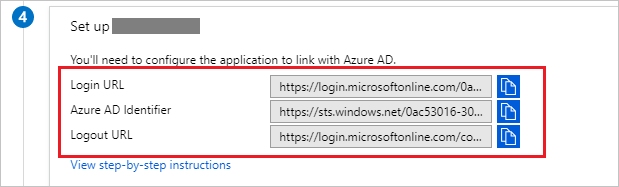
在“设置 Hightail”部分中,根据要求复制相应的 URL 。On the Set up Hightail section, copy the appropriate URL(s) based on your requirement.
备注
在 Hightail 应用上配置单一登录之前,请将你的电子邮件域添加到 Hightail 团队的允许列表,以便使用此域的所有用户都可以利用单一登录功能。Before configuring the Single Sign On at Hightail app, please add your email domain to the allowed list with Hightail team so that all the users who are using this domain can use Single Sign On functionality.
创建 Azure AD 测试用户Create an Azure AD test user
在本部分,我们将在 Azure 门户中创建名为 B.Simon 的测试用户。In this section, you'll create a test user in the Azure portal called B.Simon.
在 Azure 门户的左侧窗格中,依次选择“Azure Active Directory”、“用户”和“所有用户” 。From the left pane in the Azure portal, select Azure Active Directory, select Users, and then select All users.
选择屏幕顶部的“新建用户”。Select New user at the top of the screen.
在“用户”属性中执行以下步骤:In the User properties, follow these steps:
在“名称”字段中,输入 B.Simon。In the Name field, enter B.Simon.
在“用户名”字段中输入 username@companydomain.extension。In the User name field, enter the username@companydomain.extension. 例如,B.Simon@contoso.com。For example, B.Simon@contoso.com.
选中“显示密码”复选框,然后记下“密码”框中显示的值。Select the Show password check box, and then write down the value that's displayed in the Password box.
单击“创建”。Click Create.
分配 Azure AD 测试用户Assign the Azure AD test user
在本部分中,将通过授予 B.Simon 访问 Hightail 的权限,允许其使用 Azure 单一登录。In this section, you'll enable B.Simon to use Azure single sign-on by granting access to Hightail.
在 Azure 门户中,依次选择“企业应用程序”、“所有应用程序”。In the Azure portal, select Enterprise Applications, and then select All applications.
在应用程序列表中,选择“Hightail” 。In the applications list, select Hightail.
在应用的概述页中,找到“管理”部分,选择“用户和组” 。In the app's overview page, find the Manage section and select Users and groups.
选择“添加用户”,然后在“添加分配”对话框中选择“用户和组”。Select Add user, then select Users and groups in the Add Assignment dialog.
在“用户和组”对话框中,从“用户”列表中选择“B.Simon”,然后单击屏幕底部的“选择”按钮。In the Users and groups dialog, select B.Simon from the Users list, then click the Select button at the bottom of the screen.
如果你希望将某角色分配给用户,可以从“选择角色”下拉列表中选择该角色。If you are expecting a role to be assigned to the users, you can select it from the Select a role dropdown. 如果尚未为此应用设置任何角色,你将看到选择了“默认访问权限”角色。If no role has been set up for this app, you see "Default Access" role selected.
在“添加分配”对话框中,单击“分配”按钮。In the Add Assignment dialog, click the Assign button.
配置 Hightail SSOConfigure Hightail SSO
若要在 Hightail 中自动执行配置,需要通过单击“安装扩展” 来安装 我的应用安全登录浏览器扩展。To automate the configuration within Hightail, you need to install My Apps Secure Sign-in browser extension by clicking Install the extension.

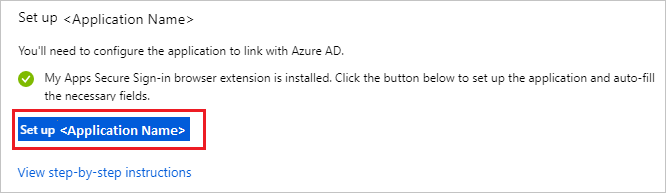
将扩展添加到浏览器后,单击“设置 Hightail”,此时会将你定向到 Hightail 应用程序 。After adding extension to the browser, click on Set up Hightail will direct you to the Hightail application. 在此处,提供管理员凭据以登录到 Hightail。From there, provide the admin credentials to sign into Hightail. 浏览器扩展会自动配置该应用程序,并自动执行步骤 3-6。The browser extension will automatically configure the application for you and automate steps 3-6.
若要手动设置 Hightail,请在另一个浏览器窗口中,打开“Hightail” 管理门户。If you want to setup Hightail manually, in another browser window, open the Hightail admin portal.
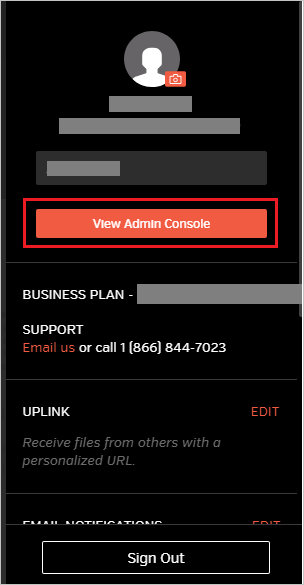
单击页面右上角的“用户”图标 。Click on User icon from the top right corner of the page.

单击“查看管理控制台” 选项卡。Click View Admin Console tab.
在顶部菜单中,单击“SAML” 选项卡并执行以下步骤:In the menu on the top, click the SAML tab and perform the following steps:
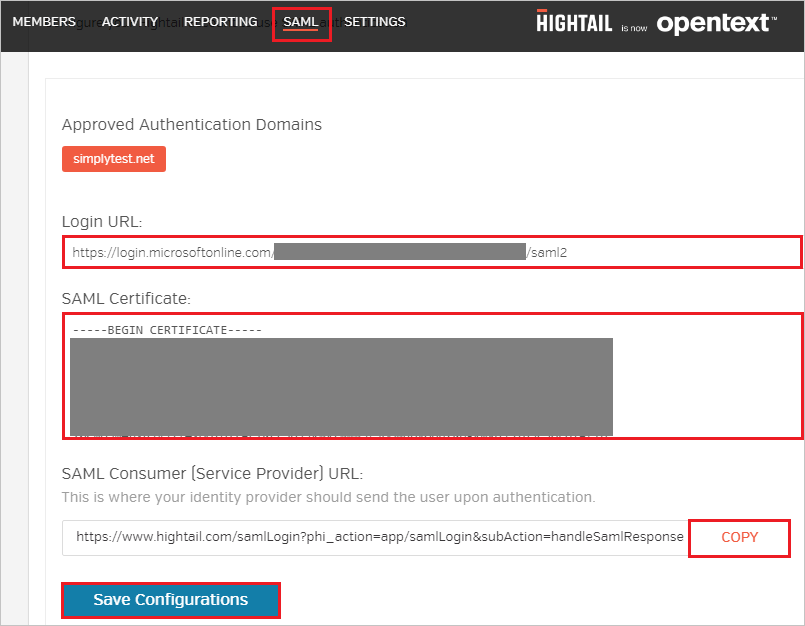
a.a. 在“登录 URL”文本框中,粘贴从 Azure 门户复制的“登录 URL”值 。In the Login URL textbox, paste the value of Login URL copied from Azure portal.
b.b. 在记事本中打开从 Azure 门户下载的 base-64 编码证书,将其内容复制到剪贴板,然后再粘贴到“SAML 证书” 文本框。Open your base-64 encoded certificate in notepad downloaded from Azure portal, copy the content of it into your clipboard, and then paste it to the SAML Certificate textbox.
c.c. 单击“复制”以复制实例的 SAML 使用者 URL,并将其粘贴到 Azure 门户的“基本 SAML 配置”部分的“回复 URL”文本框中。Click COPY to copy the SAML consumer URL for your instance and paste it in Reply URL textbox in Basic SAML Configuration section on Azure portal.
d.d. 单击“保存配置” 。Click Save Configurations.
创建 Hightail 测试用户Create Hightail test user
在本部分,我们将在 Hightail 中创建名为 Britta Simon 的用户。In this section, a user called Britta Simon is created in Hightail. Hightail 支持默认已启用的实时用户预配。Hightail supports just-in-time user provisioning, which is enabled by default. 此部分不存在任何操作项。There is no action item for you in this section. 如果 Hightail 中不存在用户,身份验证后会创建一个新用户。If a user doesn't already exist in Hightail, a new one is created after authentication.
备注
如果需要手动创建用户,则需要联系 Hightail 支持团队。If you need to create a user manually, you need to contact the Hightail support team.
测试 SSOTest SSO
在本部分,你将使用以下选项测试 Azure AD 单一登录配置。In this section, you test your Azure AD single sign-on configuration with following options.
SP 启动的:SP initiated:
在 Azure 门户中单击“测试此应用程序”。Click on Test this application in Azure portal. 这样将会重定向到 Hightail 登录 URL,可以从那里启动登录流。This will redirect to Hightail Sign on URL where you can initiate the login flow.
直接转到 Hightail 登录 URL,并从那里启动登录流。Go to Hightail Sign-on URL directly and initiate the login flow from there.
IDP 启动的:IDP initiated:
在 Azure 门户中单击“测试此应用程序”后,你应自动登录到为其设置了 SSO 的 HightailClick on Test this application in Azure portal and you should be automatically signed in to the Hightail for which you set up the SSO
还可以使用 Microsoft 访问面板在任何模式下测试此应用程序。You can also use Microsoft Access Panel to test the application in any mode. 在访问面板中单击 Hightail 磁贴时,如果是在 SP 模式下配置的,会重定向到应用程序登录页来启动登录流;如果是在 IDP 模式下配置的,则应会自动登录到为其设置了 SSO 的 Hightail。When you click the Hightail tile in the Access Panel, if configured in SP mode you would be redirected to the application sign on page for initiating the login flow and if configured in IDP mode, you should be automatically signed in to the Hightail for which you set up the SSO. For more information about the Access Panel, see Introduction to the Access Panel.
后续步骤Next steps
配置 Hightail 后,可以强制实施会话控制,以实时防止组织的敏感数据发生外泄和渗透。Once you configure Hightail you can enforce session control, which protects exfiltration and infiltration of your organization’s sensitive data in real time. 会话控制从条件访问扩展而来。Session control extends from Conditional Access.

一站式 AI 云服务平台
更多推荐



 0
0 0
0- 0


 已为社区贡献1条内容

所有评论(0)