
【中文乱码】idea Springboot项目sout,debug控制台中文输出乱码解决方案
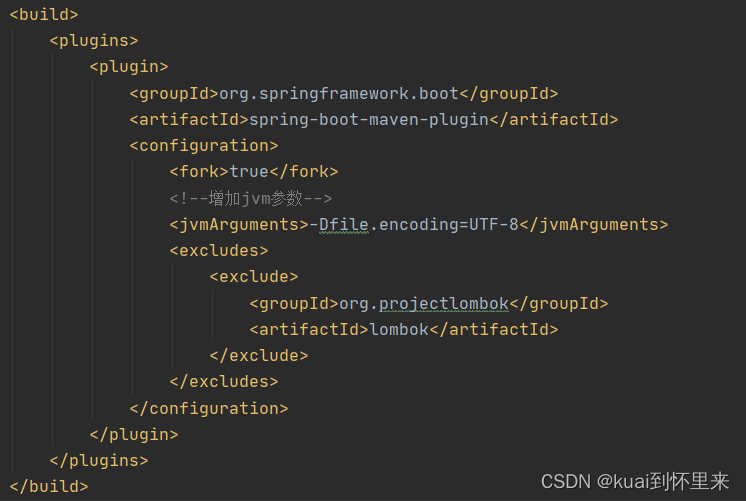
IDEA 2020.3.3版本,创建了Maven->Spring Boot项目,使用System.out.println(),@Slf4j 中的debug,info 控制台输出 出现中文乱码问题。最后在pom.xml文件中标签中添加如下配置,解决了问题。
·
出现问题的环境
IDEA 2020.3.3版本,创建了Maven->Spring Boot项目,使用System.out.println(),@Slf4j 中的debug,info 控制台输出 出现中文乱码问题
解决步骤
1. 先检查 File -> Settings -> File Encodings 是否设置为 UTF-8 (没有解决)
2. Edit Configurations中 设置VM Options 为 -Dfile.encoding=UTF-8 (没有解决)
3. 在Help -> Edit Custom VM Options 中追加 -Dfile.encoding=utf-8,并且重启IDEA (没有解决)
最后在pom.xml文件中 标签中添加如下配置,解决了问题
 <fork>true</fork>
 <!--增加jvm参数-->
 <jvmArguments>-Dfile.encoding=UTF-8</jvmArguments>

一站式 AI 云服务平台
更多推荐



 0
0 0
0- 0


 已为社区贡献1条内容

所有评论(0)