
idea插件之activate-power-mode和activate-power-mode-x
activate-power-mode插件特效执行时有的时候会报以下异常,不会影响idea和项目,但是特效频繁的话,异常也会频繁,不嫌麻烦的关了继续用就好,嫌弃麻烦的就重装插件,或者取消窗口抖动的特效。这个是升级版,自定义功能稍微多一些,bug频率会更少,高版本idea依旧会有,但很少,低版本idea应该几乎不会存在上面说的异常。settings里的其他设置里,有两个设置,一个可以设置触发特效的最
1.没用但有趣的插件activate-power-mode
idea插件中搜索activate-power-mode,进行安装,安装之后需要重启。
成功后idea中会有以下图标
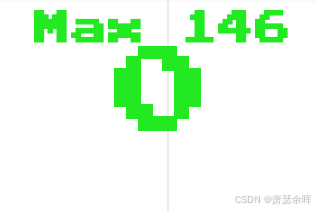
该插件的配置在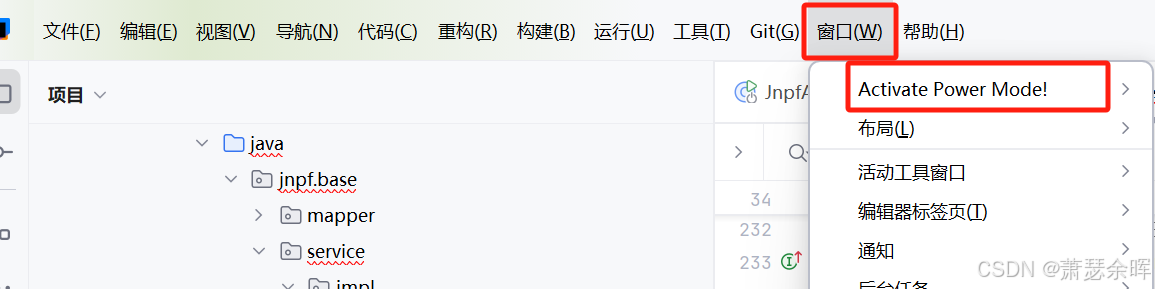
我这里用的idea中文插件,英文版的在Window一栏中。
里面的配置不多

- Enable 此选项可以控制该插件的开启和关闭
- Shake 此选项,可以控制你在写代码时是否会拥有窗口抖动的特效
- Particle 控制代码上方是否会有雪花一样的颜色块
- Combo 此选项,可以显示和隐藏本文第一张图的那个图标
- Colorful 设置雪花块颜色
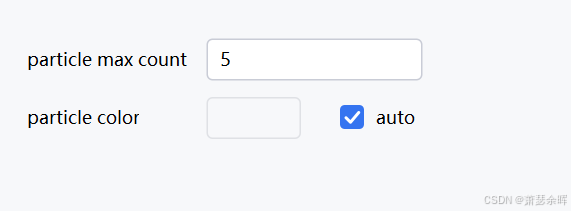
settings里的其他设置里,有两个设置,一个可以设置触发特效的最大代码数量,一个可以设置雪花块的自定义颜色。默认是黑色。
activate-power-mode插件特效执行时有的时候会报以下异常,不会影响idea和项目,但是特效频繁的话,异常也会频繁,不嫌麻烦的关了继续用就好,嫌弃麻烦的就重装插件,或者取消窗口抖动的特效。雪花块儿的特效也会触发这个异常,但是没有那么频繁。再或者可以装activate-power-mode-X,属于升级版本。
com.intellij.openapi.editor.impl.DocumentImpl$UnexpectedBulkUpdateStateException
    at com.intellij.openapi.editor.impl.DocumentImpl.assertNotInBulkUpdate(DocumentImpl.java:1172)
    at com.intellij.openapi.editor.impl.view.EditorView.assertNotInBulkMode(EditorView.java:632)
    at com.intellij.openapi.editor.impl.view.EditorView.offsetToVisualLine(EditorView.java:197)
    at com.intellij.openapi.editor.impl.EditorImpl.offsetToVisualLine(EditorImpl.java:1360)
    at com.intellij.openapi.editor.impl.CaretImpl.createVerticalInfo(CaretImpl.java:702)
    at com.intellij.openapi.editor.impl.CaretImpl.setCurrentLogicalCaret(CaretImpl.java:755)
    at com.intellij.openapi.editor.impl.CaretImpl.updateCachedStateIfNeeded(CaretImpl.java:1472)
    at com.intellij.openapi.editor.impl.CaretImpl.getLogicalPosition(CaretImpl.java:655)
    at com.intellij.openapi.editor.impl.CaretImpl.getSelectionEndPosition(CaretImpl.java:1003)
    at com.jiyuanime.listener.ActivatePowerDocumentListener.documentChanged(ActivatePowerDocumentListener.java:80)
    at com.intellij.openapi.editor.impl.DocumentImpl.changedUpdate(DocumentImpl.java:873)
    at com.intellij.openapi.editor.impl.DocumentImpl.updateText(DocumentImpl.java:778)
    at com.intellij.openapi.editor.impl.DocumentImpl.replaceString(DocumentImpl.java:643)
    at com.intellij.openapi.editor.impl.DocumentImpl.replaceString(DocumentImpl.java:590)
    at com.intellij.psi.formatter.DocumentBasedFormattingModel.replaceWhiteSpace(DocumentBasedFormattingModel.java:148)
    at com.intellij.formatting.engine.FormatProcessorUtils.replaceWhiteSpace(FormatProcessorUtils.java:45)
    at com.intellij.formatting.engine.ApplyChangesState.doIteration(ApplyChangesState.java:175)
    at com.intellij.formatting.engine.State.iteration(State.java:25)
    at com.intellij.formatting.engine.StateProcessor.iteration(StateProcessor.java:41)
    at com.intellij.formatting.FormatProcessor.doIterationsSynchronously(FormatProcessor.java:147)
    at com.intellij.formatting.FormatProcessor.performModifications(FormatProcessor.java:142)
    at com.intellij.formatting.FormatProcessor.performModifications(FormatProcessor.java:132)
    at com.intellij.formatting.FormatterImpl.adjustLineIndentsForRange(FormatterImpl.java:399)
    at com.intellij.psi.impl.source.codeStyle.CodeStyleManagerImpl$3.doPerform(CodeStyleManagerImpl.java:385)
    at com.intellij.psi.impl.source.codeStyle.CodeStyleManagerRunnable.perform(CodeStyleManagerRunnable.java:106)
    at com.intellij.psi.impl.source.codeStyle.CodeStyleManagerImpl.adjustLineIndent(CodeStyleManagerImpl.java:388)
    at com.intellij.codeInsight.editorActions.PasteHandler.indentEachLine(PasteHandler.java:306)
    at com.intellij.codeInsight.editorActions.PasteHandler.lambda$doPaste$1(PasteHandler.java:237)
    at com.intellij.openapi.application.impl.ApplicationImpl.runWriteAction(ApplicationImpl.java:1038)
    at com.intellij.codeInsight.editorActions.PasteHandler.doPaste(PasteHandler.java:225)
    at com.intellij.codeInsight.editorActions.PasteHandler.execute(PasteHandler.java:121)
    at com.intellij.codeInsight.editorActions.PasteHandler.doExecute(PasteHandler.java:74)
    at com.intellij.openapi.editor.actionSystem.EditorActionHandler.lambda$execute$4(EditorActionHandler.java:207)
    at com.intellij.openapi.editor.actionSystem.EditorActionHandler.doIfEnabled(EditorActionHandler.java:110)
    at com.intellij.openapi.editor.actionSystem.EditorActionHandler.execute(EditorActionHandler.java:206)
    at com.intellij.openapi.editor.actionSystem.EditorAction.lambda$actionPerformed$0(EditorAction.java:96)
    at com.intellij.openapi.command.impl.CoreCommandProcessor.executeCommand(CoreCommandProcessor.java:139)
    at com.intellij.openapi.command.impl.CoreCommandProcessor.executeCommand(CoreCommandProcessor.java:97)
    at com.intellij.openapi.editor.actionSystem.EditorAction.actionPerformed(EditorAction.java:105)
    at com.intellij.openapi.editor.actionSystem.EditorAction.actionPerformed(EditorAction.java:80)
    at com.intellij.openapi.actionSystem.ex.ActionUtil$1.run(ActionUtil.java:255)
    at com.intellij.openapi.actionSystem.ex.ActionUtil.performActionDumbAware(ActionUtil.java:272)
    at com.intellij.openapi.keymap.impl.IdeKeyEventDispatcher$1.performAction(IdeKeyEventDispatcher.java:620)
    at com.intellij.openapi.keymap.impl.IdeKeyEventDispatcher.lambda$processAction$2(IdeKeyEventDispatcher.java:669)
    at com.intellij.openapi.application.TransactionGuardImpl.performUserActivity(TransactionGuardImpl.java:195)
    at com.intellij.openapi.keymap.impl.IdeKeyEventDispatcher.processAction(IdeKeyEventDispatcher.java:668)
    at com.intellij.openapi.keymap.impl.IdeKeyEventDispatcher.processActionOrWaitSecondStroke(IdeKeyEventDispatcher.java:520)
    at com.intellij.openapi.keymap.impl.IdeKeyEventDispatcher.inInitState(IdeKeyEventDispatcher.java:475)
    at com.intellij.openapi.keymap.impl.IdeKeyEventDispatcher.dispatchKeyEvent(IdeKeyEventDispatcher.java:212)
    at com.intellij.ide.IdeEventQueue._dispatchEvent(IdeEventQueue.java:697)
    at com.intellij.ide.IdeEventQueue.dispatchEvent(IdeEventQueue.java:382)
    at java.awt.EventDispatchThread.pumpOneEventForFilters(EventDispatchThread.java:201)
    at java.awt.EventDispatchThread.pumpEventsForFilter(EventDispatchThread.java:116)
    at java.awt.EventDispatchThread.pumpEventsForHierarchy(EventDispatchThread.java:105)
    at java.awt.EventDispatchThread.pumpEvents(EventDispatchThread.java:101)
    at java.awt.EventDispatchThread.pumpEvents(EventDispatchThread.java:93)
    at java.awt.EventDispatchThread.run(EventDispatchThread.java:82)
2.activate-power-mode-x
这个是升级版,自定义功能稍微多一些,bug频率会更少,高版本idea依旧会有,但很少,低版本idea应该几乎不会存在上面说的异常。下面是它的选项配置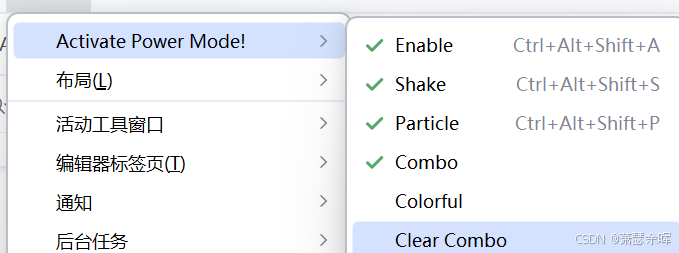
-
Enable 此选项可以控制该插件的开启和关闭
-
Shake 此选项,可以控制你在写代码时是否会拥有窗口抖动的特效
-
Particle 控制代码上方是否会有雪花一样的颜色块
-
Combo 此选项,可以显示和隐藏本文第一张图的那个图标
-
Colorful 颜色设置
-
Clear Combo 此选项会清理本文第一张图记录的操作记录的数量
还可以在设置中设置自己的偏好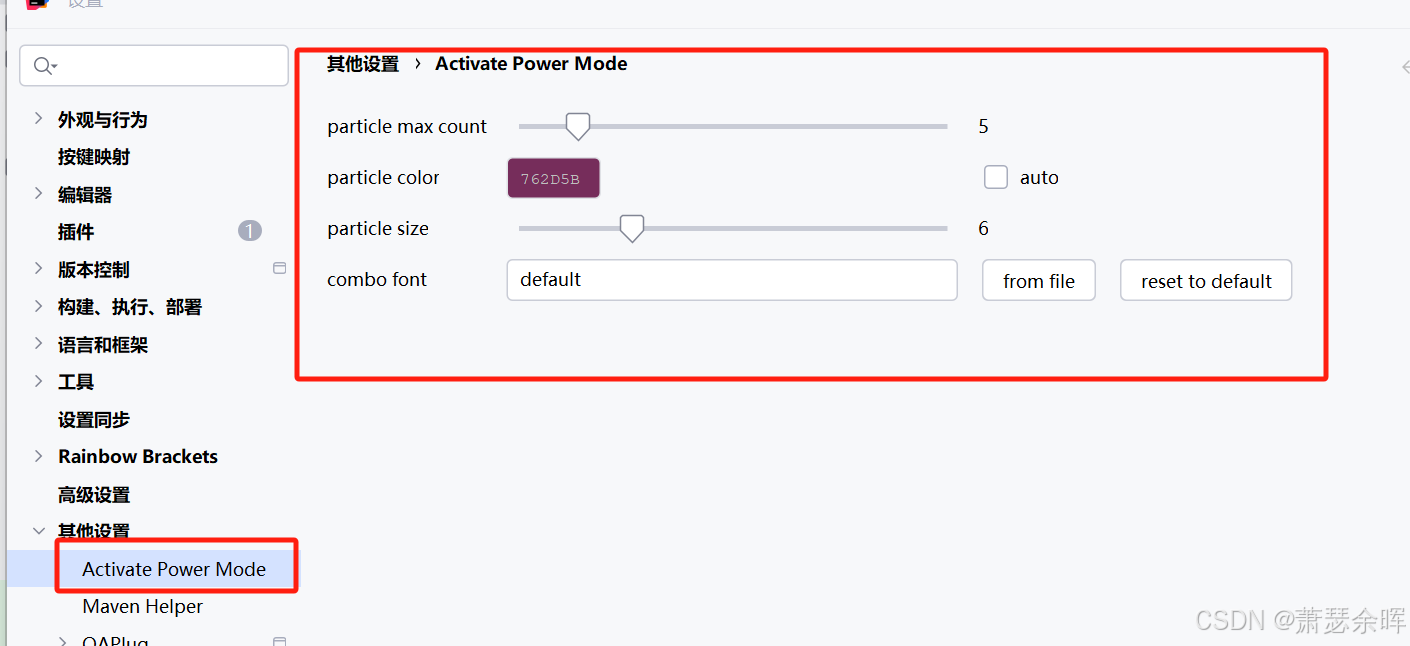
-
第一个用来设置最大触发特效的代码字数数量
-
第二个用来自定义自己喜欢的颜色特效
-
第三个用来设置尺寸
-
第四个可以自定义本文第一张图的那个图标

一站式 AI 云服务平台
更多推荐



 5
5 0
0- 0


 已为社区贡献1条内容

所有评论(0)