
安装了 idea 无法在 macOS 命令行执行 maven
在macOS上配置IntelliJ IDEA中的Maven路径,首先需要找到Maven的安装目录,通常位于/Applications/IntelliJ IDEA.app/Contents/plugins/maven/lib/maven3。接着,编辑用户环境变量配置文件.bash_profile,可以通过访达的快捷键Command+Shift+.显示隐藏文件,或使用vim ~/.bash_profi
·
安装了 idea 后,maven 的路径
打开 访达 ,找到 idea , 右键

找到这个目录
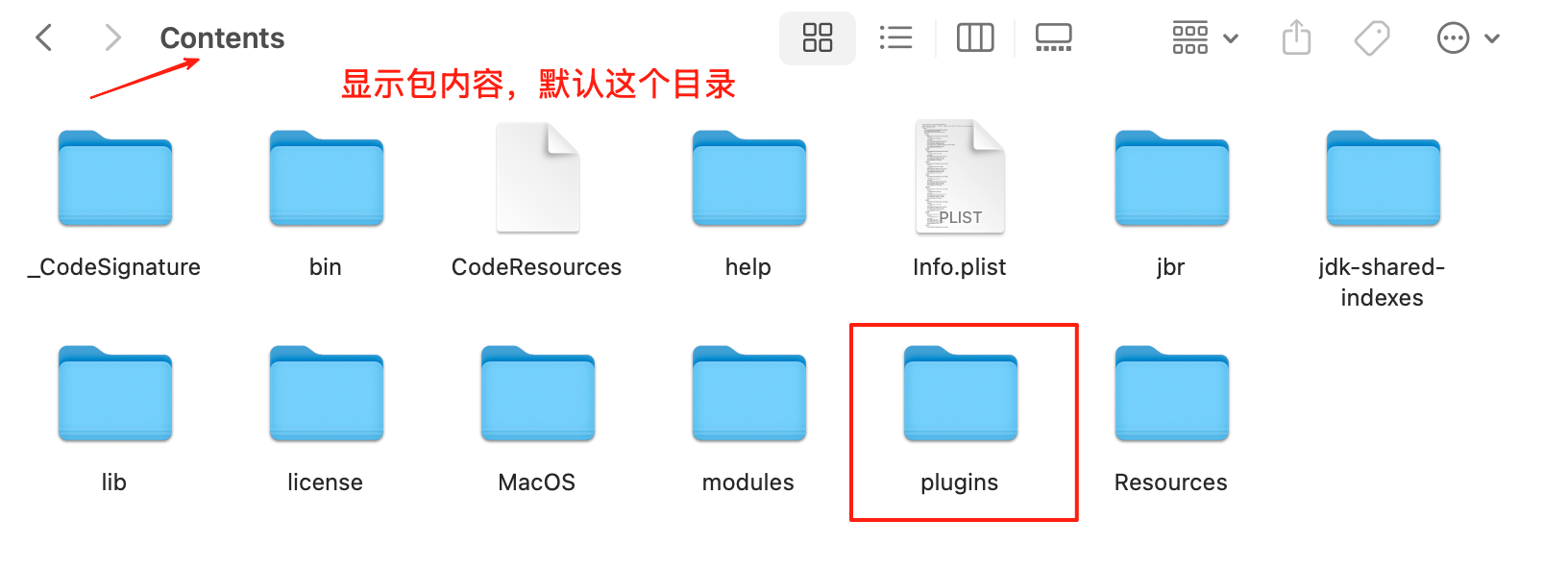
/Applications/IntelliJ\ IDEA.app/Contents/plugins/maven/lib/maven3
配置
第一步 打开用户环境变量配置
.bash_profile // 为隐藏文件
macOS 访达 command + shift + . 打开隐藏文件显示或关闭。
或者
vim ~/.bash_profile
第二步 增加访问 maven 的环境配置
source ~/.bash_profile
载入环境变量。
第三步
给 mvn 增加权限
# 进入mvn目录
cd /Applications/IntelliJ\ IDEA.app/Contents/plugins/maven/lib/maven3/bin
# 添加权限,a-所有用户,x-执行权限
chmod a+x mvn
第四步
查看情况,打开终端
mvn -version
mvn -version
Apache Maven 3.9.9 (8e8579a9e76f7d015ee5ec7bfcdc97d260186937)
成功 !!!

一站式 AI 云服务平台
更多推荐



 14
14 0
0- 0


 已为社区贡献4条内容

所有评论(0)