
如何将SQL数据库备份到网络共享
Backing up SQL databases regularly is must. We have already covered ways to can easily backup all your SQL server databases to a local hard drive, but this does not protect against drive and/or system
Backing up SQL databases regularly is must. We have already covered ways to can easily backup all your SQL server databases to a local hard drive, but this does not protect against drive and/or system failure. As an extra layer of protection against this type of disaster, you can copy or directly create your backups on a network share.
必须定期备份SQL数据库。 我们已经介绍了可以轻松地将所有SQL Server数据库备份到本地硬盘驱动器的方法 ,但这不能防止驱动器和/或系统故障。 作为针对此类灾难的额外保护层,您可以在网络共享上复制或直接创建备份。
本地备份,然后复制到网络共享 (Backup Locally and then Copy to the Network Share)
The preferred and most direct way to accomplish this task is simply to create a local backup of a database and then copy the respective backup file to a network share. You can do this by creating a batch script which looks like this:
完成此任务的首选且最直接的方法是简单地创建数据库的本地备份,然后将相应的备份文件复制到网络共享。 您可以通过创建如下所示的批处理脚本来做到这一点:
SET LocalFolder=C:Program FilesMicrosoft SQL ServerMSSQL.1MSSQLBackupSqlCmd -E -Q “Backup Database MyDB To Disk=’%LocalFolder%MyDB.bak'”XCopy “%LocalFolder%MyDB.bak” “\192.168.16.55BackupDatabases” /Z /VDEL “%LocalFolder%MyDB.bak”
SET LocalFolder = C:Program FilesMicrosoft SQL ServerMSSQL.1MSSQLBackupSqlCmd -E -Q“将数据库MyDB备份到磁盘='%LocalFolder%MyDB.bak'” XCopy“%LocalFolder%MyDB.bak”“ \ 192.168.16.55BackupDatabases” / Z / VDEL“%LocalFolder%MyDB.bak”
This script does the following (line by line):
该脚本执行以下操作(逐行):
- Sets a variable to the local SQL backup directory. 将变量设置为本地SQL备份目录。
- Creates a SQL backup of MyDB (using Windows Authentication) to the local SQL backup directory. 创建MyDBSQL备份(使用Windows身份验证)到本地SQL备份目录。
- Copies the local backup file to a network share. 将本地备份文件复制到网络共享。
- Deletes the local backup file. 删除本地备份文件。
Again, this is the preferred method because it works out of the box and likelihood of a backup failure is minimal since the backup is created on a local disk. However, if you do not have a enough disk space to store local copies of backup files this action will fail. In this event, you will need to add additional disk space or backup directly to a network share.
同样,这是首选方法,因为它可以直接使用,并且备份失败的可能性很小,因为备份是在本地磁盘上创建的。 但是,如果您没有足够的磁盘空间来存储备份文件的本地副本,则此操作将失败。 在这种情况下,您将需要添加其他磁盘空间或直接备份到网络共享。
直接备份到网络共享 (Backup Directly to a Network Share)
Typically, when you try to create a backup directly to a network share using a command such as:
通常,当您尝试使用以下命令直接将备份创建到网络共享时:
SqlCmd -E -Q “Backup Database MyDB To Disk=’\192.168.16.55BackupDatabasesMyDB.bak'”
SqlCmd -E -Q“将MyDB备份到磁盘='\ 192.168.16.55BackupDatabasesMyDB.bak'”
You will mostly likely get an error along the lines of:
您很可能会遇到以下错误:
Msg 3201, Level 16, State 1, Server JF, Line 1Cannot open backup device ‘\192.168.16.55BackupDatabasesMyDB.bak’. Operating system error 5(Access is denied.).Msg 3013, Level 16, State 1, Server JF, Line 1BACKUP DATABASE is terminating abnormally.
消息3201,级别16,状态1,服务器JF,行1无法打开备份设备'\ 192.168.16.55BackupDatabasesMyDB.bak'。 操作系统错误5(访问被拒绝。)。消息3013,级别16,状态1,服务器JF,第1行备份数据库异常终止。
This error occurs despite the fact that you ran the SQL backup command using Windows Authentication (the -E switch) and the Windows account as the ability to access and copy files to the share through Windows Explorer.
尽管您使用Windows身份验证(-E开关)和Windows帐户运行SQL备份命令作为通过Windows资源管理器访问文件并将其复制到共享的功能,但仍会发生此错误。
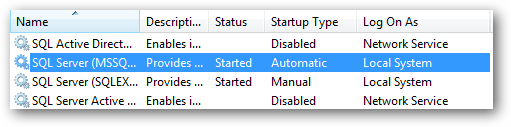
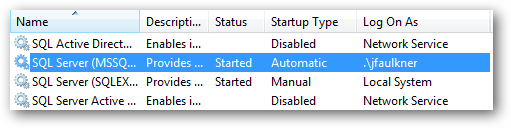
The reason this action fails is because the SQL command is executed within the bounds of the account the SQL Server service is running as. When you view the Services list on your computer, most likely you will see the SQL Server service running as (the Log On As column) either Local System or Network Service which are system accounts which have no network access.
该操作失败的原因是因为SQL命令是在运行SQL Server服务的帐户的范围内执行的。 当您在计算机上查看“服务”列表时,很可能会看到SQL Server服务作为“本地系统”或“网络服务”(“登录为”列)运行,这是没有网络访问权限的系统帐户。
On our system the backup to a network share command fails because we have the SQL Server service running as Local System which, again, cannot get to any network resources.
在我们的系统上,备份到网络共享命令失败,因为我们有作为本地系统运行SQL Server服务,该服务同样无法访问任何网络资源。
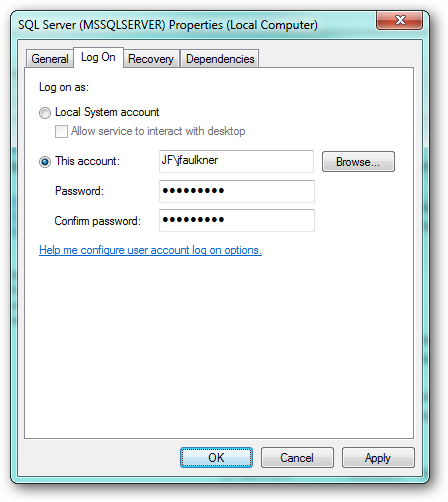
In order to allow SQL to backup directly to a network share, we have to run the SQL Server service as a local account which does have access to network resources.
为了允许SQL直接备份到网络共享,我们必须将SQL Server服务作为可以访问网络资源的本地帐户运行。
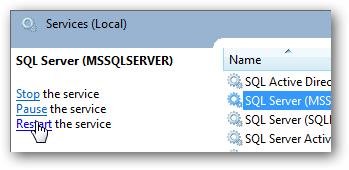
Edit the properties of the SQL Server service and on the Log On tab, configure the service to run as an alternate account which has network access rights.
编辑SQL Server服务的属性,然后在“登录”选项卡上,将该服务配置为作为具有网络访问权限的备用帐户运行。
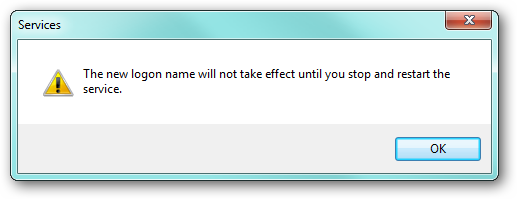
When you click OK, you will get a prompt that the settings will not take effect until the service is restarted.
当您单击确定时,您将收到提示,提示该设置在重新启动服务后才会生效。
Restart the service.
重新启动服务。
The services list should now show the SQL Server service is running as the account you configured.
现在,服务列表应显示SQL Server服务以您配置的帐户身份运行。
Now when you run the command to backup directly to a network share:
现在,当您运行命令直接备份到网络共享时:
SqlCmd -E -Q “Backup Database MyDB To Disk=’\192.168.16.55BackupDatabasesMyDB.bak'”
SqlCmd -E -Q“将MyDB备份到磁盘='\ 192.168.16.55BackupDatabasesMyDB.bak'”
You should see a success message:
您应该看到一条成功消息:
Processed 152 pages for database ‘MyDB’, file ‘MyDB’ on file 1.Processed 2 pages for database ‘MyDB’, file ‘MyDB_log’ on file 1.BACKUP DATABASE successfully processed 154 pages in 0.503 seconds (2.493 MB/sec).
已处理152页的数据库'MyDB',文件1上的文件'MyDB'。已处理2页的数据库'MyDB',文件1上的文件'MyDB_log'。BACKUPDATABASE在0.503秒(2.493 MB /秒)中成功处理了154页。
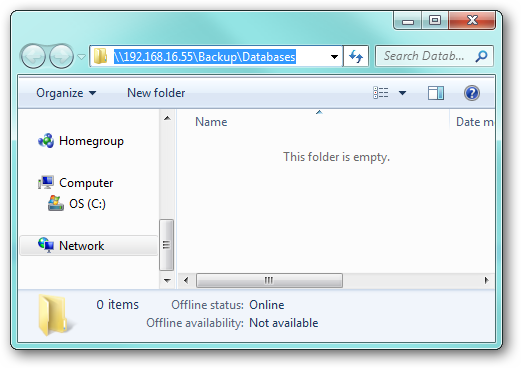
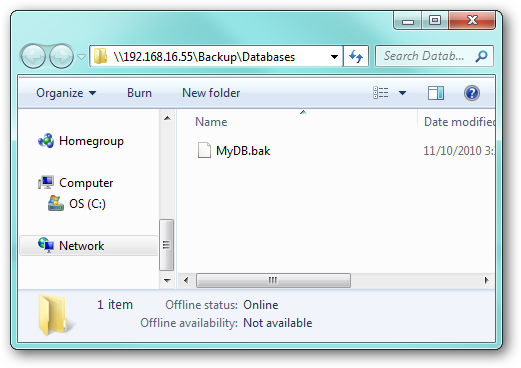
With the backup file now in the network share directory:
现在将备份文件放在网络共享目录中:
Network Share Considerations
网络共享注意事项
It is important to note that the backup command expects to be able to connect directly to the network share without being prompted for credentials. The account you have configured the SQL Server service to run as must have a trusted connection with the network share where the respective credentials allow access, otherwise an error like this may occur:
重要的是要注意,backup命令希望能够直接连接到网络共享,而不会提示输入凭据。 您已配置SQL Server服务运行的帐户必须与各自的凭据允许访问的网络共享具有受信任的连接,否则可能会发生以下错误:
Msg 3201, Level 16, State 1, Server JF, Line 1Cannot open backup device ‘\192.168.16.55BackupDatabasesMyDB.bak’. Operating system error 1326(Logon failure: unknown user name or bad password.).Msg 3013, Level 16, State 1, Server JF, Line 1BACKUP DATABASE is terminating abnormally.
消息3201,级别16,状态1,服务器JF,行1无法打开备份设备'\ 192.168.16.55BackupDatabasesMyDB.bak'。 操作系统错误1326(登录失败:用户名未知或密码错误。)。消息3013,级别16,状态1,服务器JF,第1行备份数据库异常终止。
This error indicates that the account’s user name and password were not accepted by the network share and the command failed.
此错误表明网络共享未接受帐户的用户名和密码,命令失败。
Another issue to keep in mind is the backup is performed directly to a network resource, so any hiccups in the network connection could cause your backup to fail. For this reason, you should only backup to network locations which are stable (i.e. probably not a VPN).
要记住的另一个问题是,备份是直接对网络资源执行的,因此网络连接中的任何故障都可能导致备份失败。 因此,您应该仅备份到稳定的网络位置(即可能不是VPN)。
Security Implications
安全隐患
As mentioned earlier, using the method where you backup locally and then copy to a network share is preferred as it allows you to run the SQL Service as an account with local system access only.
如前所述,首选使用本地备份然后复制到网络共享的方法,因为它允许您将SQL Service作为仅具有本地系统访问权限的帐户运行。
By running the service as an alternate account you open the door to potential security issues. For example, a malicious SQL script could execute under the alternate account and attack network resources. Additionally, any changes to respective account (password changes/expirations or deletion/disabling of the account) will cause the SQL Server service to fail to start.
通过将服务作为备用帐户运行,您可能会遇到潜在的安全问题。 例如,恶意SQL脚本可以在备用帐户下执行,并攻击网络资源。 此外,对相应帐户的任何更改(密码更改/到期或帐户的删除/禁用)都将导致SQL Server服务无法启动。
It is important to keep these points in mind if you do run your SQL Server instance using an alternate account. While these are not show stoppers if proper precautions are taken, you should consider adding additional hard drive space and then implement the local backup and copy so you can run the SQL service using a local account.
如果您确实使用备用帐户运行SQL Server实例,则务必牢记这些要点。 如果采取了适当的预防措施,尽管这些措施没有显示出来,但您应该考虑添加额外的硬盘驱动器空间,然后实施本地备份和复制,以便可以使用本地帐户运行SQL服务。
翻译自: https://www.howtogeek.com/51788/how-to-backup-sql-databases-to-a-network-share/

一站式 AI 云服务平台
更多推荐



 0
0 0
0- 0


 已为社区贡献2条内容

所有评论(0)