
SQLite数据库转移到MySQL数据库中
本人很懒,以上两块内容网上都有,官网介绍非常详细,我就不小丑了。
独创性说明
这篇文档其实早就写好了,该任务是我在实习期遇到的一个简单任务。快一年了,想着在这个平台更新一篇工作记录。相对来说没什么技术含量,但是也是我从0到0.001的过程,正好活跃一下账号,快两年没更新了。所以各位看看就行了,欢迎指正。后续可能还会更新一些工作记录,我筛选一下,然后搬运到这个平台。
需求
最近工作有这个需求,ok,需求了解了,接下来就开始研究怎么干了。
先将问题拆解:
1、这两种数据库各有什么特点,共同点是什么
2、如何部署数据库以及如何去访问数据库(可以用那种可视化工具连接到数据库)
3、相同的数据集在两个数据库上存储的结构是什么,每个字段的定义有什么区别
SQLite介绍(略)
MySQL介绍(略)
本人很懒,以上两块内容网上都有,官网介绍非常详细,我就不小丑了。
区别
一、这两个数据库的用法不一样,命令有所区别。具体等自己用了就会有体会。
二、重点是要搞清楚,在两种数据库中表格是怎么创建的,每个字段是如何被定义的。
SQLite 和 MySQL 在数据类型上有一些不同,因此在从 SQLite 迁移到 MySQL 时,需要考虑将某些数据类型进行转换。以下是一些常见的 SQLite 数据类型与 MySQL 数据类型之间的转换对应:
-
TEXT:SQLite 中的
TEXT类型对应于 MySQL 中的VARCHAR或TEXT类型。如果数据长度较小,可以考虑使用
VARCHAR,而对于较大的文本数据,可以使用TEXT类型。 -
INTEGER:SQLite 的
INTEGER类型对应于 MySQL 的INT或INTEGER类型。 -
REAL:SQLite 中的
REAL类型通常对应于 MySQL 的DOUBLE或FLOAT类型。 -
BLOB:SQLite 中的
BLOB类型是用于存储二进制数据,对应于 MySQL 的BLOB或LONGBLOB类型。 -
DATETIME:SQLite 中的
DATETIME类型对应于 MySQL 的DATETIME或TIMESTAMP类型。 -
BOOLEAN:SQLite 并没有直接的
BOOLEAN类型。通常,SQLite 使用INTEGER类型,将0表示为FALSE,1表示为TRUE。在 MySQL 中,可以使用BOOL或BOOLEAN类型来表示布尔值。
基本就用到这些,当然当迁移数据时,需要根据实际情况检查表的结构并根据需要进行适当的数据类型转换。数据类型的选择应该基于数据的存储需求以及目标数据库的最佳实践。这些是一般情况下的对应关系,但在特定情况下可能会有其他因素需要考虑,比如数据的大小、精度和性能需求等。
三、访问SQLite只需要提供正确的数据库路径,而访问MySQL就需要提供主机名、用户名、密码、数据库名,如果需要,还要有执行的 SQL 查询。然后,使用相关库的连接方法(常用python的pymysql模块)建立到数据库的连接,创建游标对象执行 SQL 查询或命令,获取结果并进行相应的处理。最后,通过关闭连接来释放资源。
实战
import sqlite3
import pymysql
import re


def case_insensitive_replace(source_str, target_str, replacement_str):
    return re.compile(re.escape(target_str), re.IGNORECASE).sub(replacement_str, source_str)#删除即可,只是为了验证某些结果写的,后续没用到

def check_sqlite_sequence(sqlite_db_path: str):
    sqlite_conn = sqlite3.connect(sqlite_db_path)
    sqlite_cursor = sqlite_conn.cursor()

    # 检查是否存在 sqlite_sequence 表
    sqlite_cursor.execute("SELECT name FROM sqlite_master WHERE type='table' AND name='sqlite_sequence'")
    result = sqlite_cursor.fetchone()

    if result:
        print("数据库中存在 sqlite_sequence 表。")
        sqlite_conn.close()
        return True
    else:
        print("数据库中不存在 sqlite_sequence 表。")
        sqlite_conn.close()
        return False

def copy_tables_to_mysql(sqlite_db_path: str, mysql_host: str, mysql_user: str, mysql_password: str, mysql_database: str):
    # 连接到SQLite数据库
    sqlite_conn = sqlite3.connect(sqlite_db_path)
    sqlite_cursor = sqlite_conn.cursor()
    print(f"连接到SQLite数据库:{sqlite_db_path}")

    # 获取SQLite数据库中的所有表名
    sqlite_cursor.execute("SELECT name FROM sqlite_master WHERE type='table'")
    tables = sqlite_cursor.fetchall()
    print(tables)
    # 检查是否存在 sqlite_sequence 表
    if check_sqlite_sequence(sqlite_db_path):
        # 如果存在,从 tables 列表中删除该表名
        tables = [table[0] for table in tables if table[0] != 'sqlite_sequence']
        print("删除 sqlite_sequence 表后的表格列表:", tables)
    # 连接到MySQL数据库
    mysql_conn = pymysql.connect(host=mysql_host,
                                 user=mysql_user,
                                 password=mysql_password,
                                 database=mysql_database,
                                 port=8090)
    mysql_cursor = mysql_conn.cursor()
    print("连接到MySQL数据库")

    failed_tables = []  # 用于存储写入失败的表名

    for table in tables:
        table_name = table
        # print(f"处理表格:{table_name}")

        # 从SQLite数据库读取数据
        sqlite_cursor.execute(f"PRAGMA table_info({table_name})")
        columns_info = sqlite_cursor.fetchall()

        sqlite_cursor.execute(f"SELECT * FROM {table_name}")
        sqlite_data = sqlite_cursor.fetchall()


        columns = []
        for column in columns_info:
            column_name = column[1]
            column_type = column[2].lower()
            columns.append(f"`{column_name}` {column_type}")

        columns_str = ', '.join(columns)
        print((columns_str))
        # 修改代码段,转化字段类型
        modified_columns_str = columns_str.replace(
            "varchar",
            "varchar(255)"  # 按需修改长度
        ).replace(
            "datetime",
            "timestamp" # 或其他日期时间类型
        ).replace(
            "integer",
            "int"
        ).replace(
            "text",
            "longtext"
        ).replace(
            "boolean",
            "bool"
        )


        print(modified_columns_str)
        # 删除MySQL表格(如果存在)
        drop_table_query = f"DROP TABLE IF EXISTS `{table_name}`"
        mysql_cursor.execute(drop_table_query)
        print(f"表 `{table_name}` 已存在并已被删除")

        # 创建MySQL表格
        create_table_query = f"CREATE TABLE `{table_name}` ({modified_columns_str})"
        mysql_cursor.execute(create_table_query)
        print(f"表 `{table_name}` 创建成功")
        # 创建MySQL表格(如果不存在)
        # create_table_query = f"CREATE TABLE IF NOT EXISTS `{table_name}` ({modified_columns_str});"
        # create_table_query = f"CREATE TABLE IF NOT EXISTS `{table_name}` ({columns_str});"
        # mysql_cursor.execute(create_table_query)

        # 删除MySQL表中的所有现有记录
        mysql_cursor.execute(f"TRUNCATE TABLE `{table_name}`")

        # 将数据插入到MySQL数据库
        insert_columns_str = ', '.join([f"`{column[1]}`" for column in columns_info])
        insert_query = f"INSERT INTO `{table_name}` ({insert_columns_str}) VALUES ({', '.join(['%s'] * len(columns_info))})"
        print(insert_query)
        try:
            mysql_cursor.executemany(insert_query, sqlite_data)
            print(f"已迁移表格 '{table_name}' 的数据")
            print("--------------------------------------------")
        except pymysql.Error as e:
            failed_tables.append(table_name)  # 记录写入失败的表名
            print(f"写入表格 '{table_name}' 的数据时出现错误:{e}")

    if failed_tables:
        print("未能成功写入数据的表格:", failed_tables)

    # 提交更改并关闭连接
    mysql_conn.commit()
    mysql_conn.close()
    sqlite_conn.close()

# 使用示例
if __name__ == "__main__":
    sqlite_db_path = r"path"  # 指定你的 SQLite 数据库路径
    mysql_host = "localhost"  # MySQL 主机名或 IP
    mysql_user = "root"  # MySQL 用户名
    mysql_password = "password"  # MySQL 密码
    mysql_database = "database_name"  # 目标 MySQL 数据库名
    copy_tables_to_mysql(sqlite_db_path, mysql_host, mysql_user, mysql_password, mysql_database)
what are sqlite_sequence and sqlite_master
sqlite_master 和 sqlite_sequence 是 SQLite 数据库系统中的系统表。它们用于存储关于数据库架构和序列的信息。
-
sqlite_master:
-
sqlite_master是一个系统表,它包含有关数据库中所有表的元数据信息。这些信息包括表的名称、类型、创建语句等。在创建数据库时,sqlite_master表会自动创建,用于记录数据库的结构。 -
示例查询语句:
SELECT * FROM sqlite_master WHERE type='table';
-
-
sqlite_sequence:
-
sqlite_sequence是 SQLite 中用于自动递增列的表。当你在表中定义一个带有AUTOINCREMENT关键字的列时,SQLite 会在sqlite_sequence表中创建一个与该表关联的条目,用于存储下一个将要分配的自动递增值。 -
示例查询语句:
SELECT * FROM sqlite_sequence;
-
在创建 SQLite 数据库时,sqlite_master 表是自动创建的,因为它是用于记录数据库结构的系统表。sqlite_sequence 表只有在你创建带有自动递增列的表时,才会在需要时自动创建。
总的来说,sqlite_master 用于记录数据库的结构,而 sqlite_sequence 用于跟踪自动递增列的下一个值。
具体示例请查看文章最后一张图
sqlite_sequence and sqlite_master are system tables in SQLite that store information about the database schema and sequence information.
-
sqlite_master:
-
sqlite_masteris a system table that contains metadata about all the tables and views in the database. It includes information such as table names, types, and the SQL statements used to create the tables. When you create a database, thesqlite_mastertable is automatically generated to record the structure of the database. -
Example query:
SELECT * FROM sqlite_master WHERE type='table';
-
-
sqlite_sequence:
-
sqlite_sequenceis a system table used to manage auto-incrementing columns in SQLite databases. When you create a table with a column defined asAUTOINCREMENT, SQLite automatically creates an entry in thesqlite_sequencetable to keep track of the next value to be assigned to the auto-incrementing column. -
Example query:
SELECT * FROM sqlite_sequence;
-
In summary, sqlite_master is used to store information about the structure of the database, including tables and views, while sqlite_sequence is specifically for managing auto-incrementing columns. These system tables help SQLite maintain and organize essential information about the database schema and sequence values.
for example:
e, including tables and views, while sqlite_sequence is specifically for managing auto-incrementing columns. These system tables help SQLite maintain and organize essential information about the database schema and sequence values.
for example: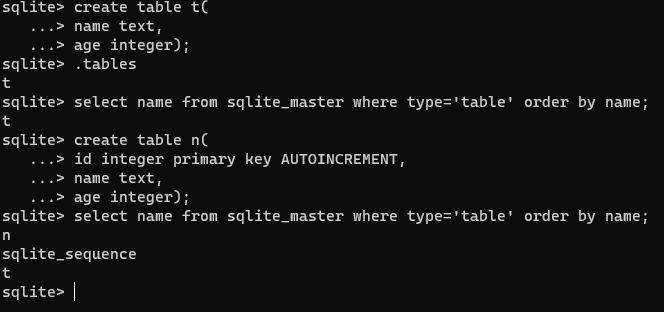

一站式 AI 云服务平台
更多推荐



 43
43 0
0- 0


 已为社区贡献1条内容

所有评论(0)