
Mysql 数据库ERROR 1820 (HY000): You must reset your password using ALTER USER 解决办法
Mysql 5.7数据库原来一直都能正常访问,突然访问不了,一直改都改不了。mysql> select authentication_string,password_expired from user where user='root';update user set authenticatio_string=password('123456'),password_expir...
·
Mysql 5.7数据库原来一直都能正常访问,突然访问不了,一直改都改不了,做了如下的操作:
1、查找问题
1.1、跳过数据库权限验证:
vim /etc/my.cnf在my.cnf文件最后添加skip-grant-tables并保存
1.2、重启mysql:
sudo systemctl restart mysqldmysql> use mysql;1.3、判断“password_expired”是否为Y
mysql> select authentication_string,password_expired from user where user='root';
1.4、判断“default_password_lifetime”是否为0
mysql> show VARIABLES like "%password%";
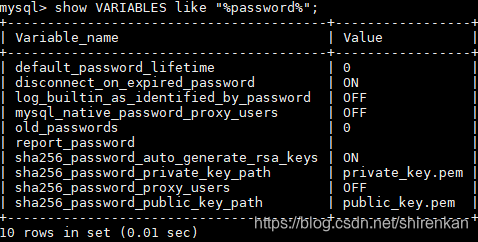
2、“password_expired”为Y的解决方法
2.1、修改“password_expired”的值:
update user set authenticatio_string=password('123456'),password_expired='N' where user='root';
2.2、恢复数据库权限验证:
vim /etc/my.cnf在my.cnf文件最后去掉skip-grant-tables并保存
2.3、重启mysql:
sudo systemctl restart mysqld3、“default_password_lifetime”为0解决方法
3.1、修改“default_password_lifetime”的值:
mysql> set GLOBAL default_password_lifetime=0;
3.2、恢复数据库权限验证:
vim /etc/my.cnf在my.cnf文件最后去掉skip-grant-tables并保存
3.3、重启mysql:
sudo systemctl restart mysqld

一站式 AI 云服务平台
更多推荐



 2
2 0
0- 0


 已为社区贡献1条内容

所有评论(0)