
phpMyAdmin配置管理多个数据库服务器方法
用了好几个第三方软件,最后还是喜欢用phpMyAdmin1.打开phpMyadmin目录,找到config.inc.php,若不存在,将config.sample.inc .php更名为config.inc.php2.将以下代码注释或删除3.改成以下内容即可:/*** Servers configuration*/$server_hosts = array('1' =&...
·
用了好几个第三方软件,最后还是喜欢用phpMyAdmin
1.打开phpMyadmin目录,找到config.inc.php,若不存在,将config.sample.inc .php更名为config.inc.php
2.将以下代码注释或删除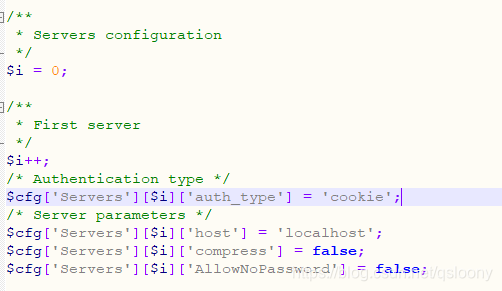
3.改成以下内容即可:
/**
 * Servers configuration
 */
$server_hosts = array(
	'1' => array('server_name' => 'localhost', 'host' => '127.0.0.1', 'user'=>'', 'password' => ''),
	'2' => array('server_name' => 'test', 'host' => 'xxx.xxx.x.xx', 'user'=>'', 'password' => ''),
	'3' => array('server_name' => 'test2', 'host' => 'xxx.xxx.x.xxx', 'user'=>'', 'password' => '')
);

foreach($server_hosts as $key => $sh)
{
	$cfg['Servers'][$key]['verbose'] = $sh['server_name'];
	$cfg['Servers'][$key]['auth_type'] = 'cookie';
	$cfg['Servers'][$key]['host'] = $sh['host'];
	$cfg['Servers'][$key]['user'] = $sh['user'];
	$cfg['Servers'][$key]['password'] = $sh['password'];
	$cfg['Servers'][$key]['connect_type'] = 'tcp';
	$cfg['Servers'][$key]['compress'] = false;
	$cfg['Servers'][$key]['extension'] = 'mysqli';
	$cfg['Servers'][$key]['AllowNoPassword'] = false;
}
$cfg['ServerDefault'] = 1;
4.保存、重启
5.效果: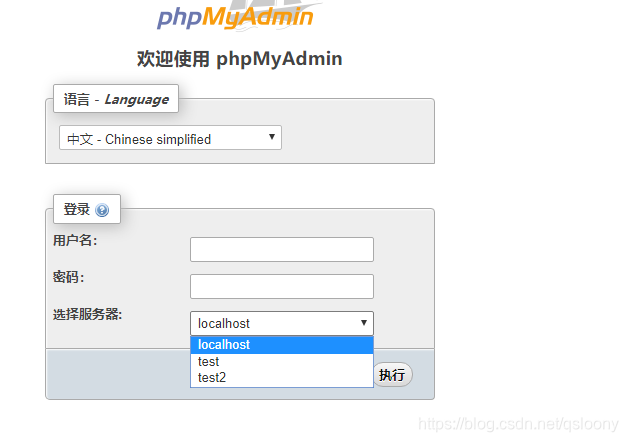

一站式 AI 云服务平台
更多推荐



 0
0 0
0- 0


 已为社区贡献1条内容

所有评论(0)