
数据库:PostgreSQL:客户端安装
这篇文章介绍一下PostgreSQL的客户端安装方法。
·

这篇文章介绍一下PostgreSQL的客户端安装方法。
文章目录
Ubuntu
执行如下安装命令:
sudo apt-get update
sudo apt-get install postgresql-client
Debian
执行如下安装命令:
sudo apt-get update
sudo apt-get install postgresql-client
Windows
安装方法参看:
macOS
在macOS下有多种安装方法,主要如下所示
方法1: 使用brew安装整体的包
macOS下PostgreSQL只提供了postgres的包,可以通过如下命令安装全体的包
执行命令:brew install postgres
方法2: 使用官方的安装包
使用官方的安装包,一路Next就可以安装完成了,下载地址为:
方法3: 使用Postgres.app
Postgres.app把相关需要的内容都进行了打包,下载地址为:
官方目前已经测试过的相关版本信息如下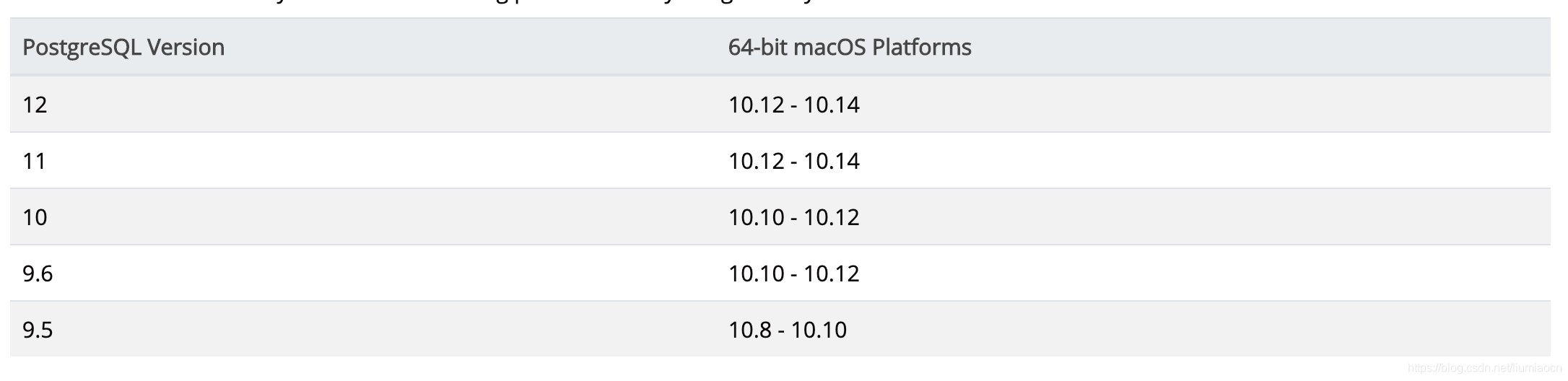
方法4: 使用libpq
如果你只希望安装客户端,那可以考虑使用libpq来代替,安装方式如下所示
环境确认
liumiaocn:~ liumiao$ sw_vers
ProductName:	Mac OS X
ProductVersion:	10.15.6
BuildVersion:	19G73
liumiaocn:~ liumiao$
brew update
确认brew状态,使用如下命令:
执行命令:brew doctor
liumiaocn:~ liumiao$ brew doctor
Please note that these warnings are just used to help the Homebrew maintainers
with debugging if you file an issue. If everything you use Homebrew for is
working fine: please don't worry or file an issue; just ignore this. Thanks!

Warning: The following directories do not exist:
/usr/local/sbin

You should create these directories and change their ownership to your account.
  sudo mkdir -p /usr/local/sbin
  sudo chown -R $(whoami) /usr/local/sbin
liumiaocn:~ liumiao$
执行brew update
liumiaocn:~ liumiao$ brew update
==> Downloading https://homebrew.bintray.com/bottles-portable-ruby/portable-ruby-2.6.3_2.yosemite.bottle.tar.gz
################################################################################################################################# 100.0%
==> Pouring portable-ruby-2.6.3_2.yosemite.bottle.tar.gz
==> Homebrew has enabled anonymous aggregate formulae and cask analytics.
Read the analytics documentation (and how to opt-out) here:
  https://docs.brew.sh/Analytics
No analytics have been recorded yet (or will be during this `brew` run).

Updated 3 taps (homebrew/core, homebrew/cask and homebrew/services).
...省略
gambit                                        podman                                        youview
ghostlab                                      pokemon-trading-card-game-online
liumiaocn:~ liumiao$
brew install libpq
liumiaocn:~ liumiao$ brew install libpq
==> Downloading https://homebrew.bintray.com/bottles/openssl%401.1-1.1.1g.catalina.bottle.tar.gz
...省略
Bash completion has been installed to:
  /usr/local/etc/bash_completion.d
liumiaocn:~ liumiao$
结果确认
本文安装的内容可以在如下目录下查询到
liumiaocn:bin liumiao$ pwd
/usr/local/Cellar/libpq/12.4/bin
liumiaocn:bin liumiao$ ls
clusterdb		initdb			pg_ctl			pg_resetwal		pg_waldump
createdb		pg_archivecleanup	pg_dump			pg_restore		pgbench
createuser		pg_basebackup		pg_dumpall		pg_rewind		psql
dropdb			pg_checksums		pg_isready		pg_test_fsync		reindexdb
dropuser		pg_config		pg_receivewal		pg_test_timing		vacuumdb
ecpg			pg_controldata		pg_recvlogical		pg_upgrade
liumiaocn:bin liumiao$
可以看到已经有psql等命令了,所以只需要将bin追加至PATH中即可。也可每次都带上全路径进行访问。
liumiaocn:bin liumiao$ /usr/local/Cellar/libpq/12.4/bin/psql --version
psql (PostgreSQL) 12.4
liumiaocn:bin liumiao$
总结
这篇文章介绍了一下常见的操作系统下的Postgres客户端的安装方式。

一站式 AI 云服务平台
更多推荐



 4
4 0
0- 0


 已为社区贡献1条内容

所有评论(0)