
SQLite数据库在嵌入式linux下的简单使用(含移植、命令行方式使用、C语言方式使用)
主要将介绍在嵌入式Linux中如何移植并使用SQLite数据库完成简单的增、删、改、查的功能(命令行和C语言方式)。
什么是SQLite

SQLite是一个c语言库,它实现了一个小型、快速、自包含、高可靠性、全功能的SQL数据库引擎,也是世界上使用最多的数据库引擎(大名鼎鼎的安卓内置的数据库就是SQLite)。
重要的是SQLite的开发人员承诺到2050年,SQLite文件格式是稳定的、跨平台的、向后兼容的,所以完全可以放心使用了。
本文概述
主要将介绍在嵌入式Linux中如何移植并使用SQLite数据库完成简单的增、删、改、查的功能(命令行和C语言)。
SQLite的移植
- 因为嵌入式Linux运行环境不确定,编译器不确定,所以选择下载源码安装,本文是在Ubuntu下对SQLite3进行编译、运行的(嵌入式Linux是一样的)。SQLite3下载地址
- 我这里下载的是:sqlite-autoconf-3470000.tar.gz
- 在Ubuntu中使用命令解压源码:
tar -zxvf sqlite-autoconf-3470000.tar.gz - 进入解压后的目录执行命令:
./configure --host=xxx_compilation_toolchain --prefix=xxx_install_pathname,其中host指定你的编译器(如果要在嵌入式板子上运行,一般是交叉编译工具链),prefix指定安装目录(最好使用绝对路径)。 - 然后执行
make、make install - 将xxx_install_pathname目录中的bin中的拷贝到目标运行环境的/bin目录中,将xxx_install_pathname目录中的lib拷贝到目标目录的lib中,这样你就可以执行sqlite3进入数据库的命令行啦
SQLite使用
命令行下的使用方法
一般我们在最终的使用中很少去用命令行操作,但是我们在调试、测试等某些特定场合还是很好用的,这里以执行整个数据库完成增删改查功能来演示。
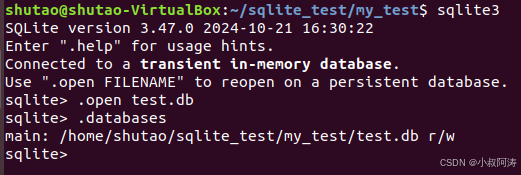
1、打开/创建数据库
.open test.db
2、创建表
语法:
CREATE TABLE database_name.table_name(
   column1 datatype  PRIMARY KEY(one or more columns),
   column2 datatype,
   column3 datatype,
   .....
   columnN datatype,
);
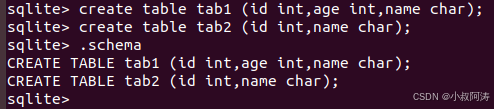
我这里增加两个表tab1和tab2,tab1中包括了一个int类型id表示编号,int类型的age表示年龄,char类型的name表示姓名;tab2中包括了一个int类型id表示编号,char类型的name表示姓名:
create table tab1 (id int,age int,name char);
create table tab2 (id int,name char);
3、往表中增加数据
语法:
插入全部数据:
INSERT INTO TABLE_NAME VALUES (value1,value2,value3,...valueN);
指定表项插入:
INSERT INTO TABLE_NAME [(column1, column2, column3,...columnN)] VALUES (value1, value2, value3,...valueN);
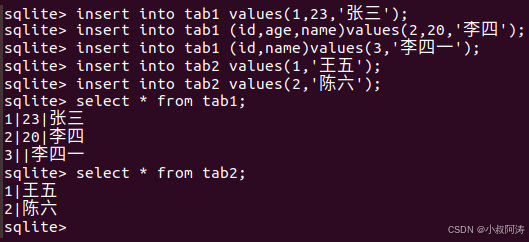
这里我往表tab1、tab2里增加了若干:
insert into tab1 values(1,23,'张三');
insert into tab1 (id,age,name)values(2,20,'李四');
insert into tab1 (id,name)values(3,'李四一');
insert into tab2 values(1,'王五');
insert into tab2 values(2,'陈六');
还有其它插入技巧,本文不做演示,如:
从tab2中插入数据到tab1:
INSERT INTO tab1 [(column1, column2, ... columnN)] SELECT column1, column2, ...columnN FROM tab2 [WHERE condition];
4、删除表中信息
语法:
DELETE FROM table_name WHERE [condition];
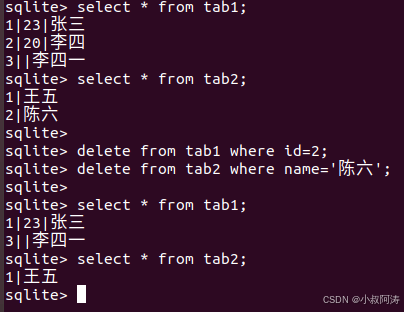
可以根据成员内容删除,如:
#删除tab1的李四
delete from tab1 where id=2;
#删除tab2中的陈六
delete from tab2 where name='陈六';
注:如果想要删除表中所有内容,则不需要使用where子句,本文不做演示,如:
delete from tab1
5、改动表的信息
语法:
UPDATE table_name SET column1 = value1, column2 = value2...., columnN = valueN WHERE [condition];
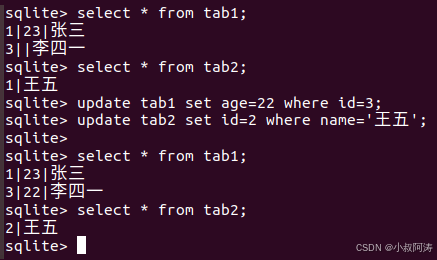
可以根据表中信息来改动,如:
update tab1 set age=22 where id=3;
update tab2 set id=2 where name='王五';
6、查阅表的信息
语法:
SELECT column1, column2, columnN FROM table_name;
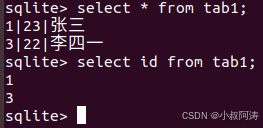
在前面的演示中,其实已经多次用到了:
#查看tab1所有数据
select * from tab1;
#查看表tab1中的id数据
select id from tab1;
7、关闭数据库
.exit 或.quit

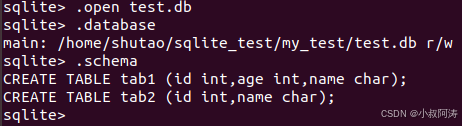
8、其他常用命令,上面可能都已经用到了
.databases查看数据库信息
.schema查看所有表信息
C语言下的使用方法
1、主要接口
/*
作用:打开一个新的数据库连接
参数1:需要打开的数据库;
参数2:数据库操作句柄,通过此句柄可操作数据库
返回值:SQLITE_OK打开成功,非SQLITE_OK打开失败
*/
int sqlite3_open(
  const char *filename,   /* Database filename (UTF-8) */
  sqlite3 **ppDb          /* OUT: SQLite db handle */
);

/*
作用:关闭数据库连接
参数:需要关闭的数据库操作句柄
返回值:SQLITE_OK关闭成功,非SQLITE_OK关闭失败
*/
int sqlite3_close(sqlite3 *);

/*
作用:执行sql语句
参数1:数据库操作句柄
参数2:要执行的sql语句
参数3:回调函数,执行完sql语句后会调用这个函数(为NULL不执行)
参数4:回调函数的第一个参数
参数5:错误信息
返回值:SQLITE_OK关闭成功,非SQLITE_OK关闭失败
*/
int sqlite3_exec(
  sqlite3*,                                  /* An open database */
  const char *sql,                           /* SQL to be evaluated */
  int (*callback)(void*,int,char**,char**),  /* Callback function */
  void *,                                    /* 1st argument to callback */
  char **errmsg                              /* Error msg written here */
);

/*
作用:执行sql后回调
参数1:表示sqlite3_exec时传入的第四个参数
参数2:本条记录有多少字段
参数3:该字段的值
参数4:跟参数3对应,该字段的名称
*/
int (*callback)(void*,int,char**,char**)
2、本文以一个示例来演示SQLite在C语言下的使用
目标功能:实现一个图书馆管理系统,管理员可以上架和下架书籍,可实现自动或者手动编号;阅读者可以购买书籍,购买后库存会根据购买数量减少;如果不存在数据库文件还会自动创建。
作者声明:本程序只是一个示例程序,目的是为了更方便的演示SQLite的C语言接口的使用,不可避免的会有漏洞、考虑不周、编码不规范的地方,敬请谅解。
#include <stdio.h>
#include <sqlite3.h>
#include <stdlib.h>
#include <unistd.h>
#include <string.h>

/*
作用:执行sql后回调
参数1:表示sqlite3_exec时传入的第四个参数
参数2:本条记录有多少字段
参数3:该字段的值
参数4:跟参数3对应,该字段的名称
返回值:调用者使用
*/
static int callback(void *info, int argc, char **argv, char **azColName)
{
    for(int i=0; i<argc; i++)
    {
        printf("\t%s:%s\t", azColName[i], argv[i] ? argv[i] : "NULL");

        //这个需要获取count look_appoint_book用
        if((info != NULL) && (strcmp(azColName[i], "count") == 0))
        {
            *((int*)info) = atoi(argv[i]);
        }

        //这个需要获取id get_last_book_id用
        if((info != NULL) && (strcmp(azColName[i], "id") == 0))
        {
            *((int*)info) = atoi(argv[i]);
        }
    }

    printf("\n----------------------分隔线---------------------------\n");
    return 0;
}

/*
作用:检查数据库文件是否存在,不存在就创建表
参数1:需要操作的数据库文件名
返回值:无
*/
void books_database_check(char * database_file)
{
    int rc = 0;
    sqlite3 *db;
    char sql[128] = {'\0'};
    char *zErrMsg = 0;

    //不等于0表示文件不存在,不存在就创建表
    if(access(database_file, R_OK) != 0)
    {
        printf("数据库不存在,创建%s文件\n", database_file);

        //打开/创建数据
        rc = sqlite3_open(database_file, &db);
        if( rc )
        {
            printf("不能打开数据库%s: %s\n", database_file, sqlite3_errmsg(db));
            return;
        }
        else
        {
            printf("打开数据库成功%s %d\n", database_file, rc);
        }

        //创建表
        sprintf(sql, "create table tab1 (id int,name char, count int);");

        rc = sqlite3_exec(db, sql, callback, NULL, &zErrMsg);
        if( rc != SQLITE_OK )
        {
            printf("SQL 错误: %s\n", zErrMsg);
            sqlite3_free(zErrMsg);
        }
        else
        {
            printf("表创建成功\n");
        }

        sqlite3_close(db);
    }
}

/*
作用:网数据库增加一条书籍信息
参数1:需要操作的数据库文件名
参数2:增加的书籍编号
参数3:增加书籍名称
参数3:增加书籍数量
返回值:无
*/
void add_book(char * database_file, int id, char * name, int count)
{
    int rc = 0;
    sqlite3 *db;
    char sql[128] = {'\0'};
    char *zErrMsg = 0;

    //打开/创建数据
    rc = sqlite3_open(database_file, &db);
    if( rc )
    {
        printf("增加书籍失败,不能打开数据库%s: %s\n", database_file, sqlite3_errmsg(db));
        return;
    }
    else
    {
        printf("add_book 打开数据库成功\n");
    }

    //往表中增加数据
    sprintf(sql, "insert into tab1 values(%d,'%s', %d);", id, name, count);

    rc = sqlite3_exec(db, sql, callback, NULL, &zErrMsg);
    if( rc != SQLITE_OK )
    {
        printf("SQL 错误: %s\n", zErrMsg);
        sqlite3_free(zErrMsg);
    }
    else
    {
        printf("插入数据成功:%d %s\n", id, name);
    }

    sqlite3_close(db);
}

/*
作用:往数据库删除一条
参数1:需要操作的数据库文件名
参数2:需要删除的id
返回值:无
*/
void del_book(char * database_file, int id)
{
    int rc = 0;
    sqlite3 *db;
    char sql[128] = {'\0'};
    char *zErrMsg = 0;

    //打开/创建数据
    rc = sqlite3_open(database_file, &db);
    if( rc )
    {
        printf("删除书籍失败,不能打开数据库%s: %s\n", database_file, sqlite3_errmsg(db));
        return;
    }
    else
    {
        printf("del_book 打开数据库成功\n");
    }

    //往表中增加数据delete from tab1 where id=2;
    sprintf(sql, "delete from tab1 where id=%d;", id);

    rc = sqlite3_exec(db, sql, callback, NULL, &zErrMsg);
    if( rc != SQLITE_OK )
    {
        printf("SQL 错误: %s\n", zErrMsg);
        sqlite3_free(zErrMsg);
    }
    else
    {
        printf("删除数据成功:%d\n", id);
    }

    sqlite3_close(db);
}

/*
作用:更改书籍数量
参数1:需要操作的数据库文件名
参数2:需要查看的键,如:id或者name
参数3:需要查看的值,如:2或者《活着》
参数3:设置参数2和参数3对应的书籍库存
返回值:书籍号和名字对应的库存数
*/
void update_book_count(char * database_file, char * key, char * val, int count_val)
{
    int rc = 0;
    sqlite3 *db;
    char sql[128] = {'\0'};
    char *zErrMsg = 0;

    //打开/创建数据
    rc = sqlite3_open(database_file, &db);
    if( rc )
    {
        printf("更改书籍数量失败,不能打开数据库%s: %s\n", database_file, sqlite3_errmsg(db));
        return;
    }
    else
    {
        printf("update_book_count 打开数据库成功\n");
    }

    //往表中更新数据
    sprintf(sql, "update tab1 set count=%d where %s=%s;", count_val, key, val);

    rc = sqlite3_exec(db, sql, callback, NULL, &zErrMsg);
    if( rc != SQLITE_OK )
    {
        printf("SQL 错误: %s\n", zErrMsg);
        sqlite3_free(zErrMsg);
    }
    else
    {
        printf("更新数据成功:%s\n", key);
    }

    sqlite3_close(db);
}

/*
作用:查看数据库所有书籍信息
参数1:需要操作的数据库文件名
返回值:无
*/
void look_all_book(char * database_file)
{
    int rc = 0;
    sqlite3 *db;
    char sql[128] = {'\0'};
    char *zErrMsg = 0;

    //打开/创建数据
    rc = sqlite3_open(database_file, &db);
    if( rc )
    {
        printf("查询数据库失败,不能打开数据库%s: %s\n", database_file, sqlite3_errmsg(db));
        return;
    }
    else
    {
        printf("look_all_book 打开数据库成功\n");
    }

    //查询所有表
    sprintf(sql, "select * from tab1;");

    rc = sqlite3_exec(db, sql, callback, NULL, &zErrMsg);
    if( rc != SQLITE_OK )
    {
        printf("SQL 错误: %s\n", zErrMsg);
        sqlite3_free(zErrMsg);
    }
    else
    {
        printf("查询数据成功:look_all_book\n");
    }

    sqlite3_close(db);
}

/*
作用:查看数据库指定书籍数量
参数1:需要操作的数据库文件名
参数2:需要查看的键,如:id或者name
参数3:需要查看的值,如:2或者《活着》
返回值:书籍号和名字对应的库存数
*/
int look_appoint_book(char * database_file, char * key, char * val)
{
    int rc = 0;
    sqlite3 *db;
    char sql[128] = {'\0'};
    char *zErrMsg = 0;
    int cont = 0;

    //打开/创建数据
    rc = sqlite3_open(database_file, &db);
    if( rc )
    {
        printf("查询数据库失败,不能打开数据库%s: %s\n", database_file, sqlite3_errmsg(db));
        return 0;
    }
    else
    {
        printf("look_appoint_book 打开数据库成功\n");
    }

    //查询所有表
    sprintf(sql, "select count from tab1 where %s = %s;", key, val);

    rc = sqlite3_exec(db, sql, callback, &cont, &zErrMsg);
    if( rc != SQLITE_OK )
    {
        printf("SQL 错误: %s\n", zErrMsg);
        sqlite3_free(zErrMsg);
    }
    else
    {
        printf("查询数据成功:%s\n", key);
    }

    sqlite3_close(db);

    return cont;
}

/*
作用:获取最后一条的id
参数1:需要操作的数据库文件名
返回值:编号最末尾的id
*/
int get_last_book_id(char * database_file)
{
    int rc = 0;
    sqlite3 *db;
    char sql[128] = {'\0'};
    char *zErrMsg = 0;
    int id = 0;

    //打开/创建数据
    rc = sqlite3_open(database_file, &db);
    if( rc )
    {
        printf("查询数据库失败,不能打开数据库%s: %s\n", database_file, sqlite3_errmsg(db));
        return 0;
    }
    else
    {
        printf("get_last_book_id 打开数据库成功\n");
    }

    //查询所有表
    sprintf(sql, "select id from tab1 order by id desc limit 1;");

    rc = sqlite3_exec(db, sql, callback, &id, &zErrMsg);
    if( rc != SQLITE_OK )
    {
        printf("SQL 错误: %s\n", zErrMsg);
        sqlite3_free(zErrMsg);
    }
    else
    {
        printf("查询数据成功:get_last_book_id\n");
    }

    sqlite3_close(db);

    return id;
}

/*
作用:购买若干本书籍
参数1:需要操作的数据库文件名
参数2:调用处传过来的操作数(可优化)
参数3:购买数量
返回值:无
*/
void shop_book_count(char * database_file, int last_operate_num, int shop_count)
{
    char id[32] = {'\0'};
    char name[32] = {'\0'};
    int count = 0;

    //根据id
    if(last_operate_num == 1)
    {
        printf("请输入购买书籍id:");
        scanf("%s", id);
        count = look_appoint_book(database_file, "id", id);
        //库存够才卖
        if(shop_count <= count)
        {
            //减少书籍数量
            update_book_count(database_file, "id", id, count - shop_count);
        }
        else
        {
            printf("id=%s库存不够\n", id);
        }
    }
    //根据名字
    else if(last_operate_num == 2)
    {
        printf("请输入购买书籍name:");
        scanf("%s", name);
        count = look_appoint_book(database_file, "name", name);
        //库存够才卖
        if(shop_count <= count)
        {
            //减少书籍数量
            update_book_count(database_file, "name", name, count - shop_count);
        }
        else
        {
            printf("name=%s库存不够\n", name);
        }
    }
    else
    {

    }
}

/*
作用:购买书籍
参数1:需要操作的数据库文件名
返回值:无
*/
void shop_book(char * database_file)
{
    int operate_num = 0;
    //购买数量
    int shop_count = 0;

    while (1)
    {
        printf("\n\n---------------------购买界面------------------------\n");
        printf("输入0退出购买\n");
        printf("输入1根据id购买书籍\n");
        printf("输入2根据名称购买书籍\n");
        printf("请输入你要执行的操作:");
        scanf("%d", &operate_num);
        if(operate_num != 0)
        {
            printf("请输入购买数量:");
            scanf("%d", &shop_count);
        }

        switch (operate_num)
        {
            case 0:
                return;
            case 1:
            case 2:
                shop_book_count(database_file, operate_num, shop_count);
                break;

            default:
                break;
        }
    }
}

/*
作用:书城,用于购买书籍
参数1:需要操作的数据库文件名
返回值:无
*/
void do_book_shop(char * database_file)
{
    int operate_num = 0;

    while (1)
    {
        printf("\n\n--------------------商城主界面-------------------------\n");
        printf("输入0退出书城\n");
        printf("输入1购买书籍\n");
        printf("输入2查看书城书籍\n");
        printf("请输入你要执行的操作:");
        scanf("%d", &operate_num);

        switch (operate_num)
        {
            case 0:
                return;
            case 1:
                shop_book(database_file);
                break;
            case 2:
                look_all_book(database_file);
                break;

            default:
                break;
        }
    }
}

/*
作用:上架书籍
参数1:需要操作的数据库文件名
返回值:无
*/
void management_add_book(char * database_file)
{
    int id = 0, count = 0;
    char name[64] = {'\0'};

    printf("请输入你要上架的书籍编号(输入0表示自动编号):");
    scanf("%d", &id);

    //自动编号实现
    if(id == 0)
    {
        id = get_last_book_id(database_file) + 1;
    }

    printf("请输入你要上架的书籍名称:");
    scanf("%s", name);

    printf("请输入你要上架的书籍数量:");
    scanf("%d", &count);

    add_book(database_file, id, name, count);
}


/*
作用:下架书籍
参数1:需要操作的数据库文件名
返回值:无
*/
void management_del_book(char * database_file)
{
    int id = 0;

    printf("请输入你要下架的书籍编号:");
    scanf("%d", &id);

    del_book(database_file, id);
}

/*
作用:管理图书信息,上架书籍和下架书籍
参数1:需要操作的数据库文件名
返回值:无
*/
void do_book_management(char * database_file)
{
    int operate_num = 0;

    while (1)
    {
        printf("\n\n---------------------管理主界面------------------------\n");
        printf("输入0退出管理\n");
        printf("输入1上新书籍\n");
        printf("输入2下架书籍\n");
        printf("输入3查看书城书籍\n");
        printf("请输入你要执行的操作:");
        scanf("%d", &operate_num);

        switch (operate_num)
        {
            case 0:
                return;
            case 1:
                management_add_book(database_file);
                break;
            case 2:
                management_del_book(database_file);
                break;
            case 3:
                look_all_book(database_file);
                break;

            default:
                break;
        }
    }

}

/*
作用:入口函数
使用方法:./a.out xxx.db
返回值:系统使用
*/
int main(int argc, char * argv[])
{
    sqlite3 *db;
    char *zErrMsg = 0;
    int rc;
    int operate_num = 0;

    if(argc != 2)
    {
        printf("需要两个参数,如:%s xxx.db\n", argv[0]);
        return -1;
    }

    //检查数据库是否存在,不存在就创建表
    books_database_check(argv[1]);

    while (1)
    {
        printf("\n\n--------------------主界面-------------------------\n");
        printf("输入1进入商城\n");
        printf("输入2管理商城\n");
        printf("输入0退出商城\n");
        printf("请输入你要执行的操作:");
        scanf("%d", &operate_num);

        switch (operate_num)
        {
            case 0:
                return 0;
            case 1:
                do_book_shop(argv[1]);
                break;
            case 2:
                do_book_management(argv[1]);
                break;

            default:
                break;
        }
    }
}
注:作者水平有限,如有错误,请大家及时指出,我会第一时间修改,谢谢大家了。
版权说明:可自由转载使用,转载请注明出处。

一站式 AI 云服务平台
更多推荐



 19
19 0
0- 0


 已为社区贡献1条内容

所有评论(0)