
pg数据库百分比处理
PostgreSQL数据库中,两个integer类型数据,如何处理为百分比形式有表 student ,其中id字段为character类型,total和complete字段为integer型total为总任务量,complete为完成任务量,当前诉求,求出完成率,保留一位小数操作尝试一,直接相除 complete/total,可以看到结果为0这里为0,因为两个字段均为integer型,会按整数相除
PostgreSQL数据库中,两个integer类型数据,如何处理为百分比形式
有表 student ,其中id字段为character类型,total和complete字段为integer型

total为总任务量,complete为完成任务量,当前诉求,求出完成率,保留一位小数
操作尝试
一,直接相除 complete/total,可以看到结果为0
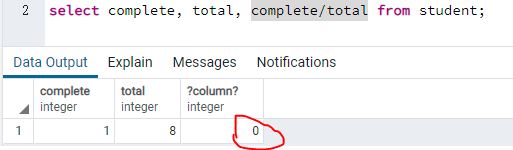
这里为0,因为两个字段均为integer型,会按整数相除处理。
二,使用round函数 round(complete/total, 1)
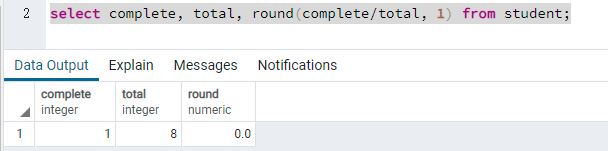
这里结果与操作一类似,只是加了小数点。因为round只是对round(complete/total, 1)中输入的原值做格式化处理,而原值complete/total依然遵循两个integer数据相除的原则。
查看round后的结果列,结果值类型为 numeric,尝试将除数或被除数设置为numeric类型
三、除数小数化 complete::numeric,round(complete::numeric/total, 3)
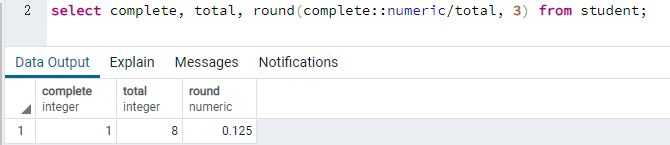
这里的操作,将complete做了小数化,这里,可以同时将total做小数化,效果相同
四,百分比形式
如果要将结果展示为百分比形式,比如0.125要展示为12.5%
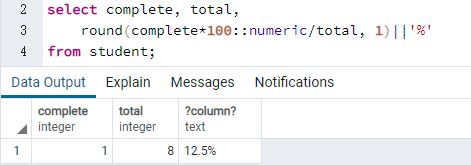
这里做了一个操作 round(complete*100::numeric/total, 1)||'%'
-
除数complete 乘以 100
-
round小数保留3位修改为了1位
-
round函数外拼接 || '%'
五、除数为0处理
如果除数total有为0的情况,complete/total 会报错,使用case when 关键字
select complete, total,
(case when total=0 then '/' else round(complete*100::numeric/total, 1)||'%' end) as complete_rate
from student;
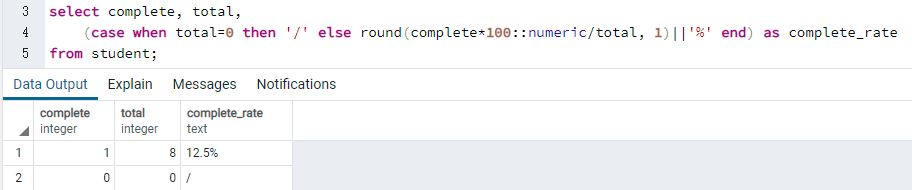
如此,除数为0的问题也成功解决。

一站式 AI 云服务平台
更多推荐



 1
1 0
0- 0


 已为社区贡献1条内容

所有评论(0)