
效率翻倍!用Vite+React极速打造Chrome插件|企业文档导入AI知识库
被文档搬运支配的恐惧?想要快速根据自己公司的文档搭建一套AI知识库需要打开多个平台反复复制粘贴是时候用技术终结这一切了!今天带大家用前沿的Vite+React技术栈,开发一个能自动抓取企业文档并导入到知识库的Chrome插件!技术方案图将公司内部的文档导入到知识库的一个chrome插件1、 账号切换功能提供配置选项,用户可快速切换使用。2、 数据导入流程获取页面信息 : 获取当前页面唯一标识符(.
被文档搬运支配的恐惧?
-
想要快速根据自己公司的文档搭建一套AI知识库
-
需要打开多个平台反复复制粘贴
是时候用技术终结这一切了!
今天带大家用前沿的Vite+React技术栈,开发一个能自动抓取企业文档并导入到知识库的Chrome插件!
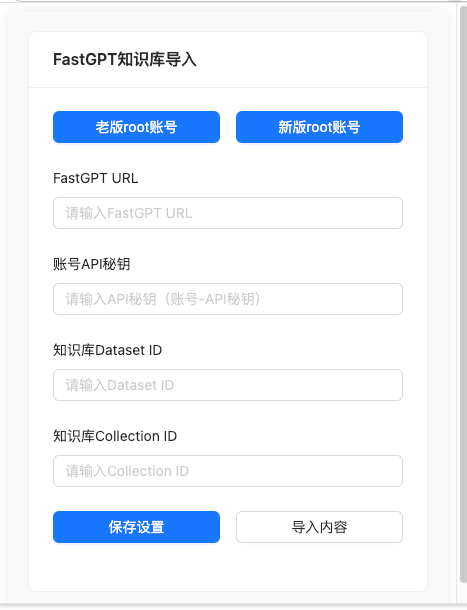
技术方案图
将公司内部的文档导入到知识库的一个chrome插件
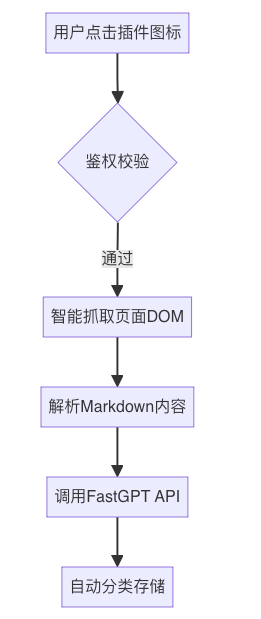
1、 账号切换功能
- 提供配置选项,用户可快速切换使用。
2、 数据导入流程
- 获取页面信息 : 获取当前页面唯一标识符(url)。
- 发送导入指令 : 使用获取到的pageId向内容脚本发送导入请求,并处理响应结果。
3、 设置管理
- 提供自定义URL、API秘钥和知识库ID的输入功能,支持保存用户配置。
搭建项目
使用 Vite 来创建一个新的项目
使用 Yarn 创建项目的命令为 yarn create vite fastgptplug
在命令执行过程中,选择框架为 React,语言为 JavaScript
% yarn create vite fastgptplug
yarn create v1.22.19
[1/4] 🔍  Resolving packages...
[2/4] 🚚  Fetching packages...
[3/4] 🔗  Linking dependencies...
[4/4] 🔨  Building fresh packages...

success Installed "create-vite@6.2.0" with binaries:
      - create-vite
      - cva
✔ Select a framework: › React
✔ Select a variant: › JavaScript

Scaffolding project in /Users/zhongxin/Downloads/test20250211...

Done. Now run:

cd fastgptplug
  yarn
  yarn dev

✨  Done in 9.36s.
配置插件信息
在 public下新建 manifest.json
🔍 Manifest V3 特性:
-
采用
service_worker替代旧版background pages,内存占用降低30% -
权限粒度控制更严格,需声明
host_permissions白名单 -
禁止远程代码执行,需通过
content_security_policy加固安全
{
  "manifest_version": 3,
"name": "CF文档导入FastGPT",
"version": "1.0",
"description": "将CF文档内容导入到FastGPT知识库",
"permissions": ["activeTab","storage","tabs"],
"host_permissions": [
    "*://cf.qunhequnhe.com/*",
    "*://saas-help-backend-sit.k8s-qunhe.qunhequnhe.com/*",
    "*://fastqa.qunhequnhe.com/*"
  ],
"content_scripts": [{"matches":["*://cf.qunhequnhe.com/*"],"js":["content.js"],"run_at":"document_end"}],
  ...
}
配置vite编译信息
修改 vite.config.js
import { defineConfig } from'vite'
import react from'@vitejs/plugin-react'
import { resolve } from'path'

// https://vite.dev/config/
exportdefault defineConfig({
plugins: [react()],
build: {
    rollupOptions: {
      input: {
        main: resolve(__dirname, 'index.html'),
        background: resolve(__dirname, 'src/background/index.js'),
        content: resolve(__dirname, 'src/content/index.js'),
      },
  },
  ...
})
编写 background脚本
在 src/background/index.js 中编写服务工作者脚本,处理与 CF 文档和 FastGPT 的交互逻辑。
// 消息中枢设计模式
chrome.runtime.onMessage.addListener((request, sender, sendResponse) => {
if (request.type === 'fetchCFDocument') {
    // 获取内部文档的操作
    handleFetchCFDocument(request, sendResponse);
    returntrue; // 保持异步响应
  }
if (request.type === 'insertFastGPTData') {
    // 知识库数据插入操作
    handleInsertFastGPTData(request, sendResponse);
    returntrue; // 保持异步响应
  }
});
编写 content脚本
在 src/content/index.js 中编写内容脚本,负责从网页中提取信息并与后台脚本通信。
// 监听来自popup的消息
chrome.runtime.onMessage.addListener((request, sender, sendResponse) => {
console.log('Content script received message:', request);
if (request.action === 'getPageId') {
    // 获取当前页面信息(url)
  }
if (request.action === 'import') {
    // 处理导入逻辑,主要是调用background的方法
    // 1. 调用fetchCFDocument拿到文档信息
    const cfResponse = awaitnewPromise((resolve, reject) => {
      chrome.runtime.sendMessage({ type: 'fetchCFDocument', url: `接口?pageId=${pageId}` }, (response) => resolve(response));
    });
    // 2. 调用insertFastGPTData将数据插入知识库
    const fastgptResponse = awaitnewPromise((resolve, reject) => {
      chrome.runtime.sendMessage(
        {
          type: 'insertFastGPTData',
          url: `${fastgptUrl}/api/core/dataset/data/insertData`,
          apiKey: settings.apiKey,
          data: importData,
        },
        (response) => resolve(response),
      );
    });
});
🚧 开发避坑指南
- 沙箱隔离问题
Content Script与页面环境通信需通过
window.postMessage - API安全
敏感配置存储应使用
chrome.storage.local而非localStorage - 版本兼容
Manifest V3不再支持远程代码,所有逻辑必须本地化
创建 React 组件
在 src/components 目录下创建 Popup.jsx 用于插件的用户界面。
<Card title="FastGPT知识库导入">
  <Form layout="vertical">
    {/* 账号切换 */}
    <Form.Item>
      <Row justify="center" gutter={16}>
        <Col span={12}>
          <Button onClick={handleChangeOldConfig}>老版root账号</Button>
        </Col>
        <Col span={12}>
          <Button onClick={handleChangeNewConfig}>新版root账号</Button>
        </Col>
      </Row>
    </Form.Item>

    {/* 配置信息 */}
    <Form.Item label="FastGPT URL">
      <Input id="fastgptUrl" value={settings.fastgptUrl} onChange={handleChange} placeholder="请输入FastGPT URL" />
    </Form.Item>
    {/* 其他表单字段 */}

    {/* 操作按钮 */}
    <Form.Item>
      <Button onClick={handleImport}>导入内容</Button>
    </Form.Item>
</Form>
</Card>
发布插件
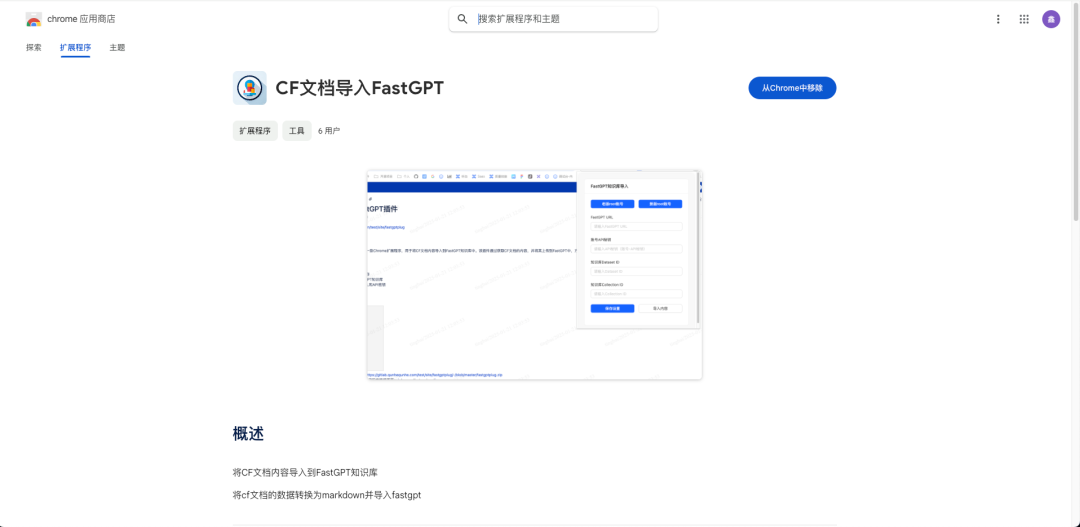
后续如果想要将插件发布到Chrome插件应用商店可以
登录 CWS 开发者控制台 :https://chrome.google.com/u/1/webstore/devconsole
账号注册开发者账号(需要5美元的信用卡,可以淘宝)

一站式 AI 云服务平台
更多推荐


 5
5 0
0- 0


 已为社区贡献2条内容

所有评论(0)