
数据文件shrink_SQL Server中的Shrink TempDB数据库概述
数据文件shrinkThis article explores the usage of TempDB and different ways to shrink the TempDB database in SQL Server本文探讨了TempDB的用法以及在SQL Server中缩小TempDB数据库的不同方法Each instance of Micros...
数据文件shrink
This article explores the usage of TempDB and different ways to shrink the TempDB database in SQL Server
本文探讨了TempDB的用法以及在SQL Server中缩小TempDB数据库的不同方法
Each instance of Microsoft SQL Server has a system database TempDB. It is a backbone for the SQL Server instance. Let’s review the TempDB database and its usage with ways to shrink the TempDB database in the further sections of this article.
Microsoft SQL Server的每个实例都有一个系统数据库TempDB 。 它是SQL Server实例的骨干。 让我们在本文的其他部分中回顾一下TempDB数据库及其用法,以及如何缩小TempDB数据库的方法。
关于TempDB的一些要点 (Few important points about TempDB)
- TempDB is a global resource (available for all connected user) system database TempDB是全局资源(可供所有连接的用户使用)系统数据库
- SQL Server recreates the TempDB database each time SQL Service restarts. During restart, it takes a copy of MDF and LDF from the model database. The size and number of MDF and LDF files reset to preconfigured size 每次重新启动SQL Service时,SQL Server都会重新创建TempDB数据库。 重新启动期间,它将从模型数据库中获取MDF和LDF的副本。 MDF和LDF文件的大小和数量重置为预配置的大小
- SQL Server does not perform recovery on the TempDB, and previous data is lost SQL Server不会在TempDB上执行恢复,并且以前的数据会丢失
- TempDB database is always in the Simple recovery model, and we cannot take database backup for it TempDB数据库始终处于简单恢复模型中,因此我们无法为其进行数据库备份
- We cannot roll back transactions in the TempDB because it minimally logs the transactions 我们无法在TempDB中回滚事务,因为它最少地记录了事务
TempDB使用情况摘要 (TempDB Usage Summary)
- Usually, we create local temporary tables (# naming conventions) and global temporary tables (## naming conventions) to prepare intermediate tables. SQL Server creates those temporary tables in the TempDB database 通常,我们创建本地临时表(#命名约定)和全局临时表(##命名约定)以准备中间表。 SQL Server在TempDB数据库中创建这些临时表
- We can create or rebuild an index in TempDB using the SORT_IN_TEMPDB= ON clause. SQL Server performs all sorting calculations in the TempDB instead of the database on which the object belongs 我们可以使用SORT_IN_TEMPDB = ON子句在TempDB中创建或重建索引。 SQL Server在TempDB中而不是对象所属的数据库中执行所有排序计算
- SQL Server uses the TempDB for the Read COMMITTED SNAPSHOT isolation level. SQL Server uses the row versioning for each record. The old version also gets an additional 14 bytes in the TempDB to track the row versioning SQL Server将TempDB用于读取已提交快照隔离级别。 SQL Server对每条记录使用行版本控制。 旧版本还在TempDB中获得额外的14个字节来跟踪行版本控制
- Internal objects such as Cursor work tables, Spool operations, Intermediate sorts operations such as GROUP BY, ORDER BY, UNION, DBCC CHECKDB, Temporary large object storage, Service broker event notification 内部对象,例如游标工作表,假脱机操作,中间排序操作,例如GROUP BY,ORDER BY,UNION,DBCC CHECKDB,临时大对象存储,Service Broker事件通知
- In the Multiple Active Result Sets (using MultipleActiveResultSets=True), SQL Server uses the versioning and stores that in the TempDB 在多个活动结果集中(使用MultipleActiveResultSets = True),SQL Server使用版本控制并将其存储在TempDB中
You can go through these articles, Configuration, operations and restrictions of the TempDB SQL Server system database and How to monitor the SQL Server TempDB database to get more details on the TempDB database.
您可以阅读以下文章, TempDB SQL Server系统数据库的配置,操作和限制以及如何监视SQL Server TempDB数据库以获取有关TempDB数据库的更多详细信息。
收缩TempDB活动概述 (Overview of Shrink TempDB activity)
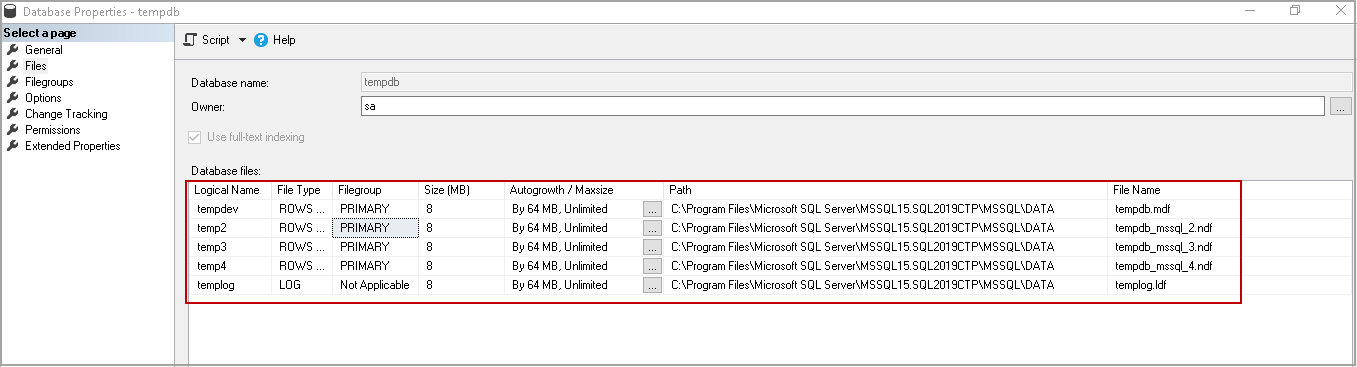
Starting from SQL Server 2016, the installation wizard automatically detects the CPU cores and creates the necessary number of database files for the TempDB. It also sets the maximum growth of individual files to 64 MB.
从SQL Server 2016开始,安装向导将自动检测CPU内核并为TempDB创建所需数量的数据库文件。 它还将单个文件的最大增长设置为64 MB。
In the following screenshot, you can see the TempDB configuration for my demo SQL instance.
在以下屏幕截图中,您可以看到我的演示SQL实例的TempDB配置。
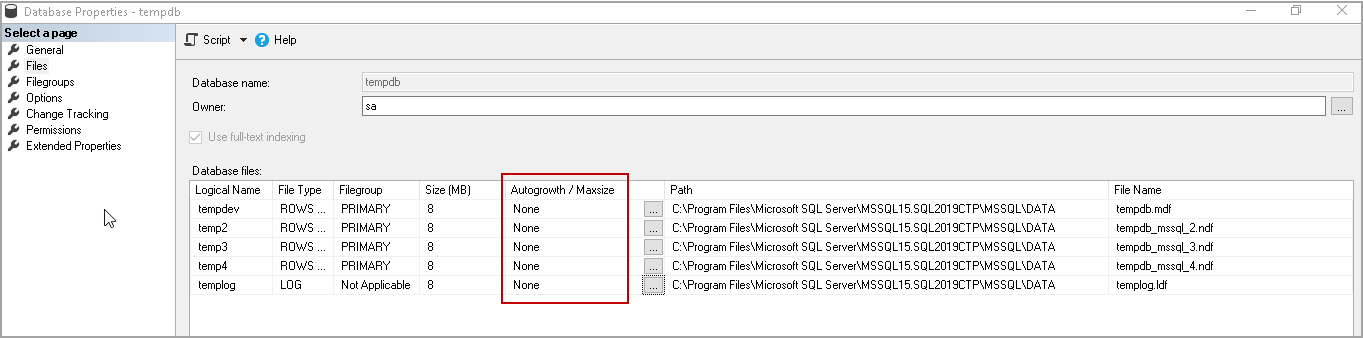
For this demonstration, I will disable the Autogrowth for the TempDB database.
对于此演示,我将禁用TempDB数据库的自动增长。
- Note: Please do not ever do this on the production instance; I am doing it on my test instance for demo purposes only 注意:请勿在生产实例上执行此操作; 我在测试实例上进行此操作仅出于演示目的
Execute the following query to create a local temporary table and insert data into it.
执行以下查询以创建本地临时表并将数据插入其中。
CREATE TABLE #TempTable (col1 char(1000), col2 char(1000))

    SET NOCOUNT ON;
    DECLARE @i INT = 1

    BEGIN TRAN
     WHILE @i <= 150000
     BEGIN
      INSERT INTO #TempTable values ('A','B')
      SET @i += 1
     END

    COMMIT TRAN

    DROP TABLE #TempTable
It gives the following error message. SQL Server could not increase the size of the TempDB log file and unable to perform the transaction. You might think that we disabled the autogrowth, and if we enable autogrowth to resolve the issue. Consider this situation like the TempDB log file grown to the size of the disk, and you do not have sufficient free space in the disk for the log file to grow.
它给出以下错误信息。 SQL Server无法增加TempDB日志文件的大小,并且无法执行事务。 您可能会认为我们禁用了自动增长功能,并且如果启用了自动增长功能就可以解决此问题。 考虑这种情况,例如TempDB日志文件增长到磁盘大小,并且磁盘中没有足够的可用空间来增长日志文件。
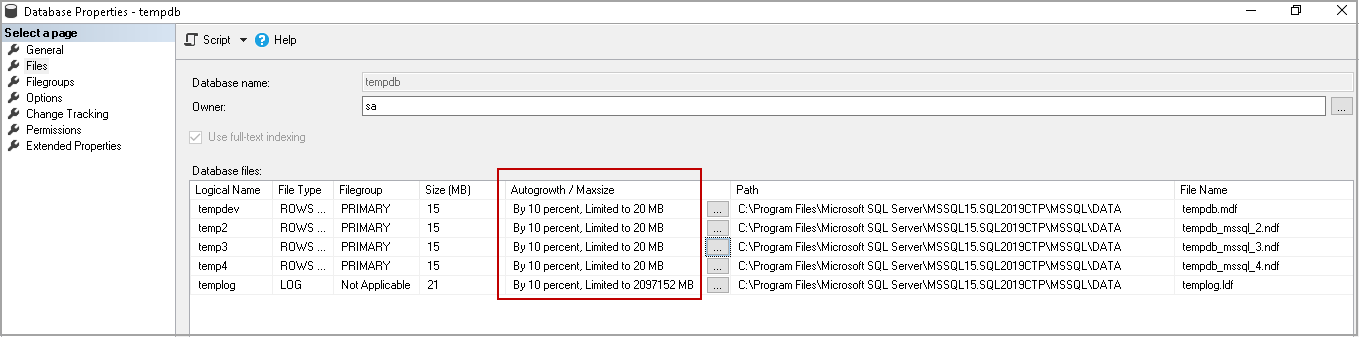
Let’s enable the autogrowth for data files with a maximum size of 20MB for each data file. We can see that log file growth for the TempDB is enabled, and it does not have maximum file size.
让我们为数据文件启用自动增长,每个数据文件的最大大小为20MB。 我们可以看到TempDB的日志文件增长已启用,并且没有最大文件大小。
Let’s rerun the query to fill up TempDB and see the error message. SQL Server primary filegroup does not have free space.
让我们重新运行查询以填充TempDB并查看错误消息。 SQL Server主文件组没有可用空间。

At this point, if you try to refresh SQL instance as well, you get a similar error message.
此时,如果您也尝试刷新SQL实例,则会收到类似的错误消息。
收缩TempDB数据库的不同方法 (Different ways to shrink TempDB database)
You can look at the disk usage by top tables report to check what are the objects consuming space in the TempDB. Right-click on the TempDB-> go to Reports-> Standard Reports-> Disk Usage by Top Tables.
您可以按顶部表格报告查看磁盘使用情况,以检查哪些对象占用了TempDB中的空间。 右键单击TempDB->转到“报告”->“标准报告”->“按顶级表的磁盘使用情况”。
In this screenshot, we can see #TempTable is consuming the space in the TempDB.
在此屏幕截图中,我们可以看到#TempTable正在占用TempDB中的空间。
You can drop the existing object in the TempDB, and it should release the space for you. It is not possible every time to drop objects, especially in the production instance. We could lose all previous work due to this.
您可以将现有对象放在TempDB中,它应该为您释放空间。 不可能每次都放下对象,尤其是在生产实例中。 因此,我们可能会丢失所有以前的工作。
使用DBCC SHRINKFILE收缩TEMPDB (Shrink TEMPDB using DBCC SHRINKFILE)
We can use the DBCC SHRINKFILE command to shrink the data or log file for the TempDB. We do not need a restart of SQL Service in this case.
我们可以使用DBCC SHRINKFILE命令来缩小TempDB的数据或日志文件。 在这种情况下,我们不需要重新启动SQL Service。
DBCC SHRINKFILE(logical_filename, size_in_MB)
Execute the following query to get individual file size in TempDB.
执行以下查询以获取TempDB中的单个文件大小。
SELECT name,
    file_id,
    type_desc,
    size * 8 / 1024 [TempdbSizeInMB]
FROM tempdb.sys.database_files
ORDER BY type_desc DESC,
      file_id;
Let’s try to shrink TempDev data file using the DBCC SHRINKFILE command.
让我们尝试使用DBCC SHRINKFILE命令缩小TempDev数据文件。
DBCC SHRINKFILE(tempdev,10)
It performs the shrink, and you get the following output.
它执行收缩,并获得以下输出。
You can further try to shrink the file.
您可以进一步尝试缩小文件。
DBCC SHRINKFILE(tempdev,0)
In this way, we need to shrink the individual data or log files.
这样,我们需要缩小单个数据或日志文件。
使用DBCC SHRINKDATABASE命令收缩TEMPDB (Shrink TEMPDB using DBCC SHRINKDATABASE command)
We can also shrink the TempDB database using the DBCC SHRINKDATABASE command. The Syntax for the command is as follows.
我们还可以使用DBCC SHRINKDATABASE命令来缩小TempDB数据库。 该命令的语法如下。
DBCC SHRINKDATABASE(TempDB, ‘target_percentage_of_free_space’);
Let’s use this command to shrink TempDB and leave 10 percent free space.
让我们使用此命令缩小TempDB并保留10%的可用空间。
DBCC SHRINKDATABASE(tempdb, 10);
It performs the database level shrink, and you get the following output.
它执行数据库级别的收缩,并获得以下输出。
You can check the size of the data and log files for the database using tempdb.sys.database_files.
您可以使用tempdb.sys.database_files检查数据库的数据和日志文件的大小。
使用ALTER DATABASE命令调整TempDB的大小 (Resize TempDB using ALTER DATABASE command)
We can use the Alter command to resize the tempdb files. Suppose the initial size of the data and log is 1 GB, we can use this command to set it at a lower level.
我们可以使用Alter命令来调整tempdb文件的大小。 假设数据和日志的初始大小为1 GB,我们可以使用此命令将其设置为较低的级别。
The following command resizes the TempDEV and TempLog file initial size to 100 MB.
以下命令将TempDEV和TempLog文件的初始大小调整为100 MB。
USE master;
    GO
    ALTER DATABASE tempdb
    MODIFY FILE (NAME = tempdev, SIZE=100Mb);
    GO
    ALTER DATABASE tempdb
    MODIFY FILE (NAME = templog, SIZE=100Mb);
    GO
We need to restart SQL Services for this setting to take effect.
我们需要重新启动SQL Services才能使此设置生效。
使用SSMS收缩TempDB (Shrink TempDB using SSMS)
We can use the SSMS GUI method to shrink the TempDB as well. Right-click on the TempDB and go to Tasks. In the tasks list, click on Shrink, and you can select Database or files.
我们也可以使用SSMS GUI方法来缩小TempDB。 右键单击TempDB,然后转到“任务”。 在任务列表中,单击“收缩”,然后可以选择“数据库”或“文件”。
Both Database and Files options are similar to the DBCC SHRINKDATABASE and DBCC SHRINKFILE command we explained earlier.
“数据库”和“文件”选项都与我们之前介绍的DBCC SHRINKDATABASE和DBCC SHRINKFILE命令相似。
重新启动SQL Services以收缩TempDB数据库 (Restart SQL Services to Shrink TempDB database)
It should be the last option to recycle the TempDB database and resolve the disk space-related issues due to the TempDB data or log file space. In the production instance, it is difficult to find the downtime to restart the SQL Service. Therefore, you should consider the other options first and do it as a last option.
应该是回收TempDB数据库并解决由于TempDB数据或日志文件空间而导致的磁盘空间相关问题的最后一个选择。 在生产实例中,很难找到停机时间来重新启动SQL Service。 因此,您应该首先考虑其他选项,并将其作为最后一个选项。
如果您尝试缩小Tempdb,但不会释放空间怎么办? (What if you try to shrink Tempdb, but it does not release space?)
Sometimes you try to shrink the TempDB database and the command shows successful, but you do not see any free space in the database. It might be due to active transactions, versioning or objects required for the SQL Server in the TempDB as per the current workload.
有时,您尝试缩小TempDB数据库,并且命令显示成功,但是在数据库中看不到任何可用空间。 根据当前工作负载,这可能是由于TempDB中SQL Server所需的活动事务,版本控制或对象所致。
Referencing to Microsoft article, we should shrink the TempDB when the SQL Server is in idle mode or the single-user mode.
参考Microsoft文章 ,当SQL Server处于空闲模式或单用户模式时,我们应该缩小TempDB。
We can still try to shrink the TempDB using the following method.
我们仍然可以尝试使用以下方法缩小TempDB。
-
Execute the DBCC DROPCLEANBUFFERS command to flush cached indexes and data pages
执行DBCC DROPCLEANBUFFERS命令以刷新缓存的索引和数据页
CHECKPOINT; GO DBCC DROPCLEANBUFFERS; GO -
Execute the DBCC FREEPROCCACHE command to clear the procedural cache
执行DBCC FREEPROCCACHE命令以清除过程缓存
DBCC FREEPROCCACHE;
            GO
Now, try to shrink the database using the earlier methods. You should give preference to DBCC SHRINKFILE instead of the DBCC SHRINKDATABASE command.
现在,尝试使用早期方法缩小数据库。 您应该优先使用DBCC SHRINKFILE而不是DBCC SHRINKDATABASE命令。
在单用户模式下收缩TempDB (Shrink TempDB in Single user mode)
Sometimes you cannot start the SQL Services due to TempDB size, and you require to reset the initial size using the alter database command. Suppose you executed the alter database command to resize the tempdb data file, but accidentally you specified the initial size of the file that is not feasible as per your free disk space. You tried to restart SQL Service, but it could not start because there is not sufficient free space in the drive to create the TempDB files.
有时由于TempDB的大小而无法启动SQL Services,并且您需要使用alter database命令重置初始大小。 假设您执行了alter database命令来调整tempdb数据文件的大小,但是偶然地您指定了该文件的初始大小,这对于您的可用磁盘空间是不可行的。 您尝试重新启动SQL Service,但由于驱动器中没有足够的可用空间来创建TempDB文件而无法启动。
You need to start SQL Services in minimal configuration mode and resize the TempDB files.
您需要以最小配置模式启动SQL Services并调整TempDB文件的大小。
SQL Services should be in the stopped state to use the minimal configuration mode.
SQL Services应该处于停止状态以使用最小配置模式。
- Open a command prompt with administrative privilege 以管理员权限打开命令提示符
-
Go to the SQL Server Binary folder. In my SQL instance, the path for the BINN folder is as follows
转到“ SQL Server Binary”文件夹。 在我SQL实例中,BINN文件夹的路径如下
C:\Program Files\Microsoft SQL Server\MSSQL15.SQL2019CTP\MSSQL\Binn
C:\ Program Files \ Microsoft SQL Server \ MSSQL15.SQL2019CTP \ MSSQL \ Binn
If you are not sure about the path, right-click on SQL Service in SQL Server Configuration Manager and the properties page, you can look at Binary path
如果不确定路径,请在“ SQL Server配置管理器”和属性页中右键单击“ SQL服务”,可以查看“二进制路径”。
-
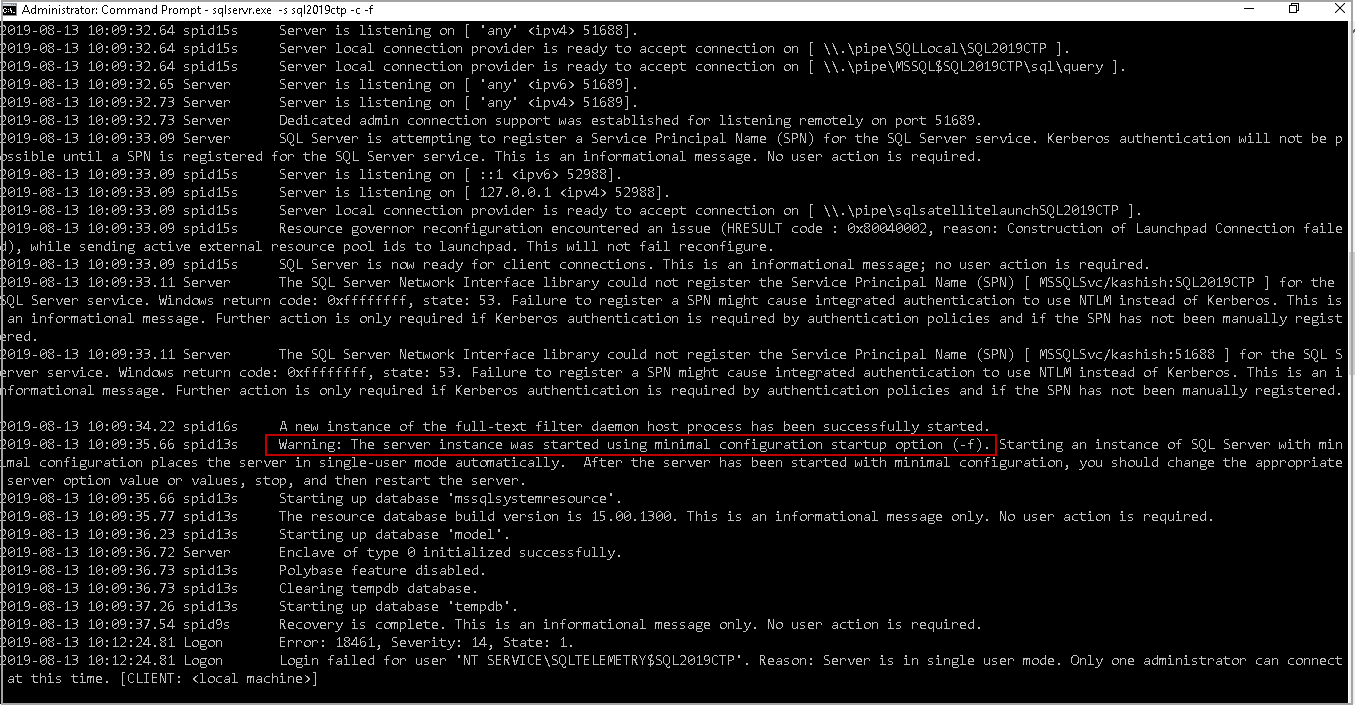
Execute the following command in administrative prompt ( for my SQL2019CTP instance)
在管理提示下执行以下命令(对于我SQL2019CTP实例)
sqlservr.exe -s SQL2019CTP -c -f
sqlservr.exe -s SQL2019CTP -c -f
It starts SQL Services in minimal configuration mode, and you can see it as a warning message as well
它以最小配置模式启动SQL Services,您也可以将其视为警告消息。
-
Open another command prompt and connect to the SQL server using the SQLCMD
打开另一个命令提示符并使用SQLCMD连接到SQL Server
-
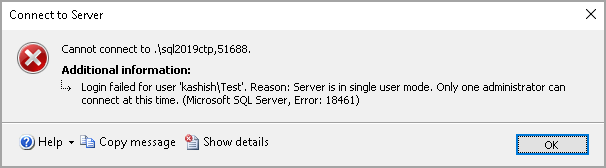
Note: Only one administrator can connect to SQL Server at this time. If you try to connect, you get the following error message
注意:此时,只有一名管理员可以连接到SQL Server。 如果您尝试连接,则会收到以下错误消息
Now, we can run the alter database command to resize the TempDB. You need to run the alter database command for eachtempdb file
现在,我们可以运行alter database命令来调整TempDB的大小。 您需要为每个tempdb文件运行alter database命令
USE master;
                GO
                ALTER DATABASE tempdb
                MODIFY FILE (NAME = tempdev, SIZE=100Mb);
                GO
                ALTER DATABASE tempdb
                MODIFY FILE (NAME = templog, SIZE=100Mb);
                GO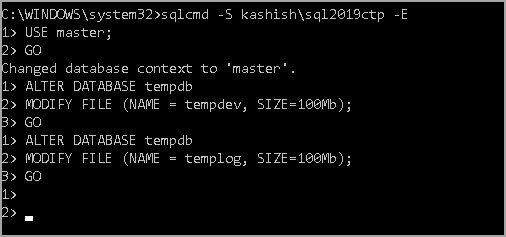
-
-
Return the administrative command prompt in which we started SQL Service in minimal configuration mode and press CTRL+C to exit
返回以最小配置模式启动SQL Service的管理命令提示符,然后按CTRL + C退出
-
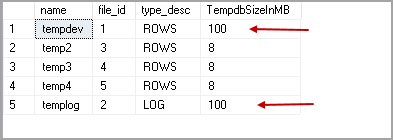
Start the SQL Services using the SQL Server Configuration Manager and verify the changes using the following query
使用SQL Server配置管理器启动SQL Services,并使用以下查询验证更改
SELECT
                name, file_id, type_desc, size * 8 / 1024 [TempdbSizeInMB]
                FROM sys.master_files
                WHERE DB_NAME(database_id) = 'tempdb'
                ORDER BY type_desc DESC, file_id
                GO
In the screenshot, we can see that initial size for the TempDev and TempLog file is 100 MB
在屏幕截图中,我们可以看到TempDev和TempLog文件的初始大小为100 MB

结论 (Conclusion)
In this article, we explored the importance of the TempDB database in SQL Server and various methods to shrink the TempDB database. You should be aware of all these methods and take appropriate actions if required.
在本文中,我们探讨了SQL Server中的TempDB数据库的重要性以及缩小TempDB数据库的各种方法。 您应该了解所有这些方法,并在需要时采取适当的措施。
翻译自: https://www.sqlshack.com/overview-of-the-shrink-tempdb-database-in-sql-server/
数据文件shrink

一站式 AI 云服务平台
更多推荐



 0
0 0
0- 0


 已为社区贡献13条内容

所有评论(0)