
Python 接口自动化必备JSONPath模块
拒绝复杂编程,拒绝循环嵌套,轻松提取JSON内部数据。JsonPath模块,让你在结构化数据海洋中自由航行,快速定位所需信息。简洁、高效,为数据分析、API交互等场景量身打造;
1
文章开篇
Python的魅力,犹如星河璀璨,无尽无边;人生苦短、我用Python!
JSONPath的简介
JSONPath是一种用于在JSON数据中查找和操作数据的表达式语言;
它提供了一种简洁而灵活的方式,可以在复杂的JSON结构中快速定位和提取所需的数据;
JSONPath可以在各种编程语言和工具中使用,例如在JavaScript、Python、Java等语言中都有对应的库或工具支持。
通过使用JSONPath,可以方便地从JSON数据中提取特定部分,进行进一步的处理和分析;
JSONPath的语法
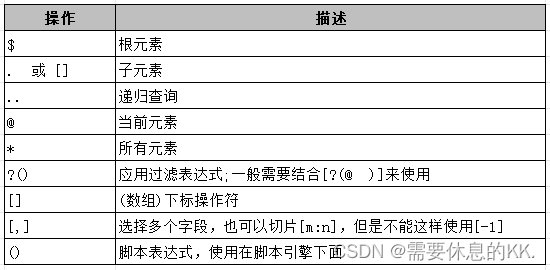
1.过滤器
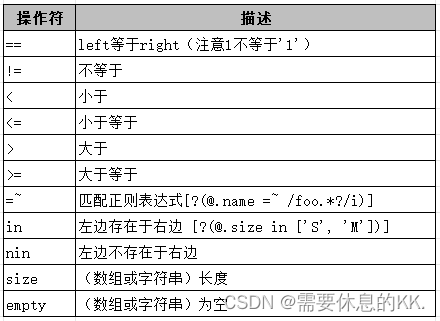
在Python中,JSONPath的过滤器功能是一种强大的机制,它允许开发者以声明式的方式精确地筛选和定位JSON数据中的特定元素。
过滤器通过逻辑表达式来实现,这些表达式基于JSONPath语法,提供了对数组和对象元素的细粒度访问;
基于各种条件来过滤JSON数据,例如根据属性值是否大于、小于或等于某个值,或者是否等于某个特定的字符串;
可以使用单个条件来过滤数据,例如[?(@.age > 18)],这将选择所有年龄大于18岁的对象;
可以使用逻辑运算符&&(与)和||(或)来组合多个条件,从而构建更复杂的过滤表达式;
例如,[?(@.price < 10 && @.category == ‘fiction’)]将选择价格低于10且类别为’fiction’的对象;
JSONPath过滤器对字符串的处理非常严谨。
在过滤器表达式中,所有的字符串都必须用单引号包围,以确保字符串的正确解析。例如,[?(@.color == ‘blue’)]将选择所有颜色属性为’blue’的对象;
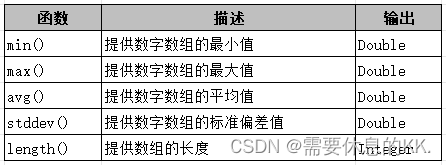
2.函数
虽然JsonPath表达式本身主要用于提取和过滤JSON数据,但通常在某些情境下,可能希望在表达式执行后对其结果进行进一步的处理。
但是,Python中的jsonpath库不直接支持在表达式执行后进行调用。这意味着,如果需要对JsonPath查询结果进行进一步的操作,需要在Python代码中显式地处理这些结果。
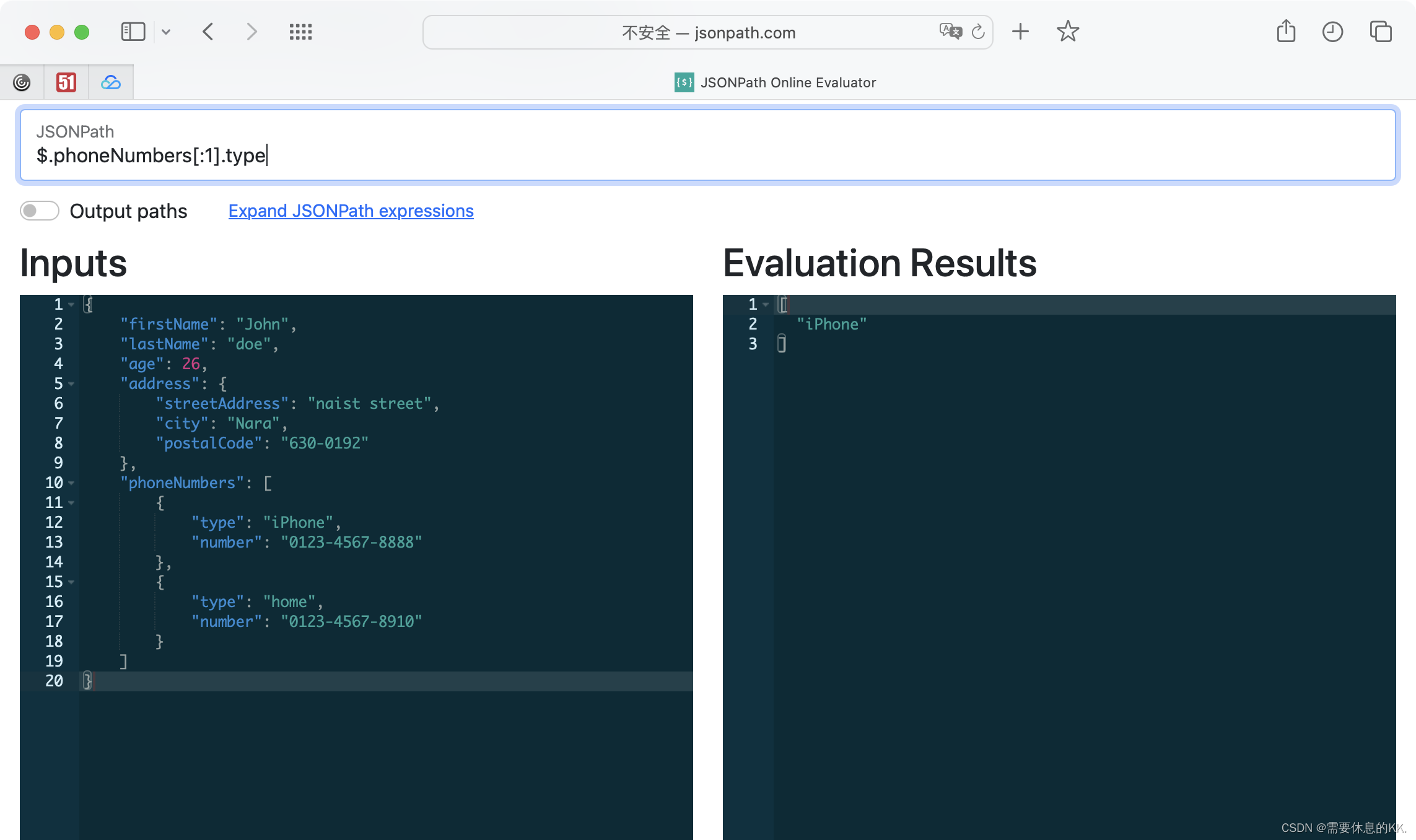
JSONPath的验证
可以在**http://jsonpath.com/站点**进行验证JSONPath的执行效果。
JSONPath的安装
jsonpath模块属于Python第三方库,需要额外下载安装,命令如下:
pip install jsonpath
pip install jsonpath-ng  # 后面会使用ng模块封装一个工具类
JSONPath的使用
函数原型:def jsonpath(obj, expr, result_type=‘VALUE’, debug=0, use_eval=True)
函数参数释义:
- **obj:**实际需要处理的json数据
- **expr:**jsonpath表达式
- **result_type:**返回结果的类型,默认为’Value’表示返回数据的值,'IPATH’表示返回数据的键
- **debug:**是否开启调试模式 默认为0 关闭 ,非0都表示开启
- **use_eval:**debug=1时,配合调试
示例数据
jd = {
    "store": {
        "book": [
            {"category": "reference", "author": "Nigel Rees", "title": "Sayings of the Century", "price": 8.95},
            {"category": "fiction", "author": "Evelyn Waugh", "title": "Sword of Honour", "price": 12.99},
            {"category": "fiction", "author": "Herman Melville", "title": "Moby Dick", "isbn": "0-553-21311-3", "price": 8.99},
            {"category": "fiction", "author": "J. R. R. Tolkien", "title": "The Lord of the Rings", "isbn": "0-395-19395-8", "price": 22.99}
        ],
        "bicycle": {
            "color": "red",
            "price": 19.95
        }
    },
    "expensive": 10
}
示例代码
from jsonpath import jsonpath

# 返回书店中所有图书的作者
print(jsonpath(jd, "$.store.book[*].author"))   # ['Nigel Rees', 'Evelyn Waugh', 'Herman Melville', 'J. R. R. Tolkien']
print(jsonpath(jd, "$..author"))    # ['Nigel Rees', 'Evelyn Waugh', 'Herman Melville', 'J. R. R. Tolkien']

# 返回书店中所有的东西,不仅包括书,还有其他的物品
print(jsonpath(jd, "$.store.*"))    # [[{'category': 'reference', 'author': 'Nigel Rees', 'title': 'Sayings of the Century', 'price': 8.95}, {'category': 'fiction', 'author': 'Evelyn Waugh', 'title': 'Sword of Honour', 'price': 12.99}, {'category': 'fiction', 'author': 'Herman Melville', 'title': 'Moby Dick', 'isbn': '0-553-21311-3', 'price': 8.99}, {'category': 'fiction', 'author': 'J. R. R. Tolkien', 'title': 'The Lord of the Rings', 'isbn': '0-395-19395-8', 'price': 22.99}], {'color': 'red', 'price': 19.95}]

# 返回书店中所有物品的价格
print(jsonpath(jd, "$.store..price"))   # [8.95, 12.99, 8.99, 22.99, 19.95]

# 第三本图书
print(jsonpath(jd, "$..book[2]"))   # [{'category': 'fiction', 'author': 'Herman Melville', 'title': 'Moby Dick', 'isbn': '0-553-21311-3', 'price': 8.99}]

# 倒数第二本书
print(jsonpath(jd, "$..book[-2:-1]"))   # [{'category': 'fiction', 'author': 'Herman Melville', 'title': 'Moby Dick', 'isbn': '0-553-21311-3', 'price': 8.99}]

# 前两本书
print(jsonpath(jd, "$..book[0,1]")) # [{'category': 'reference', 'author': 'Nigel Rees', 'title': 'Sayings of the Century', 'price': 8.95}, {'category': 'fiction', 'author': 'Evelyn Waugh', 'title': 'Sword of Honour', 'price': 12.99}]

# 从索引 0(含)到索引 2(不含)的所有图书
print(jsonpath(jd, "$..book[:2]"))  # [{'category': 'reference', 'author': 'Nigel Rees', 'title': 'Sayings of the Century', 'price': 8.95}, {'category': 'fiction', 'author': 'Evelyn Waugh', 'title': 'Sword of Honour', 'price': 12.99}]

# 从索引 1(含)到索引 2(不含)的所有图书
print(jsonpath(jd, "$..book[1:2]")) # [{'category': 'fiction', 'author': 'Evelyn Waugh', 'title': 'Sword of Honour', 'price': 12.99}]

# 最后两本书
print(jsonpath(jd, "$..book[-2:]")) # [{'category': 'fiction', 'author': 'Herman Melville', 'title': 'Moby Dick', 'isbn': '0-553-21311-3', 'price': 8.99}, {'category': 'fiction', 'author': 'J. R. R. Tolkien', 'title': 'The Lord of the Rings', 'isbn': '0-395-19395-8', 'price': 22.99}]

# 从索引 2(含)到最后的所有书籍
print(jsonpath(jd, "$..book[2:]"))  # [{'category': 'fiction', 'author': 'Herman Melville', 'title': 'Moby Dick', 'isbn': '0-553-21311-3', 'price': 8.99}, {'category': 'fiction', 'author': 'J. R. R. Tolkien', 'title': 'The Lord of the Rings', 'isbn': '0-395-19395-8', 'price': 22.99}]

# 所有带有 ISBN 编号的图书
print(jsonpath(jd, "$..book[?(@.isbn)]"))   # [{'category': 'fiction', 'author': 'Herman Melville', 'title': 'Moby Dick', 'isbn': '0-553-21311-3', 'price': 8.99}, {'category': 'fiction', 'author': 'J. R. R. Tolkien', 'title': 'The Lord of the Rings', 'isbn': '0-395-19395-8', 'price': 22.99}]

# 返回店内价格等于10元的所有图书
print(jsonpath(jd, "$.store.book[?(@.price == 10)]"))   # False

# 返回店内价格小于10元的所有图书
print(jsonpath(jd, "$.store.book[?(@.price < 10)]"))    # [{'category': 'reference', 'author': 'Nigel Rees', 'title': 'Sayings of the Century', 'price': 8.95}, {'category': 'fiction', 'author': 'Herman Melville', 'title': 'Moby Dick', 'isbn': '0-553-21311-3', 'price': 8.99}]
print(jsonpath(jd, "$..book[?(@.price <= 10)]"))        # [{'category': 'reference', 'author': 'Nigel Rees', 'title': 'Sayings of the Century', 'price': 8.95}, {'category': 'fiction', 'author': 'Herman Melville', 'title': 'Moby Dick', 'isbn': '0-553-21311-3', 'price': 8.99}]

# 所有与正则表达式匹配的书籍(忽略大小写)
print(jsonpath(jd, "$..book[?(@.author =~ /.*REES/i)]"))    # False

# 把一切东西都返回
print(jsonpath(jd, "$..*")) # [{'book': [{'category': 'reference', 'author': 'Nigel Rees', 'title': 'Sayings of the Century', 'price': 8.95}, {'category': 'fiction', 'author': 'Evelyn Waugh', 'title': 'Sword of Honour', 'price': 12.99}, {'category': 'fiction', 'author': 'Herman Melville', 'title': 'Moby Dick', 'isbn': '0-553-21311-3', 'price': 8.99}, {'category': 'fiction', 'author': 'J. R. R. Tolkien', 'title': 'The Lord of the Rings', 'isbn': '0-395-19395-8', 'price': 22.99}], 'bicycle': {'color': 'red', 'price': 19.95}}, 10, [{'category': 'reference', 'author': 'Nigel Rees', 'title': 'Sayings of the Century', 'price': 8.95}, {'category': 'fiction', 'author': 'Evelyn Waugh', 'title': 'Sword of Honour', 'price': 12.99}, {'category': 'fiction', 'author': 'Herman Melville', 'title': 'Moby Dick', 'isbn': '0-553-21311-3', 'price': 8.99}, {'category': 'fiction', 'author': 'J. R. R. Tolkien', 'title': 'The Lord of the Rings', 'isbn': '0-395-19395-8', 'price': 22.99}], {'color': 'red', 'price': 19.95}, {'category': 'reference', 'author': 'Nigel Rees', 'title': 'Sayings of the Century', 'price': 8.95}, {'category': 'fiction', 'author': 'Evelyn Waugh', 'title': 'Sword of Honour', 'price': 12.99}, {'category': 'fiction', 'author': 'Herman Melville', 'title': 'Moby Dick', 'isbn': '0-553-21311-3', 'price': 8.99}, {'category': 'fiction', 'author': 'J. R. R. Tolkien', 'title': 'The Lord of the Rings', 'isbn': '0-395-19395-8', 'price': 22.99}, 'reference', 'Nigel Rees', 'Sayings of the Century', 8.95, 'fiction', 'Evelyn Waugh', 'Sword of Honour', 12.99, 'fiction', 'Herman Melville', 'Moby Dick', '0-553-21311-3', 8.99, 'fiction', 'J. R. R. Tolkien', 'The Lord of the Rings', '0-395-19395-8', 22.99, 'red', 19.95]
真实工具类封装
from jsonpath_ng import jsonpath, parse


class JsonPathUtil:
    def __init__(self, data):
        self.data = data

    def find(self, path):
        """查询所有匹配项"""
        jsonpath_expr = parse(path)
        return [match.value for match in jsonpath_expr.find(self.data)]

    def find_first(self, path):
        """查询单个匹配项"""
        matches = self.find(path)
        if matches:
            return matches[0]
        return None

    def update(self, path, value):
        """手动更新匹配项的值"""
        jsonpath_expr = parse(path)
        matches = jsonpath_expr.find(self.data)
        if not matches:
            return False  # 未找到匹配项
        # 假设只更新第一个匹配项
        parent = matches[0].context.value
        if isinstance(parent, list):
            parent[matches[0].path.fields[0]] = value
        elif isinstance(parent, dict):
            parent[matches[0].path.fields[0]] = value
        return True

    def delete(self, path):
        """手动删除匹配项"""
        jsonpath_expr = parse(path)
        matches = jsonpath_expr.find(self.data)
        if not matches:
            return False  # 未找到匹配项
        # 假设只删除第一个匹配项
        parent = matches[0].context.value
        if isinstance(parent, list):
            del parent[matches[0].path.fields[0]]
        elif isinstance(parent, dict):
            del parent[matches[0].path.fields[0]]
        return True


# 示例使用
if __name__ == "__main__":
    data = {
        "store": {
            "book": [
                {"category": "reference",
                 "author": "Nigel Rees",
                 "title": "Sayings of the Century",
                 "price": 8.95
                 },
                {"category": "fiction",
                 "author": "Evelyn Waugh",
                 "title": "Sword of Honour",
                 "price": 12.99
                 }
            ],
            "bicycle": {
                "color": "red",
                "price": 19.95
            }
        }
    }

    util = JsonPathUtil(data)

    # 查询所有书的作者
    print("Authors:", util.find("$.store.book[*].author"))

    # 查询第一本书的价格
    print("First book price:", util.find_first("$.store.book[0].price"))

    # 尝试更新第一本书的价格
    if util.update("$.store.book[0].price", 9.99):
        print("Updated first book price:", data['store']['book'][0]['price'])

    # 尝试删除自行车的颜色
    if util.delete("$.store.bicycle.color"):
        print("Deleted bicycle color:", data['store']['bicycle'])
总结
JsonPath是Python中用于处理JSON数据的强大工具,它提供了一种简洁明了的查询语言,能够轻松提取和过滤JSON数据中的信息了;
无论是处理简单的键值对还是复杂的嵌套结构,JsonPath都能快速准确地完成任务。
此外,JsonPath还可与其他Python库结合,实现更丰富的数据处理功能。
广泛应用于数据提取、API测试、数据清洗等领域,是Python数据处理工具箱中不可或缺的一部分。

一站式 AI 云服务平台
更多推荐



 41
41 0
0- 0


 已为社区贡献1条内容

所有评论(0)