
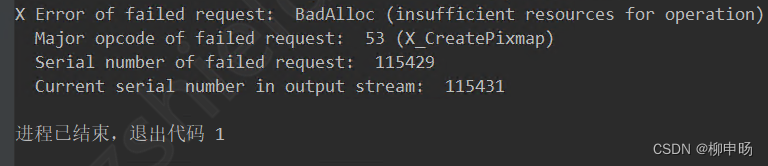
X Error of failed request: BadAlloc (insufficient resources for operation)
X Error of failed request: BadAlloc (insufficient resources for operation)
·
报错信息
原因分析
报错代码中多次使用matplot.pyplot画图。但是由于matplotlib维护的Figure是有数量上限的(RuntimeWarning: More than 20 figures have been opened.),不断创建新的Figure实例,不及时处理的话很容易造成内存泄漏。
解决思路
所以需要对Figure实例进行及时清理或者合理复用,下面需要用到的代码:
plt.cla() # 清除axes,即当前 figure 中的活动的axes,但其他axes保持不变。
plt.clf() # 清除当前 figure 的所有axes,但是不关闭这个 window,所以能继续复用于其他的 plot。
plt.close() # 关闭 window,如果没有指定,则指当前 window。
思路1:合理复用
只创建一个 Figure 对象,在画下一个图之前,使用 plt.clf() 清理掉 axes,这样可以复用 Figure实例。
plt.clf()
示例:
import matplotlib as mpl
mpl.use('TkAgg')
import matplotlib.pyplot as plt
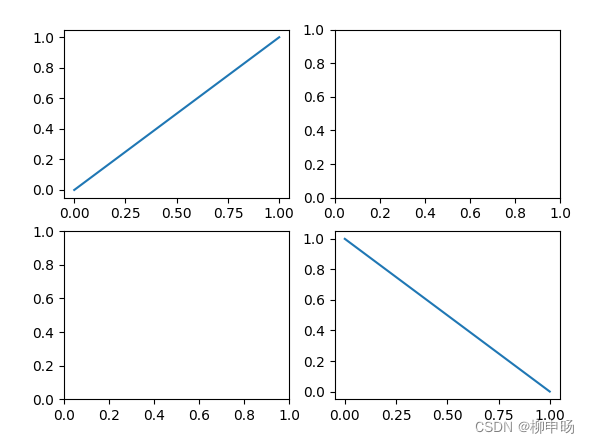
fig, axe = plt.subplots(2,2)
axe[0][0].plot([0,1],[0,1])
axe[1][1].plot([0,1],[1,0])
plt.show()
plt.savefig('test.png')
plt.clf()

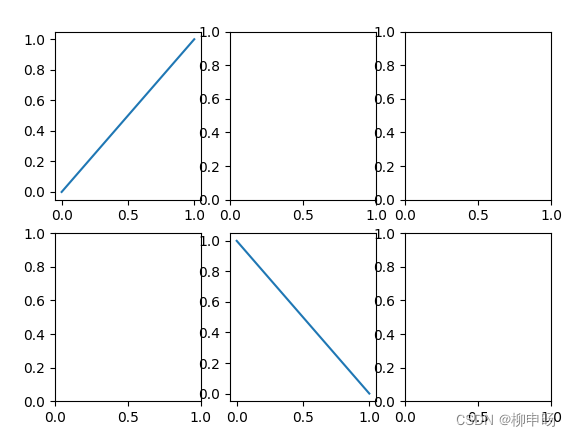
fig2 = plt.gcf() #获取当前的图标(Figure实例)
print(f'fig is fig2 : {fig is fig2}')
# fig is fig2 : True

axe = fig2.subplots(2,3) #重新规划为2*3个子图
axe[0][0].plot([0,1],[0,1])
axe[1][1].plot([0,1],[1,0])
plt.show()
思路2: 及时清理
及时清除并且关闭掉 Figure 对象,但是要注意这样频繁的 “创建→清除” 是会拖慢你的代码运行速度的。
plt.cla()
plt.close("all")
参考

一站式 AI 云服务平台
更多推荐



 0
0 0
0- 0


 已为社区贡献1条内容

所有评论(0)