
python 知乎接口_python接口自动化——pytest框架
1、pytest认识(1)pytest比unnitest的优点:(2)pytest使用规则:测试文件以test_开头(以_test结尾也可以)测试类以Test开头,并且不能带有__init__方法测试函数以test_开头(3)安装3.8.0版本:>pip install pytest==3.8.0(4)pytest一个简单的例子#test_pyexample.py脚本import ti...
1、pytest认识
(1)pytest比unnitest的优点:
(2)pytest使用规则:
- 测试文件以test_开头(以_test结尾也可以)
- 测试类以Test开头,并且不能带有__init__方法
- 测试函数以test_开头
(3)安装3.8.0版本:
>pip install pytest==3.8.0(4)pytest一个简单的例子
#test_pyexample.py脚本

import time
#import pytest  不用导入,安装好以后可以直接用

def add(x,y):
    return x+y
def test_add():
    assert add(1,2)==3

def test_add2():
    print("I am 2")
    time.sleep(3)
    assert add(1.2,1.3)==5.3
    assert add(2,2)==4
pycharm控制台运行结果:
Launching pytest with arguments test_pyexample.py::test_add2 in E:navy_lupythonexercise_scriptpytest_script

============================= test session starts =============================
platform win32 -- Python 3.7.1, pytest-3.8.0, py-1.8.0, pluggy-0.12.0
rootdir: E:navy_lupythonexercise_scriptpytest_script, inifile:
plugins: sugar-0.9.2collected 1 item

test_pyexample.py FI am 2

test_pyexample.py:8 (test_add2)
5.3 != 2.5

Expected :2.5
Actual   :5.3
 <Click to see difference>

def test_add2():
        print("I am 2")
        time.sleep(3)
>       assert add(1.2,1.3)==5.3
E       assert 2.5 == 5.3
E        +  where 2.5 = add(1.2, 1.3)

test_pyexample.py:12: AssertionError
                                                      [100%]

================================== FAILURES ===================================
__________________________________ test_add2 __________________________________

    def test_add2():
        print("I am 2")
        time.sleep(3)
>       assert add(1.2,1.3)==5.3
E       assert 2.5 == 5.3
E        +  where 2.5 = add(1.2, 1.3)

test_pyexample.py:12: AssertionError
---------------------------- Captured stdout call -----------------------------
I am 2
========================== 1 failed in 3.16 seconds ===========================
Process finished with exit code 0
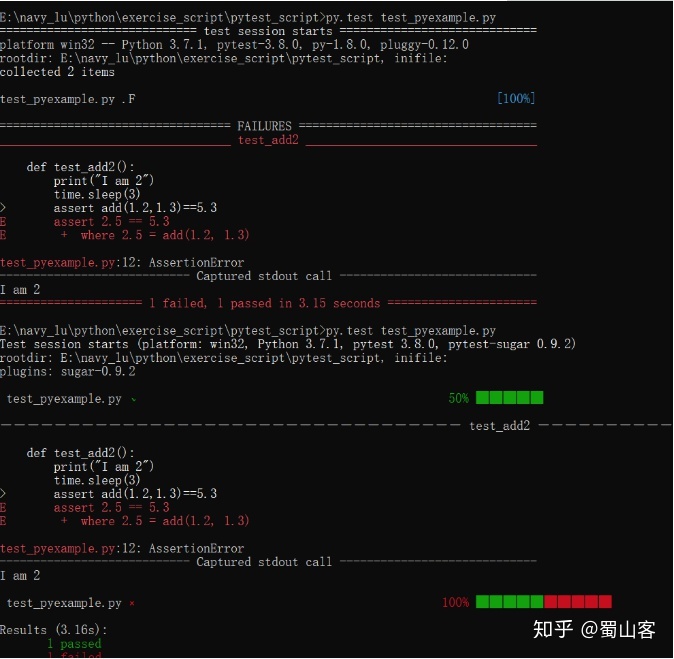
命令行运行结果:
(1)cd 到代码所在的目录,执行命令:py.test test_pyexample.py
(2)安装pytest-sugar插件可以看到进度条
测试结果如下:
2、pytest参数化:@pytest.mark.parametrize()
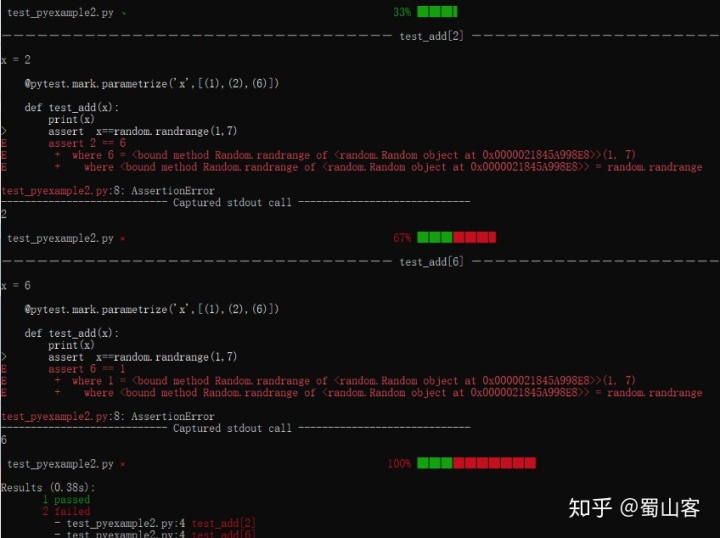
(1)单个参数
使用装饰器:@pytest.mark.parametrize()
import pytest
import random

@pytest.mark.parametrize('x',[(1),(2),(6)])

def test_add(x):
    print(x)
    assert  x==random.randrange(1,7)
运行结果:
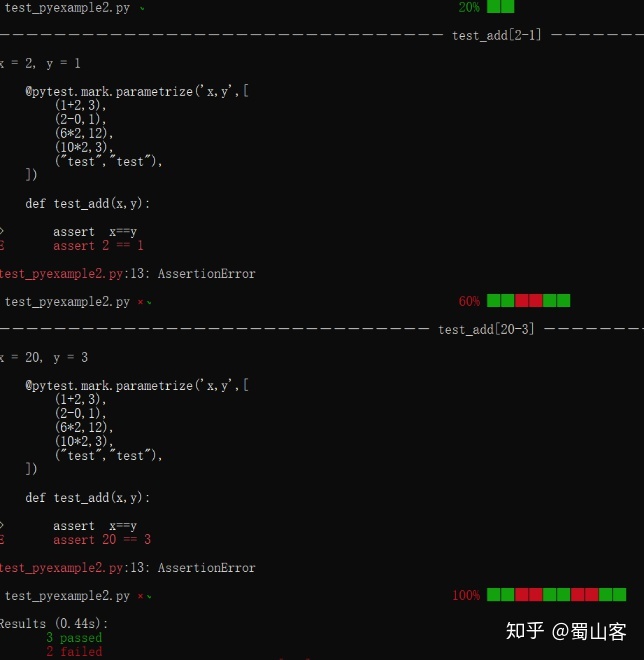
(2)多个参数:
import pytest

@pytest.mark.parametrize('x,y',[
    (1+2,3),
    (2-0,1),
    (6*2,12),
    (10*2,3),
    ("test","test"),
])

def test_add(x,y):   #必须与上面保持一致,只能用x,y不能用其他字母

    assert  x==y
运行结果:
3、pytest多个assert:pytest-assume
安装插件:pip install pytest-assume
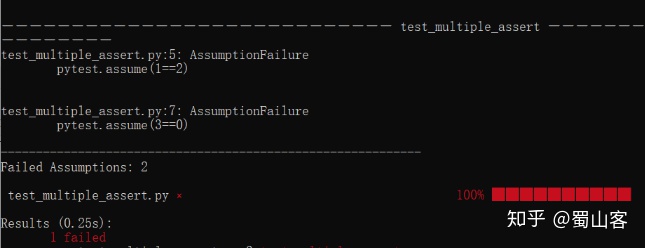
使用多个assert,结果中只有第一个错误,没有报出第二个
import pytest

def test_multiple_assert():

    assert (1==2)
    assert (2==2)
    assert (3==0)
执行结果:
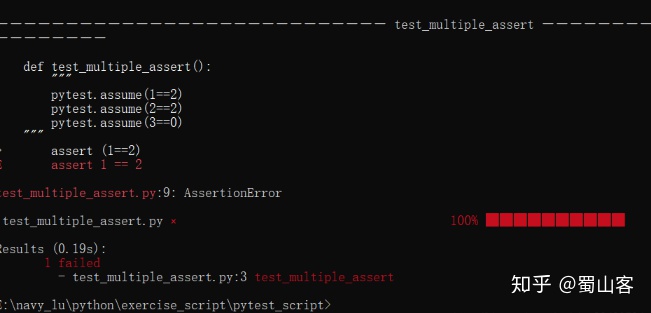
使用assume ,会把所有错误都报出来:
4、重新运行失败的用例:pytest- rerunfailures
安装插件:pip install pytest- rerunfailures
(pytest的安装路径)>pytest --reruns n 脚本路径,
(pytest的安装路径)>pytest -s --reruns n 脚本路径,
import random

def add(x,y):
    return x+y

def test_add():
    random_value=random.randint(2,7)
    print('random_value:'+str(random_value))
    assert add(1,3)==random_value
运行命令:
C:Usersldld0AppDataLocalProgramsPythonPython37Lib>
pytest --rerunsE:navy_lupythonexercise_scriptpytest_scripttest_pyexample_rerun.py
第一次运行:(整个过程:一共运行4次,第一次运行失败,后面重新运行3次都失败了)
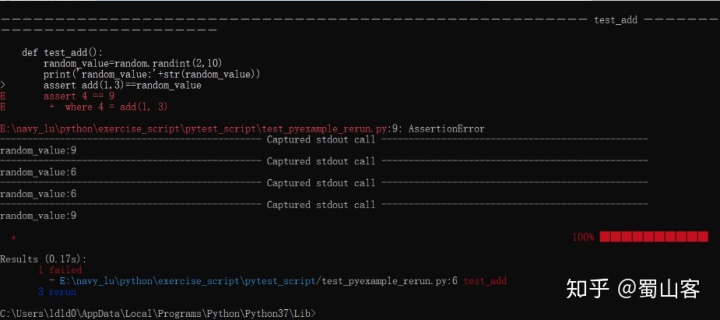
第二次运行:(整个过程:一共运行了4次,第一次失败了,三个R,表示重新运行3次,第三次重新运行成功;如果重新运行第1次就成功了,就算设置的是重新运行3次,后面两次也不会再运行)

5、控制测试运行顺序:pytest--ordering
安装插件pip install pytest-ordering
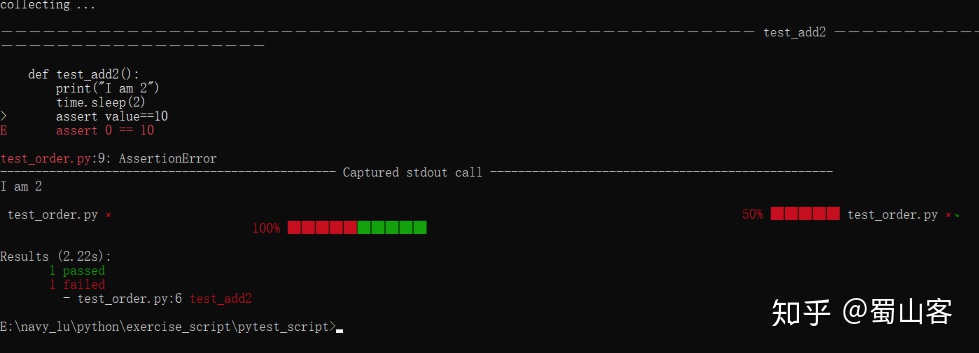
借助于装饰器@pytest.mark.run(order=1)控制测试运行的顺序
import time

value=0

def test_add2():
    print("I am 2")
    time.sleep(2)
    assert value==10


def test_add():
    print("I am add")
    global value
    value=10
执行结果:
使用装饰器:
import pytest
import time

value=0
@pytest.mark.run(order=2) #后执行order=2
def test_add2():
    print("I am 2")
    time.sleep(2)
    assert value==10

@pytest.mark.run(order=1)   #先执行order=1
def test_add():
    print("I am add")
    global value
    value=10
    assert value==10
运行结果:

点赞关注收藏~~~~

一站式 AI 云服务平台
更多推荐



 0
0 0
0- 0


 已为社区贡献3条内容

所有评论(0)