
linux centos7增加文件夹权限,Linux运维-Centos7-文件权限管理(2)
原标题:Linux运维-Centos7-文件权限管理(2)修改权限一.使用字符设定修改权限用的命令:chmod作用:修改文件,目录的权限语法:chmod [对谁操作] [操作符] [赋于什么权限] 文件名对谁操作:u----> 用户user,表示文件或目录的所有者g---->用户组group,表示文件或目录所属的用户组o---->其它用户othersa---->所有用户al
原标题:Linux运维-Centos7-文件权限管理(2)
修改权限
一.使用字符设定
修改权限用的命令:chmod
作用:修改文件,目录的权限
语法:chmod [对谁操作] [操作符] [赋于什么权限] 文件名
对谁操作:
u----> 用户user,表示文件或目录的所有者
g---->用户组group,表示文件或目录所属的用户组
o---->其它用户others
a---->所有用户all
操作符:
+ #添加权限 ; - # 减少权限 ; = #直接给定一个权限
权限:r w x
例如下在的组合:
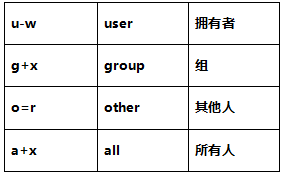
例:chmod修改权限
[root@xuegod63 ~]# touch 1.txt
[root@xuegod63 ~]# ll 1.txt
-rw-r--r-- 1 root root 0 5月 8 21:20 1.txt
[root@xuegod63 ~]#
[root@xuegod63 ~]# chmod u-w 1.txt
[root@xuegod63 ~]# ll 1.txt
-r--r--r-- 1 root root 0 5月 8 21:20 1.txt
[root@xuegod63 ~]# chmod g+x 1.txt
[root@xuegod63 ~]# ll 1.txt
-r--r-xr-- 1 root root 0 5月 8 21:20 1.txt
[root@xuegod63 ~]# chmod a+x 1.txt # 给shell脚本加一个可执行权限
[root@xuegod63 ~]# ll 1.txt
-r-xr-xr-x 1 root root 0 5月 8 21:20 1.txt
[root@xuegod63 ~]#
[root@xuegod63 ~]# chmod a=rwx 1.txt
[root@xuegod63 ~]# ll 1.txt
-rwxrwxrwx 1 root root 0 5月 8 21:20 1.txt
二.使用八进制(0-7)数字表示权限法

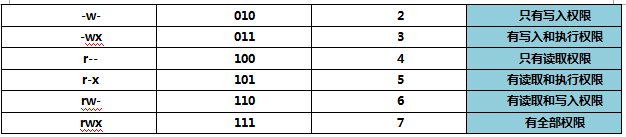
例1:
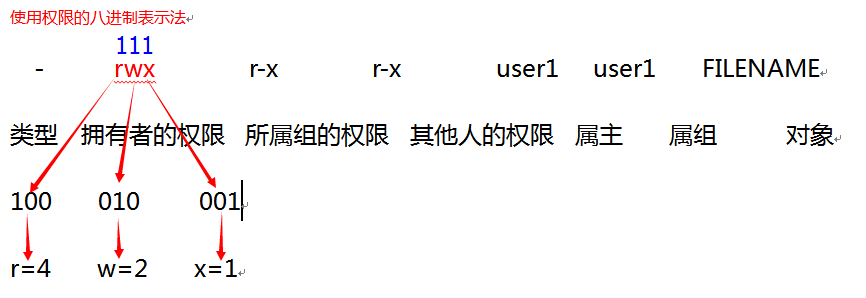
互动:rw- 的值是多少? 答: 4+2=6
rwx r-x r-x 的值是多少? 答: rwx=4+2+1=7 ; r-x=4+1=5 rwx r-x r-x=7 5 5
语法:
chmod 755 文件或文件夹名字
chmod a=rwx b.txt 等于 chmod 777 b.txt
例:
[root@xuegod63 ~]# touch dd.txt
[root@xuegod63 ~]# ll dd.txt
-rw-r--r-- 1 root root 0 5月 8 21:40 dd.txt
[root@xuegod63 ~]# chmod 755 dd.txt
[root@xuegod63 ~]# ll dd.txt
-rwxr-xr-x 1 root root 0 5月 8 21:40 dd.txt
[root@xuegod63 ~]# chmod 700 dd.txt
[root@xuegod63 ~]# ll dd.txt
-rwx------ 1 root root 0 5月 8 21:40 dd.txt
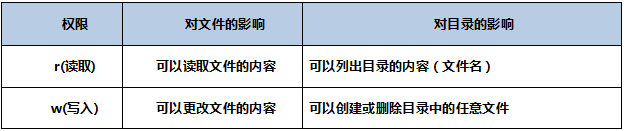
权限对文件和目录的影响
有三种权限可以应用:读取,写入与执行,这些权限对访问文件和目录的影响如下:

三.补码
为什么我们创建的文件的权限是644呢?
我们创建文件的默认权限是怎么来的?
umask命令允许你设定文件创建时的缺省模式,对应每一类用户(文件属主、同组用户、其他用户)存在一个相应的umask值中的数字
文件默认权限=666 ,目录默认权限=777
我们一般在/etc/profile、$ [HOME]/.bash_profile或$[HOME]/.profile中设置umask值。
永久生效,编辑用户的配置文件vim .bash_profile
[root@xuegod63 ~]# vim /etc/profile

注: UID大于199 且用户的组名和用户名一样,那么 umask值为002,否则为022.
注: -gt 在shell中表示大于; id -g 显示用户组ID ,id -gn显示组名。
临时生效: umask 权限补码
[root@xuegod63 ~]# umask 044
[root@xuegod63 ~]# touch ss.txt
[root@xuegod63 ~]# ll ss.txt
-rw--w--w- 1 root root 0 5月 8 21:47 ss.txt
权限的算法:一般情况是:目录默认权限-umask 值
666-022=644
777-022=755
#这是一个好的记忆方法,但不严谨。
互动:umask掩码为033 创建普通文件后,权限是什么?
互动:umask掩码为033 创建普通文件后,权限是什么? 666-033=633 ( rw- -wx -wx) ?
例:[root@xuegod63 ~]# umask 033
[root@xuegod63 ~]# touch k.txt
[root@xuegod63 ~]# ll k.txt
-rw-r--r-- 1 root root 0 5月 8 22:00 k.txt
答:结果为: 644
权限科学的计算方法:
1、将默认权限(目录777,文件666)和umask值都转换为2进制
2、对umask取反
3、将默认权限和umask取反后的值做与运算
4、将得到的二进制值再转换8进制,即为权限,
例1: umask 为022
6 6 6 umask 0 2 2
110 110 110 000 010 010 # 转成二进制
111 101 101 # umask取反的值
110 110 110 与 #第二步,默认权限和umask取反后的值做与运算
111 101 101 # umask取反的值
110 100 100
6 4 4 #转成8进制
例2: umask 为033 结果为: 644
6 6 6 umask 0 3 3
110 110 110 000 011 011 # 转成二进制
111 100 100 # umask取反的值
110 110 110 与 #默认权限和umask取反后的值做与运算
111 100 100 # umask取反的值
110 100 100
6 4 4 #转成8进制返回搜狐,查看更多
责任编辑:

一站式 AI 云服务平台
更多推荐



 0
0 0
0- 0


 已为社区贡献2条内容

所有评论(0)