
Centos7.x启动postfix服务失败,提示 Job for postfix.service failed because the control process exited with
失败提示信息为:Job for postfix.service failed because the control process exited with error code. See “systemctl status postfix.service” and “journalctl -xe” for details.执行journalctl -xe命令获得如下信息:修改/etc/postf
·
环境信息: CentOS7,MySQL5.7
问题: 在 CentOS 7 系统中,开启 postfix 邮件服务,执行命令
[root@hzuwei ~] systemctl start postfix
等待很长时间之后,提示服务启动失败!失败提示信息如下所示:
[root@hzuwei ~] Job for postfix.service failed because the control process exited with error code. See "systemctl status postfix.service" and "journalctl -xe" for details.
依据错误提示,执行journalctl -xe命令获得如下信息: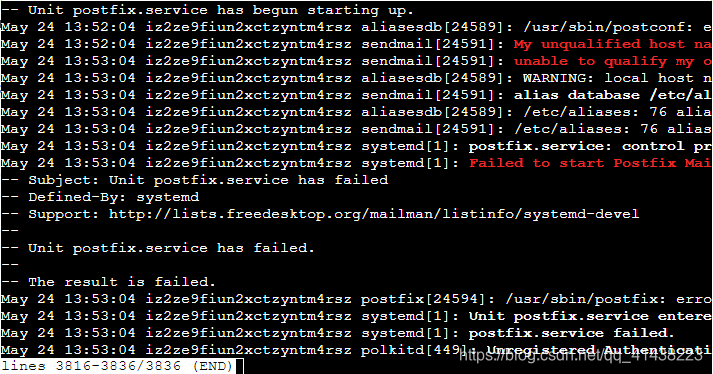
解决方案如下:
- 修改
/etc/postfix/main.cf文件中的
修改为:inet_interfaces = localhost inet_protocols = all
上述修改可以解决外部ip访问和传输协议的限制。修改后,依旧无法启动 postfix 服务时,执行下面的操作。inet_interfaces = all inet_protocols = all - 执行postfix check检查,当输出如下信息时,

证明无法加载分享库:libmysqlclient.so.18。默认安装的 postfix,使用的 MySQL5.5 的依赖分享库,具体原因是缺少了 Percona-XtraDB-Cluster-shared-55-5.5.37-25.10.756.el6.x86_64.rpm 安装包所导致的。执行如下 wget 命令下载:
执行上述命令下载时,假如提示[root@hzuwei ~] wget http://www.percona.com/redir/downloads/Percona-XtraDB-Cluster/5.5.37-25.10/RPM/rhel6/x86_64/Percona-XtraDB-Cluster-shared-55-5.5.37-25.10.756.el6.x86_64.rpmwget command not found,使用该yum install -y wget来安装 wget 工具。
下载完成后,执行下列命令完成安装:[root@hzuwei ~] rpm -ivh Percona-XtraDB-Cluster-shared-55-5.5.37-25.10.756.el6.x86_64.rpm注意:上述操作假如你安装的MySQL不是5.5版本的话,可能依旧无法启动
参考连接:解决 libmysqlclient.so.18 缺失的问题 - 当你安装的是 MySQL5.7 时, 自带的是 libmysqlclient.so.20 文件,可通过安装下列库来解决:
https://dev.mysql.com/get/Downloads/MySQL-5.7/mysql-community-libs-compat-5.7.25-1.el7.x86_64.rpm
BUG每一记,编程好省力!如果有帮到你,希望您可以动动小手,点歌赞咯~~~

一站式 AI 云服务平台
更多推荐



 1
1 0
0- 0


 已为社区贡献1条内容

所有评论(0)