
自动化测试Ⅰ SpringBootTest
在CI/CD流程中,测试自动化是不可或缺的一环。自动化测试可以迅速反馈集成后的代码是否能够正常工作,它是实现CI/CD的基础。没有自动化测试,CI/CD流程将无法高效运行,因为手动测试无法满足快速迭代的需求。
1.概述
在CI/CD流程中,测试自动化是不可或缺的一环。自动化测试可以迅速反馈集成后的代码是否能够正常工作,它是实现CI/CD的基础。没有自动化测试,CI/CD流程将无法高效运行,因为手动测试无法满足快速迭代的需求。
Spring Test与JUnit等其他测试框架结合起来,提供了便捷高效的测试手段。而Spring Boot Test 是在Spring Test之上的再次封装,增加了切片测试,增强了mock能力。
整体上,Spring Boot Test支持的测试种类,大致可以分为如下三类:
- 单元测试:一般面向方法,编写一般业务代码时,测试成本较大。涉及到的注解有@Test。
- 切片测试:一般面向难于测试的边界功能,介于单元测试和功能测试之间。涉及到的注解有@RunWith @WebMvcTest等。
- 功能测试:一般面向某个完整的业务功能,同时也可以使用切面测试中的mock能力,推荐使用。涉及到的注解有@RunWith
@SpringBootTest等。
功能测试过程中的几个关键要素及支撑方式如下:
- 测试运行环境:通过@RunWith 和 @SpringBootTest启动spring容器。
- mock能力:Mockito提供了强大mock功能。
- 断言能力:AssertJ、Hamcrest、JsonPath提供了强大的断言能力。
2.详细描述
添加依赖 <dependency><groupId>org.springframework.boot</groupId><artifactId>spring-boot-starter-test</artifactId><scope>test</scope></dependency>
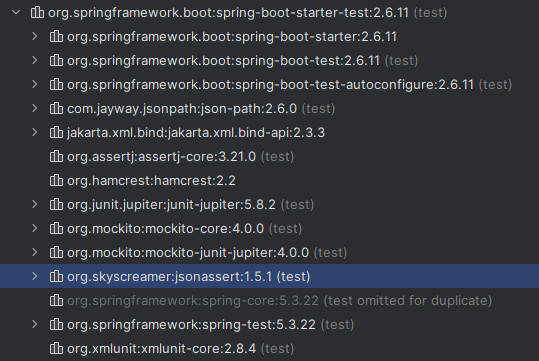
一旦依赖了spring-boot-starter-test,下面这些类库将被一同依赖进去:
- JUnit:java测试事实上的标准,默认依赖版本是4.12(JUnit5和JUnit4差别比较大,集成方式有不同)。
- Spring Test & Spring Boot Test:Spring的测试支持。
- AssertJ:提供了流式的断言方式。
- Hamcrest:提供了丰富的matcher。
- Mockito:mock框架,可以按类型创建mock对象,可以根据方法参数指定特定的响应,也支持对于mock调用过程的断言。
- JSONassert:为JSON提供了断言功能。
- JsonPath:为JSON提供了XPATH功能。
1.单元测试
public class ControllerTest {
    @Test
    void exampleTest() throws Exception {
            assertThat(1).isEqualTo(1);
    }
}
@RunWith是Junit4提供的注解,将Spring和Junit链接了起来。假如使用Junit5,不再需要使用。
@ExtendWith注解,@SpringBootTest和其它@*Test默认已经包含了该注解。
@SpringBootTest替代了spring-test中的@ContextConfiguration注解,目的是加载ApplicationContext,启动spring容器。
使用@SpringBootTest时并没有像@ContextConfiguration一样显示指定locations或classes属性,原因在于@SpringBootTest注解会自动检索程序的配置文件,检索顺序是从当前包开始,逐级向上查找被@SpringBootApplication或@SpringBootConfiguration注解的类。
单元测试具体讲就是测试单个方法。可以new 对象,也可以从Spring容器中拿对象。@*Test主要定义了容器的加载方式。跟是否是单元测试、集成测试、功能测试没有关系。具体看测试内容是否符合测试类型的定义。
2.切片测试
所谓切片测试,官网文档称为 “slice” of your application,实际上是对一些特定组件的称呼。这里的slice并非单独的类(毕竟普通类只需要基于JUnit的单元测试即可),而是介于单元测试和集成测试中间的范围。
slice是指一些在特定环境下才能执行的模块,比如MVC中的Controller、JDBC数据库访问、Redis客户端等,这些模块大多脱离特定环境后不能独立运行,假如spring没有为此提供测试支持,开发者只能启动完整服务对这些模块进行测试,这在一些复杂的系统中非常不方便,所以spring为这些模块提供了测试支持,使开发者有能力单独对这些模块进行测试。
通过@*Test开启具体模块的测试支持,开启后spring仅加载相关的bean,无关内容不会被加载。
使用@WebMvcTest用来校验controllers是否正常工作的示例:
@WebMvcTest(IndexController.class)
public class SpringBootTest {
    @Autowired
    private MockMvc mvc;
    @Test
    public void testExample() throws Exception {
        //groupManager访问路径
        //param传入参数
        MvcResult result=mvc.perform(MockMvcRequestBuilders.post("/groupManager").param("pageNum","1").param("pageSize","10")).andReturn();
        MockHttpServletResponse response = result.getResponse();
        String content = response.getContentAsString();
        List<JtInfoDto> jtInfoDtoList = GsonUtils.toObjects(content, new TypeToken<List<JtInfoDto>>() {}.getType());
        for(JtInfoDto infoDto : jtInfoDtoList){
            System.out.println(infoDto.getJtCode());
        }

    }
}
使用@WebMvcTest和MockMvc搭配使用,可以在不启动web容器的情况下,对Controller进行测试(注意:仅仅只是对controller进行简单的测试,如果Controller中依赖用@Autowired注入的service、dao等则不能这样测试)。
- 这个注解仅用于Controller层的单元测试。默认情况下会仅实例化所有的Controller,可以通过指定单个Controller的方式实现对单个Controller的测试。
- 同时,如果被测试的Controller依赖Service的话,需要对该Service进行mock,如使用@MockBean
- 该注解的定义中还包括了@AutoConfigureMockMvc注解,因此,可以直接使用MockMvc对被测controller发起http请求。当然这过程中是不会产生真实的网络流量的
切片测试是SpringBoot Test提出的概念。主要是为了方便测试一些组件。至于是单元测试、集成测试还得看具体的实现。将之前不容易测试的组件分别进行了一些处理,方便写测试。
3.功能测试(集成测试)
一般情况下,使用@SpringBootTest后,Spring将加载所有被管理的bean,基本等同于启动了整个服务,此时便可以开始功能测试。
由于web服务是最常见的服务,且我们对于web服务的测试有一些特殊的期望,所以@SpringBootTest注解中,给出了webEnvironment参数指定了web的environment,该参数的值一共有四个可选值:
- MOCK:此值为默认值,该类型提供一个mock环境,可以和@AutoConfigureMockMvc或@AutoConfigureWebTestClient搭配使用,开启Mock相关的功能。注意此时内嵌的服务(servlet容器)并没有真正启动,也不会监听web服务端口。
- RANDOM_PORT:启动一个真实的web服务,监听一个随机端口。
- DEFINED_PORT:启动一个真实的web服务,监听一个定义好的端口(从application.properties读取)。
- NONE:启动一个非web的ApplicationContext,既不提供mock环境,也不提供真实的web服务。
注:如果当前服务的classpath中没有包含web相关的依赖,spring将启动一个非web的ApplicationContext,此时的webEnvironment就没有什么意义了。
@SpringBootTest
@AutoConfigureMockMvc
public class ControllerTest {
    @Autowired
    private MockMvc mvc;
    @Test
    void exampleTest() throws Exception {
        MvcResult result = mvc.perform(MockMvcRequestBuilders.get("/*/*").param("param1", "1").header(AuthConstants.AUTHORIZATION_KEY, "***")).andReturn();
        MockHttpServletResponse response = result.getResponse();
        String content = response.getContentAsString();
        Result result1 = JSONObject.parseObject(content, Result.class);
        assertThat(result1.getCode()).isEqualTo(200);
    }
}
根据测试的定义,功能测试偏向于用户角度去验收功能,集成测试是不同的模块(服务)之间相互调用是否正确。都涉及到不同模块之间的调用。这里根据测试内容不同,都可以包括。
3.注解详解
1.从功能上讲,SpringBoot Test中的注解主要包含如下几类:
- 配置类型:@TestConfiguration等,提供一些测试相关的配置入口。
- mock类型:@MockBean 等,提供mock支持。
- 启动测试类型:@SpringBootTest.以Test结尾的注解,具有加载applicationContext的能力。
- 自动配置类型: @AutoConfigureJdbc 等,以AutoConfigure开头的注解,具有加载测试支持功能的能力。
1.配置类型的注解
- @TestComponent:该注解是另一种@Component,在语义上用来指定某个Bean是专门用于测试的。该注解适用于测试代码和正式混合在一起时,不加载被该注解描述的Bean,使用不多。
- @TestConfiguration:该注解是另一种@TestComponent,它用于补充额外的Bean或覆盖已存在的Bean。在不修改正式代码的前提下,使配置更加灵活。
- @TypeExcludeFilters:用来排除@TestConfiguration和@TestComponent。适用于测试代码和正式代码混合的场景,使用不多。
- @OverrideAutoConfiguration:可用于覆盖@EnableAutoConfiguration,与ImportAutoConfiguration结合使用,以限制所加载的自动配置类。在不修改正式代码的前提下,提供了修改配置自动配置类的能力。
- @PropertyMapping:定义@AutoConfigure*注解中用到的变量名称,例如在@AutoConfigureMockMvc中定义名为spring.test.mockmvc.webclient.enabled的变量。一般不使用。
使用@SpringBootApplication启动测试或者生产代码,被@TestComponent描述的Bean会自动被排除掉。如果不是则需要向@SpringBootApplication添加TypeExcludeFilter。
2.mock类型的注解
- @MockBean:用于mock指定的class或被注解的属性。
- @MockBeans:使@MockBean支持在同一类型或属性上多次出现。
- @SpyBean:用于spy指定的class或被注解的属性。
- @SpyBeans:使@SpyBean支持在同一类型或属性上多次出现
@MockBean和@SpyBean这两个注解,在mockito框架中本来已经存在,且功能基本相同。Spring Boot Test又定义一份重复的注解,目的在于使MockBean和SpyBean被ApplicationContext管理,从而方便使用。
MockBean和SpyBean功能非常相似,都能模拟方法的各种行为。不同之处在于MockBean是全新的对象,跟正式对象没有关系;而SpyBean与正式对象紧密联系,可以模拟正式对象的部分方法,没有被模拟的方法仍然可以运行正式代码。
3.自动配置类型的注解(@AutoConfigure*)
- @AutoConfigureJdbc 自动配置JDBC
- @AutoConfigureCache 自动配置缓存
- @AutoConfigureDataLdap 自动配置LDAP
- @AutoConfigureJson 自动配置JSON
- @AutoConfigureJsonTesters 自动配置JsonTester
- @AutoConfigureDataJpa 自动配置JPA
- @AutoConfigureTestEntityManager 自动配置TestEntityManager
- @AutoConfigureRestDocs 自动配置Rest Docs
- @AutoConfigureMockRestServiceServer 自动配置 MockRestServiceServer
- @AutoConfigureWebClient 自动配置 WebClient
- @AutoConfigureWebFlux 自动配置 WebFlux
- @AutoConfigureWebTestClient 自动配置 WebTestClient
- @AutoConfigureMockMvc 自动配置 MockMvc
- @AutoConfigureWebMvc 自动配置WebMvc
- @AutoConfigureDataNeo4j 自动配置 Neo4j
- @AutoConfigureDataRedis 自动配置 Redis
- @AutoConfigureJooq 自动配置 Jooq
- @AutoConfigureTestDatabase 自动配置Test Database,可以使用内存数据库
这些注解可以搭配@*Test使用,用于开启在@*Test中未自动配置的功能。例如@SpringBootTest和@AutoConfigureMockMvc组合后,就可以注入org.springframework.test.web.servlet.MockMvc。
自动配置类型有两种方式:
- 功能测试(即使用@SpringBootTest)时显示添加。
- 一般在切片测试中被隐式使用,例如@WebMvcTest注解时,隐式添加了@AutoConfigureCache、@AutoConfigureWebMvc、@AutoConfigureMockMvc。
4. 启动测试类型的注解(@*Test)
所有的@*Test注解都被@BootstrapWith注解,它们可以启动ApplicationContext,是测试的入口,所有的测试类必须声明一个@*Test注解。
- @SpringBootTest 自动侦测并加载@SpringBootApplication或@SpringBootConfiguration中的配置,默认web环境为MOCK,不监听任务端口
- @DataRedisTest 测试对Redis操作,自动扫描被@RedisHash描述的类,并配置Spring Data Redis的库
- @DataJpaTest 测试基于JPA的数据库操作,同时提供了TestEntityManager替代JPA的EntityManager
- @DataJdbcTest 测试基于Spring Data JDBC的数据库操作
- @JsonTest 测试JSON的序列化和反序列化
- @WebMvcTest 测试Spring MVC中的controllers
- @WebFluxTest 测试Spring WebFlux中的controllers
- @RestClientTest 测试对REST客户端的操作
- @DataLdapTest 测试对LDAP的操作
- @DataMongoTest 测试对MongoDB的操作
- @DataNeo4jTest 测试对Neo4j的操作
除了@SpringBootTest之外的注解都是用来进行切面测试的,他们会默认导入一些自动配。
一般情况下,推荐使用@SpringBootTest而非其它切片测试的注解,简单有效。若某次改动仅涉及特定切片,可以考虑使用切片测试。
@SpringBootTest
1.概述
- 这个注解用于集成测试,也就是默认会加载完整的Spring应用程序并注入所有所需的bean。一般会通过带有@SpringBootApplication的配置类来实现。
- 由于会加载整个应用到Spring容器中,整个启动过程是非常缓慢的(通常10+秒起步),一般会用于集成测试,可以使用TestRestTemplete或者MockMvc来发起请求并验证响应结果。
- SpringBootTest中的也可以使用Mockito等Mock工具来对某些bean进行mock,但是一般不会只对单个层进行测试,推荐用于单个应用的端到到集成测试。
- 如果涉及到第三方依赖,如数据库、服务间调用、Redis等,可以考虑服务虚拟化方案。
2.配置项如下
- value 指定配置属性
- properties 指定配置属性,和value意义相同
- classes 指定配置类,等同于@ContextConfiguration中的class,若没有显示指定,将查找嵌套的@Configuration类,然后返回到SpringBootConfiguration搜索配置
- webEnvironment 指定web环境,可选值有:MOCK、RANDOM_PORT、DEFINED_PORT、NONE
2.1 webEnvironment详细说明:
- MOCK 此值为默认值,该类型提供一个mock环境,此时内嵌的服务(servlet容器)并没有真正启动,也不会监听web端口。
- RANDOM_PORT 启动一个真实的web服务,监听一个随机端口。
- DEFINED_PORT 启动一个真实的web服务,监听一个定义好的端口(从配置中读取)。
- NONE 启动一个非web的ApplicationContext,既不提供mock环境,也不提供真是的web服务。
2. 相互之间的搭配组合
- @RunWith(SpringRunner.class)是JUnit的注解,作用是关联Spring Boot Test,使运行JUnit时同时启动Spring
- @SpringBootTest(webEnvironment = WebEnvironment.RANDOM_PORT) 作用是启动Spring的ApplicationContext,参数webEnvironment指定了运行的web环境
- @AutoConfigureTestDatabase 作用是启动一个内存数据库,不使用真实的数据库
其中@RunWith和@Test必须存在,@AutoConfigure可以同时配置任意多个,而配置类型的注解可以在需要时添加。(RunWith是junit5之前的注解,junit5之后不再使用)
3. 相似注解的区别与联系
1.@TestComment vs @Comment
- @TestComponent是另一种@Component,在语义上用来指定某个Bean是专门用于测试的
- 使用@SpringBootApplication服务时,@TestComponent会被自动排除
2.@TestConfiguration vs @Configuration
- @TestConfiguration是Spring Boot Boot Test提供的,@Configuration是Spring Framework提供的。
- @TestConfiguration实际上是也是一种@TestComponent,只是这个@TestComponent专门用来做配置用。
- @TestConfiguration和@Configuration不同,它不会阻止@SpringBootTest的查找机制,相当于是对既有配置的补充或覆盖。
3.@SpringBootTest vs @WebMvcTest(或@*Test)
- 都可以启动Spring的ApplicationContext
- @SpringBootTest自动侦测并加载@SpringBootApplication或@SpringBootConfiguration中的配置,@WebMvcTest不侦测配置,只是默认加载一些自动配置。
- @SpringBootTest测试范围一般比@WebMvcTest大。
4.代码示例
1.@SpringBootTest注解
该注解可以创建ApplicationContext,而且可以根据其他注解组合适用特定场景。
1.@AutoConfigureMockMvc ,mock请求
@AutoConfigureMockMvc 自动配置 MockMvc;
MockMvc 进行mock http请求。
import com.alibaba.fastjson.JSON;
import com.alibaba.fastjson.JSONObject;
import com.drama.cloud.common.web.util.Result;
import org.junit.jupiter.api.Test;
import org.springframework.beans.factory.annotation.Autowired;
import org.springframework.boot.test.autoconfigure.web.servlet.AutoConfigureMockMvc;
import org.springframework.boot.test.context.SpringBootTest;
import org.springframework.mock.web.MockHttpServletResponse;
import org.springframework.test.web.servlet.MockMvc;
import org.springframework.test.web.servlet.MvcResult;
import org.springframework.test.web.servlet.request.MockMvcRequestBuilders;
import static org.assertj.core.api.Assertions.assertThat;

/**
 * @author HengHengNiu
 * @desc  测试controller
 * @create 2024/3/6
 */
@SpringBootTest
@AutoConfigureMockMvc
class StatisticMsgControllerTest {
    @Autowired
    private MockMvc mvc;

    @Test
    void lastMonthMsgList() throws Exception {
        StaticTestDTO staticTestDTO = new StaticTestDTO();
        staticTestDTO.setEndTime(16463008000001L);
        staticTestDTO.setStartTime(17097408L);

        MvcResult result = mvc.perform(MockMvcRequestBuilders
                .post("/staticTest").param("uId", "38")
                .content(JSON.toJSONString(staticTestDTO))
                .contentType("application/json")).andReturn();//模拟请求获取返回参数
        MockHttpServletResponse response = result.getResponse();
        response.setCharacterEncoding("UTF-8");
        String content = response.getContentAsString();
        Result result1 = JSONObject.parseObject(content, Result.class);
        assertThat(result1.getCode()).isEqualTo(200);//进行断言
    }
}
2.@MockBean
mock Bean,进行单元测试,有些实现没有完成或过于复杂,可以mock实现。
import com.alibaba.fastjson.JSON;
import com.alibaba.fastjson.JSONObject;
import com.drama.cloud.common.web.util.Result;
import org.junit.jupiter.api.Test;
import org.springframework.beans.factory.annotation.Autowired;
import org.springframework.boot.test.autoconfigure.web.servlet.AutoConfigureMockMvc;
import org.springframework.boot.test.context.SpringBootTest;
import org.springframework.boot.test.mock.mockito.MockBean;
import org.springframework.mock.web.MockHttpServletResponse;
import org.springframework.test.web.servlet.MockMvc;
import org.springframework.test.web.servlet.MvcResult;
import org.springframework.test.web.servlet.request.MockMvcRequestBuilders;
import java.util.ArrayList;
import java.util.List;
import static org.assertj.core.api.Assertions.assertThat;
import static org.mockito.BDDMockito.given;

/**
 * @author HengHengNiu
 * @desc 测试controller
 * @create 2024/3/6
 */
@SpringBootTest
@AutoConfigureMockMvc
class StatisticControllerMockServiceTest {
    @Autowired
    private MockMvc mvc;
    //controller中的Service,注入后会调用mock的代理对象
    @MockBean
    private StatisticService statisticService;
    @Test
    void lastMonthMsgList() throws Exception {
        StaticTestDTO staticTestDTO = new StaticTestDTO();
        staticTestDTO.setEndTime(16463008000001L);
        staticTestDTO.setStartTime(17097408L);
        //创建返回的mock数据
        List<TestDTO> mockList = new ArrayList<>();
        TestDTO testDTO = new TestDTO();
        testDTO.setBrandName("brandName");
        testDTO.setSendCount(100);
        testDTO.setNickName("nickname");
        mockList.add(testDTO);
        //给调用的statisticService.staticBrandSend返回结果赋值
        given(this.statisticService.staticBrandSend(staticTestDTO)).willReturn(mockList);
        MvcResult result = mvc.perform(MockMvcRequestBuilders
                .post("/test").param("uId", "38")
                .content(JSON.toJSONString(staticTestDTO))
                .contentType("application/json")).andReturn();
        MockHttpServletResponse response = result.getResponse();
        response.setCharacterEncoding("UTF-8");
        String content = response.getContentAsString();
        Result result1 = JSONObject.parseObject(content, Result.class);
        assertThat(result1.getCode()).isEqualTo(200);
    }
}
2.@WebMvcTest注解
测试 Spring MVC controllers 是否按预期那样工作。
import com.alibaba.fastjson.JSON;
import com.alibaba.fastjson.JSONObject;
import com.drama.cloud.common.web.util.Result;
import lombok.extern.slf4j.Slf4j;
import org.junit.jupiter.api.Test;
import org.springframework.beans.factory.annotation.Autowired;
import org.springframework.boot.test.autoconfigure.web.servlet.WebMvcTest;
import org.springframework.mock.web.MockHttpServletResponse;
import org.springframework.test.web.servlet.MockMvc;
import org.springframework.test.web.servlet.MvcResult;
import org.springframework.test.web.servlet.request.MockMvcRequestBuilders;
import static org.assertj.core.api.Assertions.assertThat;

/**
 * @author HengHengNiu
 * @desc
 * @create 2023/9/18
 */
@Slf4j
@WebMvcTest(TestController.class)
public class ControllerTest {
    @Autowired
    private MockMvc mvc;

    @Test
    void exampleTest() throws Exception {
        MvcResult result = mvc.perform(MockMvcRequestBuilders.get("/msg/unreadList").param("msgId", "1")).andReturn();
        MockHttpServletResponse response = result.getResponse();
        String content = response.getContentAsString();
        Result result1 = JSONObject.parseObject(content, Result.class);
        assertThat(result1.getCode()).isEqualTo(200);
    }
}
参考:

一站式 AI 云服务平台
更多推荐



 10
10 0
0- 0


 已为社区贡献1条内容

所有评论(0)