
chrome扩展-自动化网页行为
话不多说,直接上代码。
·
话不多说,直接上代码
popup.html
<!DOCTYPE html>
<html lang="en">
<head>
    <meta charset="UTF-8">
    <meta name="viewport" content="width=device-width, initial-scale=1.0">
    <title>Document</title>
    <script src="../js/popup.js" type="module"></script>
    <link rel="stylesheet",type="text/css" href="../css/popup.css">
</head>
<body>
    <!--<div class="div1">
        <input type="text" placeholder=" 填写录制名称" id="actionName" class="btn" style="width: 100%;">
    </div>-->
    <div class="div1">
        <div class="switchDiv">
            <label>录制</label>
            <label class="switch">
                <input type="checkbox" id="record"/>
                <span class="slider round"></span>
            </label>
        </div>
        <input type="button" class="btn" id="refresh" value="刷新页面">
        <label for="upload" class="lab">
            <input type="button" class="btn" value="上传文件">
            <input type="file" id="upload" multiple>
        </label>
    </div>
    <div id="action_container">
    </div>
</body>
</html>
popup.js
console.log('popup.js');
document.addEventListener("DOMContentLoaded", function () {
    chrome.tabs.query({active: true, currentWindow: true}, (tabs) => {
        if(tabs){
            if(tabs.length>0){
                const refresh=document.getElementById('refresh');
                refresh.addEventListener('click',()=>{
                    chrome.tabs.reload();
                });
                const record=document.getElementById('record');
                //同步录制状态
                chrome.storage.sync.get(['isRecord','actionss'],(data)=>{
                    record.checked=data.isRecord;
                    const m=data.actionss;
                    for(var x=0;x<m.length;x++){
                        addEle(JSON.parse(m[x].msg),m[x].an);
                    }
                });
                record.addEventListener('click',function(){
                    if(this.checked){
                        chrome.tabs.reload();
                    }
                    //存储录制状态
                    chrome.storage.sync.set({
                        isRecord:this.checked
                    });
                });
                const upload=document.getElementById('upload');
                upload.addEventListener('change',function(event){
                    const files = event.target.files;
                    const actionss=[];
                    for(var i=0;i<files.length;i++){
                        if(files[i].type==='application/json'){
                            const reader = new FileReader();
                            const fileName = files[i].name.replace('.json','');
                            reader.onload = function(e) {
                                //缓存信息
                                actionss.push({msg:e.target.result,an:fileName});
                                chrome.storage.sync.set({
                                    actionss:actionss
                                });
                                //addEle(JSON.parse(e.target.result),fileName);
                            };
                            reader.readAsText(files[i],'UTF-8');
                        }
                    }
                });
            }
        }
    });
});

chrome.runtime.onMessage.addListener(async (request,sender,sendResponse)=>{
    //接受background回传的actions
    if(request.background_action==='record_actions'){
        //显示在popup上
        addEle(request.background_message,getT());
    }
    return true;
});
async function addEle(actions,fileName){
    const action_container=document.getElementById('action_container');
    /*const foldBtn=document.createElement('p');
    foldBtn.textContent='折叠';
    foldBtn.addEventListener('click',()=>{
        //fold(p);
        fold(action_name);
        fold(download);
        fold(replay);
    });
    action_container.appendChild(foldBtn);
    const p=document.createElement('p');
    p.textContent=JSON.stringify(actions);
    action_container.appendChild(p);*/

    const action_name=document.createElement('input');
    action_name.type='text';
    action_name.value=fileName;
    action_name.style.width='150px';
    action_name.style.marginTop='5px';
    action_container.appendChild(action_name);

    const download=document.createElement('input');
    download.type='button';
    download.value='下载';
    download.style.marginLeft='5px';
    download.addEventListener('click',()=>{
        saveJSONToFile(JSON.stringify(actions),action_name.value);
    });
    action_container.appendChild(download);

    const replay=document.createElement('input');
    replay.type='button';
    replay.value='回放';
    replay.style.marginLeft='5px';
    replay.addEventListener('click',function(){
        //通知后台开始分发actions
        runtimeSendMessage('popup_replay',actions);
    });
    action_container.appendChild(replay);
}
async function runtimeSendMessage(...args){
    chrome.runtime.sendMessage({
        popup_action:args[0],
        popup_message:args[1]
    },function(response){
        if(chrome.runtime.lastError||!response){
        }
    });
}
async function saveJSONToFile(jsonData, fileName) {
    const blob = new Blob([jsonData], { type: 'application/json' });
    const url = URL.createObjectURL(blob);
    const link = document.createElement('a');
    link.href = url;
    link.download = fileName+'.json';
    link.click();
    URL.revokeObjectURL(url);
}
function getT(){
    const now = new Date();
    const year = now.getFullYear();
    const month = (now.getMonth() + 1).toString().padStart(2, '0');
    const day = now.getDate().toString().padStart(2, '0');
    const hours = now.getHours().toString().padStart(2, '0');
    const minutes = now.getMinutes().toString().padStart(2, '0');
    const seconds = now.getSeconds().toString().padStart(2, '0');
    return `${year}_${month}_${day}_${hours}_${minutes}_${seconds}`;
}
function fold(fold_div){
    if (fold_div.style.display === 'none') {
        fold_div.style.display = 'block';
    } else {
        fold_div.style.display = 'none';
    }
}
popup.css
body{
    width: 260px;
    height: auto;
}
.div1{
    padding: 5px;
    background: #f1f1f1;
    display: flex;
    justify-content: center;
    align-items: center;
}
.lab{
    position: relative;
}
#upload{
    position: absolute;
    left: 0;
    top: 0;
    opacity: 0;
}
.btn{
    margin-left: 5px;
    box-sizing: border-box;
    font-size: 12px;
    background-color: white;
    color: rgb(0, 116, 124);
    border: 1px solid,rgb(0, 116, 124);
    height: 30px;
}
/* The switch - the box around the slider */
.switchDiv label{
    margin: 5px;
}

.switch {
    position: relative;
    display: inline-block;
    width: 30px;
    height: 15px;
}

/* Hide default HTML checkbox */
.switch input {
    opacity: 0;
    width: 0;
    height: 0;
}

/* The slider */
.slider {
    position: absolute;
    cursor: pointer;
    top: 0;
    left: 0;
    right: 0;
    bottom: 0;
    background-color: #ccc;
    -webkit-transition: .2s;
    transition: .2s;
}

.slider:before {
    position: absolute;
    content: "";
    height: 13px;
    width: 13px;
    left: 1px;
    bottom: 1px;
    background-color: white;
    -webkit-transition: .2s;
    transition: .2s;
}

input:checked + .slider {
    background-color: #2196F3;
}

input:checked + .slider:before {
    -webkit-transform: translateX(14px);
    -ms-transform: translateX(14px);
    transform: translateX(14px);
}

/* Rounded sliders */
.slider.round {
    border-radius: 34px;
}

.slider.round:before {
    border-radius: 50%;
}
/* The switch - the box around the slider */
content.js
console.log('content.js');
var inputTypes = ['text','password','number','email','tel'];
var exclusionElement = ['DIV']
document.addEventListener('input',(e)=>{
    record(e);
},true);
document.addEventListener('click',(e)=>{
    record(e);
},true);
chrome.runtime.onMessage.addListener(async (request,sender,sendResponse)=>{
    //接收background发来的分解任务并执行
    if(request.background_action==='background_replay'){
        if(request.background_message){
            replay(request.background_message);
        }
    }
});
//执行任务
function replay(action){
    const xpath=action.xpath;
    if(xpath!=null){
        const element = document.evaluate(xpath, document, null, XPathResult.ANY_TYPE, null).iterateNext();
        if(element){
            if(inputTypes.includes(element.type)){
                element.value=action.value;
            }else{
                element.click();
            }
        }
    }
}
//记录任务
function record(e){
    const t=e.target;
    const xpath=getXPath(t);
    const message={
        xpath:xpath || null,
        value:t.value || null,
        timestamp:Date.now() || null
    }
    //排除不需要点击或输入的元素
    chrome.storage.sync.get(['isRecord'],(data)=>{
        if(!exclusionElement.includes(t.tagName) && data.isRecord){
            //将action发送给background存储
            runtimeSendMessage('record_action',message);
        }
    });
}
function getXPath(element) {
    if (element.id !== "") {
        return '//*[@id="' + element.id + '"]';
    }
    if (element === document.body) {
        return "/html/body";
    }
    var index = 1;
    const childNodes = element.parentNode ? element.parentNode.childNodes : [];
    var siblings = childNodes;
    for (var i = 0; i < siblings.length; i++) {
        var sibling = siblings[i];
        if (sibling === element) {
            return (
                getXPath(element.parentNode) +
                "/" +
                    element.tagName.toLowerCase() +
                "[" +
                    index +
                "]"
            );
        }
        if (sibling.nodeType === 1 && sibling.tagName === element.tagName) {
            index++;
        }
    }
}
//发送任务给background
async function runtimeSendMessage(...args){
    chrome.runtime.sendMessage({
        content_action:args[0],
        content_message:args[1]
    },function(response){
        if(chrome.runtime.lastError||!response){
        }
    });
}
content.css
background.js
console.log('background.js');
var actions=[];
//监听popup的按钮
chrome.storage.onChanged.addListener(function(changes, namespace) {
    for (let [key, {oldValue, newValue}] of Object.entries(changes)) {
        if(key==='isRecord'){
            if(!newValue){ //false时发送actions给popup用来创建内容
                runtimeSendMessage('record_actions',actions);
            }else{
                actions=[];
            }
        }
    }
});
chrome.runtime.onMessage.addListener(async (request,sender,sendResponse)=>{
    //接收content的action
    if(request.content_action==='record_action'){
        actions.push(request.content_message);
        //接收popup开始分发的命令
    }else if(request.popup_action==='popup_replay'){
        if(request.popup_message){
            actions=request.popup_message;
            sendToContent();
        }
    }
    return true;
});
async function runtimeSendMessage(...args){
    chrome.runtime.sendMessage({
        background_action:args[0],
        background_message:args[1]
    },function(response){
        if(chrome.runtime.lastError||!response){
        }
    });
}
async function sendToContent(){
    if (actions.length == 0){
        console.log('actions is empty');
        return;
    }
    const times=actions.map(action=>action.timestamp);
    const state = () => {
        const timeDif=calDif(times); //计算列表前两数之差
        tabSendMessage('background_replay',actions[0]); //分解任务发送给content执行
        times.shift();
        actions.shift(); //去除列表第一个,后进
        if (actions.length > 0){
            setTimeout(function(){
                state();
            },timeDif);
        }
    }
    state();
}
function calDif(nums) {
    if (nums.length >= 2) {
        return nums[1] - nums[0];
    } else {
        return 0;
    }
}
async function tabSendMessage(...args){
    chrome.tabs.query({active: true, currentWindow: true}, (tabs) => {
        chrome.tabs.sendMessage(tabs[0].id,{
            background_action:args[0],
            background_message:args[1]
        },function(response){
            if(chrome.runtime.lastError||!response){
            }
        });
    });
}
manifest.json
{
  "manifest_version": 3,
  "name": "自动化网页",
  "author":"atomic",
  "version": "1.0.0",
  "description": "自动化网页",
  "icons": {
      "16": "./imgs/icon16.png",
      "32": "./imgs/icon32.png",
      "48": "./imgs/icon48.png"
  },
  "content_scripts": [
    {
      "matches": ["<all_urls>"],
      "css": ["./css/content.css"],
      "js": ["./js/content.js"],
      "run_at":"document_start",
      "all_frames": true
    }
  ],
  "action": {
    "default_title": "自动化网页",
    "default_popup": "./html/popup.html"
  },
  "background": {
    "service_worker": "./js/background.js",
    "type": "module"
  },
  "host_permissions": [
      "<all_urls>"
  ],
  "permissions": [
      "activeTab","scripting",
      "storage","tabs","background",
      "debugger","sidePanel"
  ]
}
完整结构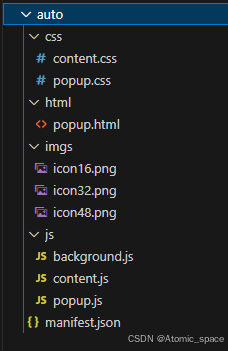

一站式 AI 云服务平台
更多推荐



 1
1 0
0- 0


 已为社区贡献1条内容

所有评论(0)