
2024年最全MMseqs2蛋白质序列快速高效比对工具,Linux运维架构师成长路线
最全的Linux教程,Linux从入门到精通第一份《Linux从入门到精通》466页内容简介====本书是获得了很多读者好评的Linux经典畅销书**《Linux从入门到精通》的第2版**。本书第1版出版后曾经多次印刷,并被51CTO读书频道评为“最受读者喜爱的原创IT技术图书奖”。本书第﹖版以最新的Ubuntu 12.04为版本,循序渐进地向读者介绍了Linux 的基础应用、系统管理、网络应用、
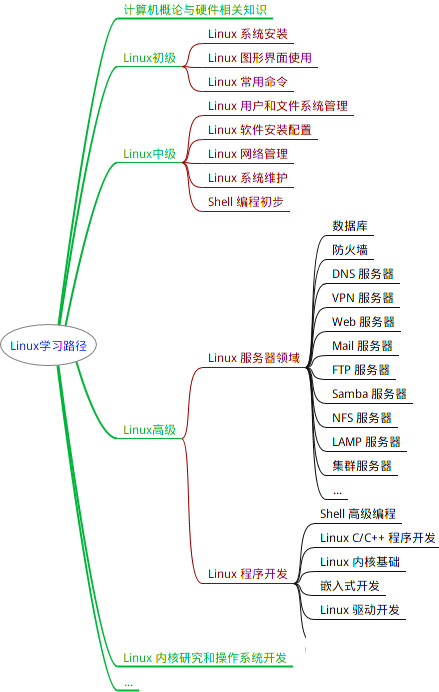
最全的Linux教程,Linux从入门到精通
======================
-
linux从入门到精通(第2版)
-
Linux系统移植
-
Linux驱动开发入门与实战
-
LINUX 系统移植 第2版
-
Linux开源网络全栈详解 从DPDK到OpenFlow
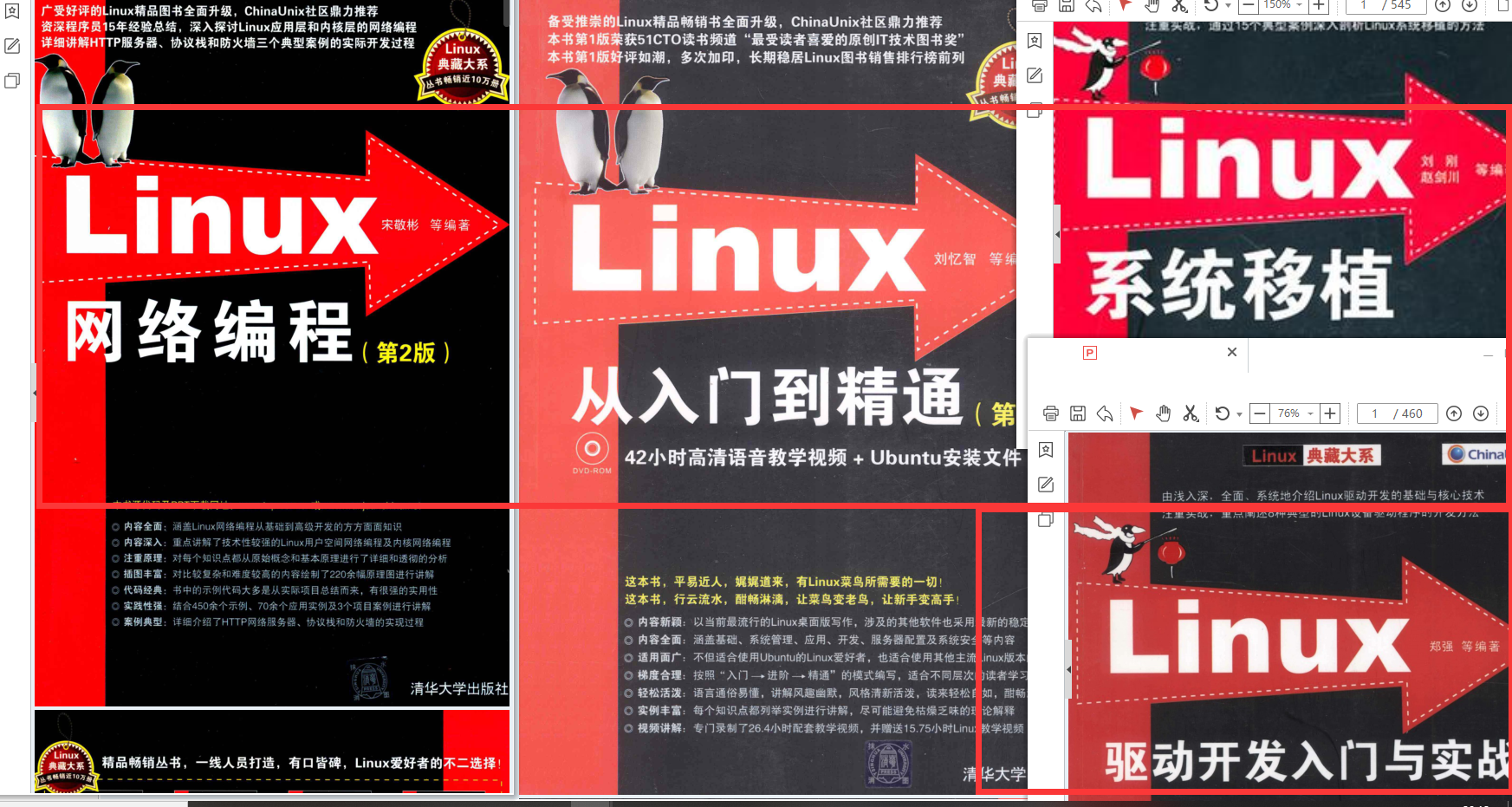
第一份《Linux从入门到精通》466页
====================
内容简介
====
本书是获得了很多读者好评的Linux经典畅销书**《Linux从入门到精通》的第2版**。本书第1版出版后曾经多次印刷,并被51CTO读书频道评为“最受读者喜爱的原创IT技术图书奖”。本书第﹖版以最新的Ubuntu 12.04为版本,循序渐进地向读者介绍了Linux 的基础应用、系统管理、网络应用、娱乐和办公、程序开发、服务器配置、系统安全等。本书附带1张光盘,内容为本书配套多媒体教学视频。另外,本书还为读者提供了大量的Linux学习资料和Ubuntu安装镜像文件,供读者免费下载。

本书适合广大Linux初中级用户、开源软件爱好者和大专院校的学生阅读,同时也非常适合准备从事Linux平台开发的各类人员。
需要《Linux入门到精通》、《linux系统移植》、《Linux驱动开发入门实战》、《Linux开源网络全栈》电子书籍及教程的工程师朋友们劳烦您转发+评论
网上学习资料一大堆,但如果学到的知识不成体系,遇到问题时只是浅尝辄止,不再深入研究,那么很难做到真正的技术提升。
一个人可以走的很快,但一群人才能走的更远!不论你是正从事IT行业的老鸟或是对IT行业感兴趣的新人,都欢迎加入我们的的圈子(技术交流、学习资源、职场吐槽、大厂内推、面试辅导),让我们一起学习成长!
# install by brew 一般是mac系统默认的,当然mac就是linux系统,所以其他linux系统也可以自己安装配置brew工具
brew install mmseqs2

# install via conda,这个大家都能用,估计做生信的都有了,直接命令安装
conda install -c conda-forge -c bioconda mmseqs2

# install docker,会容器管理的建议这个,导入导出方便,随处可移,运行完自动释放
docker pull ghcr.io/soedinglab/mmseqs2

###下面的就做参考吧,大家可能没有运维经验的会不熟悉
# static build with AVX2 (fastest)
wget https://mmseqs.com/latest/mmseqs-linux-avx2.tar.gz; tar xvfz mmseqs-linux-avx2.tar.gz; export PATH=$(pwd)/mmseqs/bin/:$PATH
# static build with SSE4.1
wget https://mmseqs.com/latest/mmseqs-linux-sse41.tar.gz; tar xvfz mmseqs-linux-sse41.tar.gz; export PATH=$(pwd)/mmseqs/bin/:$PATH
# static build with SSE2 (slowest, for very old systems)
wget https://mmseqs.com/latest/mmseqs-linux-sse2.tar.gz; tar xvfz mmseqs-linux-sse2.tar.gz;

###linux环境下就这样不用写注册表,将生成的二进制程序文件加入到系统环境中就好了。
export PATH=$(pwd)/mmseqs/bin/:$PATH

###克隆git仓库,自行编译,需要有debug经验
git clone https://github.com/soedinglab/MMseqs2.git
cd MMseqs2
mkdir build
cd build
cmake -DCMAKE_BUILD_TYPE=RELEASE -DCMAKE_INSTALL_PREFIX=. ..
make
make install
export PATH=$(pwd)/bin/:$PATH
全参数使用帮助信息:
MMseqs2 Version: 13.45111
© Martin Steinegger (martin.steinegger@snu.ac.kr)

usage: mmseqs <command> [<args>]

Easy workflows for plain text input/output
  easy-search       	Sensitive homology search
  easy-linsearch    	Fast, less sensitive homology search
  easy-cluster      	Slower, sensitive clustering
  easy-linclust     	Fast linear time cluster, less sensitive clustering
  easy-taxonomy     	Taxonomic classification
  easy-rbh          	Find reciprocal best hit

Main workflows for database input/output
  search            	Sensitive homology search
  linsearch         	Fast, less sensitive homology search
  map               	Map nearly identical sequences
  rbh               	Reciprocal best hit search
  linclust          	Fast, less sensitive clustering
  cluster           	Slower, sensitive clustering
  clusterupdate     	Update previous clustering with new sequences
  taxonomy          	Taxonomic classification

Input database creation
  databases         	List and download databases
  createdb          	Convert FASTA/Q file(s) to a sequence DB
  createindex       	Store precomputed index on disk to reduce search overhead
  createlinindex    	Create linsearch index
  convertmsa        	Convert Stockholm/PFAM MSA file to a MSA DB
  tsv2db            	Convert a TSV file to any DB
  tar2db            	Convert content of tar archives to any DB
  msa2profile       	Convert a MSA DB to a profile DB

Handle databases on storage and memory
  compress          	Compress DB entries
  decompress        	Decompress DB entries
  rmdb              	Remove a DB
  mvdb              	Move a DB
  cpdb              	Copy a DB
  lndb              	Symlink a DB
  unpackdb          	Unpack a DB into separate files
  touchdb           	Preload DB into memory (page cache)

Unite and intersect databases
  createsubdb       	Create a subset of a DB from list of DB keys
  concatdbs         	Concatenate two DBs, giving new IDs to entries from 2nd DB
  splitdb           	Split DB into subsets
  mergedbs          	Merge entries from multiple DBs
  subtractdbs       	Remove all entries from first DB occurring in second DB by key

Format conversion for downstream processing
  convertalis       	Convert alignment DB to BLAST-tab, SAM or custom format
  createtsv         	Convert result DB to tab-separated flat file
  convert2fasta     	Convert sequence DB to FASTA format
  result2flat       	Create flat file by adding FASTA headers to DB entries
  createseqfiledb   	Create a DB of unaligned FASTA entries
  taxonomyreport    	Create a taxonomy report in Kraken or Krona format

Sequence manipulation/transformation
  extractorfs       	Six-frame extraction of open reading frames
  extractframes     	Extract frames from a nucleotide sequence DB
  orftocontig       	Write ORF locations in alignment format
  reverseseq        	Reverse (without complement) sequences
  translatenucs     	Translate nucleotides to proteins
  translateaa       	Translate proteins to lexicographically lowest codons
  splitsequence     	Split sequences by length
  masksequence      	Soft mask sequence DB using tantan
  extractalignedregion	Extract aligned sequence region from query

Result manipulation
  swapresults       	Transpose prefilter/alignment DB
  result2rbh        	Filter a merged result DB to retain only reciprocal best hits
  result2msa        	Compute MSA DB from a result DB
  result2dnamsa     	Compute MSA DB with out insertions in the query for DNA sequences
  result2stats      	Compute statistics for each entry in a DB
  filterresult      	Pairwise alignment result filter
  offsetalignment   	Offset alignment by ORF start position
  proteinaln2nucl   	Transform protein alignments to nucleotide alignments
  result2repseq     	Get representative sequences from result DB
  sortresult        	Sort a result DB in the same order as the prefilter or align module
  summarizealis     	Summarize alignment result to one row (uniq. cov., cov., avg. seq. id.)
  summarizeresult   	Extract annotations from alignment DB

Taxonomy assignment
  createtaxdb       	Add taxonomic labels to sequence DB
  createbintaxonomy 	Create binary taxonomy from NCBI input
  addtaxonomy       	Add taxonomic labels to result DB
  taxonomyreport    	Create a taxonomy report in Kraken or Krona format
  filtertaxdb       	Filter taxonomy result database
  filtertaxseqdb    	Filter taxonomy sequence database
  aggregatetax      	Aggregate multiple taxon labels to a single label
  aggregatetaxweights	Aggregate multiple taxon labels to a single label
  lcaalign          	Efficient gapped alignment for lca computation
  lca               	Compute the lowest common ancestor
  majoritylca       	Compute the lowest common ancestor using majority voting

Multi-hit search
  multihitdb        	Create sequence DB for multi hit searches
  multihitsearch    	Search with a grouped set of sequences against another grouped set
  besthitperset     	For each set of sequences compute the best element and update p-value
  combinepvalperset 	For each set compute the combined p-value
  mergeresultsbyset 	Merge results from multiple ORFs back to their respective contig

Prefiltering
  prefilter         	Double consecutive diagonal k-mer search
  ungappedprefilter 	Optimal diagonal score search
  kmermatcher       	Find bottom-m-hashed k-mer matches within sequence DB
  kmersearch        	Find bottom-m-hashed k-mer matches between target and query DB

Alignment
  align             	Optimal gapped local alignment
  alignall          	Within-result all-vs-all gapped local alignment
  transitivealign   	Transfer alignments via transitivity
  rescorediagonal   	Compute sequence identity for diagonal
  alignbykmer       	Heuristic gapped local k-mer based alignment

Clustering
  clust             	Cluster result by Set-Cover/Connected-Component/Greedy-Incremental
  clusthash         	Hash-based clustering of equal length sequences
  mergeclusters     	Merge multiple cascaded clustering steps

Profile databases
  result2profile    	Compute profile DB from a result DB
  msa2result        	Convert a MSA DB to a profile DB
  msa2profile       	Convert a MSA DB to a profile DB
  profile2pssm      	Convert a profile DB to a tab-separated PSSM file
  profile2consensus 	Extract consensus sequence DB from a profile DB
  profile2repseq    	Extract representative sequence DB from a profile DB
  convertprofiledb  	Convert a HH-suite HHM DB to a profile DB

Profile-profile databases
  enrich            	Boost diversity of search result
  result2pp         	Merge two profile DBs by shared hits
  profile2cs        	Convert a profile DB into a column state sequence DB
  convertca3m       	Convert a cA3M DB to a result DB
  expandaln         	Expand an alignment result based on another
  expand2profile    	Expand an alignment result based on another and create a profile

Utility modules to manipulate DBs
  view              	Print DB entries given in --id-list to stdout
  apply             	Execute given program on each DB entry
  filterdb          	DB filtering by given conditions
  swapdb            	Transpose DB with integer values in first column
  prefixid          	For each entry in a DB prepend the entry key to the entry itself
  suffixid          	For each entry in a DB append the entry key to the entry itself
  renamedbkeys      	Create a new DB with original keys renamed

Special-purpose utilities
  diffseqdbs        	Compute diff of two sequence DBs
  summarizetabs     	Extract annotations from HHblits BLAST-tab-formatted results
  gff2db            	Extract regions from a sequence database based on a GFF3 file
  maskbygff         	Mask out sequence regions in a sequence DB by features selected from a GFF3 file
  convertkb         	Convert UniProtKB data to a DB
  summarizeheaders  	Summarize FASTA headers of result DB
  nrtotaxmapping    	Create taxonomy mapping for NR database
  extractdomains    	Extract highest scoring alignment regions for each sequence from BLAST-tab file
  countkmer         	Count k-mers
光看帮助会有点懵了,但总体还是清晰的,下面大家可以在逐步使用中熟悉这些参数的使用方法。
这里说一下主要工作流程模块:
###帮助文件最上面是关于主要工作流程模块的介绍。
easy-search       	Sensitive homology search,高敏感度同源基因搜索
easy-linsearch    	Fast, less sensitive homology search,较低敏感度同源基因搜索
easy-cluster      	Slower, sensitive clustering,较慢的较高敏感度聚类
easy-linclust     	Fast linear time cluster, less sensitive clustering,快速线性时间聚类,低灵敏度聚类
easy-taxonomy     	Taxonomic classification,物种注释
easy-rbh          	Find reciprocal best hit,查找最佳命中


#####使用时很简单,分别查看帮助文件
mmseqs easy-search --help
mmseqs easy-linsearch --help
mmseqs easy-cluster --help
mmseqs easy-linclust --help
mmseqs easy-taxonomy --help
mmseqs easy-rbh --help
2. 下载数据库Downloading databases
#先查看有些什么数据库,可以直接使用下面的帮助信息查看

mmseqs databases

Usage: mmseqs databases <name> <o:sequenceDB> <tmpDir> [options]

  Name                	Type      	Taxonomy	Url
- UniRef100           	Aminoacid 	     yes	https://www.uniprot.org/help/uniref
- UniRef90            	Aminoacid 	     yes	https://www.uniprot.org/help/uniref
- UniRef50            	Aminoacid 	     yes	https://www.uniprot.org/help/uniref
- UniProtKB           	Aminoacid 	     yes	https://www.uniprot.org/help/uniprotkb
- UniProtKB/TrEMBL    	Aminoacid 	     yes	https://www.uniprot.org/help/uniprotkb
- UniProtKB/Swiss-Prot	Aminoacid 	     yes	https://uniprot.org
- NR                  	Aminoacid 	     yes	https://ftp.ncbi.nlm.nih.gov/blast/db/FASTA
- NT                  	Nucleotide	       -	https://ftp.ncbi.nlm.nih.gov/blast/db/FASTA
- GTDB                  Aminoacid	     yes	https://gtdb.ecogenomic.org
- PDB                 	Aminoacid 	       -	https://www.rcsb.org
- PDB70               	Profile   	       -	https://github.com/soedinglab/hh-suite
- Pfam-A.full         	Profile   	       -	https://pfam.xfam.org
- Pfam-A.seed         	Profile   	       -	https://pfam.xfam.org
- Pfam-B              	Profile   	       -	https://xfam.wordpress.com/2020/06/30/a-new-pfam-b-is-released
- CDD                   Profile                -        https://www.ncbi.nlm.nih.gov/Structure/cdd/cdd.shtml
- eggNOG              	Profile   	       -	http://eggnog5.embl.de
- VOGDB                 Profile                -        https://vogdb.org
- dbCAN2              	Profile   	       -	http://bcb.unl.edu/dbCAN2
- SILVA                 Nucleotide           yes        https://www.arb-silva.de
- Resfinder           	Nucleotide	       -	https://cge.cbs.dtu.dk/services/ResFinder
- Kalamari            	Nucleotide	     yes	https://github.com/lskatz/Kalamari
下载指定数据库
#下载swissprot数据库
mmseqs databases UniProtKB/Swiss-Prot outpath/swissprot tmp
下载完的数据库就在指定路径下,不含swissprot名, 也就是自己指定的/outpath路径,使用的时候指定数据库路径/outpath/swissprot
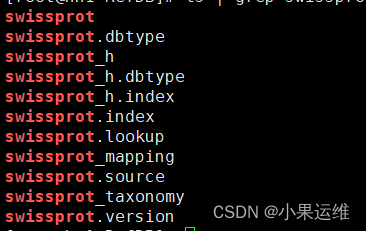
当然可以自己下载fasta文件手动配置数据库
3. 创建数据库
使用MMseqs创建一个数据库,该数据库将包含您要使用的蛋白质序列数据。要创建数据库,请执行以下命令:
#先将参考库fasta文件生成mmseqs对应数据库文件
mmseqs createdb <sequences.fasta> <database_name>

## 其中,`<sequences.fasta>`是您的蛋白质序列文件名,`<database_name>`是您要为数据库指定的名称。

#######################################################################################
mmseqs createdb examples/QUERY.fasta queryDB
mmseqs createdb examples/DB.fasta targetDB
4. 训练数据库
为了提高比对质量,可以训练数据库。要训练数据库,请执行以下命令:
#建立索引,加速比对
mmseqs createindex <database_name> <index_prefix>

# 其中,`<database_name>`是您之前创建的数据库名称,`<index_prefix>`是用于索引的前缀。
5. 进行比对
现在,您可以使用MMseqs比对您的蛋白质序列了。要进行比对,请执行以下命令:
mmseqs search <query.fasta> <database_name> <result_file> <tmp_dir>
#其中,`<query.fasta>`是您要比对的蛋白质序列文件名,`<database_name>`是您之前创建的数据库名称,`<result_file>`是将保存结果的文件名,`<tmp_dir>`是用于临时文件的目录。
#### 例如,这里直接用easy-search模块基于swissprot数据库进行QUERY.fasta输入文件的比对
#### 比对结果放入alnRes.m8
#### 个人建议输入文件,数据库文件还有输出文件和tmp目录统一都使用绝对路径
mmseqs easy-search examples/QUERY.fasta swissprot alnRes.m8 tmp
###结果是不是很熟悉:
k141_759496_length_1110_cov_3.0000_1 A8BQB4 0.258 337 187 0 117 369 1084 1420 2.200E-12 73
k141_759496_length_1110_cov_3.0000_1 Q2PQH8 0.258 337 187 0 117 369 1084 1420 3.903E-12 72
k141_759496_length_1110_cov_3.0000_1 P35574 0.252 337 188 0 117 369 1106 1442 6.921E-12 72
k141_759496_length_1110_cov_3.0000_1 P35573 0.244 337 191 0 117 369 1083 1419 1.205E-10 68
k141_759496_length_1110_cov_3.0000_1 Q06625 0.345 83 51 0 117 195 1067 1149 8.270E-08 59

最全的Linux教程,Linux从入门到精通
======================
1. **linux从入门到精通(第2版)**
2. **Linux系统移植**
3. **Linux驱动开发入门与实战**
4. **LINUX 系统移植 第2版**
5. **Linux开源网络全栈详解 从DPDK到OpenFlow**

第一份《Linux从入门到精通》466页
====================
内容简介
====
本书是获得了很多读者好评的Linux经典畅销书**《Linux从入门到精通》的第2版**。本书第1版出版后曾经多次印刷,并被51CTO读书频道评为“最受读者喜爱的原创IT技术图书奖”。本书第﹖版以最新的Ubuntu 12.04为版本,循序渐进地向读者介绍了Linux 的基础应用、系统管理、网络应用、娱乐和办公、程序开发、服务器配置、系统安全等。本书附带1张光盘,内容为本书配套多媒体教学视频。另外,本书还为读者提供了大量的Linux学习资料和Ubuntu安装镜像文件,供读者免费下载。

**本书适合广大Linux初中级用户、开源软件爱好者和大专院校的学生阅读,同时也非常适合准备从事Linux平台开发的各类人员。**
> 需要《Linux入门到精通》、《linux系统移植》、《Linux驱动开发入门实战》、《Linux开源网络全栈》电子书籍及教程的工程师朋友们劳烦您转发+评论
**网上学习资料一大堆,但如果学到的知识不成体系,遇到问题时只是浅尝辄止,不再深入研究,那么很难做到真正的技术提升。**
**[需要这份系统化的资料的朋友,可以点击这里获取!](https://bbs.csdn.net/forums/4f45ff00ff254613a03fab5e56a57acb)**
**一个人可以走的很快,但一群人才能走的更远!不论你是正从事IT行业的老鸟或是对IT行业感兴趣的新人,都欢迎加入我们的的圈子(技术交流、学习资源、职场吐槽、大厂内推、面试辅导),让我们一起学习成长!**

一站式 AI 云服务平台
更多推荐



 5
5 0
0- 0


 已为社区贡献4条内容

所有评论(0)