
active directory自动化实现
注意:txt、csv文件以UTF-8编码保存,否侧中文乱码不可识别。
·
ADuser增与改
文件读取
注意:txt、csv文件以UTF-8编码保存,否侧中文乱码不可识别。
创建模板.txt:

群组.csv: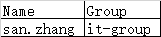
更改描述.txt:
精确或模糊匹配:
创建
Import-Csv c:\users\y\desktop\powershell\创建模板.txt | foreach {New-ADUser -Name $_.name -DisplayName $_.displayname -Description $_.description -UserPrincipalName $_.userprincipalname -SamAccountName $_.samaccountname -AccountExpirationDate $null -Company $_.company -Department $_.department -Title $_.title -Path $_.path -AccountPassword (ConvertTo-SecureString "Abc123" -AsPlainText -Force) -PasswordNeverExpires $true -Enabled $true}
Import-Csv c:\users\y\desktop\powershell\群组.csv | foreach {Add-adgroupmember -Identity $_.Group -members $_.Name}
更改
Import-Csv c:\users\y\desktop\powershell\更改描述.txt | foreach {Set-ADUser -Identity $_.name -DisplayName $_.displayname -Description $_.description}
查询
$a=Get-Content -Path c:\users\y\desktop\powershell\description.txt
foreach($i in $a){
$b=(Get-ADUser -Filter {Description -like $i} -SearchBase "OU=SHYK,OU=组织机构,DC=sinopec,DC=ad" | Select name) >>c:\users\y\desktop\查询描述.txt
}
ADuser查与改
新建目录
New-Item -Path "C:\result" -ItemType Directory
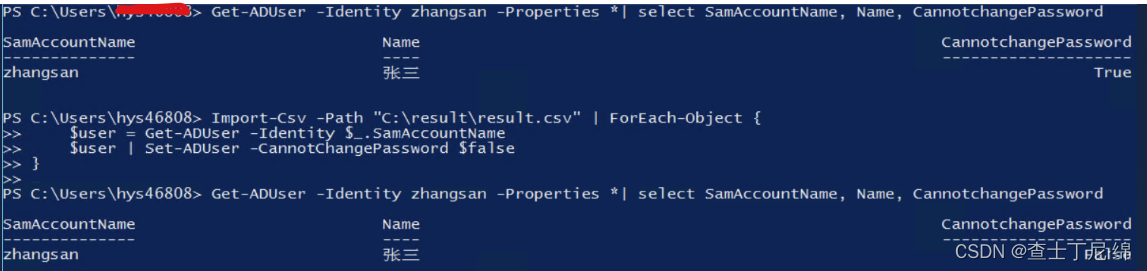
查询“用户不能更改密码”为勾选状态的所有域用户,将域账户、姓名、勾选状态作为结果保存到C:\result\result.csv
Get-ADUser -Filter * -Properties CannotChangePassword | Where-Object { $_.CannotChangePassword -eq $true } | Select SamAccountName, Name, CannotChangePassword | Export-Csv -Path "C:\result\result.csv" -NoTypeInformation -Encoding UTF8

将符合条件的结果,作为输入,取消勾选“用户不能更改密码"。
Import-Csv -Path "C:\result\result.csv" | ForEach-Object {
$user = Get-ADUser -Identity $_.SamAccountName
$user | Set-ADUser -CannotChangePassword $false
}
ADuser恢复
检查Active Directory回收站是否启用,并启用
Get-ADOptionalFeature -Filter {Name -like "Recycle Bin Feature"}

Enable-ADOptionalFeature -Identity "CN=Recycle Bin Feature,CN=Optional Features,CN=Directory Service,CN=Windows NT,CN=Services,CN=Configuration,DC=hy,DC=com" -Scope ForestOrConfigurationSet -Target "域名"
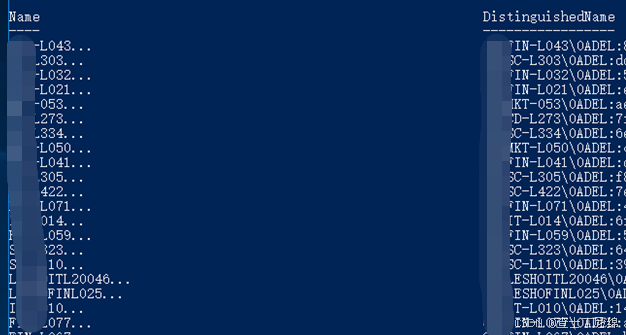
查看已删除的用户
Get-ADObject -Filter 'isDeleted -eq $true -and objectClass -eq "user"' -IncludeDeletedObjects | Select-Object Name, DistinguishedName
恢复
Get-ADObject -Filter 'isDeleted -eq $true -and objectClass -eq "user"' -IncludeDeletedObjects |
ForEach-Object {

     Restore-ADObject -Identity $_.DistinguishedName
}

一站式 AI 云服务平台
更多推荐



 3
3 0
0- 0


 已为社区贡献2条内容

所有评论(0)