
yum安装epel-release扩展源后yum 安装其他包报错:One of the configured repositories failed (unKnown)
yum 安装epel-release扩展源后报错:One of the configured repositories failed (unKnown)-----------------------------------------------------报错分析:1、错误提示一:(虚假原因)One of the configured repositories failed (Unknown),
yum 安装epel-release扩展源后报错:One of the configured repositories failed (unKnown)
-----------------------------------------------------
报错分析:
1、错误提示一:(虚假原因)
One of the configured repositories failed (Unknown),and yum doesn't have enough cached data to continue.
中文翻译
其中一个已配置的存储库失败(未知),并且yum没有足够的缓存数据可以继续。
2、错误提示二:(真实原因)(出问题的根本)
Cannot retrieve metalink for repository: epel/x86_64. Please verify its path and try again
中文翻译
无法检索存储库的metalink:epel / x86_64。 请验证其路径,然后重试
3.完整错误
One of the configured repositories failed (unKnown),
 and yum doesn't have enough cached data to continue. At this point the only
 safe thing yum can do is fail. There are a few ways to work "fix" this:
     1. Contact the upstream for the repository and get them to fix the problem.
     2. Reconfigure the baseurl/etc. for the repository, to point to a working
        upstream. This is most often useful if you are using a newer
        distribution release than is supported by the repository (and the
        packages for the previous distribution release still work).
     3. Disable the repository, so yum won't use it by default. Yum will then
        just ignore the repository until you permanently enable it again or use
        --enablerepo for temporary usage:
            yum-config-manager --disable <repoid>
     4. Configure the failing repository to be skipped, if it is unavailable.
        Note that yum will try to contact the repo. when it runs most commands,
        so will have to try and fail each time (and thus. yum will be be much
        slower). If it is a very temporary problem though, this is often a nice
        compromise:
            yum-config-manager --save --setopt=<repoid>.skip_if_unavailable=true
Cannot retrieve metalink for repository: epel/x86_64. Please verify its path and try again
4.简单分析
由于读者使用yum安装了epel源扩展包,在yum源的路径里,更新了epel.repo、epel-testing.repo两个文件,下载的源随之也需要更改!!!
解决方法
步骤一:(备份)
备份需要修改的两个文件
(当然最好备份整个yum.repos.d路径下的所有文件)
cd /etc/yum.repos.d/
mkdir yum_bak
cp -p .* yum_bak/
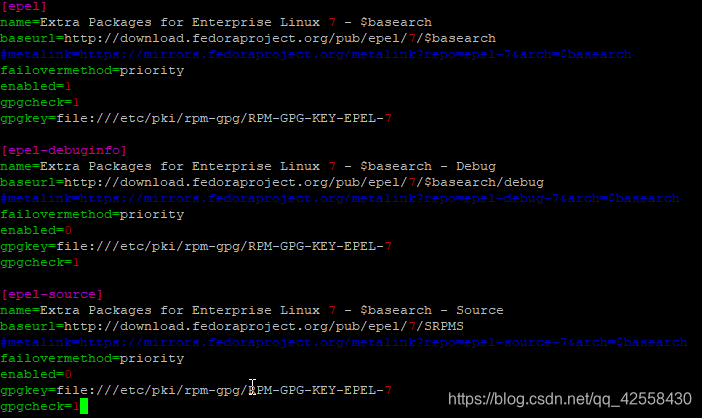
步骤二:(修改epel.repo配置文件)
1.管理员方式编辑:vim /etc/yum.repos.d/epel.repo
2.注释掉所有的metalink开头的行,取消注释baseurl开头的行
(这里列举一处在,有多处需要自己去发现,一般三处)
[epel]
name=Extra Packages for Enterprise Linux 7 - $basearch
#----------------------------------------------------------
baseurl=http://download.fedoraproject.org/pub/epel/7/$basearch
#metalink=https://mirrors.fedoraproject.org/metalink?repo=epel-7&arch=$basearch
#----------------------------------------------------------
failovermethod=priority
enabled=1
gpgcheck=1
gpgkey=file:///etc/pki/rpm-gpg/RPM-GPG-KEY-EPEL-7
这里提供我修改好的图片供参考:
步骤三 :(修改CentOS-Base.repo配置文件)
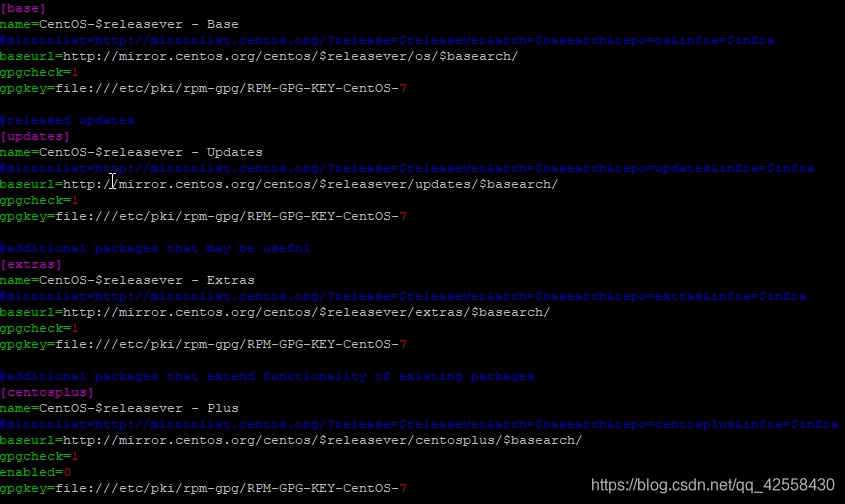
1.管理员方式编辑:vim /etc/yum.repos.d/CentOS-Base.repo
2.注释掉所有的mirrorlist开头的行,取消注释baseurl开头的行
(不列举了,有多处需要自己去发现,一般四处)
这里提供我修改好的图片供参考:
步骤四 :(清除缓存等,更新yum源)
yum clean all
yum makecache
yum update
提示:
网上有很多资料说:
1.检查能否ping百度,我公司使用了代理直接ping不通任何外网地址。也有同行发现ping通了也会有相同问题,因此排除这个解决方法
2.修改/etc/resolv.conf,添加dns解析,同样我公司内网行不通!也排除这个问题!!!注:当然如果是外网机的话,前面两点是需要配置的!
·
·
·
作者说明:写文档,就用心写到最好,供大家阅读!!!

一站式 AI 云服务平台
更多推荐



 0
0 0
0- 0


 已为社区贡献1条内容

所有评论(0)