
从小白到大神之路之学习运维第29天
第二阶段基础时间:2023年5月25日参加人:全班人员内容:Apache服务目录一、基本信息二、安装方法三、配置方法四、虚拟主机头1:基于不同的IP地址2:基于不同的端口3:基于不同的域名(一)概述web服务器的中间件用于构建静态web站点默认版本2.4.6(二)应用场景web服务器后台解析视频站点博客......(一)安装方式(二)rpm/yum安装主配置文件:(三)源码安装(一)优化命令路径(
第二阶段基础
时 间:2023年5月25日
参加人:全班人员
内 容:
Apache服务
目录
一、基本信息
(一)概述
web服务器的中间件
用于构建静态web站点
默认版本2.4.6
(二)应用场景
web服务器
后台解析
视频站点
博客 ......
二、安装方法
(一)安装方式
rpm/yum安装
源码安装
(二)rpm/yum安装
rpm -ivh httpd...rpm
yum install httpd
主配置文件:
/etc/httpd/conf/httpd.conf
Listen 80
User apache
Group apache
ServerName www.example.com:80
Require all denied;Require all granted
DocumentRoot "/var/www/html"
DirectoryIndex index.html
(三)源码安装
1:解包
tar -xzf httpd-2.4.54.tar.gz
2:配置
cd httpd-2.4.254
./configure --prefix=/usr/local/apache
yum -y install apr apr-util apr-util-devel
./configure --prefix=/usr/local/apache
yum -y install gcc gcc-c++
./configure --prefix=/usr/local/apache
yum -y install pcre-devel
./configure --prefix=/usr/local/apache
3:编译
make
4:安装
make install
查看
cd /usr/local/apache
三、配置方法
(一)优化命令路径
将安装目录中的启动命令链接到/usr/local/bin
echo $PATH 查看命令选择路径
ln -s /usr/local/apache/bin/apachectl
/usr/local/bin/apachectl 软链接
配置文件 (/usr/local/apache/conf/httpd.conf)
ServerRoot "/usr/local/apache"
定义apache安装路径
Listen 80
定义apache的监听端口号
LoadModule
加载apache运行时的必要模块文件
User daemon
Group daemon
定义运行用户和运行组
运行用户:程序需运行时哪个用户打开的程序文件
ServerName www.example.com:80
定义web服务使用域名访问
Require all denied;Require all granted
定义访问权限;
denied:不能访问
granted:可以访问
DocumentRoot "/usr/local/apache/htdocs"
定义文档根目录
DirectoryIndex index.html
定义默认访问主页
ErrorLog "logs/error_log"
LogLevel warn
LogFormat
CustomLog
定义:
错误日志路径;错误日志级别;
日志格式;访问日志
开启服务
apachectl start
网址访问192.168.2.20
四、虚拟主机头
(一)修改方式
修改主配置文件
vim /usr/local/apache/conf/httpd.conf
声明监听不同的IP地址的80端口
开启使用虚拟主机文件的选项
# Virtual hosts
Include conf/extra/httpd-vhosts.conf
主配置文件包含虚拟主机配置文件
vim /usr/local/apache/conf/extra/httpd-vhosts.conf
(二)实现方法
1:基于不同的IP地址
步骤一:修改主配置文件
vim /usr/local/apache/conf/httpd.conf
声明监听不同的IP地址的80端口
Listen 192.168.2.20:80
Listen 192.168.2.30:80
开启使用虚拟主机文件的选项
# Virtual hosts
# Include conf/extra/httpd-vhosts.conf
步骤二:配置定义默认访问主页
vim /usr/local/apache/htdocs
mkdir hy1 mkdir hy2
cp index.html hy1
cp indes.heml hy2
分别键入内容,以便下步验证
例:hy1--index.html
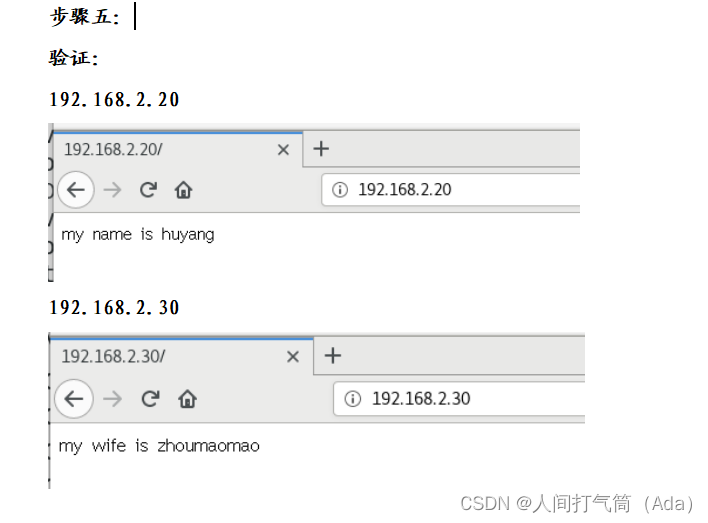
my name is huyang
例:hy2--index.html
my wife is zhoumaomao
步骤三:主配置文件包含虚拟主机配置文件
vim /usr/local/apache/conf/extra/httpd-vhosts.conf
<VirtualHost 192.168.2.20:80>
DocumentRoot "/usr/local/apache/htdocs/hy1"
#ServerName dummy-host.example.com
#ServerAlias www.dummy-host.example.com
ErrorLog "logs/2.20-error_log"
CustomLog "logs/2.20-access_log" common
<VirtualHost 192.168.2.30:80>
DocumentRoot "/usr/local/apache/htdocs/hy2"
#ServerName dummy-host2.example.com
ErrorLog "logs/2.30-error_log"
CustomLog "logs/2.30-access_log" common
步骤四:启动服务
apachectl start
步骤五:
验证:
192.168.2.20
192.168.2.30
2:基于不同的端口
步骤一:修改主配置文件
vim /usr/local/apache/conf/httpd.conf
声明监听不同的IP地址的80端口
Listen 192.168.2.20:8081
Listen 192.168.2.20:8082
开启使用虚拟主机文件的选项
# Virtual hosts
# Include conf/extra/httpd-vhosts.conf
步骤二:配置定义默认访问主页
vim /usr/local/apache/htdocs
mkdir hy1 mkdir hy2
cp index.html hy1
cp indes.heml hy2
分别键入内容,以便下步验证
例:hy1--index.html
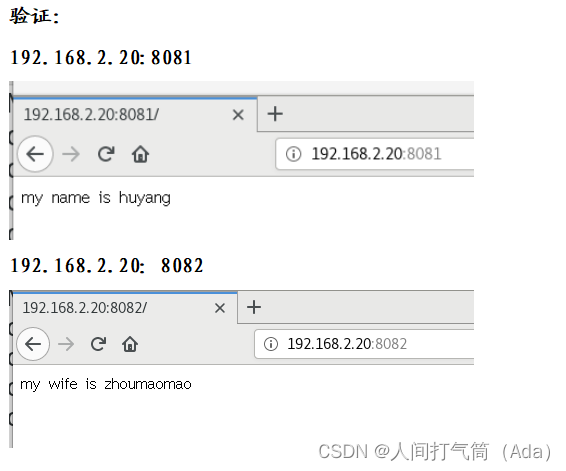
my name is huyang
例:hy2--index.html
my wife is zhoumaomao
步骤三:主配置文件包含虚拟主机配置文件
vim /usr/local/apache/conf/extra/httpd-vhosts.conf
<VirtualHost 192.168.2.20:8081>
DocumentRoot "/usr/local/apache/htdocs/hy1"
#ServerName dummy-host.example.com
#ServerAlias www.dummy-host.example.com
ErrorLog "logs/8081-error_log"
CustomLog "logs/8081-access_log" common
<VirtualHost 192.168.2.20:8082>
DocumentRoot "/usr/local/apache/htdocs/hy2"
#ServerName dummy-host2.example.com
ErrorLog "logs/8082-error_log"
CustomLog "logs/8082-access_log" common
步骤四:启动服务
apachectl start
步骤五:
验证:
192.168.2.20:8081
192.168.2.20:8082
3:基于不同的域名
步骤一:安装dns域名解析
yum -y install bind
配置dns主配置文件
配置dns区域配置文件
配置数据文件
正向解析:
反向解析:
步骤二:修改主配置文件
vim /usr/local/apache/conf/httpd.conf
声明监听不同的IP地址的80端口
Listen 192.168.2.20:80
开启使用虚拟主机文件的选项
# Virtual hosts
# Include conf/extra/httpd-vhosts.conf
步骤三:配置定义默认访问主页
vim /usr/local/apache/htdocs
mkdir hy1 mkdir hy2
cp index.html hy1
cp indes.heml hy2
分别键入内容,以便下步验证
例:hy1--index.html
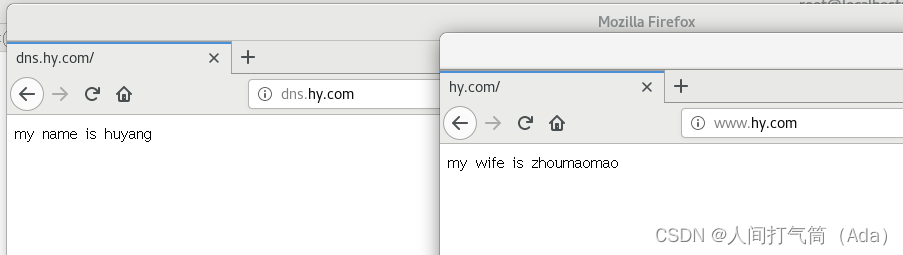
my name is huyang
例:hy2--index.html
my wife is zhoumaomao
步骤四:主配置文件包含虚拟主机配置文件
vim /usr/local/apache/conf/extra/httpd-vhosts.conf
<VirtualHost dns.hy.com:80>
DocumentRoot "/usr/local/apache/htdocs/hy1"
ServerName dummy-dns.hy.com
#ServerAlias www.dummy-host.example.com
ErrorLog "hy-error_log"
CustomLog "hy-access_log" common
<VirtualHost www.hy.com:80>
DocumentRoot "/usr/local/apache/htdocs/hy2"
ServerName dummy-www.hy.com
ErrorLog "hy-error_log"
CustomLog "hy-access_log" common
步骤五:启动服务
apachectl start
步骤六:
验证:
dns.hy.com
www.hy.com

一站式 AI 云服务平台
更多推荐



 1
1 0
0- 0


 已为社区贡献21条内容

所有评论(0)