
从零开始架构Vue3+typescript低代码平台starfish-h5,页面结构完成,编辑模块拖拽或监听鼠标模块移动,实现放大缩小,公共方法防多次点击
为了从零搭建一个大型的项目,自己研究学习参考开发一款属于自己的低代码平台技术栈Vue3typescriptwebpack目录结构pages 存放页面Editer 编辑组件页面styles 全局样式utils 全局公共方法_ 公共方法editMouse 编辑器鼠标拖拽和监听鼠标滚动事件更新2021/9/26 更新配置完善、路由新增、sass模块引入2021/9/27 更新编辑模块移动与拖拽和鼠标滑动
·
为了从零搭建一个大型的项目,自己研究学习参考开发一款属于自己的低代码平台
技术栈
- Vue3
- typescript
- webpack
目录结构
- pages 存放页面
- Editer 编辑组件页面
- styles 全局样式
- utils 全局公共方法
- _ 公共方法
- editMouse 编辑器鼠标拖拽和监听鼠标滚动事件
更新
2021/9/26 更新配置完善、路由新增、sass模块引入
2021/9/27 更新编辑模块移动与拖拽和鼠标滑动联动,放大缩小
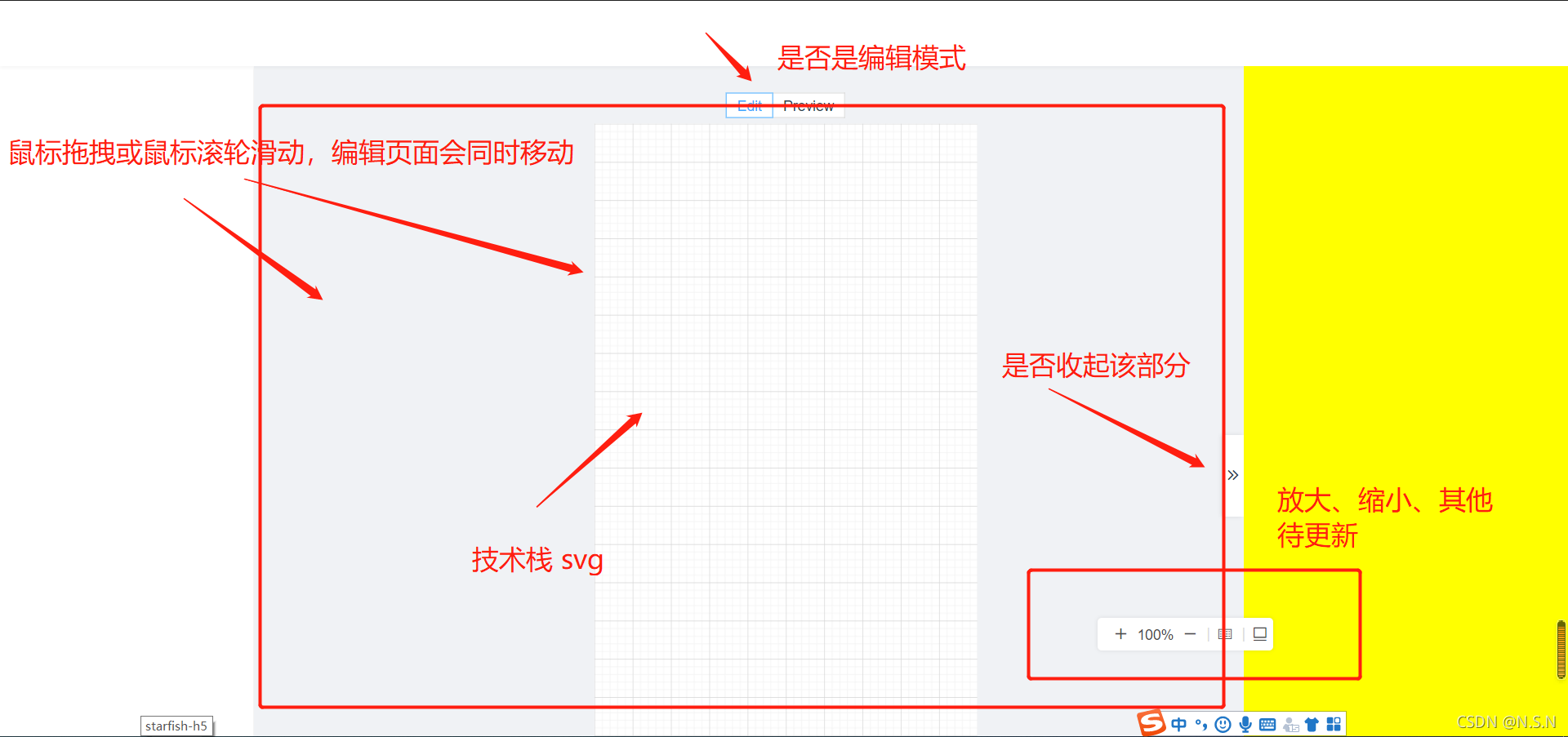
编辑页面随鼠标拖拽移动
// 获取用户点击编辑器当前的transform值
function getDomTransfrom(dom: HTMLElement): Array<number> {
  const translates = getComputedStyle(dom).transform;
  const translatesArr: string[] = translates.substring(7).split(",");
  let nowX = 0;
  let nowY = 0;
  if (translatesArr.length > 4) {
    nowX = parseFloat(translatesArr[4]);
    nowY = parseFloat(translatesArr[5].replace(/\)/g, ""));
  }
  return [nowX, nowY];
}
function useUserMove(canvasBox: HTMLElement, e: any, isTransition: isTransition): void {
  // 检查用户鼠标落到编辑器中
  e.preventDefault();
  const dom: any = document.getElementsByClassName("canvasBox")[0];
  // 获取用户点击编辑器当前的transform值
  const [nowX, nowY] = getDomTransfrom(dom);
  const startX = e.clientX;
  const startY = e.clientY;
  const move = (e: any) => {
 	// 移动的位置
    const moveX = e.clientX;
    const moveY = e.clientY;
    // 当前位置+移动的距离
    const x = moveX - startX + nowX;
    const y = moveY - startY + nowY;
    canvasBox.style.transform = `translate(${x}px, ${y}px)`;
  };
  const up = () => {
    // 鼠标松开,则恢复补件动画
    isTransition.value = true;
    document.documentElement.removeEventListener("mousemove", move);
    document.documentElement.removeEventListener("mouseup", up);
  };
  // 鼠标落下监听鼠标的移动与松开
  document.documentElement.addEventListener("mousemove", move);
  document.documentElement.addEventListener("mouseup", up);
}
编辑页面随鼠标滚轮移动
在没有滚动条或者内容没有被滚动的时候也会发生,意思是只要鼠标动不管页面动不动。如果你是想一个元素内容滚动后接受一个通知的话,使用onscroll事件。
function windowAddMouseWheel(canvasBox: HTMLElement) {
   // 使用window.onmousewheel时ts会报错,出现无该属性,所以重新定义了一下
  const win: any = window,
    de: any = document;
  let move: number;
  const scrollFunc = function (e: any) {
    const [nowX, nowY] = getDomTransfrom(canvasBox);
    e = e || window.event;
    if (e.wheelDelta) {
      //判断浏览器IE,谷歌滑轮事件
      if (e.wheelDelta > 0) {
        //当滑轮向上滚动时
        console.log("滑轮向下滚动");
      }
      if (e.wheelDelta < 0) {
        //当滑轮向下滚动时
        console.log("滑轮向上滚动");
      }
      move = e.wheelDelta;
    } else if (e.detail) {
      //Firefox滑轮事件
      if (e.detail > 0) {
        //当滑轮向上滚动时
        console.log("滑轮向下滚动");
      }
      if (e.detail < 0) {
        //当滑轮向下滚动时
        console.log("滑轮向上滚动");
      }
      move = e.detail;
    }
    // 鼠标滚轮滚动只y轴变更
    canvasBox.style.transform = `translate(${nowX}px, ${nowY + move}px)`;
  };
  document.addEventListener("DOMMouseScroll", scrollFunc, false);
  win.onmousewheel = de.onmousewheel = scrollFunc;
}
防止多次点击方法
在window对象中加入新的变量,ts会提示The property ‘MyNamespace’ does not exist on value of type ‘window’ any"即找不到变量
所以需要为window声明这个变量:
// 给window新增属性必须为window新增属性
declare global {
  interface Window {
    clickCountLimitMock: boolean;
  }
}

class Flex {
  lastClickTime: number;
  constructor() {
    this.lastClickTime = 0;
  }
  //  防止用户多次点击
  clickCountLimit(): boolean {
    let isCanGo = false;

    if (window.clickCountLimitMock) {
      return true;
    }
    if (!this.lastClickTime) {
      this.lastClickTime = new Date().getTime();
      isCanGo = true;
    } else {
      const shicha = new Date().getTime() - this.lastClickTime;
      this.lastClickTime = new Date().getTime();
      isCanGo = shicha >= 1000;
    }
    if (!isCanGo) {
      console.log("手残党点击太快了");
    }
    return isCanGo;
  }
}
希望大佬们能给我这个小萌新个star,感激不尽,低代码平台持续更新,从零搭建,我们一起学习
github仓库跳转

一站式 AI 云服务平台
更多推荐



 0
0 0
0- 0


 已为社区贡献2条内容

所有评论(0)