
pytorch使用hiddenlayer深度学习模型可视化
问题描述在写神经网络模型的时候,往往不能很直观的判断我们设计的模型是否是我们想象中的样子,因此需要将模型可视化。解决方案:1.安装hiddenlayer:pip install hiddenlayer2.应用实例例如有一个两层的神经网络class CNN2(nn.Module):#3 layersdef __init__(self,num_classes=10):super(CNN2, self)
·
问题描述
在写神经网络模型的时候,往往不能很直观的判断我们设计的模型是否是我们想象中的样子,因此需要将模型可视化。
解决方案:
1.安装hiddenlayer:
pip install hiddenlayer
2.应用实例
例如有一个两层的神经网络
class CNN2(nn.Module):  #3 layers
    def __init__(self,num_classes=10):
        super(CNN2, self).__init__()

        self.layer1 = nn.Sequential(
            nn.Conv2d(1, 16, kernel_size=3),  # 16, 26 ,26
            nn.BatchNorm2d(16),
            nn.ReLU(inplace=True)
        )
        self.layer2 = nn.Sequential(
            nn.Conv2d(16, 16, kernel_size=1),  # 16, 26 ,26
            nn.BatchNorm2d(16),
            nn.ReLU(inplace=True)
        )


        self.fc1 = nn.Linear(1*10816, 2048)
        self.fc2 = nn.Linear(2048, num_classes)

    def forward(self, x):
        x = self.layer1(x)
        x = self.layer2(x)
        x = x.view(x.size(0), -1)
        x = self.fc1(x)
        x = self.fc2(x)

        return F.log_softmax(x, dim=1)
自定义函数来打印模型的参数,以及可视化图像
def modelhiddenlayer(model,input,input2):
     # import hiddenlayer as h
     # params: model = MSDNet(args).cuda() input = (3, 32, 32) input2 = [1 ,3, 32,32]
     print(model)
     summary(model, input)
     vis_graph = h.build_graph(model, torch.zeros(input2).cuda())   # 获取绘制图像的对象
     vis_graph.theme = h.graph.THEMES["blue"].copy()     # 指定主题颜色
     vis_graph.save("./demo1.png")   # 保存图像的路径
定义主函数
def main():
    model = CNN2(10).cuda()
    input = (1, 28, 28)
    input2 = [1,1,28,28]
    modelhiddenlayer(model,input,input2)

if __name__ == '__main__':
    main()
结果如图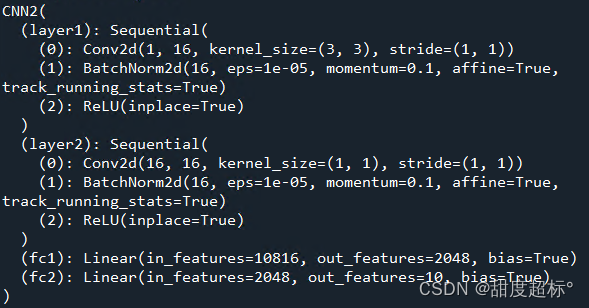
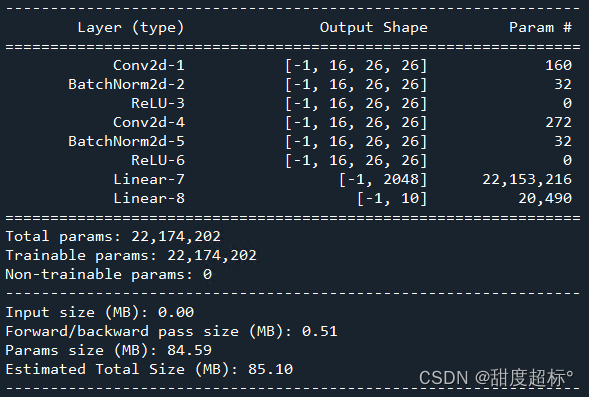

成功!
完整代码
import torch
from torch import nn
import torch.nn.functional as F
from torchsummary import summary
import hiddenlayer as h
from torchviz import make_dot

class CNN2(nn.Module):  #3 layers
    def __init__(self,num_classes=10):
        super(CNN2, self).__init__()

        self.layer1 = nn.Sequential(
            nn.Conv2d(1, 16, kernel_size=3),  # 16, 26 ,26
            nn.BatchNorm2d(16),
            nn.ReLU(inplace=True)
        )
        self.layer2 = nn.Sequential(
            nn.Conv2d(16, 16, kernel_size=1),  # 16, 26 ,26
            nn.BatchNorm2d(16),
            nn.ReLU(inplace=True)
        )


        self.fc1 = nn.Linear(1*10816, 2048)
        self.fc2 = nn.Linear(2048, num_classes)

    def forward(self, x):
        x = self.layer1(x)
        x = self.layer2(x)
        x = x.view(x.size(0), -1)
        x = self.fc1(x)
        x = self.fc2(x)

        return F.log_softmax(x, dim=1)

def modelhiddenlayer(model,input,input2):
     # import hiddenlayer as h
     # params: model = MSDNet(args).cuda() input = (3, 32, 32) input2 = [1 ,3, 32,32]
     print(model)
     summary(model, input)
     vis_graph = h.build_graph(model, torch.zeros(input2).cuda())   # 获取绘制图像的对象
     vis_graph.theme = h.graph.THEMES["blue"].copy()     # 指定主题颜色
     vis_graph.save("./demo1.png")   # 保存图像的路径

def main():
    model = CNN2(10).cuda()
    input = (1, 28,28)
    input2 = [1 ,1,28,28]
    modelhiddenlayer(model,input,input2)

if __name__ == '__main__':
    main()

一站式 AI 云服务平台
更多推荐



 1
1 0
0- 0


 已为社区贡献1条内容

所有评论(0)