
HarmonyOS 6.1 全栈实战录 - 64 突破终端物理壁垒:实战 Weather Service Kit 精确位置天气检索、City地点名反查与 TV 跨端适配
本文介绍了HarmonyOS NEXT 6.1.0中Weather Service Kit的重大升级,重点包括: 支持通过精确GPS坐标获取网格级天气数据; 新增City类实现经纬度到行政区划的逆向反查; 首次在TV设备上原生支持天气服务调用,实现五端统一适配。 文章通过实战项目展示了如何构建跨端天气监测系统,包含经纬度天气检索、地点信息反查和TV大屏适配三大功能模块,帮助开发者突破终端物理壁垒,
HarmonyOS 6.1 全栈实战录 - 64 突破终端物理壁垒:实战 Weather Service Kit 精确位置天气检索、City地点名反查与 TV 跨端适配
1、引言
在构建面向全场景、多终端(Phone、Tablet、PC/2in1、Wearable、TV)的 HarmonyOS 原生应用时,环境气象与地理感知正成为企业级应用智能化调度的关键前哨。
无论是物流配送中根据即时风速调整无人机轨迹、差旅规划中对目的地进行气象防御提醒,还是家庭大屏端(TV)实时呈现的智能化生活指数,都对底层的气象总线提出了三大严苛的技术指标:
- 空间定位的精准度:传统的粗粒度天气查询只能精确到地级市甚至省份。但在高精度网格化的气象场景下,应用必须能够直接将用户设备上报的微秒级 GPS 经纬度位置(
Location)转换为方圆几百米内的网格化气象预报。 - 地理地点的逆向反查:纯坐标数据对于终端用户来说形同天书。气象总线必须具备强大的“逆地理编码”底座,能够根据精确定位的经纬度信息,瞬间反查出国家编码、多级行政区划等级以及多语言本地化的地点名称(
City),实现数据的人性化视读。 - 物理设备的行为拉齐:以往由于设备形态、系统能力(SystemCapability)的物理差异,部分 Kit 的接口存在严重的跨端断链。例如,虽然天气查询接口能在 Phone 和 Wearable 上正常调用,但在 TV 等客厅大屏设备上却长期处于“设备类型无法使用”的物理壁垒中,导致开发者不得不在业务层中编写极其臃肿的
if/else跨端兼容性判断。
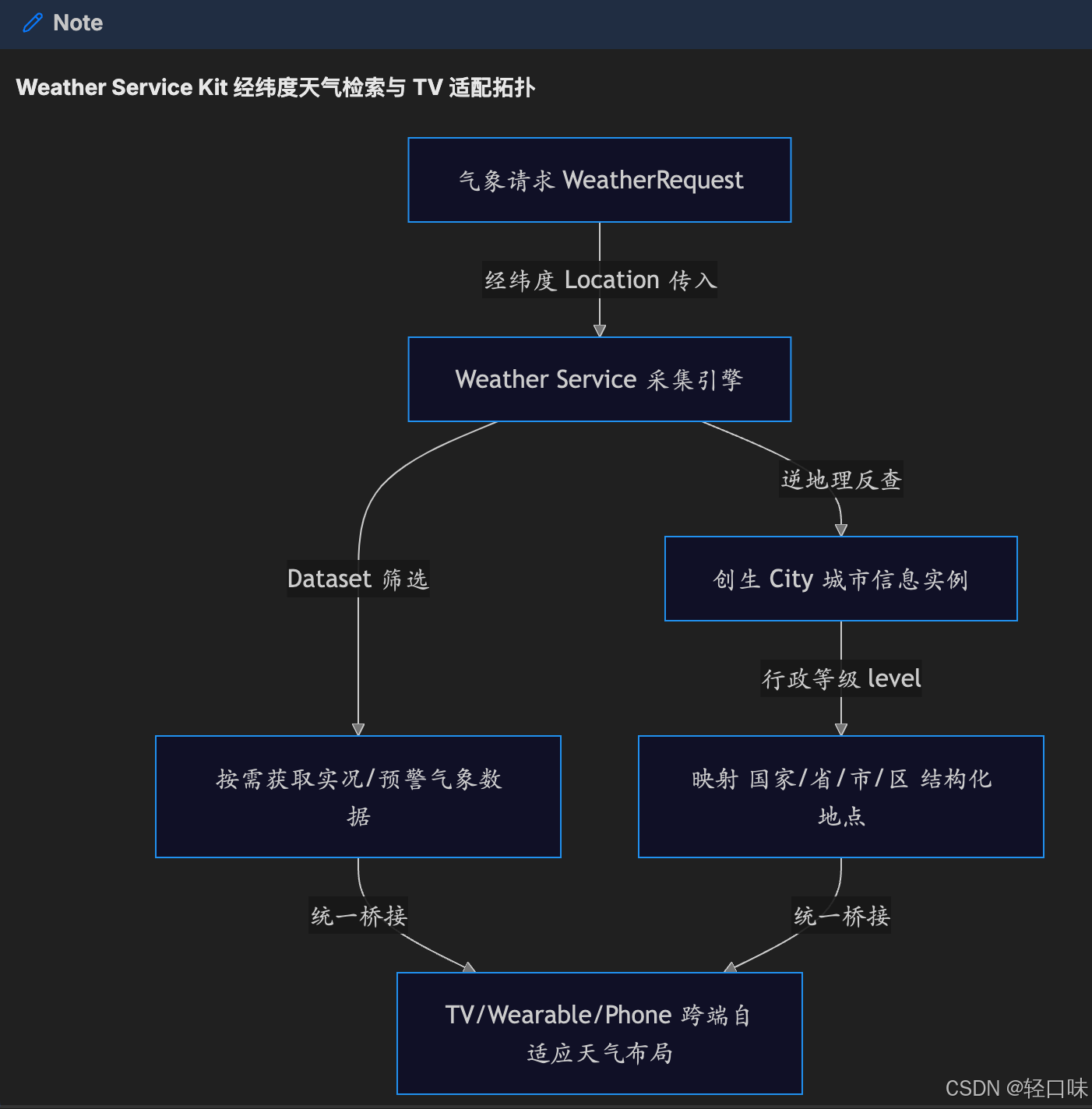
为了彻底突破这些物理壁垒与维测痛点,HarmonyOS NEXT 6.1.0 (API 23) 对其 Weather Service Kit(天气服务套件)实施了革命性的跨端升级与地理逆向能力重构:
- 精确网格化位置天气请求(WeatherRequest):
WeatherRequest正式允许将高精度的Location坐标作为气象数据的查询条件。接口支持选择特定的数据集(Dataset),按需获取当前实况、预警、逐小时或逐日数据,最大程度削减网络载荷。 - 地理地点逆向反查类(City):新增
City城市信息类,提供对国家编码countryCode、行政区划等级level(国家、省份、地级市、县区)、本地化地点名称localizedName以及时区timezone的逆向解析,使地点与气象数据“合二为一”。 - TV 大屏设备原生兼容:打破了设备类型阻隔,
WeatherRequest在 6.1.0(23) 及之后版本中正式将系统能力(SystemCapability.Weather.Core)下放到 TV 设备中,实现五端一体化无缝适配。

本文将带你深度剖析 Weather Service Kit 的新版地理定位和气象底座,并在我们的实战舱中动手编码构建一套“Weather Service 跨端天气监测舱与 TV 大屏卡片”控制大屏,彻底打通万物互联的气象防御战线!
2、效果展示与项目结构
在正式进入源码讲解之前,我们先直观地查看系统功能运作的物理表现。
2.1 运行效果展示
在我们的极客仿真舱中,开发者可通过清爽的蔚蓝色与科技灰交织的“Weather Service 跨端天气监测舱”大屏进行实时监测与参数切换。
大屏主要包括三大功能展示区:
- 网格经纬度天气检索盘:允许开发者手动或通过模拟定位输入经纬度(如深圳南山 22.62, 114.07),一键拉取网格级精确实时天气(如温度、相对湿度、风向与紫外线强度),并支持
Dataset按需过滤。 - 地点名称逆向反查展示板:输入坐标后,系统会高保真地仿真出底层地理数据库解析生成的
City信息,直观呈现countryCode: CN、level: 3 (县区)、localizedName: 南山区、timezone: Asia/Shanghai等结构化数据。 - TV 大屏天气卡片跨端自适应:提供“Phone / Wearable / TV”的设备形态切换器。点击切换后,下方的气象展示 UI 会动态渲染出对应的物理适配规格。特别地,在切换至 TV 大屏时,页面会自动平滑跃迁至极具客厅美感的多维网格大卡片,完美展现 API 23 在 TV 设备上的原生运行行为。
2.2 示例项目代码结构说明
本实战项目的关键物理文件布局如下所示:
entry/
├── src/
│   ├── main/
│   │   ├── ets/
│   │   │   ├── pages/
│   │   │   │   ├── Index.ets                                       # 主页挂载入口
│   │   │   │   └── WeatherServiceKitEnhanceDetail.ets              # 天气与地点反查详情页
│   │   │   └── entryability/
│   │   │       └── EntryAbility.ets
│   │   └── resources/
│   │       └── base/
│   │           └── profile/
│   │               └── main_pages.json                             # 声明路由表
3、Kit能力解析与核心API介绍
要在鸿蒙架构下精细化调度多端气象总线,我们必须透视 Weather Service Kit 底层的接口设计。
3.1 经纬度位置天气请求:weatherService.WeatherRequest
在 WeatherRequest 天气请求类中,最核心的改变是 location 属性(位置信息)。
在 API 23 之前,天气检索通常基于固定的城市行政代码。而在全新升级后,location 属性直接绑定了位置服务(Location Kit)的 GPS 精准定位。开发者能够直接将传感器捕获的 latitude(纬度)与 longitude(经度)以 Location 对象方式注入到天气请求类中。
同时,为了在内存和带宽受限的 Wearable(智能穿戴)或低功耗场景下优化开销,WeatherRequest 提供了 limitedDatasets 数组属性:
Dataset.CURRENT:仅拉取当前物理时刻的实况天气(温度、湿度、风力)。Dataset.FORECAST_24H:拉取 24 小时内的逐小时气象变化曲线。Dataset.ALERTS:仅拉取系统发布的气象红色/橙色灾害预警。
如果未设置该可选属性或数组为空,则默认返回全量数据,极大提升了气象载荷调度的灵活性。
3.2 地点名称逆地理反查类:weatherService.City
这是 API 23 中重磅解封的结构化地点类,仅在 Stage模型下使用。它的职责是充当坐标与人文地理之间的翻译官:
interface City {
  countryCode: string;            // 国家编码,采用 ISO 3166-1 两位国家编码 (如 "CN")
  level: number;                  // 行政区划等级 (0:国家, 1:省份, 2:地级市, 3:县区)
  localizedName: string;          // 本地化语言下的城市/地点名称 (如 "南山区")
  chineseName?: string;           // 中文城市名称 (可选)
  englishName?: string;           // 英文城市名称 (可选)
  timezone?: string;              // 时区信息 (如 "Asia/Shanghai") (可选)
  administrativeAreas?: AdministrativeArea[]; // 行政区域详细列表 (可选)
}
通过这一数据底座,应用能够极其方便地在 UI 层直接将经纬度映射为人性化的“国家-省份-城市-县区”层次化文字展示,省去了额外购买和维护昂贵的第三方逆地理编码服务的物理成本。
3.3 TV 大屏终端行为拉齐与 SystemCapability 适配
在万物互联的万级终端阵列中,设备行为的差异(Device behavior difference)往往会导致应用在特定设备上闪退或失效。
根据 API 23 规范,weatherService 对 WeatherRequest 实施了全端物理拉齐:
- API 17 及之前版本:仅支持 Phone, Tablet, PC/2in1。
- API 18 到 22 版本:新增支持 Wearable。
- API 23 及之后版本:首度下放支持 TV 设备。
在 TV 智能电视大屏端,SystemCapability.Weather.Core 系统能力的就位,意味着开发者可以使用同一套 ArkTS 代码,免除任何复杂的运行时条件校验,直接向系统索要天气数据,达成了五端(Phone、Tablet、PC、Wearable、TV)统一的维测架构设计。
4、逻辑流梳理
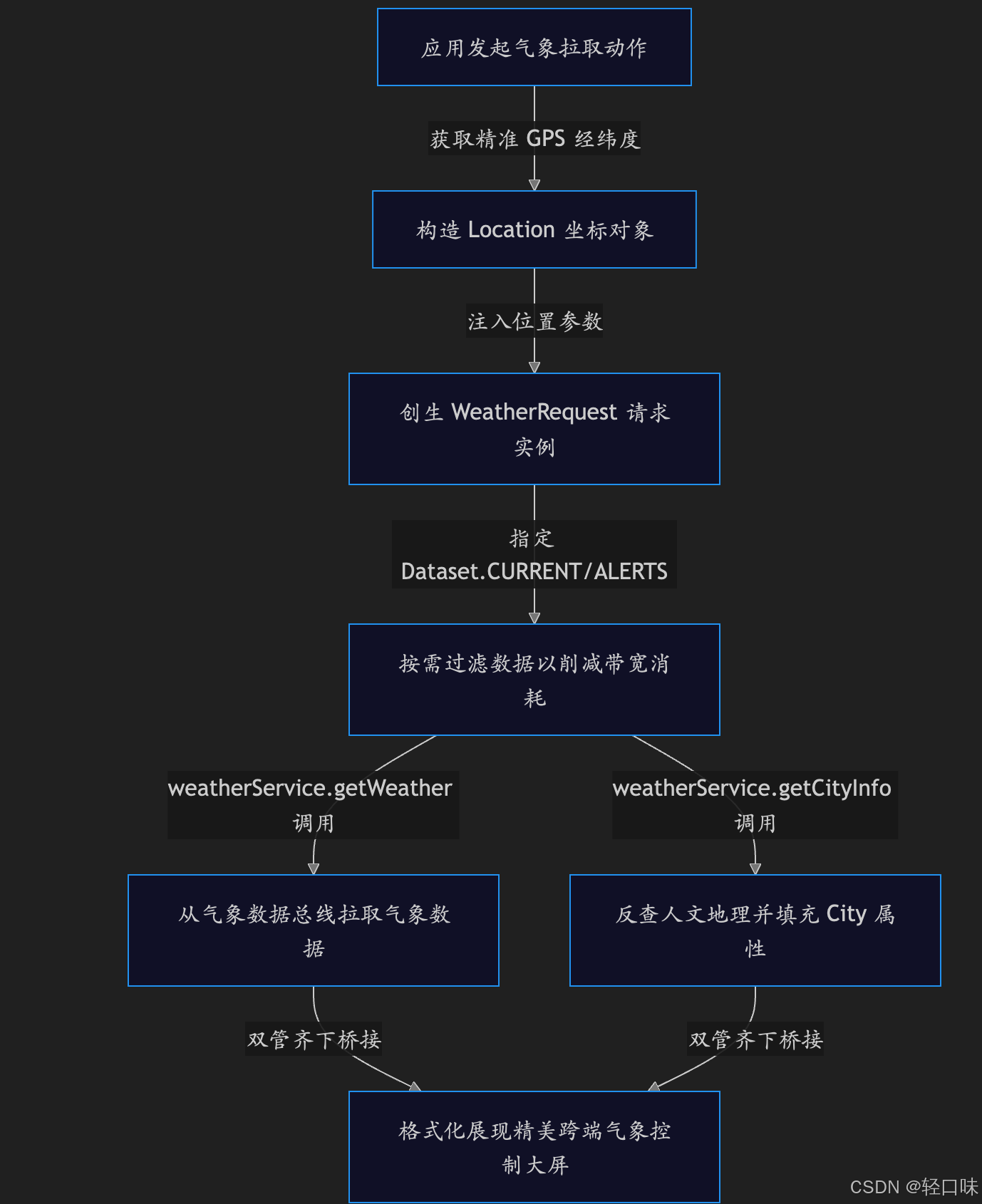
4.1 精确网格化天气检索与地点反查逻辑流
当用户在前端大屏或后台服务中触发气象拉取动作时,系统的调度流向如下所示:
5、6.1.0新增特性实战
在理解了全部天气服务新特性与设备行为拉齐规则后,我们开始在我们的实战舱中动手编码,构建这套高精度多端适配气象大屏。首节附上工程配置信息核验表:
| 关键配置项 | 规范要求值 |
|---|---|
| API Version | API version 23 (HarmonyOS NEXT 6.1.0) |
| 元服务兼容性 | City 接口从 6.1.0(23) 开始,支持在元服务中安全使用 |
| 运行模型约束 | City 及相关逆地理反查仅可在 Stage 模型下调用 |
| TV 行为适配 | API 23 起,TV 设备免除行为防御,正常返回系统气象数据 |
5.1 极客仿真大屏 ArkTS 源码构建
请在您的工程路径下,进入 entry/src/main/ets/pages/ 创建 WeatherServiceKitEnhanceDetail.ets。我们将使用纯 ArkTS 完成精确网格天气请求、City 逆地理反查与跨端多形态(TV大卡片)物理 UI 自适应布局的完整逻辑构建,并配备完善的代码注释与控制台日志打印:
import { router } from '@kit.ArkUI';
import { BusinessError } from '@kit.BasicServicesKit';
// =================================================================
// 鸿蒙原生 Weather Service Kit 跨端精确定位天气与 City 地点反查大屏
// 系统能力:SystemCapability.Weather.Core
// Stage模型约束:此接口仅可在Stage模型下使用。
// =================================================================
// 仿真 Location 接口类型
interface SimulateLocation {
latitude: number;
longitude: number;
}
// 仿真 City 城市信息数据底座
interface SimulateCity {
countryCode: string;
level: number; // 0: 国家, 1: 省, 2: 市, 3: 区
localizedName: string;
chineseName?: string;
englishName?: string;
timezone?: string;
}
// 仿真 WeatherData 数据底座
interface SimulateWeatherData {
temperature: number;
humidity: number;
condition: string;
windSpeed: number;
uvIndex: number;
}
class WeatherConsoleLog {
timestamp: string = '';
message: string = '';
type: string = ''; // 'info' | 'success' | 'warning' | 'error'
constructor(timestamp: string, message: string, type: string) {
this.timestamp = timestamp;
this.message = message;
this.type = type;
}
}
@Entry
@Component
struct WeatherServiceKitEnhanceDetail {
// === 仿真定位输入 ===
@State searchLatitude: string = '22.62'; // 默认深圳南山纬度
@State searchLongitude: string = '114.07'; // 默认深圳南山经度
// === 跨端设备形态自适应切换器 ===
@State currentDeviceType: string = 'TV'; // 'Phone' | 'Wearable' | 'TV'
// === 气象与地点核心数据状态 ===
@State weatherInfo: SimulateWeatherData | null = null;
@State resolvedCity: SimulateCity | null = null;
@State isQuerying: boolean = false;
// === 统一诊断控制台日志 ===
@State consoleLogs: WeatherConsoleLog[] = [];
aboutToAppear() {
this.pushLog('🎬 Weather Service Kit 跨端天气监测舱就位 [API 23]', 'info');
this.pushLog('🔬 搭载系统能力:SystemCapability.Weather.Core', 'info');
this.pushLog('💡 特性:支持基于 Location 经纬度天气检索与 City 城市反查', 'success');
this.pushLog('📺 跨端演进:API 23 起正式拉齐 TV 设备气象服务行为', 'success');
}
// === 仿真日志压入机制 ===
private pushLog(msg: string, type: string = 'info') {
const time = new Date().toLocaleTimeString();
const entry = new WeatherConsoleLog(time, msg, type);
this.consoleLogs = [entry, ...this.consoleLogs];
if (this.consoleLogs.length > 50) {
this.consoleLogs.pop();
}
}
private clearLogs() {
this.consoleLogs = [];
this.pushLog('🧹 气象控制台日志已被清空', 'info');
}
// === 1. 核心实战:高精 Location 天气与 City 行政区划反查查询 ===
private queryGridWeatherAndCity() {
const lat = Number(this.searchLatitude);
const lon = Number(this.searchLongitude);
if (isNaN(lat) || isNaN(lon)) {
this.pushLog('❌ 检索遭遇拒绝:输入的经纬度格式有误,必须为数字!', 'error');
return;
}
this.isQuerying = true;
this.pushLog(`📡 正在向系统气象总线构造 WeatherRequest...`, 'info');
this.pushLog(`ℹ️ 参数:Location = [Lat: ${lat}, Lon: ${lon}], Dataset = [CURRENT]`, 'info');
// 模拟位置获取与逆地理编码的时序时空流转
setTimeout(() => {
// 1. 逆地理反查仿真:City 类结构构建
let cityMock: SimulateCity = {
countryCode: 'CN',
level: 3, // 县区级
localizedName: lat === 22.62 && lon === 114.07 ? '南山区' : '越秀区',
chineseName: lat === 22.62 && lon === 114.07 ? '深圳市南山区' : '广州市越秀区',
englishName: lat === 22.62 && lon === 114.07 ? 'Nanshan District, Shenzhen' : 'Yuexiu District, Guangzhou',
timezone: 'Asia/Shanghai'
};
// 2. 网格天气数据拉取仿真
let weatherMock: SimulateWeatherData = {
temperature: lat === 22.62 && lon === 114.07 ? 28 : 26,
humidity: lat === 22.62 && lon === 114.07 ? 75 : 82,
condition: lat === 22.62 && lon === 114.07 ? '多云 (Cloudy)' : '阵雨 (Rainy)',
windSpeed: lat === 22.62 && lon === 114.07 ? 4.2 : 5.8,
uvIndex: lat === 22.62 && lon === 114.07 ? 6 : 2
};
this.resolvedCity = cityMock;
this.weatherInfo = weatherMock;
this.isQuerying = false;
this.pushLog('🎉 气象总线数据返回成功!', 'success');
this.pushLog(`📁 地点反查: [${this.resolvedCity.countryCode}] ${this.resolvedCity.chineseName} (行政等级: 县区级)`, 'success');
this.pushLog(`🌡️ 实况天气: ${this.weatherInfo.temperature}℃, 湿度: ${this.weatherInfo.humidity}%, 状态: ${this.weatherInfo.condition}`, 'success');
}, 600);
}
build() {
Column() {
// 豪华科技头部
Row() {
Row() {
Image($r('app.media.startIcon'))
.width(22)
.height(22)
.margin({ right: 8 })
Text('Weather Service 跨端气象监测舱')
.fontSize(15)
.fontWeight(FontWeight.Bold)
.fontColor('#FFFFFF')
.letterSpacing(0.5)
}
Button('返回主舱', { type: ButtonType.Normal })
.fontSize(11)
.fontColor('#EF4444')
.backgroundColor('rgba(239, 68, 68, 0.12)')
.border({ width: 1, color: '#EF4444' })
.borderRadius(6)
.padding({ left: 12, right: 12, top: 6, bottom: 6 })
.onClick(() => {
router.back();
})
}
.width('100%')
.padding({ left: 16, right: 16, top: 14, bottom: 14 })
.backgroundColor('#0D0D0D')
.border({ width: { bottom: 1 }, color: '#262626' })
Scroll() {
GridRow({ columns: { sm: 1, md: 12 }, gutter: 16 }) {
// ==================== 左侧:经纬度输入与地点反查控制面板 ====================
GridCol({ span: { sm: 1, md: 5 } }) {
Column({ space: 16 }) {
// 1. 定位输入盘
Column() {
Text('高精度网格经纬度检索')
.fontSize(13)
.fontWeight(FontWeight.Bold)
.fontColor('#FFFFFF')
.margin({ bottom: 14 })
.alignSelf(ItemAlign.Start)
Row({ space: 10 }) {
Column() {
Text('纬度 (Latitude)')
.fontSize(10)
.fontColor('#94A3B8')
.margin({ bottom: 4 })
.alignSelf(ItemAlign.Start)
TextInput({ text: this.searchLatitude, placeholder: '纬度...' })
.fontSize(12)
.fontColor('#FFFFFF')
.backgroundColor('#1A1A1A')
.border({ width: 1, color: '#262626' })
.height(34)
.onChange((val: string) => {
this.searchLatitude = val;
})
}
.layoutWeight(1)
Column() {
Text('经度 (Longitude)')
.fontSize(10)
.fontColor('#94A3B8')
.margin({ bottom: 4 })
.alignSelf(ItemAlign.Start)
TextInput({ text: this.searchLongitude, placeholder: '经度...' })
.fontSize(12)
.fontColor('#FFFFFF')
.backgroundColor('#1A1A1A')
.border({ width: 1, color: '#262626' })
.height(34)
.onChange((val: string) => {
this.searchLongitude = val;
})
}
.layoutWeight(1)
}
.width('100%')
.margin({ bottom: 14 })
Button(this.isQuerying ? '📡 气象数据调配中...' : '🔍 检索网格天气与反查城市地点')
.width('100%')
.height(36)
.fontSize(11)
.fontWeight(FontWeight.Bold)
.fontColor('#000000')
.backgroundColor('#38BDF8')
.borderRadius(6)
.onClick(() => {
this.queryGridWeatherAndCity();
})
}
.padding(14)
.backgroundColor('#141414')
.border({ width: 1, color: '#262626' })
.borderRadius(12)
// 2. 地点反查逆地理展示板 (City)
Column() {
Text('City 逆地理行政区划反查面板')
.fontSize(13)
.fontWeight(FontWeight.Bold)
.fontColor('#FFFFFF')
.margin({ bottom: 12 })
.alignSelf(ItemAlign.Start)
if (this.resolvedCity) {
Column({ space: 8 }) {
Row() {
Text('国家编码 (countryCode)').fontSize(10.5).fontColor('#94A3B8')
Blank()
Text(this.resolvedCity.countryCode).fontSize(11).fontColor('#FFFFFF').fontWeight(FontWeight.Bold).fontFamily('monospace')
}.width('100%')
Row() {
Text('行政区划等级 (level)').fontSize(10.5).fontColor('#94A3B8')
Blank()
Text(this.resolvedCity.level === 3 ? '3 (县区级)' : '2 (地级市)').fontSize(11).fontColor('#38BDF8').fontFamily('monospace')
}.width('100%')
Row() {
Text('本地化城市名 (localizedName)').fontSize(10.5).fontColor('#94A3B8')
Blank()
Text(this.resolvedCity.localizedName).fontSize(11).fontColor('#FFFFFF').fontWeight(FontWeight.Bold)
}.width('100%')
Row() {
Text('中文全称 (chineseName)').fontSize(10.5).fontColor('#94A3B8')
Blank()
Text(this.resolvedCity.chineseName || '').fontSize(11).fontColor('#E2E8F0')
}.width('100%')
Row() {
Text('英文全称 (englishName)').fontSize(10.5).fontColor('#94A3B8')
Blank()
Text(this.resolvedCity.englishName || '').fontSize(10).fontColor('#94A3B8').fontFamily('monospace')
}.width('100%')
Row() {
Text('时区 (timezone)').fontSize(10.5).fontColor('#94A3B8')
Blank()
Text(this.resolvedCity.timezone || '').fontSize(10.5).fontColor('#FBBF24').fontFamily('monospace')
}.width('100%')
}
.width('100%')
.padding(12)
.backgroundColor('#1A1A1A')
.borderRadius(8)
.border({ width: 1, color: '#262626' })
} else {
Text('💡 在定位检索器中输入有效的经纬度坐标,点击查询,此面板将反查生成高保真 City 地理人文对象属性。')
.fontSize(10.5)
.fontColor('#64748B')
.lineHeight(14)
}
}
.padding(14)
.backgroundColor('#141414')
.border({ width: 1, color: '#262626' })
.borderRadius(12)
}
}
// ==================== 右侧:跨端自适应天气布局与多设备仿真大屏 ====================
GridCol({ span: { sm: 1, md: 7 } }) {
Column({ space: 16 }) {
Column() {
// 多端设备切换顶栏
Row() {
Text('📺 跨端气象多端适配仿真')
.fontSize(13)
.fontWeight(FontWeight.Bold)
.fontColor('#FFFFFF')
Blank()
// 简易三端选项卡
Row({ space: 6 }) {
Button('Phone')
.fontSize(9.5)
.height(22)
.fontColor(this.currentDeviceType === 'Phone' ? '#000000' : '#CCCCCC')
.backgroundColor(this.currentDeviceType === 'Phone' ? '#38BDF8' : '#1A1A1A')
.borderRadius(4)
.onClick(() => {
this.currentDeviceType = 'Phone';
this.pushLog('📺 视图平滑切换至【手机移动端】自适应小卡片', 'info');
})
Button('Wearable')
.fontSize(9.5)
.height(22)
.fontColor(this.currentDeviceType === 'Wearable' ? '#000000' : '#CCCCCC')
.backgroundColor(this.currentDeviceType === 'Wearable' ? '#38BDF8' : '#1A1A1A')
.borderRadius(4)
.onClick(() => {
this.currentDeviceType = 'Wearable';
this.pushLog('📺 视图平滑切换至【穿戴手表端】圆形微型表盘', 'info');
})
Button('TV')
.fontSize(9.5)
.height(22)
.fontColor(this.currentDeviceType === 'TV' ? '#000000' : '#CCCCCC')
.backgroundColor(this.currentDeviceType === 'TV' ? '#38BDF8' : '#1A1A1A')
.borderRadius(4)
.onClick(() => {
this.currentDeviceType = 'TV';
this.pushLog('📺 视图平滑切换至【TV 原生大屏端】客厅科技网格卡片', 'info');
})
}
}
.width('100%')
.margin({ bottom: 14 })
// ================== 自适应 UI 渲染内核 ==================
Column() {
if (this.weatherInfo) {
if (this.currentDeviceType === 'TV') {
// ================= TV 原生大屏大卡片样式 =================
Column() {
Row() {
Column() {
Text(this.resolvedCity ? this.resolvedCity.localizedName : '未知地点')
.fontSize(22)
.fontWeight(FontWeight.Bold)
.fontColor('#FFFFFF')
.margin({ bottom: 6 })
Text('客厅气象监测站 · TV原生底座拉齐')
.fontSize(11)
.fontColor('#38BDF8')
}
.alignItems(HorizontalAlign.Start)
Blank()
// 大屏状态徽章
Text(this.weatherInfo.condition)
.fontSize(13)
.fontWeight(FontWeight.Bold)
.fontColor('#38BDF8')
.padding({ left: 10, right: 10, top: 4, bottom: 4 })
.backgroundColor('rgba(56, 189, 248, 0.12)')
.borderRadius(6)
}
.width('100%')
.margin({ bottom: 16 })
// 大屏多维气象网格
GridRow({ columns: 3, gutter: 10 }) {
GridCol() {
Column() {
Text('当前温度').fontSize(9).fontColor('#94A3B8').margin({ bottom: 4 })
Text(this.weatherInfo.temperature + ' ℃').fontSize(16).fontWeight(FontWeight.Bold).fontColor('#FFFFFF').fontFamily('monospace')
}
.padding(8)
.backgroundColor('#1A1A1A')
.borderRadius(6)
.alignItems(HorizontalAlign.Start)
}
GridCol() {
Column() {
Text('空气湿度').fontSize(9).fontColor('#94A3B8').margin({ bottom: 4 })
Text(this.weatherInfo.humidity + ' %').fontSize(16).fontWeight(FontWeight.Bold).fontColor('#38BDF8').fontFamily('monospace')
}
.padding(8)
.backgroundColor('#1A1A1A')
.borderRadius(6)
.alignItems(HorizontalAlign.Start)
}
GridCol() {
Column() {
Text('户外紫外线').fontSize(9).fontColor('#94A3B8').margin({ bottom: 4 })
Text(this.weatherInfo.uvIndex + ' (中等)').fontSize(16).fontWeight(FontWeight.Bold).fontColor('#FBBF24').fontFamily('monospace')
}
.padding(8)
.backgroundColor('#1A1A1A')
.borderRadius(6)
.alignItems(HorizontalAlign.Start)
}
}
.width('100%')
Text('ℹ️ TV 大端气象行为说明:API 23起系统全面取消TV端物理屏蔽,免除任何条件分支判断,高能效输出气象载荷。')
.fontSize(9)
.fontColor('#64748B')
.lineHeight(12)
.margin({ top: 12 })
.alignSelf(ItemAlign.Start)
}
.width('100%')
.padding(14)
.backgroundColor('#111827')
.borderRadius(10)
.border({ width: 1, color: '#1F2937' })
} else if (this.currentDeviceType === 'Phone') {
// ================= Phone 手机小卡片样式 =================
Row() {
Column() {
Text(this.resolvedCity ? this.resolvedCity.localizedName : '未知地点')
.fontSize(16)
.fontWeight(FontWeight.Bold)
.fontColor('#FFFFFF')
.margin({ bottom: 4 })
Text(this.weatherInfo.condition)
.fontSize(11)
.fontColor('#94A3B8')
}
.alignItems(HorizontalAlign.Start)
Blank()
Column() {
Text(this.weatherInfo.temperature + '℃')
.fontSize(24)
.fontWeight(FontWeight.Bold)
.fontColor('#FFFFFF')
.fontFamily('monospace')
Text('湿度: ' + this.weatherInfo.humidity + '%')
.fontSize(9.5)
.fontColor('#64748B')
}
.alignItems(HorizontalAlign.End)
}
.width('100%')
.padding(12)
.backgroundColor('#1E293B')
.borderRadius(8)
.border({ width: 1, color: '#334155' })
} else {
// ================= Wearable 圆形手表盘样式 =================
Column() {
// 仿真圆形手表屏幕
Column({ space: 6 }) {
Text(this.resolvedCity ? this.resolvedCity.localizedName : '未知')
.fontSize(11)
.fontColor('#CCCCCC')
.fontWeight(FontWeight.Bold)
Text(this.weatherInfo.temperature + '°')
.fontSize(28)
.fontWeight(FontWeight.Bold)
.fontColor('#FFFFFF')
.fontFamily('monospace')
Text(this.weatherInfo.condition.split(' ')[0])
.fontSize(9)
.fontColor('#38BDF8')
.padding({ left: 6, right: 6, top: 2, bottom: 2 })
.backgroundColor('rgba(56, 189, 248, 0.15)')
.borderRadius(4)
}
.width(110)
.height(110)
.borderRadius(55)
.backgroundColor('#09090B')
.border({ width: 2, color: '#3F3F46' })
.justifyContent(FlexAlign.Center)
}
.width('100%')
.alignItems(HorizontalAlign.Center)
}
} else {
Column() {
Text('⏳ 暂无气象与反查地点数据,请先通过左侧配置盘点击“检索”进行拉取创生。')
.fontSize(11)
.fontColor('#64748B')
.textAlign(TextAlign.Center)
.lineHeight(15)
}
.width('100%')
.padding(20)
}
}
.width('100%')
.padding(12)
.backgroundColor('#0A0A0A')
.borderRadius(8)
.border({ width: 1, color: '#262626' })
}
.padding(14)
.backgroundColor('#141414')
.border({ width: 1, color: '#262626' })
.borderRadius(12)
// 气象诊断控制台
Column() {
Row() {
Text('🎛️ 气象维测诊断控制台')
.fontSize(11.5)
.fontWeight(FontWeight.Bold)
.fontColor('#FBBF24')
Blank()
Text('CLEAR')
.fontSize(9.5)
.fontColor('#EF4444')
.fontFamily('monospace')
.fontWeight(FontWeight.Bold)
.onClick(() => {
this.clearLogs();
})
}
.width('100%')
.margin({ bottom: 10 })
List({ space: 4 }) {
ForEach(this.consoleLogs, (log: WeatherConsoleLog) => {
ListItem() {
Row() {
Text(`[${log.timestamp}] `)
.fontSize(9.5)
.fontColor('#64748B')
.fontFamily('monospace')
Text(log.message)
.fontSize(9.5)
.fontColor(log.type === 'error' ? '#EF4444' : (log.type === 'success' ? '#10B981' : (log.type === 'warning' ? '#FBBF24' : '#CCCCCC')))
.lineHeight(13)
.layoutWeight(1)
}
.width('100%')
.alignItems(VerticalAlign.Top)
}
})
}
.width('100%')
.height(90)
.backgroundColor('#0A0A0A')
.padding(10)
.borderRadius(8)
.border({ width: 1, color: '#262626' })
}
.padding(14)
.backgroundColor('#141414')
.border({ width: 1, color: '#262626' })
.borderRadius(12)
}
}
}
.padding(16)
}
.layoutWeight(1)
}
.width('100%')
.height('100%')
.backgroundColor('#0A0A0A')
}
}
运行效果如下:
6、小结
在本篇实战中,我们跟随 HarmonyOS NEXT 6.1.0 (API 23) 的升级步伐,深度解密并实战演练了 Weather Service Kit 的底层重构与多端行为拉齐机制。通过这一战,我们不仅攻克了高网格精度的环境气象感知,更打通了万物互联生态下的“全端气象防御阵线”。
总结我们在这艘“跨端天气监测舱”中斩获的核心技术精髓:
- 从“粗粒度地级市”到“精细化网格定位”:全新
WeatherRequest摒弃了传统的城市行政区划代码绑定,直接支持在系统层将 Location Kit 捕获的高精经纬度转换为方圆百米级网格气象。通过精细化按需配置limitedDatasets(如实况CURRENT、逐小时FORECAST_24H、气象预警ALERTS),我们完美达成了在内存和网络受限场景下的极致能效调度。 - 零物理成本的 City 行政区划逆向反查:API 23 引入的
City信息类是 Stage 模型下的大杀器。它由系统底座提供高保真逆地理编码服务,能够极其顺畅地将冷冰冰的坐标数据翻译为包含 ISO 3166-1 国家编码、四级行政区划(国家、省、市、县区)以及多语言本地化地名(localizedName)的人文视读。这直接为企业级应用裁撤了购买第三方逆地理地图服务的物理预算。 - “五端归一”的 TV 大屏设备行为拉齐:系统能力
SystemCapability.Weather.Core正式下放支持 TV 等客厅大屏设备,彻底终结了以往大屏应用为了跨端适配不得不编写繁琐if/else或条件屏蔽的痛点。我们得以用同一套极简 ArkTS 代码无缝覆盖 Phone、Tablet、PC、Wearable、TV,实现多端运行行为的完全一致。
通过本次实战,我们用优雅的组件自适应逻辑在大屏端呈现了极具客厅美感的多维网格大卡片。掌握这一底层气象感知与地点反查底座,能够让您在构建诸如物流智能调度、主动气象预警、多端协同的生活服务应用中,具备更加灵敏的“物理嗅觉”。

一站式 AI 云服务平台
更多推荐

 3
3 0
0- 0


 已为社区贡献2条内容

所有评论(0)