
零代码使用AI做一个API调用链路管理系统
·
使用AI做一个html页面。用于记录查看某一个页面都调用了哪些接口,支持数据的导入导出。使用WorkBuddy生成,零代码
工具
WorkBuddy
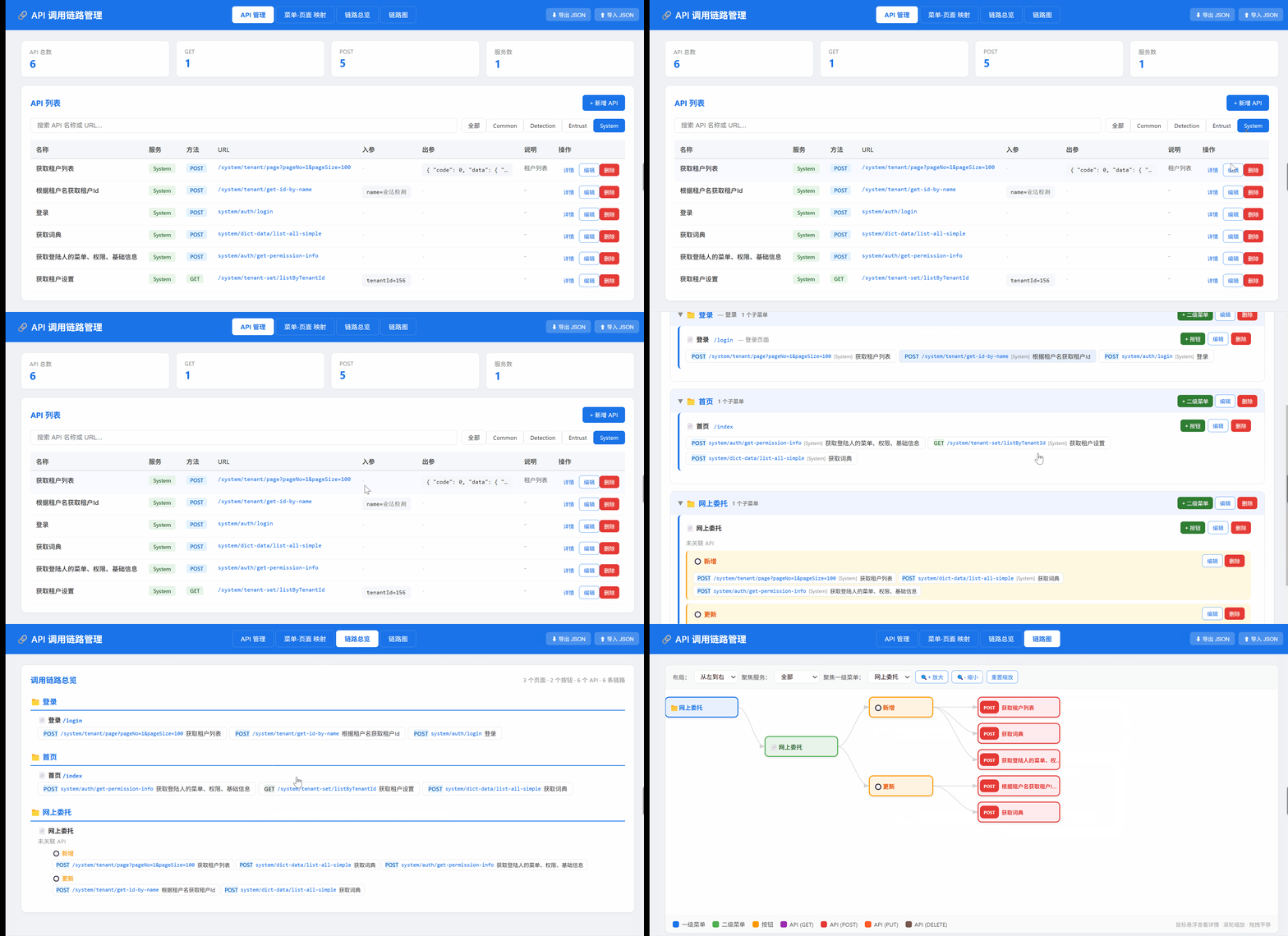
产出物功能
1.API管理
2.页面-API关联
3.链路总览
4.链路图
5.数据导出导入
产出物演示
使用过程
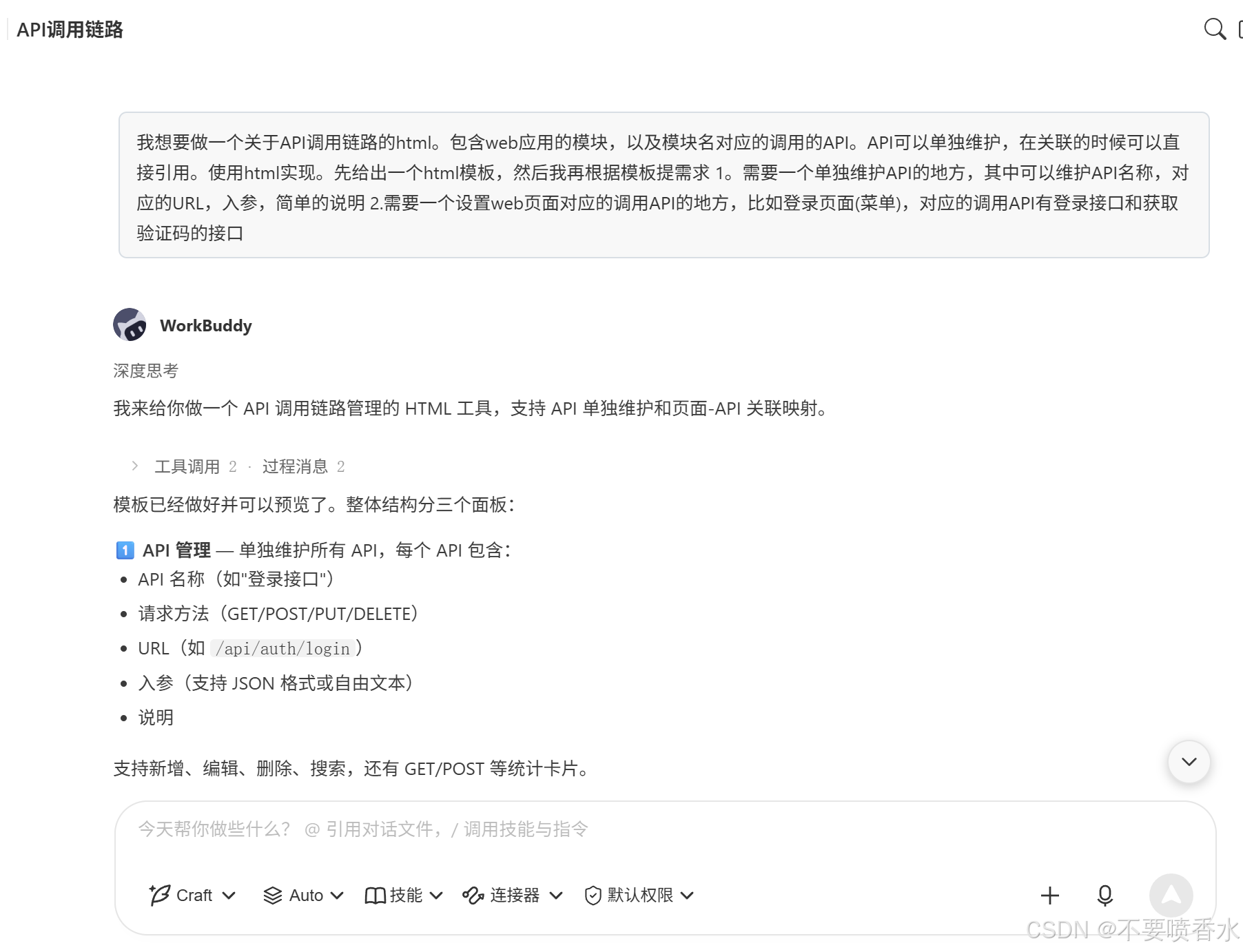
1.设定产出物、基础需求
万万没想到的是,这第一步就已经基本完成了我的需求。后续都是在此基础上修改
工作日志
## API 调用链路管理 HTML 工具
- 创建了 `api-chain-manager.html`,用于管理 Web 应用 API 调用链路
- 三个面板:API 管理、页面-API 映射、链路总览
- 第一版功能:API CRUD、页面 CRUD、API 关联选择、链路展示
- 第二版更新:
  - 新增「服务」字段(System/Common/Detection/Entrust 等预置 + 自定义)
  - 新增「出参」字段,方便查看返回数据
  - API 详情弹窗:点击可查看入参/出参完整内容
  - 服务筛选标签栏:API 管理页按服务快速筛选
  - 链路总览按服务分组展示 API
  - 数据导出/导入 JSON 文件功能(localStorage + 文件双保险)
  - API 选择器增加服务下拉筛选,方便页面关联时按服务查找 API
- 第三版更新:
  - 重构「页面-API映射」为「菜单-页面映射」,支持两级菜单+按钮的层级结构
  - 一级菜单:仅作为分类/分组,不关联 API
  - 二级菜单:对应页面,关联 API
  - 按钮:二级菜单下的操作按钮,也关联 API
  - 一级菜单可折叠/展开
  - 自动迁移旧版 pages 数据为新版 menus 格式
  - 链路总览按一级→二级→按钮的层级展示
  - 统计卡片改为:一级菜单数、二级菜单数、按钮数、已关联 API 数
- 第四版更新:
  - API 列表入参/出参列改为单行截断 + 鼠标悬浮弹出详情卡片(解决出参数据过多撑开表格的问题)
  - 新增「链路图」可视化面板(第4个 Tab)
  - 使用 SVG 绘制从左到右的层级流程图:一级菜单 → 二级菜单 → 按钮 → API
  - 支持水平/垂直布局切换、服务筛选、菜单筛选
  - 支持滚轮缩放、拖拽平移、悬浮 tooltip 查看详情
  - API 节点按请求方法着色(GET/POST/PUT/DELETE 不同颜色)
  - 未被引用的孤儿 API 也会在图中展示
产出物
<!DOCTYPE html>
<html lang="zh-CN">
<head>
<meta charset="UTF-8">
<meta name="viewport" content="width=device-width, initial-scale=1.0">
<title>API 调用链路管理</title>
<style>
* { margin: 0; padding: 0; box-sizing: border-box; }
body { font-family: -apple-system, BlinkMacSystemFont, 'Segoe UI', Roboto, sans-serif; background: #f0f2f5; color: #333; min-height: 100vh; }
/* 顶部导航 */
.top-bar { background: #1a73e8; color: #fff; padding: 16px 24px; display: flex; align-items: center; justify-content: space-between; flex-wrap: wrap; gap: 12px; }
.top-bar h1 { font-size: 20px; font-weight: 600; }
.top-bar .tabs { display: flex; gap: 4px; }
.tab-btn { padding: 8px 18px; border: 1px solid rgba(255,255,255,.3); border-radius: 6px; background: transparent; color: #fff; cursor: pointer; font-size: 14px; transition: .2s; }
.tab-btn:hover { background: rgba(255,255,255,.15); }
.tab-btn.active { background: #fff; color: #1a73e8; border-color: #fff; font-weight: 600; }
.data-actions { display: flex; gap: 8px; align-items: center; }
.data-actions .btn { font-size: 12px; padding: 6px 12px; }
.btn-data { background: rgba(255,255,255,.2); color: #fff; border: 1px solid rgba(255,255,255,.4); }
.btn-data:hover { background: rgba(255,255,255,.35); }
.main { max-width: 1400px; margin: 24px auto; padding: 0 24px; }
.panel { display: none; }
.panel.active { display: block; }
.card { background: #fff; border-radius: 10px; box-shadow: 0 1px 4px rgba(0,0,0,.08); padding: 20px; margin-bottom: 20px; }
.card-header { display: flex; justify-content: space-between; align-items: center; margin-bottom: 16px; flex-wrap: wrap; gap: 8px; }
.card-header h2 { font-size: 17px; color: #1a73e8; }
.card-header .count { font-size: 13px; color: #888; }
.btn { padding: 8px 16px; border: none; border-radius: 6px; cursor: pointer; font-size: 13px; transition: .2s; }
.btn-primary { background: #1a73e8; color: #fff; }
.btn-primary:hover { background: #1557b0; }
.btn-danger { background: #e53935; color: #fff; }
.btn-danger:hover { background: #c62828; }
.btn-outline { background: #fff; color: #1a73e8; border: 1px solid #1a73e8; }
.btn-outline:hover { background: #e8f0fe; }
.btn-sm { padding: 5px 10px; font-size: 12px; }
.btn-ghost { background: transparent; color: #1a73e8; border: 1px solid transparent; }
.btn-ghost:hover { background: #e8f0fe; border-color: #1a73e8; }
.btn-success { background: #2e7d32; color: #fff; }
.btn-success:hover { background: #1b5e20; }
.table-wrap { overflow-x: auto; }
table { width: 100%; border-collapse: collapse; font-size: 14px; }
th { background: #f5f7fa; color: #555; font-weight: 600; text-align: left; padding: 10px 12px; border-bottom: 2px solid #e0e0e0; white-space: nowrap; }
td { padding: 10px 12px; border-bottom: 1px solid #eee; vertical-align: top; }
tr:hover td { background: #f8faff; }
.td-name { font-weight: 500; color: #333; }
.td-url { color: #1a73e8; font-family: 'Consolas', monospace; font-size: 13px; }
.td-method { display: inline-block; padding: 2px 8px; border-radius: 4px; font-size: 12px; font-weight: 600; }
.method-GET { background: #e8f5e9; color: #2e7d32; }
.method-POST { background: #e3f2fd; color: #1565c0; }
.method-PUT { background: #fff3e0; color: #e65100; }
.method-DELETE { background: #fce4ec; color: #c62828; }
.td-desc { color: #666; font-size: 13px; max-width: 200px; }
.td-actions { white-space: nowrap; }
/* 出参/入参 单行截断 + 悬浮弹出 */
.params-ellipsis {
max-width: 200px;
white-space: nowrap;
overflow: hidden;
text-overflow: ellipsis;
font-family: 'Consolas', monospace;
font-size: 13px;
color: #444;
background: #f5f7fa;
padding: 6px 10px;
border-radius: 6px;
cursor: pointer;
transition: .2s;
}
.params-ellipsis:hover { background: #e3f2fd; }
.params-empty { color: #ccc; font-size: 13px; }
/* 悬浮弹出详情卡片 */
.hover-popup {
display: none;
position: fixed;
z-index: 300;
background: #fff;
border-radius: 10px;
box-shadow: 0 8px 32px rgba(0,0,0,.18);
padding: 16px;
max-width: 480px;
max-height: 360px;
overflow-y: auto;
font-family: 'Consolas', monospace;
font-size: 13px;
white-space: pre-wrap;
word-break: break-all;
color: #444;
line-height: 1.6;
border-left: 4px solid #1a73e8;
}
.hover-popup.show { display: block; }
.hover-popup h4 { font-size: 13px; color: #888; margin-bottom: 6px; font-family: -apple-system, BlinkMacSystemFont, 'Segoe UI', Roboto, sans-serif; }
.service-tag { display: inline-block; padding: 3px 10px; border-radius: 4px; font-size: 12px; font-weight: 600; background: #ede7f6; color: #5e35b1; }
.service-tag[data-svc="System"] { background: #e8f5e9; color: #2e7d32; }
.service-tag[data-svc="Common"] { background: #e3f2fd; color: #1565c0; }
.service-tag[data-svc="Detection"] { background: #fff3e0; color: #e65100; }
.service-tag[data-svc="Entrust"] { background: #fce4ec; color: #c62828; }
.modal-overlay { display: none; position: fixed; top: 0; left: 0; width: 100%; height: 100%; background: rgba(0,0,0,.35); z-index: 100; justify-content: center; align-items: center; }
.modal-overlay.show { display: flex; }
.modal { background: #fff; border-radius: 12px; padding: 24px; width: 560px; max-width: 95vw; max-height: 90vh; overflow-y: auto; box-shadow: 0 8px 32px rgba(0,0,0,.18); animation: slideIn .2s; }
@keyframes slideIn { from { transform: translateY(-20px); opacity: 0; } to { transform: translateY(0); opacity: 1; } }
.modal h3 { font-size: 18px; color: #1a73e8; margin-bottom: 18px; }
.form-group { margin-bottom: 14px; }
.form-group label { display: block; font-size: 13px; color: #555; margin-bottom: 4px; font-weight: 500; }
.form-group input, .form-group textarea, .form-group select { width: 100%; padding: 8px 12px; border: 1px solid #ddd; border-radius: 6px; font-size: 14px; transition: .2s; }
.form-group input:focus, .form-group textarea:focus, .form-group select:focus { outline: none; border-color: #1a73e8; box-shadow: 0 0 0 3px rgba(26,115,232,.12); }
.form-group textarea { resize: vertical; min-height: 60px; }
.form-row { display: flex; gap: 12px; }
.form-row .form-group { flex: 1; }
.modal-actions { display: flex; gap: 10px; justify-content: flex-end; margin-top: 20px; }
.detail-section { background: #f5f7fa; border-radius: 8px; padding: 12px 14px; margin-bottom: 10px; }
.detail-section h4 { font-size: 13px; color: #888; margin-bottom: 6px; }
.detail-content { font-family: 'Consolas', monospace; font-size: 13px; white-space: pre-wrap; word-break: break-all; color: #444; }
.api-selector { display: flex; flex-wrap: wrap; gap: 8px; padding: 12px; background: #f5f7fa; border-radius: 8px; min-height: 50px; }
.api-chip { display: inline-flex; align-items: center; gap: 4px; padding: 6px 12px; background: #e3f2fd; color: #1565c0; border-radius: 6px; font-size: 13px; cursor: pointer; transition: .2s; }
.api-chip:hover { background: #bbdefb; }
.api-chip.selected { background: #1a73e8; color: #fff; }
.api-chip .chip-method { font-weight: 600; font-size: 11px; }
.api-chip .chip-svc { font-size: 11px; opacity: .7; }
.api-chip .remove { margin-left: 4px; font-size: 16px; line-height: 1; opacity: .7; }
.api-chip .remove:hover { opacity: 1; }
.api-selector-empty { color: #999; font-size: 13px; padding: 8px 0; }
.filter-bar { display: flex; gap: 10px; margin-bottom: 16px; flex-wrap: wrap; align-items: center; }
.filter-bar input { flex: 1; min-width: 200px; padding: 8px 14px; border: 1px solid #ddd; border-radius: 6px; font-size: 14px; }
.filter-bar input:focus { outline: none; border-color: #1a73e8; box-shadow: 0 0 0 3px rgba(26,115,232,.12); }
.svc-filter { display: inline-flex; padding: 6px 14px; border-radius: 6px; font-size: 13px; cursor: pointer; background: #fff; border: 1px solid #ddd; transition: .2s; }
.svc-filter:hover { background: #f5f7fa; }
.svc-filter.active { background: #1a73e8; color: #fff; border-color: #1a73e8; }
.empty-state { text-align: center; padding: 40px 20px; color: #999; }
.empty-state .empty-icon { font-size: 48px; margin-bottom: 12px; opacity: .5; }
.empty-state p { font-size: 15px; }
.stats { display: flex; gap: 16px; margin-bottom: 20px; flex-wrap: wrap; }
.stat-card { flex: 1; min-width: 100px; background: #fff; border-radius: 8px; padding: 14px 18px; box-shadow: 0 1px 4px rgba(0,0,0,.06); }
.stat-card .stat-label { font-size: 13px; color: #888; }
.stat-card .stat-value { font-size: 24px; font-weight: 700; color: #1a73e8; }
.toast { position: fixed; top: 20px; right: 20px; padding: 12px 20px; border-radius: 8px; font-size: 14px; color: #fff; z-index: 200; animation: toastIn .3s; }
.toast-success { background: #2e7d32; }
.toast-error { background: #e53935; }
.toast-info { background: #1a73e8; }
@keyframes toastIn { from { transform: translateX(40px); opacity: 0; } to { transform: translateX(0); opacity: 1; } }
/* ========== 菜单层级树 ========== */
.menu-l1 { margin-bottom: 16px; border: 1px solid #ddd; border-radius: 10px; overflow: hidden; }
.menu-l1-header { display: flex; justify-content: space-between; align-items: center; padding: 12px 16px; background: #f0f4ff; cursor: pointer; }
.menu-l1-header:hover { background: #e4ecff; }
.menu-l1-name { font-size: 16px; font-weight: 700; color: #1a73e8; display: flex; align-items: center; gap: 6px; }
.menu-l1-toggle { font-size: 14px; color: #888; transition: transform .2s; }
.menu-l1-toggle.collapsed { transform: rotate(-90deg); }
.menu-l1-body { padding: 0 16px 16px; }
.menu-l1-body.collapsed { display: none; }
.menu-l2 { margin-bottom: 12px; background: #fff; border-radius: 8px; border-left: 4px solid #1a73e8; padding: 14px; }
.menu-l2-header { display: flex; justify-content: space-between; align-items: center; }
.menu-l2-name { font-size: 14px; font-weight: 600; color: #333; }
.menu-l2-path { font-size: 13px; color: #1a73e8; font-family: 'Consolas', monospace; }
.menu-l2-desc { font-size: 13px; color: #888; }
.menu-l2-apis { display: flex; flex-wrap: wrap; gap: 6px; margin-top: 10px; }
.menu-l2-actions { display: flex; gap: 6px; align-items: center; }
.btn-item { display: inline-flex; align-items: center; gap: 6px; padding: 8px 14px; background: #fff8e1; border-radius: 8px; border-left: 3px solid #f9a825; margin-top: 8px; width: 100%; flex-direction: column; align-items: flex-start; }
.btn-item-top { display: flex; justify-content: space-between; align-items: center; width: 100%; }
.btn-item-name { font-size: 14px; font-weight: 600; color: #e65100; }
.btn-item-path { font-size: 12px; color: #1a73e8; font-family: 'Consolas', monospace; }
.btn-item-desc { font-size: 12px; color: #888; }
.btn-item-apis { display: flex; flex-wrap: wrap; gap: 4px; margin-top: 6px; }
.chain-api-tag { display: inline-flex; align-items: center; gap: 6px; padding: 4px 12px; border-radius: 6px; font-size: 13px; background: #fff; border: 1px solid #ddd; cursor: pointer; transition: .2s; }
.chain-api-tag:hover { background: #e8f0fe; }
.chain-api-tag .tag-method { font-weight: 600; }
.chain-api-tag .tag-url { font-family: 'Consolas', monospace; font-size: 12px; color: #1a73e8; }
.chain-api-tag .tag-svc { font-size: 11px; opacity: .65; }
.chain-api-tag.small { padding: 3px 8px; font-size: 12px; }
/* 链路总览中的层级 */
.chain-l1 { margin-bottom: 18px; }
.chain-l1-name { font-size: 16px; font-weight: 700; color: #1a73e8; padding: 8px 0; border-bottom: 2px solid #1a73e8; }
.chain-l2 { margin: 10px 0 10px 16px; }
.chain-l2-header { font-size: 14px; font-weight: 600; }
.chain-btn-section { margin: 8px 0 8px 32px; }
.chain-btn-header { font-size: 13px; color: #f9a825; font-weight: 600; }
/* ========== 链路图可视化 ========== */
.graph-container {
position: relative;
background: #fff;
border-radius: 10px;
box-shadow: 0 1px 4px rgba(0,0,0,.08);
overflow: hidden;
}
.graph-toolbar {
display: flex; gap: 8px; padding: 12px 16px; background: #f8f9fa; border-bottom: 1px solid #eee; align-items: center; flex-wrap: wrap;
}
.graph-toolbar label { font-size: 13px; color: #555; }
.graph-toolbar select, .graph-toolbar input {
padding: 6px 10px; border: 1px solid #ddd; border-radius: 6px; font-size: 13px;
}
.graph-svg-wrap {
width: 100%; overflow: auto; position: relative; min-height: 500px;
}
.graph-svg-wrap svg { display: block; }
/* SVG 内部样式 */
.graph-node { cursor: pointer; }
.graph-node rect, .graph-node .node-bg { rx: 8; ry: 8; }
.graph-node text { font-family: -apple-system, BlinkMacSystemFont, 'Segoe UI', Roboto, sans-serif; }
.graph-edge { fill: none; stroke-width: 1.5; opacity: .5; }
.graph-edge:hover { opacity: 1; stroke-width: 2.5; }
.legend { display: flex; gap: 16px; padding: 10px 16px; background: #fafafa; border-top: 1px solid #eee; flex-wrap: wrap; align-items: center; font-size: 13px; color: #555; }
.legend-item { display: flex; align-items: center; gap: 6px; }
.legend-dot { width: 14px; height: 14px; border-radius: 4px; }
/* 图中节点 tooltip */
.graph-tooltip {
display: none; position: absolute; z-index: 50; background: #fff; border-radius: 8px;
box-shadow: 0 4px 16px rgba(0,0,0,.15); padding: 12px 14px; max-width: 320px;
font-size: 13px; line-height: 1.5; pointer-events: none; border-left: 4px solid #1a73e8;
}
.graph-tooltip.show { display: block; }
.graph-tooltip h5 { color: #1a73e8; margin-bottom: 4px; font-size: 14px; }
.graph-tooltip pre { font-family: Consolas, monospace; font-size: 12px; white-space: pre-wrap; word-break: break-all; color: #444; margin: 4px 0; }
</style>
</head>
<body>
<div class="top-bar">
<h1>🔗 API 调用链路管理</h1>
<div class="tabs">
<button class="tab-btn active" onclick="switchTab('api')">API 管理</button>
<button class="tab-btn" onclick="switchTab('menu')">菜单-页面 映射</button>
<button class="tab-btn" onclick="switchTab('chain')">链路总览</button>
<button class="tab-btn" onclick="switchTab('graph')">链路图</button>
</div>
<div class="data-actions">
<button class="btn btn-data" onclick="exportData()">⬇ 导出 JSON</button>
<button class="btn btn-data" onclick="importData()">⬆ 导入 JSON</button>
<input type="file" id="import-file" accept=".json" style="display:none" onchange="handleImportFile(event)">
</div>
</div>
<div class="main">
<!-- ========== Panel 1: API 管理 ========== -->
<div class="panel active" id="panel-api">
<div class="stats">
<div class="stat-card"><div class="stat-label">API 总数</div><div class="stat-value" id="stat-api-count">0</div></div>
<div class="stat-card"><div class="stat-label">GET</div><div class="stat-value" id="stat-get-count">0</div></div>
<div class="stat-card"><div class="stat-label">POST</div><div class="stat-value" id="stat-post-count">0</div></div>
<div class="stat-card"><div class="stat-label">服务数</div><div class="stat-value" id="stat-svc-count">0</div></div>
</div>
<div class="card">
<div class="card-header">
<h2>API 列表</h2>
<button class="btn btn-primary" onclick="openApiModal()">+ 新增 API</button>
</div>
<div class="filter-bar">
<input type="text" id="api-search" placeholder="搜索 API 名称或 URL..." oninput="renderApiTable()">
<div id="svc-filters-wrap"></div>
</div>
<div class="table-wrap" id="api-table-wrap"></div>
</div>
</div>
<!-- ========== Panel 2: 菜单-页面 映射 ========== -->
<div class="panel" id="panel-menu">
<div class="stats">
<div class="stat-card"><div class="stat-label">一级菜单</div><div class="stat-value" id="stat-l1-count">0</div></div>
<div class="stat-card"><div class="stat-label">二级菜单</div><div class="stat-value" id="stat-l2-count">0</div></div>
<div class="stat-card"><div class="stat-label">按钮</div><div class="stat-value" id="stat-btn-count">0</div></div>
<div class="stat-card"><div class="stat-label">已关联 API</div><div class="stat-value" id="stat-linked-count">0</div></div>
</div>
<div class="card">
<div class="card-header">
<h2>菜单层级结构</h2>
<button class="btn btn-primary" onclick="openMenuL1Modal()">+ 新增一级菜单</button>
</div>
<div class="filter-bar">
<input type="text" id="menu-search" placeholder="搜索菜单、页面、按钮名称..." oninput="renderMenuTree()">
</div>
<div class="menu-tree" id="menu-tree-wrap"></div>
</div>
</div>
<!-- ========== Panel 3: 链路总览 ========== -->
<div class="panel" id="panel-chain">
<div class="card">
<div class="card-header">
<h2>调用链路总览</h2>
<span class="count" id="chain-summary"></span>
</div>
<div id="chain-overview-wrap"></div>
</div>
</div>
<!-- ========== Panel 4: 链路图可视化 ========== -->
<div class="panel" id="panel-graph">
<div class="graph-container">
<div class="graph-toolbar">
<label>布局:</label>
<select id="graph-layout" onchange="renderGraph()">
<option value="horizontal">从左到右</option>
<option value="vertical">从上到下</option>
</select>
<label>聚焦服务:</label>
<select id="graph-svc-filter" onchange="renderGraph()">
<option value="">全部</option>
</select>
<label>聚焦一级菜单:</label>
<select id="graph-menu-filter" onchange="renderGraph()">
<option value="">全部</option>
</select>
<button class="btn btn-outline btn-sm" onclick="graphZoom(1.2)">🔍+ 放大</button>
<button class="btn btn-outline btn-sm" onclick="graphZoom(1/1.2)">🔍- 缩小</button>
<button class="btn btn-outline btn-sm" onclick="graphZoomReset">重置缩放</button>
</div>
<div class="graph-svg-wrap" id="graph-svg-wrap">
<svg id="graph-svg"></svg>
</div>
<div class="graph-tooltip" id="graph-tooltip"></div>
<div class="legend">
<div class="legend-item"><div class="legend-dot" style="background:#1a73e8"></div>一级菜单</div>
<div class="legend-item"><div class="legend-dot" style="background:#4caf50"></div>二级菜单</div>
<div class="legend-item"><div class="legend-dot" style="background:#ff9800"></div>按钮</div>
<div class="legend-item"><div class="legend-dot" style="background:#9c27b0"></div>API (GET)</div>
<div class="legend-item"><div class="legend-dot" style="background:#e53935"></div>API (POST)</div>
<div class="legend-item"><div class="legend-dot" style="background:#ff5722"></div>API (PUT)</div>
<div class="legend-item"><div class="legend-dot" style="background:#795548"></div>API (DELETE)</div>
<div style="flex:1"></div>
<span style="color:#aaa;font-size:12px">鼠标悬浮查看详情 · 滚轮缩放 · 拖拽平移</span>
</div>
</div>
</div>
</div>
<!-- 悬浮弹出详情卡片 -->
<div class="hover-popup" id="hover-popup"></div>
<!-- ===== API 编辑弹窗 ===== -->
<div class="modal-overlay" id="modal-api">
<div class="modal">
<h3 id="modal-api-title">新增 API</h3>
<div class="form-group"><label>API 名称</label><input type="text" id="api-name" placeholder="如:登录接口"></div>
<div class="form-row">
<div class="form-group"><label>请求方法</label>
<select id="api-method"><option value="GET">GET</option><option value="POST" selected>POST</option><option value="PUT">PUT</option><option value="DELETE">DELETE</option></select>
</div>
<div class="form-group"><label>所属服务</label>
<div style="display:flex;gap:8px"><select id="api-service"><option value="">自定义...</option></select><input type="text" id="api-service-custom" placeholder="输入服务名" style="flex:1;display:none"></div>
</div>
</div>
<div class="form-group"><label>URL</label><input type="text" id="api-url" placeholder="如:/api/auth/login"></div>
<div class="form-group"><label>入参(JSON 格式或自由文本)</label><textarea id="api-params" placeholder="如:{"username": "string", "password": "string"}"></textarea></div>
<div class="form-group"><label>出参(JSON 格式或自由文本)</label><textarea id="api-response" placeholder="如:{"code": 0, "data": {"token": "string"}}"></textarea></div>
<div class="form-group"><label>说明</label><textarea id="api-desc" placeholder="接口用途简述"></textarea></div>
<div class="modal-actions"><button class="btn btn-outline" onclick="closeApiModal()">取消</button><button class="btn btn-primary" onclick="saveApi()">保存</button></div>
</div>
</div>
<!-- ===== API 详情弹窗 ===== -->
<div class="modal-overlay" id="modal-api-detail">
<div class="modal" style="width:640px">
<h3 id="detail-title">API 详情</h3>
<div id="detail-body"></div>
<div class="modal-actions"><button class="btn btn-outline" onclick="closeApiDetail()">关闭</button></div>
</div>
</div>
<!-- ===== 一级菜单弹窗 ===== -->
<div class="modal-overlay" id="modal-menu-l1">
<div class="modal">
<h3 id="modal-l1-title">新增一级菜单</h3>
<div class="form-group"><label>菜单名称</label><input type="text" id="l1-name" placeholder="如:系统管理"></div>
<div class="form-group"><label>图标(可选)</label><input type="text" id="l1-icon" placeholder="如:setting 或 🛠"></div>
<div class="form-group"><label>说明</label><textarea id="l1-desc" placeholder="菜单分类说明"></textarea></div>
<div class="modal-actions"><button class="btn btn-outline" onclick="closeMenuL1Modal()">取消</button><button class="btn btn-primary" onclick="saveMenuL1()">保存</button></div>
</div>
</div>
<!-- ===== 二级菜单弹窗 ===== -->
<div class="modal-overlay" id="modal-menu-l2">
<div class="modal">
<h3 id="modal-l2-title">新增二级菜单</h3>
<div class="form-group"><label>所属一级菜单</label>
<select id="l2-parent"></select>
</div>
<div class="form-group"><label>菜单名称</label><input type="text" id="l2-name" placeholder="如:用户管理"></div>
<div class="form-group"><label>页面路径</label><input type="text" id="l2-path" placeholder="如:/system/user"></div>
<div class="form-group"><label>说明</label><textarea id="l2-desc" placeholder="页面功能简述"></textarea></div>
<div class="form-group">
<label>关联 API(点击选择/取消)</label>
<div style="margin-bottom:6px"><select id="l2-svc-filter" onchange="renderL2ApiSelector()" style="padding:6px 10px;border:1px solid #ddd;border-radius:6px;font-size:13px"><option value="">全部服务</option></select></div>
<div class="api-selector" id="l2-api-selector"></div>
</div>
<div class="modal-actions"><button class="btn btn-outline" onclick="closeMenuL2Modal()">取消</button><button class="btn btn-primary" onclick="saveMenuL2()">保存</button></div>
</div>
</div>
<!-- ===== 按钮弹窗 ===== -->
<div class="modal-overlay" id="modal-btn">
<div class="modal">
<h3 id="modal-btn-title">新增按钮</h3>
<div class="form-group"><label>所属二级菜单</label>
<select id="btn-parent" onchange="onBtnParentChange()"></select>
</div>
<div class="form-group"><label>按钮名称</label><input type="text" id="btn-name" placeholder="如:新增用户"></div>
<div class="form-group"><label>操作路径(可选)</label><input type="text" id="btn-path" placeholder="如:/system/user/add"></div>
<div class="form-group"><label>说明</label><textarea id="btn-desc" placeholder="按钮操作说明"></textarea></div>
<div class="form-group">
<label>关联 API(点击选择/取消)</label>
<div style="margin-bottom:6px"><select id="btn-svc-filter" onchange="renderBtnApiSelector()" style="padding:6px 10px;border:1px solid #ddd;border-radius:6px;font-size:13px"><option value="">全部服务</option></select></div>
<div class="api-selector" id="btn-api-selector"></div>
</div>
<div class="modal-actions"><button class="btn btn-outline" onclick="closeBtnModal()">取消</button><button class="btn btn-primary" onclick="saveBtn()">保存</button></div>
</div>
</div>
<script>
// ===== 数据层 =====
const PRESET_SERVICES = ['System', 'Common', 'Detection', 'Entrust'];
let DATA = loadFromStorage();
function getAllServices() {
const used = DATA.apis.map(a => a.service).filter(Boolean);
return [...new Set([...PRESET_SERVICES, ...used])].sort();
}
function loadFromStorage() {
try {
const raw = localStorage.getItem('api_chain_data_v2');
if (raw) {
const d = JSON.parse(raw);
d.apis = d.apis.map(a => ({ ...a, service: a.service || '', response: a.response || '' }));
if (!d.menus) d.menus = [];
return d;
}
} catch(e) {}
try {
const oldRaw = localStorage.getItem('api_chain_data');
if (oldRaw) {
const old = JSON.parse(oldRaw);
old.apis = old.apis.map(a => ({ ...a, service: a.service || '', response: a.response || '' }));
if (old.pages && old.pages.length > 0) {
const l1Id = genId();
old.menus = [{ id: l1Id, name: '默认菜单', icon: '', desc: '从旧数据迁移', children: old.pages.map(p => ({
id: p.id || genId(), name: p.name, path: p.path || '', desc: p.desc || '',
apiIds: p.apiIds || [], buttons: []
}))}];
} else { old.menus = []; }
localStorage.removeItem('api_chain_data');
localStorage.setItem('api_chain_data_v2', JSON.stringify(old));
return old;
}
} catch(e) {}
return { apis: [], menus: [] };
}
function saveToStorage() { localStorage.setItem('api_chain_data_v2', JSON.stringify(DATA)); }
function genId() { return 'id_' + Date.now() + '_' + Math.random().toString(36).substr(2, 6); }
function showToast(msg, type) {
const t = document.createElement('div');
t.className = 'toast toast-' + (type || 'info'); t.textContent = msg;
document.body.appendChild(t); setTimeout(() => t.remove(), 2500);
}
// ===== 导出 / 导入 =====
function exportData() {
const json = JSON.stringify(DATA, null, 2);
const blob = new Blob([json], { type: 'application/json' });
const url = URL.createObjectURL(blob);
const a = document.createElement('a'); a.href = url; a.download = 'api-chain-data.json'; a.click();
URL.revokeObjectURL(url); showToast('数据已导出', 'success');
}
function importData() { document.getElementById('import-file').click(); }
function handleImportFile(e) {
const file = e.target.files[0]; if (!file) return;
const reader = new FileReader();
reader.onload = function(ev) {
try {
const d = JSON.parse(ev.target.result);
if (!d.apis) { showToast('JSON 格式不正确', 'error'); return; }
d.apis = d.apis.map(a => ({ ...a, service: a.service || '', response: a.response || '' }));
if (!d.menus) d.menus = [];
DATA = d; saveToStorage(); renderAll(); showToast('导入成功!', 'success');
} catch(err) { showToast('JSON 解析失败', 'error'); }
};
reader.readAsText(file); e.target.value = '';
}
// ===== Tab =====
function switchTab(tab) {
document.querySelectorAll('.tab-btn').forEach(b => b.classList.remove('active'));
document.querySelectorAll('.panel').forEach(p => p.classList.remove('active'));
event.target.classList.add('active');
document.getElementById('panel-' + tab).classList.add('active');
if (tab === 'api') renderApiTable();
if (tab === 'menu') renderMenuTree();
if (tab === 'chain') renderChainOverview();
if (tab === 'graph') renderGraph();
}
// ===== 辅助 =====
function getAllLinkedApiIds() {
const ids = new Set();
DATA.menus.forEach(m1 => m1.children.forEach(m2 => {
m2.apiIds.forEach(id => ids.add(id));
m2.buttons.forEach(b => b.apiIds.forEach(id => ids.add(id)));
}));
return ids;
}
function countL2() { return DATA.menus.reduce((s,m) => s + m.children.length, 0); }
function countBtns() { return DATA.menus.reduce((s,m) => s + m.children.reduce((s2,c) => s2 + c.buttons.length, 0), 0); }
// ===== 服务筛选 =====
let activeSvcFilter = '';
function renderSvcFilters() {
const svcs = getAllServices();
const wrap = document.getElementById('svc-filters-wrap');
if (!svcs.length) { wrap.innerHTML = ''; return; }
let html = `<span class="svc-filter ${activeSvcFilter===''?'active':''}" onclick="setSvcFilter('')">全部</span>`;
svcs.forEach(s => { html += `<span class="svc-filter ${activeSvcFilter===s?'active':''}" onclick="setSvcFilter('${esc(s)}')">${esc(s)}</span>`; });
wrap.innerHTML = html;
}
function setSvcFilter(svc) { activeSvcFilter = svc; renderSvcFilters(); renderApiTable(); }
// ===== 出参/入参 悬浮弹出 =====
let popupTimer = null;
function showHoverPopup(el, content, title) {
const popup = document.getElementById('hover-popup');
popup.innerHTML = `<h4>${esc(title||'')}</h4>${esc(content)}`;
const rect = el.getBoundingClientRect();
let left = rect.right + 10;
let top = rect.top;
if (left + 480 > window.innerWidth) left = rect.left - 490;
if (left < 10) left = 10;
if (top + 300 > window.innerHeight) top = window.innerHeight - 310;
popup.style.left = left + 'px';
popup.style.top = top + 'px';
popup.classList.add('show');
}
function hideHoverPopup() {
document.getElementById('hover-popup').classList.remove('show');
}
// ===== API 管理 =====
let editingApiId = null;
function updateServiceSelect() {
const sel = document.getElementById('api-service');
sel.innerHTML = '<option value="">自定义...</option>';
getAllServices().forEach(s => { sel.innerHTML += `<option value="${esc(s)}">${esc(s)}</option>`; });
}
function onServiceSelectChange() {
const sel = document.getElementById('api-service'), custom = document.getElementById('api-service-custom');
if (sel.value === '') { custom.style.display = 'block'; custom.focus(); } else { custom.style.display = 'none'; custom.value = ''; }
}
function openApiModal(apiId) {
editingApiId = apiId || null;
document.getElementById('modal-api-title').textContent = apiId ? '编辑 API' : '新增 API';
updateServiceSelect();
if (apiId) {
const api = DATA.apis.find(a => a.id === apiId);
document.getElementById('api-name').value = api.name;
document.getElementById('api-method').value = api.method;
document.getElementById('api-url').value = api.url;
document.getElementById('api-params').value = api.params || '';
document.getElementById('api-response').value = api.response || '';
document.getElementById('api-desc').value = api.desc || '';
const svcs = getAllServices();
if (svcs.includes(api.service)) { document.getElementById('api-service').value = api.service; document.getElementById('api-service-custom').style.display = 'none'; document.getElementById('api-service-custom').value = ''; }
else { document.getElementById('api-service').value = ''; document.getElementById('api-service-custom').style.display = 'block'; document.getElementById('api-service-custom').value = api.service; }
} else {
['api-name','api-url','api-params','api-response','api-desc','api-service-custom'].forEach(id => document.getElementById(id).value = '');
document.getElementById('api-method').value = 'POST'; document.getElementById('api-service').value = ''; document.getElementById('api-service-custom').style.display = 'none';
}
document.getElementById('api-service').onchange = onServiceSelectChange;
document.getElementById('modal-api').classList.add('show');
}
function closeApiModal() { document.getElementById('modal-api').classList.remove('show'); }
function saveApi() {
const name = document.getElementById('api-name').value.trim();
const method = document.getElementById('api-method').value;
const url = document.getElementById('api-url').value.trim();
const params = document.getElementById('api-params').value.trim();
const response = document.getElementById('api-response').value.trim();
const desc = document.getElementById('api-desc').value.trim();
let service = document.getElementById('api-service').value;
if (!service) service = document.getElementById('api-service-custom').value.trim();
if (!name || !url) { alert('API 名称和 URL 不能为空'); return; }
if (editingApiId) { const api = DATA.apis.find(a => a.id === editingApiId); Object.assign(api, { name, method, url, service, params, response, desc }); }
else { DATA.apis.push({ id: genId(), name, method, url, service, params, response, desc }); }
saveToStorage(); closeApiModal(); renderApiTable();
}
function deleteApi(apiId) {
if (!confirm('确认删除此 API?')) return;
DATA.apis = DATA.apis.filter(a => a.id !== apiId);
DATA.menus.forEach(m1 => m1.children.forEach(m2 => {
m2.apiIds = m2.apiIds.filter(id => id !== apiId);
m2.buttons.forEach(b => { b.apiIds = b.apiIds.filter(id => id !== apiId); });
}));
saveToStorage(); renderApiTable();
}
function openApiDetail(apiId) {
const api = DATA.apis.find(a => a.id === apiId); if (!api) return;
document.getElementById('detail-title').textContent = api.name + ' — 详情';
let body = `<div style="display:flex;gap:12px;align-items:center;margin-bottom:14px">
<span class="td-method method-${api.method}">${api.method}</span>
<span style="font-family:Consolas,monospace;color:#1a73e8">${esc(api.url)}</span>
${api.service ? `<span class="service-tag" data-svc="${esc(api.service)}">${esc(api.service)}</span>` : ''}
</div>`;
body += `<div class="detail-section"><h4>入参</h4><div class="detail-content">${api.params ? esc(api.params) : '<span style="color:#999">未填写</span>'}</div></div>`;
body += `<div class="detail-section"><h4>出参</h4><div class="detail-content">${api.response ? esc(api.response) : '<span style="color:#999">未填写</span>'}</div></div>`;
if (api.desc) body += `<div class="detail-section"><h4>说明</h4><div class="detail-content">${esc(api.desc)}</div></div>`;
document.getElementById('detail-body').innerHTML = body;
document.getElementById('modal-api-detail').classList.add('show');
}
function closeApiDetail() { document.getElementById('modal-api-detail').classList.remove('show'); }
function renderApiTable() {
const search = (document.getElementById('api-search').value || '').toLowerCase();
let filtered = DATA.apis.filter(a => a.name.toLowerCase().includes(search) || a.url.toLowerCase().includes(search));
if (activeSvcFilter) filtered = filtered.filter(a => a.service === activeSvcFilter);
document.getElementById('stat-api-count').textContent = DATA.apis.length;
document.getElementById('stat-get-count').textContent = DATA.apis.filter(a => a.method === 'GET').length;
document.getElementById('stat-post-count').textContent = DATA.apis.filter(a => a.method === 'POST').length;
document.getElementById('stat-svc-count').textContent = getAllServices().filter(s => DATA.apis.some(a => a.service === s)).length;
renderSvcFilters();
if (!filtered.length) { document.getElementById('api-table-wrap').innerHTML = '<div class="empty-state"><div class="empty-icon">📡</div><p>暂无 API</p></div>'; return; }
let html = '<table><thead><tr><th>名称</th><th>服务</th><th>方法</th><th>URL</th><th>入参</th><th>出参</th><th>说明</th><th>操作</th></tr></thead><tbody>';
filtered.forEach(a => {
// 入参:单行截断 + 悬浮弹出
const paramsHtml = a.params
? `<div class="params-ellipsis" onmouseenter="showHoverPopup(this, ${JSON.stringify(JSON.stringify(a.params))}, '入参')" onmouseleave="hideHoverPopup()">${esc(a.params)}</div>`
: '<span class="params-empty">-</span>';
// 出参:单行截断 + 悬浮弹出
const respHtml = a.response
? `<div class="params-ellipsis" onmouseenter="showHoverPopup(this, ${JSON.stringify(JSON.stringify(a.response))}, '出参')" onmouseleave="hideHoverPopup()">${esc(a.response)}</div>`
: '<span class="params-empty">-</span>';
html += `<tr>
<td class="td-name">${esc(a.name)}</td>
<td>${a.service ? `<span class="service-tag" data-svc="${esc(a.service)}">${esc(a.service)}</span>` : '-'}</td>
<td><span class="td-method method-${a.method}">${a.method}</span></td>
<td class="td-url">${esc(a.url)}</td>
<td>${paramsHtml}</td>
<td>${respHtml}</td>
<td class="td-desc">${esc(a.desc)||'-'}</td>
<td class="td-actions"><button class="btn btn-ghost btn-sm" onclick="openApiDetail('${a.id}')">详情</button><button class="btn btn-outline btn-sm" onclick="openApiModal('${a.id}')">编辑</button><button class="btn btn-danger btn-sm" onclick="deleteApi('${a.id}')">删除</button></td>
</tr>`;
});
html += '</tbody></table>';
document.getElementById('api-table-wrap').innerHTML = html;
}
// ===== 一级菜单 =====
let editingL1Id = null;
function openMenuL1Modal(l1Id) {
editingL1Id = l1Id || null;
document.getElementById('modal-l1-title').textContent = l1Id ? '编辑一级菜单' : '新增一级菜单';
if (l1Id) {
const m = DATA.menus.find(m => m.id === l1Id);
document.getElementById('l1-name').value = m.name; document.getElementById('l1-icon').value = m.icon || ''; document.getElementById('l1-desc').value = m.desc || '';
} else { document.getElementById('l1-name').value = ''; document.getElementById('l1-icon').value = ''; document.getElementById('l1-desc').value = ''; }
document.getElementById('modal-menu-l1').classList.add('show');
}
function closeMenuL1Modal() { document.getElementById('modal-menu-l1').classList.remove('show'); }
function saveMenuL1() {
const name = document.getElementById('l1-name').value.trim();
const icon = document.getElementById('l1-icon').value.trim();
const desc = document.getElementById('l1-desc').value.trim();
if (!name) { alert('菜单名称不能为空'); return; }
if (editingL1Id) { const m = DATA.menus.find(m => m.id === editingL1Id); Object.assign(m, { name, icon, desc }); }
else { DATA.menus.push({ id: genId(), name, icon, desc, children: [] }); }
saveToStorage(); closeMenuL1Modal(); renderMenuTree();
}
function deleteMenuL1(l1Id) {
if (!confirm('删除一级菜单将同时删除其下所有二级菜单和按钮,确认?')) return;
DATA.menus = DATA.menus.filter(m => m.id !== l1Id);
saveToStorage(); renderMenuTree();
}
// ===== 二级菜单 =====
let editingL2Id = null, editingL2ParentId = null;
let l2SelectedApiIds = [];
function updateL2ParentSelect(selId) {
const sel = document.getElementById(selId);
sel.innerHTML = DATA.menus.map(m => `<option value="${m.id}">${esc(m.name)}</option>`).join('');
if (!DATA.menus.length) sel.innerHTML = '<option value="">请先创建一级菜单</option>';
}
function updateSvcFilterSelect(selId) {
const sel = document.getElementById(selId);
sel.innerHTML = '<option value="">全部服务</option>';
getAllServices().forEach(s => { sel.innerHTML += `<option value="${esc(s)}">${esc(s)}</option>`; });
}
function openMenuL2Modal(parentId, l2Id) {
editingL2Id = l2Id || null;
editingL2ParentId = parentId || null;
document.getElementById('modal-l2-title').textContent = l2Id ? '编辑二级菜单' : '新增二级菜单';
updateL2ParentSelect('l2-parent');
updateSvcFilterSelect('l2-svc-filter');
if (l2Id) {
let foundParent = null;
DATA.menus.forEach(m => { if (m.children.find(c => c.id === l2Id)) foundParent = m.id; });
const m2 = findL2ById(l2Id);
document.getElementById('l2-parent').value = foundParent || editingL2ParentId;
document.getElementById('l2-name').value = m2.name;
document.getElementById('l2-path').value = m2.path || '';
document.getElementById('l2-desc').value = m2.desc || '';
l2SelectedApiIds = [...m2.apiIds];
} else {
document.getElementById('l2-parent').value = parentId || (DATA.menus[0]?.id || '');
document.getElementById('l2-name').value = ''; document.getElementById('l2-path').value = ''; document.getElementById('l2-desc').value = '';
l2SelectedApiIds = [];
}
renderL2ApiSelector();
document.getElementById('modal-menu-l2').classList.add('show');
}
function closeMenuL2Modal() { document.getElementById('modal-menu-l2').classList.remove('show'); }
function renderL2ApiSelector() {
const container = document.getElementById('l2-api-selector');
const svcFilter = document.getElementById('l2-svc-filter').value;
let apisToShow = DATA.apis;
if (svcFilter) apisToShow = apisToShow.filter(a => a.service === svcFilter);
if (!apisToShow.length) { container.innerHTML = '<div class="api-selector-empty">暂无可选 API</div>'; return; }
container.innerHTML = apisToShow.map(a => {
const sel = l2SelectedApiIds.includes(a.id) ? 'selected' : '';
return `<div class="api-chip ${sel}" onclick="toggleL2Api('${a.id}')"><span class="chip-method">${a.method}</span>${a.service ? `<span class="chip-svc">[${esc(a.service)}]</span>` : ''}${esc(a.name)}${sel ? '<span class="remove" onclick="event.stopPropagation();toggleL2Api(\''+a.id+'\')">✕</span>' : ''}</div>`;
}).join('');
}
function toggleL2Api(apiId) { const idx = l2SelectedApiIds.indexOf(apiId); if (idx>=0) l2SelectedApiIds.splice(idx,1); else l2SelectedApiIds.push(apiId); renderL2ApiSelector(); }
function saveMenuL2() {
const parentId = document.getElementById('l2-parent').value;
const name = document.getElementById('l2-name').value.trim();
const path = document.getElementById('l2-path').value.trim();
const desc = document.getElementById('l2-desc').value.trim();
if (!parentId) { alert('请选择所属一级菜单'); return; }
if (!name) { alert('菜单名称不能为空'); return; }
if (editingL2Id) {
const oldParent = findL1ByL2Id(editingL2Id);
if (oldParent !== parentId) {
const oldM1 = DATA.menus.find(m => m.id === oldParent);
const m2Idx = oldM1.children.findIndex(c => c.id === editingL2Id);
const m2 = oldM1.children[m2Idx];
m2.name = name; m2.path = path; m2.desc = desc; m2.apiIds = [...l2SelectedApiIds];
oldM1.children.splice(m2Idx, 1);
DATA.menus.find(m => m.id === parentId).children.push(m2);
} else {
const m2 = findL2ById(editingL2Id);
Object.assign(m2, { name, path, desc, apiIds: [...l2SelectedApiIds] });
}
} else {
DATA.menus.find(m => m.id === parentId).children.push({ id: genId(), name, path, desc, apiIds: [...l2SelectedApiIds], buttons: [] });
}
saveToStorage(); closeMenuL2Modal(); renderMenuTree();
}
function deleteMenuL2(l2Id) {
if (!confirm('删除二级菜单将同时删除其下所有按钮,确认?')) return;
DATA.menus.forEach(m => { m.children = m.children.filter(c => c.id !== l2Id); });
saveToStorage(); renderMenuTree();
}
// ===== 按钮 =====
let editingBtnId = null, editingBtnParentL2Id = null;
let btnSelectedApiIds = [];
function updateBtnParentSelect(selectedL2Id) {
const sel = document.getElementById('btn-parent');
sel.innerHTML = '';
DATA.menus.forEach(m1 => m1.children.forEach(m2 => {
const label = m1.name + ' / ' + m2.name;
sel.innerHTML += `<option value="${m2.id}" ${m2.id===selectedL2Id?'selected':''}>${esc(label)}</option>`;
}));
if (!sel.options.length) sel.innerHTML = '<option value="">请先创建二级菜单</option>';
}
function openBtnModal(parentL2Id, btnId) {
editingBtnId = btnId || null;
editingBtnParentL2Id = parentL2Id || null;
document.getElementById('modal-btn-title').textContent = btnId ? '编辑按钮' : '新增按钮';
updateBtnParentSelect(parentL2Id);
updateSvcFilterSelect('btn-svc-filter');
if (btnId) {
const btn = findBtnById(btnId);
document.getElementById('btn-name').value = btn.name;
document.getElementById('btn-path').value = btn.path || '';
document.getElementById('btn-desc').value = btn.desc || '';
editingBtnParentL2Id = findL2ByBtnId(btnId);
document.getElementById('btn-parent').value = editingBtnParentL2Id;
btnSelectedApiIds = [...btn.apiIds];
} else {
document.getElementById('btn-name').value = ''; document.getElementById('btn-path').value = ''; document.getElementById('btn-desc').value = '';
btnSelectedApiIds = [];
}
renderBtnApiSelector();
document.getElementById('modal-btn').classList.add('show');
}
function closeBtnModal() { document.getElementById('modal-btn').classList.remove('show'); }
function onBtnParentChange() { editingBtnParentL2Id = document.getElementById('btn-parent').value; }
function renderBtnApiSelector() {
const container = document.getElementById('btn-api-selector');
const svcFilter = document.getElementById('btn-svc-filter').value;
let apisToShow = DATA.apis;
if (svcFilter) apisToShow = apisToShow.filter(a => a.service === svcFilter);
if (!apisToShow.length) { container.innerHTML = '<div class="api-selector-empty">暂无可选 API</div>'; return; }
container.innerHTML = apisToShow.map(a => {
const sel = btnSelectedApiIds.includes(a.id) ? 'selected' : '';
return `<div class="api-chip ${sel}" onclick="toggleBtnApi('${a.id}')"><span class="chip-method">${a.method}</span>${a.service ? `<span class="chip-svc">[${esc(a.service)}]</span>` : ''}${esc(a.name)}${sel ? '<span class="remove" onclick="event.stopPropagation();toggleBtnApi(\''+a.id+'\')">✕</span>' : ''}</div>`;
}).join('');
}
function toggleBtnApi(apiId) { const idx = btnSelectedApiIds.indexOf(apiId); if (idx>=0) btnSelectedApiIds.splice(idx,1); else btnSelectedApiIds.push(apiId); renderBtnApiSelector(); }
function saveBtn() {
const parentL2Id = document.getElementById('btn-parent').value;
const name = document.getElementById('btn-name').value.trim();
const path = document.getElementById('btn-path').value.trim();
const desc = document.getElementById('btn-desc').value.trim();
if (!parentL2Id) { alert('请选择所属二级菜单'); return; }
if (!name) { alert('按钮名称不能为空'); return; }
if (editingBtnId) {
const oldL2Id = findL2ByBtnId(editingBtnId);
const btn = findBtnById(editingBtnId);
btn.name = name; btn.path = path; btn.desc = desc; btn.apiIds = [...btnSelectedApiIds];
if (oldL2Id !== parentL2Id) {
const oldL2 = findL2ById(oldL2Id);
oldL2.buttons = oldL2.buttons.filter(b => b.id !== editingBtnId);
findL2ById(parentL2Id).buttons.push(btn);
}
} else {
findL2ById(parentL2Id).buttons.push({ id: genId(), name, path, desc, apiIds: [...btnSelectedApiIds] });
}
saveToStorage(); closeBtnModal(); renderMenuTree();
}
function deleteBtn(btnId) {
if (!confirm('确认删除此按钮?')) return;
DATA.menus.forEach(m => m.children.forEach(c => { c.buttons = c.buttons.filter(b => b.id !== btnId); }));
saveToStorage(); renderMenuTree();
}
// ===== 查找辅助 =====
function findL2ById(l2Id) {
for (const m of DATA.menus) { const c = m.children.find(c => c.id === l2Id); if (c) return c; }
return null;
}
function findL1ByL2Id(l2Id) {
for (const m of DATA.menus) { if (m.children.find(c => c.id === l2Id)) return m.id; }
return null;
}
function findBtnById(btnId) {
for (const m of DATA.menus) for (const c of m.children) { const b = c.buttons.find(b => b.id === btnId); if (b) return b; }
return null;
}
function findL2ByBtnId(btnId) {
for (const m of DATA.menus) for (const c of m.children) { if (c.buttons.find(b => b.id === btnId)) return c.id; }
return null;
}
// ===== 菜单树渲染 =====
function renderMenuTree() {
const search = (document.getElementById('menu-search').value || '').toLowerCase();
document.getElementById('stat-l1-count').textContent = DATA.menus.length;
document.getElementById('stat-l2-count').textContent = countL2();
document.getElementById('stat-btn-count').textContent = countBtns();
document.getElementById('stat-linked-count').textContent = getAllLinkedApiIds().size;
if (!DATA.menus.length) {
document.getElementById('menu-tree-wrap').innerHTML = '<div class="empty-state"><div class="empty-icon">📁</div><p>暂无菜单,点击上方按钮新增一级菜单</p></div>';
return;
}
let filteredMenus = DATA.menus;
if (search) {
filteredMenus = DATA.menus.filter(m1 => {
if (m1.name.toLowerCase().includes(search)) return true;
return m1.children.some(m2 => {
if (m2.name.toLowerCase().includes(search)) return true;
return m2.buttons.some(b => b.name.toLowerCase().includes(search));
});
});
}
let html = '';
filteredMenus.forEach(m1 => {
html += `<div class="menu-l1">
<div class="menu-l1-header" onclick="toggleL1('${m1.id}')">
<div class="menu-l1-name">
<span class="menu-l1-toggle" id="toggle-${m1.id}">▼</span>
${m1.icon ? `<span>${esc(m1.icon)}</span>` : '<span>📁</span>'}
${esc(m1.name)}
${m1.desc ? `<span style="font-size:13px;color:#888;margin-left:4px">— ${esc(m1.desc)}</span>` : ''}
<span style="font-size:12px;color:#888;margin-left:4px">${m1.children.length} 个子菜单</span>
</div>
<div>
<button class="btn btn-success btn-sm" onclick="openMenuL2Modal('${m1.id}')">+ 二级菜单</button>
<button class="btn btn-outline btn-sm" onclick="openMenuL1Modal('${m1.id}')">编辑</button>
<button class="btn btn-danger btn-sm" onclick="deleteMenuL1('${m1.id}')">删除</button>
</div>
</div>
<div class="menu-l1-body" id="body-${m1.id}">`;
if (!m1.children.length) {
html += '<div style="color:#999;font-size:13px;padding:10px">暂无二级菜单</div>';
} else {
m1.children.forEach(m2 => {
const apis = m2.apiIds.map(id => DATA.apis.find(a => a.id === id)).filter(Boolean);
html += `<div class="menu-l2">
<div class="menu-l2-header">
<div>
<span class="menu-l2-name">📄 ${esc(m2.name)}</span>
${m2.path ? `<span class="menu-l2-path" style="margin-left:6px">${esc(m2.path)}</span>` : ''}
${m2.desc ? `<span class="menu-l2-desc" style="margin-left:6px">— ${esc(m2.desc)}</span>` : ''}
</div>
<div class="menu-l2-actions">
<button class="btn btn-success btn-sm" onclick="openBtnModal('${m2.id}')">+ 按钮</button>
<button class="btn btn-outline btn-sm" onclick="openMenuL2Modal('${m1.id}','${m2.id}')">编辑</button>
<button class="btn btn-danger btn-sm" onclick="deleteMenuL2('${m2.id}')">删除</button>
</div>
</div>
<div class="menu-l2-apis">
${apis.length === 0 ? '<span style="color:#999;font-size:13px">未关联 API</span>' :
apis.map(a => `<div class="chain-api-tag" onclick="openApiDetail('${a.id}')"><span class="tag-method method-${a.method}">${a.method}</span><span class="tag-url">${esc(a.url)}</span>${a.service ? `<span class="tag-svc">[${esc(a.service)}]</span>` : ''}<span>${esc(a.name)}</span></div>`).join('')
}
</div>`;
m2.buttons.forEach(btn => {
const btnApis = btn.apiIds.map(id => DATA.apis.find(a => a.id === id)).filter(Boolean);
html += `<div class="btn-item">
<div class="btn-item-top">
<div>
<span class="btn-item-name">🔘 ${esc(btn.name)}</span>
${btn.path ? `<span class="btn-item-path" style="margin-left:6px">${esc(btn.path)}</span>` : ''}
${btn.desc ? `<span class="btn-item-desc" style="margin-left:6px">— ${esc(btn.desc)}</span>` : ''}
</div>
<div>
<button class="btn btn-outline btn-sm" onclick="openBtnModal('${m2.id}','${btn.id}')">编辑</button>
<button class="btn btn-danger btn-sm" onclick="deleteBtn('${btn.id}')">删除</button>
</div>
</div>
<div class="btn-item-apis">
${btnApis.length === 0 ? '<span style="color:#999;font-size:12px">未关联 API</span>' :
btnApis.map(a => `<div class="chain-api-tag small" onclick="openApiDetail('${a.id}')"><span class="tag-method method-${a.method}">${a.method}</span><span class="tag-url">${esc(a.url)}</span>${a.service ? `<span class="tag-svc">[${esc(a.service)}]</span>` : ''}<span>${esc(a.name)}</span></div>`).join('')
}
</div>
</div>`;
});
html += '</div>';
});
}
html += '</div></div>';
});
document.getElementById('menu-tree-wrap').innerHTML = html;
}
const collapsedL1 = new Set();
function toggleL1(l1Id) {
const body = document.getElementById('body-' + l1Id);
const toggle = document.getElementById('toggle-' + l1Id);
if (collapsedL1.has(l1Id)) { collapsedL1.delete(l1Id); body.classList.remove('collapsed'); toggle.classList.remove('collapsed'); }
else { collapsedL1.add(l1Id); body.classList.add('collapsed'); toggle.classList.add('collapsed'); }
}
// ===== 链路总览 =====
function renderChainOverview() {
if (!DATA.menus.length && !DATA.apis.length) {
document.getElementById('chain-overview-wrap').innerHTML = '<div class="empty-state"><div class="empty-icon">🔗</div><p>暂无数据</p></div>';
document.getElementById('chain-summary').textContent = '';
return;
}
const totalLinks = getAllLinkedApiIds().size;
document.getElementById('chain-summary').textContent = `${countL2()} 个页面 · ${countBtns()} 个按钮 · ${DATA.apis.length} 个 API · ${totalLinks} 条链路`;
const usedIds = getAllLinkedApiIds();
const unusedApis = DATA.apis.filter(a => !usedIds.has(a.id));
let html = '';
DATA.menus.forEach(m1 => {
html += `<div class="chain-l1"><div class="chain-l1-name">${m1.icon ? esc(m1.icon) + ' ' : '📁 '}${esc(m1.name)}</div>`;
m1.children.forEach(m2 => {
const apis = m2.apiIds.map(id => DATA.apis.find(a => a.id === id)).filter(Boolean);
html += `<div class="chain-l2">
<div class="chain-l2-header">📄 ${esc(m2.name)} ${m2.path ? `<span style="color:#1a73e8;font-family:Consolas,monospace;font-size:13px">${esc(m2.path)}</span>` : ''}</div>`;
if (apis.length) {
html += '<div style="display:flex;flex-wrap:wrap;gap:6px;margin-top:6px">';
apis.forEach(a => { html += `<div class="chain-api-tag" onclick="openApiDetail('${a.id}')"><span class="tag-method method-${a.method}">${a.method}</span><span class="tag-url">${esc(a.url)}</span><span>${esc(a.name)}</span></div>`; });
html += '</div>';
} else { html += '<div style="color:#999;font-size:13px;margin-top:4px">未关联 API</div>'; }
m2.buttons.forEach(btn => {
const btnApis = btn.apiIds.map(id => DATA.apis.find(a => a.id === id)).filter(Boolean);
html += `<div class="chain-btn-section">
<div class="chain-btn-header">🔘 ${esc(btn.name)} ${btn.path ? `<span style="color:#1a73e8;font-family:Consolas,monospace;font-size:12px">${esc(btn.path)}</span>` : ''}</div>`;
if (btnApis.length) {
html += '<div style="display:flex;flex-wrap:wrap;gap:4px;margin-top:4px">';
btnApis.forEach(a => { html += `<div class="chain-api-tag small" onclick="openApiDetail('${a.id}')"><span class="tag-method method-${a.method}">${a.method}</span><span class="tag-url">${esc(a.url)}</span><span>${esc(a.name)}</span></div>`; });
html += '</div>';
}
html += '</div>';
});
html += '</div>';
});
html += '</div>';
});
if (unusedApis.length) {
html += `<div style="margin-top:20px;padding:14px;background:#fff8f8;border-radius:8px;border-left:4px solid #e53935">
<div style="color:#e53935;font-weight:600;font-size:14px">⚠ 未被任何页面/按钮引用的 API</div>
<div style="display:flex;flex-wrap:wrap;gap:6px;margin-top:8px">
${unusedApis.map(a => `<div class="chain-api-tag" onclick="openApiDetail('${a.id}')"><span class="tag-method method-${a.method}">${a.method}</span><span class="tag-url">${esc(a.url)}</span>${a.service ? `<span class="tag-svc">[${esc(a.service)}]</span>` : ''}<span>${esc(a.name)}</span></div>`).join('')}
</div>
</div>`;
}
document.getElementById('chain-overview-wrap').innerHTML = html;
}
// ============================================================
// ===== 链路图可视化 =====
// ============================================================
let graphScale = 1;
let graphPanX = 0, graphPanY = 0;
let graphDragging = false, graphDragStart = {x:0,y:0,px:0,py:0};
const NODE_COLORS = {
l1: '#1a73e8',
l2: '#4caf50',
btn: '#ff9800',
GET: '#9c27b0',
POST: '#e53935',
PUT: '#ff5722',
DELETE: '#795548'
};
function updateGraphFilters() {
const svcSel = document.getElementById('graph-svc-filter');
const curSvc = svcSel.value;
svcSel.innerHTML = '<option value="">全部</option>';
getAllServices().forEach(s => { svcSel.innerHTML += `<option value="${esc(s)}" ${curSvc===s?'selected':''}>${esc(s)}</option>`; });
const menuSel = document.getElementById('graph-menu-filter');
const curMenu = menuSel.value;
menuSel.innerHTML = '<option value="">全部</option>';
DATA.menus.forEach(m => { menuSel.innerHTML += `<option value="${m.id}" ${curMenu===m.id?'selected':''}>${esc(m.name)}</option>`; });
}
function graphZoom(factor) {
graphScale *= factor;
graphScale = Math.max(0.2, Math.min(3, graphScale));
applyGraphTransform();
}
function graphZoomReset() {
graphScale = 1; graphPanX = 0; graphPanY = 0;
applyGraphTransform();
}
function applyGraphTransform() {
const g = document.getElementById('graph-g');
if (g) g.setAttribute('transform', `translate(${graphPanX},${graphPanY}) scale(${graphScale})`);
}
function renderGraph() {
updateGraphFilters();
const svg = document.getElementById('graph-svg');
const svcFilter = document.getElementById('graph-svc-filter').value;
const menuFilter = document.getElementById('graph-menu-filter').value;
// 收集需要展示的数据
let menus = DATA.menus;
if (menuFilter) menus = menus.filter(m => m.id === menuFilter);
// 构建节点和边
const nodes = [];
const edges = [];
// 列布局:L1 -> L2 -> Btn -> API
const COL_X = [80, 300, 520, 780]; // 各列中心 X
const NODE_H = 44;
const NODE_GAP = 14;
let l1Y = 40;
menus.forEach(m1 => {
const l1Id = 'l1_' + m1.id;
nodes.push({ id: l1Id, type: 'l1', label: m1.name, x: COL_X[0], y: l1Y, w: 160, h: NODE_H, data: m1 });
let l2Y = l1Y;
const m1Children = m1.children;
if (!m1Children.length) {
l2Y += NODE_H + NODE_GAP;
} else {
m1Children.forEach(m2 => {
const l2Id = 'l2_' + m2.id;
// 筛选 API by service
const m2ApiIds = svcFilter
? m2.apiIds.filter(id => { const a = DATA.apis.find(x=>x.id===id); return a && a.service === svcFilter; })
: m2.apiIds;
const hasApis = m2ApiIds.length > 0;
const hasBtns = m2.buttons.length > 0;
nodes.push({ id: l2Id, type: 'l2', label: m2.name, x: COL_X[1], y: l2Y, w: 160, h: NODE_H, data: m2, path: m2.path });
edges.push({ from: l1Id, to: l2Id });
let btnY = l2Y;
// 按钮节点
m2.buttons.forEach(btn => {
const btnApiIds = svcFilter
? btn.apiIds.filter(id => { const a = DATA.apis.find(x=>x.id===id); return a && a.service === svcFilter; })
: btn.apiIds;
const btnId = 'btn_' + btn.id;
nodes.push({ id: btnId, type: 'btn', label: btn.name, x: COL_X[2], y: btnY, w: 140, h: NODE_H, data: btn });
edges.push({ from: l2Id, to: btnId });
let apiY = btnY;
btnApiIds.forEach(apiId => {
const api = DATA.apis.find(a => a.id === apiId);
if (!api) return;
const aId = 'api_' + api.id + '_' + btn.id;
nodes.push({ id: aId, type: 'api', method: api.method, label: api.name, x: COL_X[3], y: apiY, w: 180, h: NODE_H, data: api });
edges.push({ from: btnId, to: aId });
apiY += NODE_H + NODE_GAP;
});
if (!btnApiIds.length) apiY += NODE_H + NODE_GAP;
btnY = Math.max(apiY, btnY + NODE_H + NODE_GAP);
});
// 二级菜单直接关联的 API
let apiY2 = btnY > l2Y + NODE_H + NODE_GAP ? btnY : l2Y;
// 如果有按钮,API 列从按钮下方开始
if (m2.buttons.length > 0) {
apiY2 = btnY;
}
// 不重复添加(已经在按钮下添加过的不再加)
m2ApiIds.forEach(apiId => {
// 检查是否已经在某按钮下出现
const alreadyInBtn = m2.buttons.some(b => b.apiIds.includes(apiId));
if (alreadyInBtn) return;
const api = DATA.apis.find(a => a.id === apiId);
if (!api) return;
const aId = 'api_' + api.id + '_' + m2.id;
nodes.push({ id: aId, type: 'api', method: api.method, label: api.name, x: COL_X[3], y: apiY2, w: 180, h: NODE_H, data: api });
edges.push({ from: l2Id, to: aId });
apiY2 += NODE_H + NODE_GAP;
});
if (!m2ApiIds.length && !m2.buttons.length) {
apiY2 = l2Y + NODE_H + NODE_GAP;
}
l2Y = Math.max(apiY2, btnY, l2Y + NODE_H + NODE_GAP);
});
}
l1Y = l2Y;
});
// 添加未被引用的 API
const usedIds = getAllLinkedApiIds();
const unusedApis = DATA.apis.filter(a => !usedIds.has(a.id));
if (unusedApis.length) {
let uy = l1Y + 40;
const orphanId = 'orphan_group';
nodes.push({ id: orphanId, type: 'l1', label: '⚠ 未引用 API', x: COL_X[0], y: uy, w: 160, h: NODE_H, data: {name:'未引用 API'} });
unusedApis.forEach(api => {
if (svcFilter && api.service !== svcFilter) return;
const aId = 'orphan_api_' + api.id;
uy += NODE_H + NODE_GAP;
nodes.push({ id: aId, type: 'api', method: api.method, label: api.name, x: COL_X[3], y: uy, w: 180, h: NODE_H, data: api });
edges.push({ from: orphanId, to: aId });
});
l1Y = uy + NODE_H + NODE_GAP;
}
// 计算一级菜单节点的 Y 范围(对齐到其子节点的中间)
menus.forEach(m1 => {
const l1Id = 'l1_' + m1.id;
const children = nodes.filter(n => edges.some(e => e.from === l1Id && e.to === n.id));
if (children.length) {
const minY = Math.min(...children.map(c => c.y));
const maxY = Math.max(...children.map(c => c.y));
const l1Node = nodes.find(n => n.id === l1Id);
if (l1Node) l1Node.y = (minY + maxY) / 2;
}
});
// 同理对齐二级菜单
menus.forEach(m1 => m1.children.forEach(m2 => {
const l2Id = 'l2_' + m2.id;
const children = nodes.filter(n => edges.some(e => e.from === l2Id && e.to === n.id));
if (children.length) {
const minY = Math.min(...children.map(c => c.y));
const maxY = Math.max(...children.map(c => c.y));
const l2Node = nodes.find(n => n.id === l2Id);
if (l2Node) l2Node.y = (minY + maxY) / 2;
}
}));
// 渲染 SVG
const totalH = Math.max(500, l1Y + 60);
const totalW = 1000;
svg.setAttribute('width', totalW);
svg.setAttribute('height', totalH);
svg.setAttribute('viewBox', `0 0 ${totalW} ${totalH}`);
let svgContent = `<defs>
<marker id="arrowhead" markerWidth="8" markerHeight="6" refX="8" refY="3" orient="auto">
<polygon points="0 0, 8 3, 0 6" fill="#aaa" />
</marker>
<filter id="shadow" x="-4%" y="-4%" width="108%" height="116%">
<feDropShadow dx="0" dy="2" stdDeviation="3" flood-opacity="0.1"/>
</filter>
</defs>`;
svgContent += `<g id="graph-g">`;
// 绘制边(曲线)
edges.forEach(e => {
const from = nodes.find(n => n.id === e.from);
const to = nodes.find(n => n.id === e.to);
if (!from || !to) return;
const x1 = from.x + from.w / 2;
const y1 = from.y;
const x2 = to.x - to.w / 2;
const y2 = to.y;
const cx1 = x1 + (x2 - x1) * 0.4;
const cx2 = x2 - (x2 - x1) * 0.4;
svgContent += `<path class="graph-edge" d="M${x1},${y1} C${cx1},${y1} ${cx2},${y2} ${x2},${y2}" stroke="#bbb" marker-end="url(#arrowhead)"/>`;
});
// 绘制节点
nodes.forEach(n => {
const x = n.x - n.w / 2;
const y = n.y - n.h / 2;
let fillColor, textColor, borderColor, icon;
if (n.type === 'l1') { fillColor = '#e8f0fe'; textColor = '#1a73e8'; borderColor = '#1a73e8'; icon = '📁'; }
else if (n.type === 'l2') { fillColor = '#e8f5e9'; textColor = '#2e7d32'; borderColor = '#4caf50'; icon = '📄'; }
else if (n.type === 'btn') { fillColor = '#fff3e0'; textColor = '#e65100'; borderColor = '#ff9800'; icon = '🔘'; }
else if (n.type === 'api') {
const m = n.method || 'GET';
const colors = { GET: ['#f3e5f5','#9c27b0','#9c27b0'], POST: ['#ffebee','#e53935','#e53935'], PUT: ['#fbe9e7','#ff5722','#ff5722'], DELETE: ['#efebe9','#795548','#795548'] };
const c = colors[m] || colors.GET;
fillColor = c[0]; textColor = c[2]; borderColor = c[1]; icon = m;
}
svgContent += `<g class="graph-node" data-node-id="${n.id}" onmouseenter="showGraphTooltip(event, '${n.id}')" onmouseleave="hideGraphTooltip()">`;
svgContent += `<rect x="${x}" y="${y}" width="${n.w}" height="${n.h}" rx="8" fill="${fillColor}" stroke="${borderColor}" stroke-width="2" filter="url(#shadow)"/>`;
// 图标/方法标签
if (n.type === 'api') {
svgContent += `<rect x="${x+4}" y="${y+8}" width="42" height="${n.h-16}" rx="4" fill="${borderColor}"/>`;
svgContent += `<text x="${x+25}" y="${n.y+1}" text-anchor="middle" dominant-baseline="central" fill="#fff" font-size="10" font-weight="700">${icon}</text>`;
svgContent += `<text x="${x+52}" y="${n.y+1}" dominant-baseline="central" fill="${textColor}" font-size="12" font-weight="600">${truncate(n.label, 10)}</text>`;
} else {
svgContent += `<text x="${x+10}" y="${n.y+1}" dominant-baseline="central" fill="${borderColor}" font-size="14">${icon}</text>`;
svgContent += `<text x="${x+30}" y="${n.y+1}" dominant-baseline="central" fill="${textColor}" font-size="13" font-weight="600">${truncate(n.label, 8)}</text>`;
}
svgContent += `</g>`;
});
svgContent += `</g>`;
svg.innerHTML = svgContent;
// 存储节点数据供 tooltip 使用
window._graphNodes = nodes;
// 绑定拖拽和缩放
const wrap = document.getElementById('graph-svg-wrap');
svg.onmousedown = (e) => { graphDragging = true; graphDragStart = {x:e.clientX, y:e.clientY, px:graphPanX, py:graphPanY}; };
svg.onmousemove = (e) => {
if (!graphDragging) return;
graphPanX = graphDragStart.px + (e.clientX - graphDragStart.x);
graphPanY = graphDragStart.py + (e.clientY - graphDragStart.y);
applyGraphTransform();
};
svg.onmouseup = () => { graphDragging = false; };
svg.onmouseleave = () => { graphDragging = false; };
wrap.onwheel = (e) => {
e.preventDefault();
const factor = e.deltaY < 0 ? 1.08 : 1/1.08;
graphZoom(factor);
};
graphScale = 1; graphPanX = 0; graphPanY = 0;
applyGraphTransform();
}
function truncate(str, max) {
if (!str) return '';
return str.length > max ? str.substring(0, max) + '…' : str;
}
function showGraphTooltip(event, nodeId) {
const nodes = window._graphNodes || [];
const node = nodes.find(n => n.id === nodeId);
if (!node) return;
const tooltip = document.getElementById('graph-tooltip');
let html = '';
const d = node.data;
if (node.type === 'l1') {
html = `<h5>📁 ${esc(d.name||'')}</h5>`;
if (d.desc) html += `<div style="color:#666">${esc(d.desc)}</div>`;
if (d.children) html += `<div style="color:#888;margin-top:4px">${d.children.length} 个二级菜单</div>`;
} else if (node.type === 'l2') {
html = `<h5>📄 ${esc(d.name||'')}</h5>`;
if (d.path) html += `<div style="color:#1a73e8;font-family:Consolas,monospace">${esc(d.path)}</div>`;
if (d.desc) html += `<div style="color:#666">${esc(d.desc)}</div>`;
if (d.apiIds) html += `<div style="color:#888;margin-top:4px">${d.apiIds.length} 个 API · ${d.buttons.length} 个按钮</div>`;
} else if (node.type === 'btn') {
html = `<h5>🔘 ${esc(d.name||'')}</h5>`;
if (d.path) html += `<div style="color:#1a73e8;font-family:Consolas,monospace">${esc(d.path)}</div>`;
if (d.desc) html += `<div style="color:#666">${esc(d.desc)}</div>`;
if (d.apiIds) html += `<div style="color:#888;margin-top:4px">${d.apiIds.length} 个 API</div>`;
} else if (node.type === 'api') {
html = `<h5><span style="color:${NODE_COLORS[d.method]||'#333'}">${d.method}</span> ${esc(d.name||'')}</h5>`;
html += `<div style="color:#1a73e8;font-family:Consolas,monospace">${esc(d.url||'')}</div>`;
if (d.service) html += `<div style="margin-top:4px"><span class="service-tag" data-svc="${esc(d.service)}">${esc(d.service)}</span></div>`;
if (d.params) html += `<div style="margin-top:6px"><b>入参:</b></div><pre>${esc(d.params)}</pre>`;
if (d.response) html += `<div style="margin-top:6px"><b>出参:</b></div><pre>${esc(d.response)}</pre>`;
if (d.desc) html += `<div style="color:#666;margin-top:4px">${esc(d.desc)}</div>`;
}
tooltip.innerHTML = html;
const rect = document.getElementById('graph-svg-wrap').getBoundingClientRect();
let left = event.clientX - rect.left + 15;
let top = event.clientY - rect.top + 15;
if (left + 320 > rect.width) left = left - 340;
if (top + 200 > rect.height) top = top - 220;
tooltip.style.left = left + 'px';
tooltip.style.top = top + 'px';
tooltip.classList.add('show');
}
function hideGraphTooltip() {
document.getElementById('graph-tooltip').classList.remove('show');
}
// ===== 全部渲染 =====
function renderAll() { renderApiTable(); renderMenuTree(); renderChainOverview(); }
function esc(str) { if (!str) return ''; const d = document.createElement('div'); d.textContent = str; return d.innerHTML; }
renderAll();
</script>
</body>
</html>

一站式 AI 云服务平台
更多推荐

 0
0 0
0- 0


 已为社区贡献1条内容

所有评论(0)