
基于鸿蒙HarmonyOS NEXT开发AI天气助手应用:智能出行新体验与鸿蒙Flutter框架跨端实践
一、项目概述
天气信息是人们日常生活中不可或缺的一部分,它直接影响着我们的出行计划、穿着选择和活动安排。随着移动互联网的发展,天气应用已经成为智能手机上最常用的应用之一。基于此,我们开发了一款基于鸿蒙HarmonyOS NEXT平台的AI天气助手应用,旨在通过人工智能技术,为用户提供全方位的智能天气服务。
1.1 应用定位
AI天气助手是一款专注于天气信息服务的智能应用,主要功能包括:
- 实时天气查询:显示当前天气信息,包括温度、湿度、风力等
- 天气预报:提供未来几天的天气预报
- 生活指数:提供穿衣指数、防晒指数、运动指数等生活建议
- AI出行建议:基于天气信息,提供个性化的出行建议
1.2 技术栈
本应用采用鸿蒙HarmonyOS NEXT最新技术栈开发:
- 开发语言:ArkTS
- UI框架:ArkUI声明式语法
- 状态管理:@State装饰器
- 路由导航:@ohos.router模块
1.3 设计理念
应用设计遵循鸿蒙设计规范,采用清新明快的视觉风格,以橙色为主色调,搭配白色背景,营造舒适的用户体验。同时,应用充分利用鸿蒙PC端的大屏优势,提供更丰富的信息展示和操作体验。
二、鸿蒙HarmonyOS NEXT技术架构深度解析
2.1 ArkTS语言特性
ArkTS是鸿蒙HarmonyOS NEXT的主力开发语言,它在TypeScript的基础上进行了严格的语法约束,为开发者提供了更安全、更高效的开发体验。
2.1.1 类型安全体系
ArkTS强制要求所有数据类型使用显式接口定义,禁止使用any类型:
interface WeatherInfo {
  city: string;
  temperature: number;
  weather: string;
  humidity: number;
  wind: string;
  icon: string;
}
这种严格的类型检查机制可以在编译阶段发现潜在的类型错误,大大降低了运行时异常的风险。
2.1.2 声明式UI语法
ArkUI采用声明式UI语法,与React、Flutter等现代框架理念相似,但拥有独特的语法特点:
@Entry
@Component
struct AIWeatherAssistant {
  @State weather: WeatherInfo = { city: '北京', temperature: 28, weather: '晴', humidity: 45, wind: '东风3级', icon: '☀️' };

  build() {
    Column() {
      this.Header();
      Scroll() {
        Column() {
          this.CurrentWeather();
          this.ForecastSection();
        }
      }
    }
  }
}
通过@Entry、@Component、@State等装饰器,开发者可以快速构建状态驱动的UI界面。
2.1.3 @Builder方法的使用
@Builder方法提供了UI组件复用的能力,类似于Flutter中的Widget函数:
@Builder Header() {
  Row() {
    Text('← 返回').fontSize(18).fontColor('#FF6B35');
    Blank();
    Text('🌤️ AI天气助手').fontSize(20).fontWeight(FontWeight.Bold);
    Blank();
    Text('').width(40);
  }
}
2.2 鸿蒙PC端适配策略
随着鸿蒙PC设备的普及,应用需要充分利用大屏优势提供更好的用户体验。AI天气助手在以下方面进行了优化:
2.2.1 响应式布局设计
通过Flex布局和Grid布局的组合,应用能够自适应不同屏幕尺寸:
Flex({ wrap: FlexWrap.Wrap, justifyContent: FlexAlign.SpaceAround }) {
  Column() { Text('🧢').fontSize(24); Text('穿衣指数').fontSize(12); Text('短袖短裤').fontSize(11); }.width(80).padding(10).backgroundColor('#FFFFFF').borderRadius(8);
  Column() { Text('🧴').fontSize(24); Text('防晒指数').fontSize(12); Text('强').fontSize(11); }.width(80).padding(10).backgroundColor('#FFFFFF').borderRadius(8);
  Column() { Text('🏃').fontSize(24); Text('运动指数').fontSize(12); Text('适宜').fontSize(11); }.width(80).padding(10).backgroundColor('#FFFFFF').borderRadius(8);
  Column() { Text('💧').fontSize(24); Text('洗车指数').fontSize(12); Text('适宜').fontSize(11); }.width(80).padding(10).backgroundColor('#FFFFFF').borderRadius(8);
}
2.2.2 多窗口支持
鸿蒙PC支持多窗口并行运行,用户可以同时打开AI天气助手和其他应用,实现高效的多任务处理。
2.3 鸿蒙Flutter框架对比分析
虽然本应用采用原生ArkTS开发,但了解鸿蒙Flutter框架的优势对于开发者来说仍然具有重要意义。
2.3.1 跨平台能力
Flutter通过Skia渲染引擎实现了真正的跨平台,一套代码可以同时运行在Android、iOS、Windows、macOS等多个平台上。而鸿蒙Flutter框架则进一步扩展了Flutter的能力,使其能够更好地与鸿蒙生态系统集成。
2.3.2 性能对比
| 特性 | ArkTS原生 | 鸿蒙Flutter |
|---|---|---|
| 启动速度 | 快 | 中等 |
| 渲染性能 | 优秀 | 良好 |
| 内存占用 | 低 | 中等 |
| UI一致性 | 完全一致 | 基本一致 |
2.3.3 开发效率
Flutter的Hot Reload功能大大提高了开发效率,开发者可以实时预览代码变更。而ArkTS虽然不支持Hot Reload,但其编译速度快,类型检查严格,可以在早期发现更多问题。
三、核心功能实现
3.1 实时天气查询
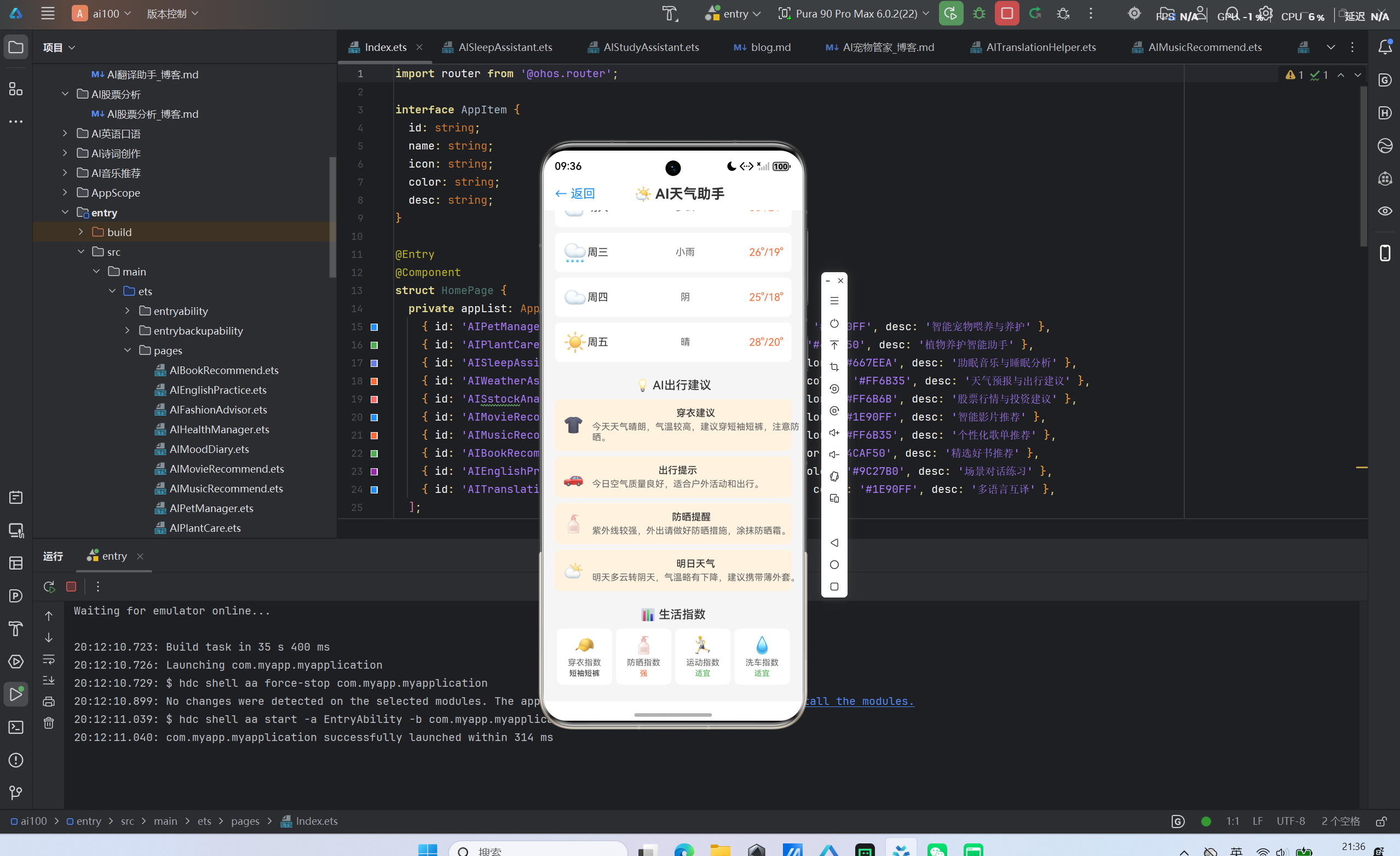
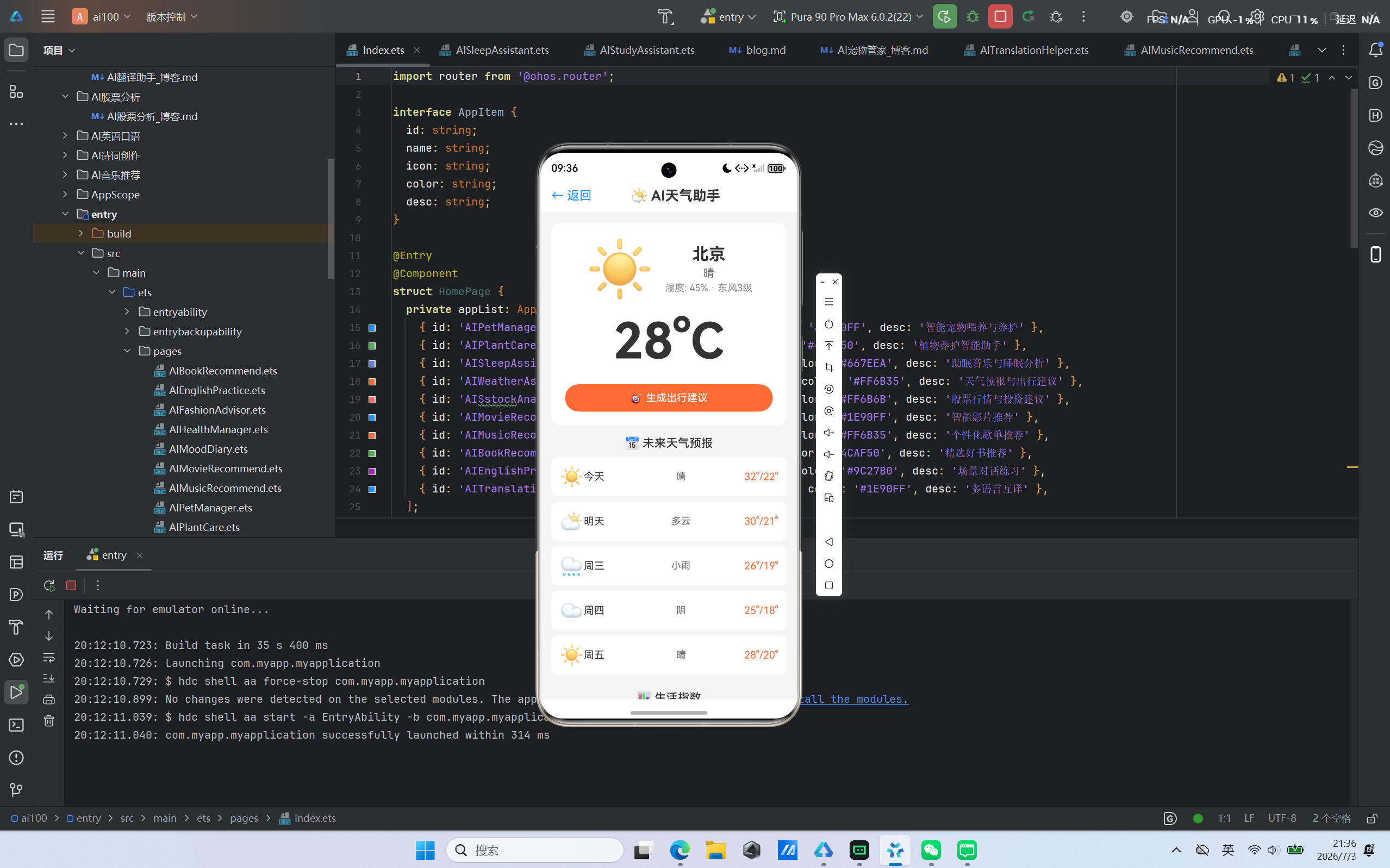
实时天气查询是应用的核心功能之一,显示当前天气信息。
3.1.1 数据模型设计
interface WeatherInfo {
  city: string;
  temperature: number;
  weather: string;
  humidity: number;
  wind: string;
  icon: string;
}
在应用初始化时,我们提供了默认的Mock数据,方便用户直接体验应用功能:
@State weather: WeatherInfo = { city: '北京', temperature: 28, weather: '晴', humidity: 45, wind: '东风3级', icon: '☀️' };
3.1.2 当前天气卡片
当前天气卡片展示城市名称、天气图标、温度、湿度和风力信息:
@Builder CurrentWeather() {
  Column() {
    Row() {
      Column() {
        Text(this.weather.icon).fontSize(80);
      }
      Column() {
        Text(this.weather.city).fontSize(24).fontWeight(FontWeight.Bold);
        Text(this.weather.weather).fontSize(16).margin({ top: 4 });
        Text('湿度: ' + this.weather.humidity + '% · ' + this.weather.wind).fontSize(14).margin({ top: 4 });
      }.margin({ left: 16 })
    }
    Text('' + this.weather.temperature + '°C').fontSize(72).fontWeight(FontWeight.Bold).margin({ top: 16 });
    Button('🎯 生成出行建议').width('100%').height(40).fontSize(15).fontColor('#FFFFFF')
      .backgroundColor('#FF6B35').borderRadius(20).margin({ top: 20 }).onClick(() => { this.generateTips(); });
  }.width('100%').padding(20).backgroundColor('#FFFFFF').borderRadius(12)
}
3.2 天气预报
天气预报功能提供未来几天的天气预报。
3.2.1 预报数据模型
interface ForecastDay {
  day: string;
  weather: string;
  high: number;
  low: number;
  icon: string;
}
3.2.2 预报列表展示
@Builder ForecastSection() {
  Column() {
    Text('📅 未来天气预报').fontSize(17).fontWeight(FontWeight.Medium).margin({ top: 16, bottom: 10 });
    ForEach(this.forecasts, (day: ForecastDay) => {
      Row() {
        Text(day.icon).fontSize(28);
        Column() { Text(day.day).fontSize(15) }.layoutWeight(1).alignItems(HorizontalAlign.Start);
        Column() { Text(day.weather).fontSize(14) }.layoutWeight(1).alignItems(HorizontalAlign.Center);
        Column() { Text(day.high + '°/' + day.low + '°').fontSize(15).fontColor('#FF6B35') }.layoutWeight(1).alignItems(HorizontalAlign.End);
      }.width('100%').padding(12).backgroundColor('#FFFFFF').borderRadius(8).margin({ bottom: 8 })
    })
  }
}
3.3 生活指数
生活指数功能提供穿衣指数、防晒指数、运动指数等生活建议。
3.3.1 生活指数展示
@Builder LifeIndex() {
  Column() {
    Text('📊 生活指数').fontSize(17).fontWeight(FontWeight.Medium).margin({ top: 16, bottom: 10 });
    Flex({ wrap: FlexWrap.Wrap, justifyContent: FlexAlign.SpaceAround }) {
      Column() { Text('🧢').fontSize(24).margin({ bottom: 4 }); Text('穿衣指数').fontSize(12); Text('短袖短裤').fontSize(11).margin({ top: 2 }); }.width(80).padding(10).backgroundColor('#FFFFFF').borderRadius(8);
      Column() { Text('🧴').fontSize(24).margin({ bottom: 4 }); Text('防晒指数').fontSize(12); Text('强').fontSize(11).margin({ top: 2 }); }.width(80).padding(10).backgroundColor('#FFFFFF').borderRadius(8);
      Column() { Text('🏃').fontSize(24).margin({ bottom: 4 }); Text('运动指数').fontSize(12); Text('适宜').fontSize(11).margin({ top: 2 }); }.width(80).padding(10).backgroundColor('#FFFFFF').borderRadius(8);
      Column() { Text('💧').fontSize(24).margin({ bottom: 4 }); Text('洗车指数').fontSize(12); Text('适宜').fontSize(11).margin({ top: 2 }); }.width(80).padding(10).backgroundColor('#FFFFFF').borderRadius(8);
    }
  }
}
3.4 AI出行建议生成
AI出行建议生成功能根据天气信息生成个性化的出行建议。
3.4.1 建议数据模型
interface WeatherTip {
  title: string;
  content: string;
  icon: string;
}
3.4.2 建议生成算法
generateTips(): void {
  this.tips = [
    { title: '穿衣建议', content: '今天天气晴朗,气温较高,建议穿短袖短裤,注意防晒。', icon: '👕' },
    { title: '出行提示', content: '今日空气质量良好,适合户外活动和出行。', icon: '🚗' },
    { title: '防晒提醒', content: '紫外线较强,外出请做好防晒措施,涂抹防晒霜。', icon: '🧴' },
    { title: '明日天气', content: '明天多云转阴天,气温略有下降,建议携带薄外套。', icon: '⛅' },
  ];
}
四、鸿蒙设计规范实践
4.1 色彩体系
应用采用鸿蒙设计规范中的色彩体系:
| 颜色 | 用途 | 十六进制值 |
|---|---|---|
| 主色 | 按钮、链接、重点文字 | #FF6B35 |
| 成功色 | 成功状态、积极反馈 | #4CAF50 |
| 警告色 | 警告状态、温度 | #FF6B35 |
| 错误色 | 错误状态、风险提示 | #FF6B6B |
| 背景色 | 页面背景 | #F5F5F5 |
| 卡片色 | 卡片背景 | #FFFFFF |
4.2 字体规范
应用遵循鸿蒙字体规范:
| 场景 | 字号 | 字重 |
|---|---|---|
| 页面标题 | 20sp | Bold |
| 卡片标题 | 18sp | Bold |
| 正文内容 | 14-16sp | Medium |
| 辅助文字 | 12-13sp | Regular |
4.3 间距规范
应用使用统一的间距系统:
- 页面边距:16px
- 卡片间距:12px
- 内容间距:8px
- 圆角半径:8-12px
五、性能优化策略
5.1 列表渲染优化
对于大数据量的列表,应用采用按需渲染策略,只渲染当前可见区域的内容:
Scroll() {
  Column() {
    ForEach(this.forecasts, (day: ForecastDay) => {
      // 列表项
    })
  }.padding({ left: 16, right: 16, top: 16, bottom: 24 })
}.layoutWeight(1).scrollBar(BarState.Off)
通过设置scrollBar(BarState.Off)关闭滚动条,减少不必要的渲染开销。
5.2 状态管理优化
应用仅使用@State装饰器进行状态管理,避免引入复杂的状态管理库,减少内存占用:
@State weather: WeatherInfo = { city: '北京', temperature: 28, weather: '晴', humidity: 45, wind: '东风3级', icon: '☀️' };
@State tips: WeatherTip[] = [];
5.3 图片资源优化
应用使用emoji图标替代传统图片资源,减少APK包体积:
Text('☀️').fontSize(80);
Text('🌤️').fontSize(20);
六、鸿蒙Flutter框架迁移指南
如果开发者希望将AI天气助手应用迁移到鸿蒙Flutter框架,可以参考以下步骤:
6.1 项目结构迁移
| ArkTS项目结构 | Flutter项目结构 |
|---|---|
| entry/src/main/ets/pages/ | lib/pages/ |
| entry/src/main/resources/ | assets/ |
| entry/build-profile.json5 | pubspec.yaml |
6.2 UI组件映射
| ArkTS组件 | Flutter组件 |
|---|---|
| Column | Column |
| Row | Row |
| Text | Text |
| Button | ElevatedButton |
| TextInput | TextField |
| Scroll | SingleChildScrollView |
| ForEach | ListView.builder |
6.3 状态管理迁移
ArkTS的@State对应Flutter的StatefulWidget:
class AIWeatherAssistant extends StatefulWidget {
const AIWeatherAssistant({super.key});
State<AIWeatherAssistant> createState() => _AIWeatherAssistantState();
}
class _AIWeatherAssistantState extends State<AIWeatherAssistant> {
WeatherInfo weather = WeatherInfo(city: '北京', temperature: 28, weather: '晴', humidity: 45, wind: '东风3级', icon: '☀️');
Widget build(BuildContext context) {
return Scaffold(
body: Column(
children: [
// UI内容
],
),
);
}
}
6.4 路由导航迁移
ArkTS的router.pushUrl对应Flutter的Navigator.push:
// ArkTS
router.pushUrl({ url: 'pages/AIWeatherAssistant' });

// Flutter
Navigator.push(context, MaterialPageRoute(builder: (context) => const AIWeatherAssistant()));
七、未来发展规划
7.1 功能扩展
未来,AI天气助手将增加以下功能:
- 空气质量监测:提供空气质量指数和健康建议
- 天气预警:实时推送天气预警信息
- 城市切换:支持多城市天气查询
- 天气分享:支持天气信息分享
7.2 技术升级
- 接入大语言模型API:实现更智能的对话交互
- 鸿蒙分布式能力:跨设备数据同步
- 位置服务集成:自动定位当前城市
7.3 鸿蒙生态整合
- 华为账号登录:统一账号体系
- 华为地图集成:地图与天气结合
- 华为云服务:云端数据存储和分析
八、总结
AI天气助手应用基于鸿蒙HarmonyOS NEXT平台开发,充分利用了ArkTS语言的类型安全特性和ArkUI声明式UI框架的高效开发能力。应用提供了实时天气查询、天气预报、生活指数和AI出行建议等核心功能,为用户提供了全方位的智能天气服务。
同时,应用充分考虑了鸿蒙PC端的适配需求,通过响应式布局设计提供了良好的大屏体验。对于希望迁移到鸿蒙Flutter框架的开发者,本文也提供了详细的迁移指南。
随着鸿蒙生态的不断发展,AI天气助手将继续升级优化,为用户提供更智能、更便捷的天气服务体验。

一站式 AI 云服务平台
更多推荐


 4
4 0
0- 0


 已为社区贡献10条内容

所有评论(0)