
Flutter+HarmonyOS跨端实战—第10篇:视频去水印与进度管理
·
实现长时任务的进度跟踪:从策略设计到用户体验的完整实践
在移动应用开发中,处理视频、大文件上传、AI模型推理等长时任务是常见的需求。与即时操作不同,这类任务耗时从几十秒到几分钟不等,如果让用户面对一个静止的界面或简单的“加载中”提示,很容易导致用户焦虑、误以为应用卡顿,甚至直接放弃操作。
进度跟踪的核心价值在于将“不可见”的后台处理过程“可视化”,为用户提供确定性的反馈,从而:
- 降低焦虑感:明确的进度条让用户知道任务正在推进,距离完成还有多远。
- 建立信任:透明的过程展示了应用的可靠性。
- 提升体验:良好的交互设计(如动画、阶段提示)能让等待时间变得不那么枯燥。
- 便于异常处理:当任务失败时,能清晰定位是在哪个阶段出了问题。
本文将深入探讨在 Flutter 应用中,如何为一个视频去水印功能设计并实现一套完整的、用户体验友好的长时任务进度跟踪系统。我们将覆盖从前端UI交互、状态管理到后端通信策略的每一个环节。
前言
视频去水印比图片处理复杂得多,主要挑战在于:
- 处理时间长:视频处理可能需要几分钟甚至更长
- 进度不可预测:AI 处理速度受视频长度、分辨率影响
- 用户体验:需要实时显示进度,避免用户焦虑
这篇文章我会带你实现完整的视频去水印功能,重点讲解进度管理和用户体验优化。
一、功能设计
1.1 业务流程
用户选择视频
   ↓
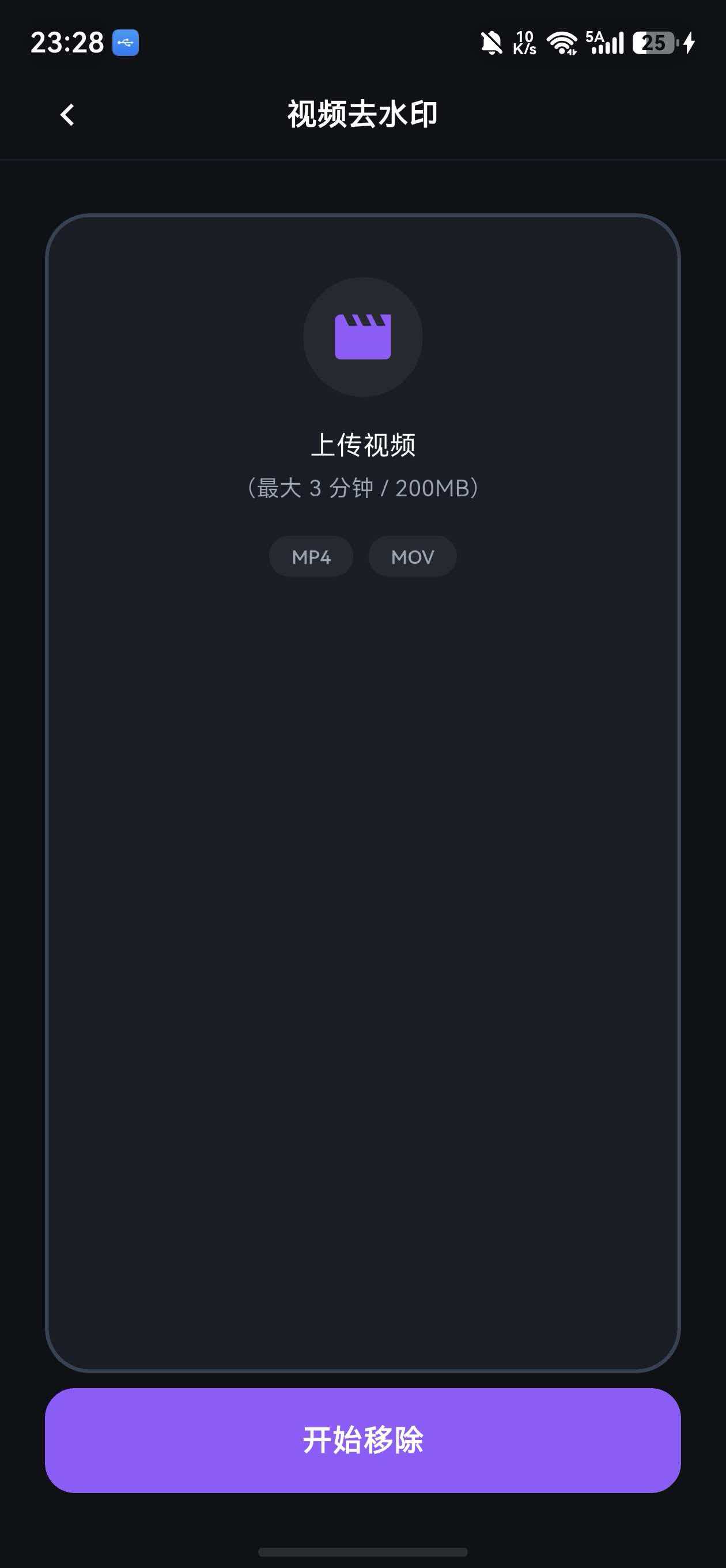
预览视频信息(时长、大小)
   ↓
确认上传
   ↓
检查积分(视频消耗更多积分)
   ↓
上传到服务器(显示上传进度)
   ↓
创建处理任务
   ↓
轮询任务状态(显示处理进度)
   ↓
处理完成
   ↓
下载结果视频
1.2 进度管理策略
三阶段进度:
- 上传阶段(0-30%):显示实际上传进度
- 处理阶段(30-90%):模拟进度或服务器返回进度
- 完成阶段(90-100%):下载结果
// lib/features/video_inpaint/models/video_task_progress.dart

class VideoTaskProgress {
  final double uploadProgress;    // 上传进度 0-1
  final double processProgress;   // 处理进度 0-1
  final TaskStage stage;          // 当前阶段

  const VideoTaskProgress({
    required this.uploadProgress,
    required this.processProgress,
    required this.stage,
  });

  /// 总体进度(0-1)
  double get totalProgress {
    switch (stage) {
      case TaskStage.uploading:
        return uploadProgress * 0.3;
      case TaskStage.processing:
        return 0.3 + processProgress * 0.6;
      case TaskStage.completed:
        return 1.0;
      case TaskStage.failed:
        return 0.0;
    }
  }

  /// 进度百分比文本
  String get progressText {
    return '${(totalProgress * 100).toInt()}%';
  }

  /// 阶段描述
  String get stageDescription {
    switch (stage) {
      case TaskStage.uploading:
        return '上传中...';
      case TaskStage.processing:
        return 'AI 处理中...';
      case TaskStage.completed:
        return '处理完成';
      case TaskStage.failed:
        return '处理失败';
    }
  }
}

enum TaskStage {
  uploading,    // 上传中
  processing,   // 处理中
  completed,    // 已完成
  failed,       // 失败
}
二、视频上传页面
2.1 视频选择
// lib/features/video_inpaint/presentation/pages/video_upload_page.dart
import 'package:flutter/material.dart';
import 'package:flutter_riverpod/flutter_riverpod.dart';
import 'package:image_picker/image_picker.dart';
import 'package:video_player/video_player.dart';
import 'dart:io';
import '../../../../app/app_colors.dart';
import '../../../../shared/widgets/gradient_button.dart';
class VideoUploadPage extends ConsumerStatefulWidget {
const VideoUploadPage({super.key});
ConsumerState<VideoUploadPage> createState() => _VideoUploadPageState();
}
class _VideoUploadPageState extends ConsumerState<VideoUploadPage> {
File? _selectedVideo;
VideoPlayerController? _videoController;
final ImagePicker _picker = ImagePicker();
void dispose() {
_videoController?.dispose();
super.dispose();
}
Future<void> _pickVideo(ImageSource source) async {
try {
final XFile? video = await _picker.pickVideo(
source: source,
maxDuration: const Duration(minutes: 5),
);
if (video != null) {
final file = File(video.path);
// 检查文件大小(最大 100MB)
final fileSize = await file.length();
if (fileSize > 100 * 1024 * 1024) {
_showError('视频大小不能超过 100MB');
return;
}
setState(() {
_selectedVideo = file;
});
// 初始化视频播放器
await _initVideoPlayer(file);
}
} catch (e) {
_showError('选择视频失败: $e');
}
}
Future<void> _initVideoPlayer(File file) async {
_videoController?.dispose();
_videoController = VideoPlayerController.file(file);
await _videoController!.initialize();
setState(() {});
}
void _showError(String message) {
ScaffoldMessenger.of(context).showSnackBar(
SnackBar(
content: Text(message),
backgroundColor: AppColors.red,
),
);
}
Widget build(BuildContext context) {
return Scaffold(
appBar: AppBar(
title: const Text('视频去水印'),
),
body: SingleChildScrollView(
padding: const EdgeInsets.all(16),
child: Column(
crossAxisAlignment: CrossAxisAlignment.stretch,
children: [
// 视频预览
_buildVideoPreview(),
const SizedBox(height: 24),
// 选择按钮
if (_selectedVideo == null) ...[
_buildPickButton(
icon: Icons.video_library,
label: '从相册选择',
onTap: () => _pickVideo(ImageSource.gallery),
),
const SizedBox(height: 12),
_buildPickButton(
icon: Icons.videocam,
label: '录制视频',
onTap: () => _pickVideo(ImageSource.camera),
),
],
// 视频信息
if (_selectedVideo != null && _videoController != null) ...[
_buildVideoInfo(),
const SizedBox(height: 24),
GradientButton(
text: '开始去水印',
onPressed: _startProcessing,
),
const SizedBox(height: 12),
TextButton(
onPressed: () {
setState(() {
_selectedVideo = null;
_videoController?.dispose();
_videoController = null;
});
},
child: const Text('重新选择'),
),
],
const SizedBox(height: 24),
// 提示信息
_buildTips(),
],
),
),
);
}
Widget _buildVideoPreview() {
return Container(
height: 300,
decoration: BoxDecoration(
color: AppColors.cardDark,
borderRadius: BorderRadius.circular(16),
border: Border.all(color: AppColors.gray700, width: 2),
),
child: _videoController != null && _videoController!.value.isInitialized
? ClipRRect(
borderRadius: BorderRadius.circular(14),
child: Stack(
alignment: Alignment.center,
children: [
AspectRatio(
aspectRatio: _videoController!.value.aspectRatio,
child: VideoPlayer(_videoController!),
),
// 播放按钮
IconButton(
icon: Icon(
_videoController!.value.isPlaying
? Icons.pause_circle_filled
: Icons.play_circle_filled,
size: 64,
color: Colors.white.withOpacity(0.8),
),
onPressed: () {
setState(() {
if (_videoController!.value.isPlaying) {
_videoController!.pause();
} else {
_videoController!.play();
}
});
},
),
],
),
)
: Center(
child: Column(
mainAxisAlignment: MainAxisAlignment.center,
children: [
Icon(
Icons.video_library_outlined,
size: 64,
color: AppColors.gray500,
),
const SizedBox(height: 16),
Text(
'请选择要去水印的视频',
style: TextStyle(
color: AppColors.gray400,
fontSize: 16,
),
),
],
),
),
);
}
Widget _buildPickButton({
required IconData icon,
required String label,
required VoidCallback onTap,
}) {
return InkWell(
onTap: onTap,
borderRadius: BorderRadius.circular(16),
child: Container(
padding: const EdgeInsets.all(20),
decoration: BoxDecoration(
color: AppColors.cardDark,
borderRadius: BorderRadius.circular(16),
border: Border.all(color: AppColors.gray700),
),
child: Row(
children: [
Container(
width: 48,
height: 48,
decoration: BoxDecoration(
color: AppColors.purple.withOpacity(0.1),
borderRadius: BorderRadius.circular(12),
),
child: Icon(icon, color: AppColors.purple),
),
const SizedBox(width: 16),
Text(
label,
style: const TextStyle(
color: AppColors.white,
fontSize: 16,
fontWeight: FontWeight.w500,
),
),
],
),
),
);
}
Widget _buildVideoInfo() {
if (_videoController == null) return const SizedBox();
final duration = _videoController!.value.duration;
final size = _videoController!.value.size;
return Container(
padding: const EdgeInsets.all(16),
decoration: BoxDecoration(
color: AppColors.cardDark,
borderRadius: BorderRadius.circular(12),
),
child: Column(
children: [
_buildInfoRow('时长', _formatDuration(duration)),
const Divider(color: AppColors.gray700),
_buildInfoRow('分辨率', '${size.width.toInt()} × ${size.height.toInt()}'),
const Divider(color: AppColors.gray700),
_buildInfoRow('消耗积分', '3 积分'),
],
),
);
}
Widget _buildInfoRow(String label, String value) {
return Row(
mainAxisAlignment: MainAxisAlignment.spaceBetween,
children: [
Text(
label,
style: const TextStyle(
color: AppColors.gray400,
fontSize: 14,
),
),
Text(
value,
style: const TextStyle(
color: AppColors.white,
fontSize: 14,
fontWeight: FontWeight.w500,
),
),
],
);
}
Widget _buildTips() {
return Container(
padding: const EdgeInsets.all(16),
decoration: BoxDecoration(
color: AppColors.orange.withOpacity(0.1),
borderRadius: BorderRadius.circular(12),
border: Border.all(
color: AppColors.orange.withOpacity(0.3),
),
),
child: Column(
crossAxisAlignment: CrossAxisAlignment.start,
children: [
Row(
children: [
Icon(
Icons.warning_amber_outlined,
color: AppColors.orange,
size: 20,
),
const SizedBox(width: 8),
const Text(
'注意事项',
style: TextStyle(
color: AppColors.orange,
fontWeight: FontWeight.bold,
),
),
],
),
const SizedBox(height: 8),
Text(
'• 支持 MP4、MOV 格式\n'
'• 视频大小不超过 100MB\n'
'• 时长不超过 5 分钟\n'
'• 处理时间约 1-3 分钟\n'
'• 视频处理消耗 3 积分',
style: TextStyle(
color: AppColors.gray400,
fontSize: 14,
height: 1.5,
),
),
],
),
);
}
String _formatDuration(Duration duration) {
final minutes = duration.inMinutes;
final seconds = duration.inSeconds % 60;
return '${minutes.toString().padLeft(2, '0')}:${seconds.toString().padLeft(2, '0')}';
}
Future<void> _startProcessing() async {
// 跳转到进度页面
Navigator.pushNamed(
context,
'/video-processing',
arguments: _selectedVideo,
);
}
}
三、进度跟踪页面
3.1 页面 UI
// lib/features/video_inpaint/presentation/pages/video_processing_page.dart
import 'package:flutter/material.dart';
import 'package:flutter_riverpod/flutter_riverpod.dart';
import 'dart:async';
import 'dart:io';
import '../../../../app/app_colors.dart';
import '../../models/video_task_progress.dart';
import '../providers/video_inpaint_provider.dart';
class VideoProcessingPage extends ConsumerStatefulWidget {
final File videoFile;
const VideoProcessingPage({required this.videoFile, super.key});
ConsumerState<VideoProcessingPage> createState() => _VideoProcessingPageState();
}
class _VideoProcessingPageState extends ConsumerState<VideoProcessingPage> {
Timer? _pollTimer;
String? _taskId;
void initState() {
super.initState();
_startProcessing();
}
void dispose() {
_pollTimer?.cancel();
super.dispose();
}
Future<void> _startProcessing() async {
// 上传视频并创建任务
final result = await ref.read(videoInpaintProvider.notifier).uploadVideo(
widget.videoFile,
onUploadProgress: (progress) {
// 更新上传进度
ref.read(videoInpaintProvider.notifier).updateProgress(
VideoTaskProgress(
uploadProgress: progress,
processProgress: 0,
stage: TaskStage.uploading,
),
);
},
);
result.fold(
(failure) {
_showError(failure.message);
},
(taskId) {
_taskId = taskId;
// 开始轮询任务状态
_startPolling();
},
);
}
void _startPolling() {
_pollTimer = Timer.periodic(const Duration(seconds: 2), (timer) async {
if (_taskId == null) return;
final result = await ref.read(videoInpaintProvider.notifier).checkTaskStatus(_taskId!);
result.fold(
(failure) {
timer.cancel();
_showError(failure.message);
},
(task) {
if (task.status == TaskStatus.completed) {
timer.cancel();
_onTaskCompleted(task);
} else if (task.status == TaskStatus.failed) {
timer.cancel();
_showError('处理失败,请重试');
}
},
);
});
}
void _onTaskCompleted(VideoTask task) {
Navigator.pushReplacementNamed(
context,
'/video-result',
arguments: task,
);
}
void _showError(String message) {
ScaffoldMessenger.of(context).showSnackBar(
SnackBar(
content: Text(message),
backgroundColor: AppColors.red,
),
);
}
Widget build(BuildContext context) {
final progress = ref.watch(videoInpaintProvider).progress;
return Scaffold(
appBar: AppBar(
title: const Text('处理中'),
leading: IconButton(
icon: const Icon(Icons.close),
onPressed: () {
_showCancelDialog();
},
),
),
body: Center(
child: Padding(
padding: const EdgeInsets.all(32),
child: Column(
mainAxisAlignment: MainAxisAlignment.center,
children: [
// 圆形进度指示器
SizedBox(
width: 200,
height: 200,
child: Stack(
alignment: Alignment.center,
children: [
// 背景圆环
SizedBox(
width: 200,
height: 200,
child: CircularProgressIndicator(
value: 1.0,
strokeWidth: 12,
backgroundColor: AppColors.gray700,
valueColor: AlwaysStoppedAnimation(AppColors.gray700),
),
),
// 进度圆环
SizedBox(
width: 200,
height: 200,
child: CircularProgressIndicator(
value: progress.totalProgress,
strokeWidth: 12,
backgroundColor: Colors.transparent,
valueColor: AlwaysStoppedAnimation(AppColors.purple),
),
),
// 进度文本
Column(
mainAxisSize: MainAxisSize.min,
children: [
Text(
progress.progressText,
style: const TextStyle(
color: AppColors.white,
fontSize: 48,
fontWeight: FontWeight.bold,
),
),
const SizedBox(height: 8),
Text(
progress.stageDescription,
style: const TextStyle(
color: AppColors.gray400,
fontSize: 16,
),
),
],
),
],
),
),
const SizedBox(height: 48),
// 提示信息
_buildTips(progress.stage),
],
),
),
),
);
}
Widget _buildTips(TaskStage stage) {
String tip;
IconData icon;
Color color;
switch (stage) {
case TaskStage.uploading:
tip = '正在上传视频到服务器...';
icon = Icons.cloud_upload;
color = AppColors.blue;
break;
case TaskStage.processing:
tip = 'AI 正在处理视频,请耐心等待\n处理时间取决于视频长度和复杂度';
icon = Icons.auto_awesome;
color = AppColors.purple;
break;
case TaskStage.completed:
tip = '处理完成!';
icon = Icons.check_circle;
color = AppColors.green;
break;
case TaskStage.failed:
tip = '处理失败,请重试';
icon = Icons.error;
color = AppColors.red;
break;
}
return Container(
padding: const EdgeInsets.all(16),
decoration: BoxDecoration(
color: color.withOpacity(0.1),
borderRadius: BorderRadius.circular(12),
border: Border.all(
color: color.withOpacity(0.3),
),
),
child: Row(
children: [
Icon(icon, color: color, size: 24),
const SizedBox(width: 12),
Expanded(
child: Text(
tip,
style: TextStyle(
color: AppColors.gray300,
fontSize: 14,
height: 1.5,
),
),
),
],
),
);
}
void _showCancelDialog() {
showDialog(
context: context,
builder: (context) => AlertDialog(
backgroundColor: AppColors.cardDark,
title: const Text(
'确认取消',
style: TextStyle(color: AppColors.white),
),
content: const Text(
'取消后将无法恢复,已消耗的积分不会退还',
style: TextStyle(color: AppColors.gray400),
),
actions: [
TextButton(
onPressed: () => Navigator.pop(context),
child: const Text('继续处理'),
),
TextButton(
onPressed: () {
_pollTimer?.cancel();
Navigator.pop(context);
Navigator.pop(context);
},
child: const Text(
'确认取消',
style: TextStyle(color: AppColors.red),
),
),
],
),
);
}
}
3.2 状态管理
// lib/features/video_inpaint/presentation/providers/video_inpaint_provider.dart

import 'dart:io';
import 'package:flutter_riverpod/flutter_riverpod.dart';
import 'package:dartz/dartz.dart';
import '../../../../core/errors/failures.dart';
import '../../models/video_task.dart';
import '../../models/video_task_progress.dart';
import '../../domain/usecases/upload_video_usecase.dart';
import '../../domain/usecases/check_task_status_usecase.dart';

/// 视频去水印状态
class VideoInpaintState {
  final bool isLoading;
  final VideoTask? currentTask;
  final VideoTaskProgress progress;
  final String? errorMessage;

  const VideoInpaintState({
    this.isLoading = false,
    this.currentTask,
    this.progress = const VideoTaskProgress(
      uploadProgress: 0,
      processProgress: 0,
      stage: TaskStage.uploading,
    ),
    this.errorMessage,
  });

  VideoInpaintState copyWith({
    bool? isLoading,
    VideoTask? currentTask,
    VideoTaskProgress? progress,
    String? errorMessage,
  }) {
    return VideoInpaintState(
      isLoading: isLoading ?? this.isLoading,
      currentTask: currentTask ?? this.currentTask,
      progress: progress ?? this.progress,
      errorMessage: errorMessage ?? this.errorMessage,
    );
  }
}

/// 视频去水印 Provider
class VideoInpaintNotifier extends StateNotifier<VideoInpaintState> {
  final UploadVideoUseCase _uploadVideoUseCase;
  final CheckTaskStatusUseCase _checkTaskStatusUseCase;

  VideoInpaintNotifier(
    this._uploadVideoUseCase,
    this._checkTaskStatusUseCase,
  ) : super(const VideoInpaintState());

  /// 上传视频
  Future<Either<Failure, String>> uploadVideo(
    File videoFile, {
    required Function(double) onUploadProgress,
  }) async {
    state = state.copyWith(isLoading: true, errorMessage: null);

    final result = await _uploadVideoUseCase(
      videoFile,
      onUploadProgress: onUploadProgress,
    );

    return result.fold(
      (failure) {
        state = state.copyWith(
          isLoading: false,
          errorMessage: failure.message,
          progress: VideoTaskProgress(
            uploadProgress: 0,
            processProgress: 0,
            stage: TaskStage.failed,
          ),
        );
        return Left(failure);
      },
      (taskId) {
        state = state.copyWith(
          isLoading: false,
          progress: VideoTaskProgress(
            uploadProgress: 1.0,
            processProgress: 0,
            stage: TaskStage.processing,
          ),
        );
        return Right(taskId);
      },
    );
  }

  /// 检查任务状态
  Future<Either<Failure, VideoTask>> checkTaskStatus(String taskId) async {
    final result = await _checkTaskStatusUseCase(taskId);

    return result.fold(
      (failure) => Left(failure),
      (task) {
        // 更新进度
        if (task.status == TaskStatus.processing) {
          // 模拟处理进度(实际应从服务器获取)
          final currentProgress = state.progress.processProgress;
          final newProgress = (currentProgress + 0.1).clamp(0.0, 0.95);

          state = state.copyWith(
            currentTask: task,
            progress: VideoTaskProgress(
              uploadProgress: 1.0,
              processProgress: newProgress,
              stage: TaskStage.processing,
            ),
          );
        } else if (task.status == TaskStatus.completed) {
          state = state.copyWith(
            currentTask: task,
            progress: VideoTaskProgress(
              uploadProgress: 1.0,
              processProgress: 1.0,
              stage: TaskStage.completed,
            ),
          );
        } else if (task.status == TaskStatus.failed) {
          state = state.copyWith(
            currentTask: task,
            progress: VideoTaskProgress(
              uploadProgress: 1.0,
              processProgress: 0,
              stage: TaskStage.failed,
            ),
          );
        }

        return Right(task);
      },
    );
  }

  /// 更新进度
  void updateProgress(VideoTaskProgress progress) {
    state = state.copyWith(progress: progress);
  }
}

/// Provider 定义
final videoInpaintProvider = StateNotifierProvider<VideoInpaintNotifier, VideoInpaintState>(
  (ref) {
    final uploadVideoUseCase = ref.watch(uploadVideoUseCaseProvider);
    final checkTaskStatusUseCase = ref.watch(checkTaskStatusUseCaseProvider);
    return VideoInpaintNotifier(uploadVideoUseCase, checkTaskStatusUseCase);
  },
);
四、UseCase 和 API 层
4.1 上传视频 UseCase
// lib/features/video_inpaint/domain/usecases/upload_video_usecase.dart

import 'dart:io';
import 'package:dartz/dartz.dart';
import 'package:flutter_riverpod/flutter_riverpod.dart';
import '../../../../core/errors/failures.dart';
import '../repositories/video_inpaint_repository.dart';

class UploadVideoUseCase {
  final VideoInpaintRepository _repository;

  UploadVideoUseCase(this._repository);

  Future<Either<Failure, String>> call(
    File videoFile, {
    required Function(double) onUploadProgress,
  }) async {
    // 验证文件
    if (!videoFile.existsSync()) {
      return const Left(ValidationFailure('文件不存在'));
    }

    // 检查文件大小(最大 100MB)
    final fileSize = await videoFile.length();
    if (fileSize > 100 * 1024 * 1024) {
      return const Left(ValidationFailure('视频大小不能超过 100MB'));
    }

    // 检查文件格式
    final extension = videoFile.path.split('.').last.toLowerCase();
    if (!['mp4', 'mov'].contains(extension)) {
      return const Left(ValidationFailure('仅支持 MP4、MOV 格式'));
    }

    // 调用 Repository
    return await _repository.uploadVideo(
      videoFile,
      onUploadProgress: onUploadProgress,
    );
  }
}

/// Provider 定义
final uploadVideoUseCaseProvider = Provider<UploadVideoUseCase>(
  (ref) {
    final repository = ref.watch(videoInpaintRepositoryProvider);
    return UploadVideoUseCase(repository);
  },
);
4.2 检查任务状态 UseCase
// lib/features/video_inpaint/domain/usecases/check_task_status_usecase.dart

import 'package:dartz/dartz.dart';
import 'package:flutter_riverpod/flutter_riverpod.dart';
import '../../../../core/errors/failures.dart';
import '../../models/video_task.dart';
import '../repositories/video_inpaint_repository.dart';

class CheckTaskStatusUseCase {
  final VideoInpaintRepository _repository;

  CheckTaskStatusUseCase(this._repository);

  Future<Either<Failure, VideoTask>> call(String taskId) async {
    return await _repository.getTask(taskId);
  }
}

/// Provider 定义
final checkTaskStatusUseCaseProvider = Provider<CheckTaskStatusUseCase>(
  (ref) {
    final repository = ref.watch(videoInpaintRepositoryProvider);
    return CheckTaskStatusUseCase(repository);
  },
);
4.3 Repository 实现
// lib/features/video_inpaint/data/repositories/video_inpaint_repository_impl.dart
import 'dart:io';
import 'package:dartz/dartz.dart';
import 'package:flutter_riverpod/flutter_riverpod.dart';
import '../../../../core/errors/failures.dart';
import '../../domain/repositories/video_inpaint_repository.dart';
import '../../models/video_task.dart';
import '../datasources/video_inpaint_remote_datasource.dart';
class VideoInpaintRepositoryImpl implements VideoInpaintRepository {
final VideoInpaintRemoteDataSource _remoteDataSource;
VideoInpaintRepositoryImpl(this._remoteDataSource);
Future<Either<Failure, String>> uploadVideo(
File videoFile, {
required Function(double) onUploadProgress,
}) async {
try {
final taskId = await _remoteDataSource.uploadVideo(
videoFile,
onUploadProgress: onUploadProgress,
);
return Right(taskId);
} on NetworkException catch (e) {
return Left(NetworkFailure(e.message));
} on ServerException catch (e) {
return Left(ServerFailure(e.message));
} catch (e) {
return Left(UnknownFailure(e.toString()));
}
}
Future<Either<Failure, VideoTask>> getTask(String taskId) async {
try {
final task = await _remoteDataSource.getTask(taskId);
return Right(task);
} on NetworkException catch (e) {
return Left(NetworkFailure(e.message));
} on ServerException catch (e) {
return Left(ServerFailure(e.message));
} catch (e) {
return Left(UnknownFailure(e.toString()));
}
}
}
/// Provider 定义
final videoInpaintRepositoryProvider = Provider<VideoInpaintRepository>(
(ref) {
final remoteDataSource = ref.watch(videoInpaintRemoteDataSourceProvider);
return VideoInpaintRepositoryImpl(remoteDataSource);
},
);
4.4 Remote DataSource
// lib/features/video_inpaint/data/datasources/video_inpaint_remote_datasource.dart

import 'dart:io';
import 'package:dio/dio.dart';
import 'package:flutter_riverpod/flutter_riverpod.dart';
import '../../../../core/network/api_client.dart';
import '../../models/video_task.dart';

class VideoInpaintRemoteDataSource {
  final ApiClient _apiClient;

  VideoInpaintRemoteDataSource(this._apiClient);

  /// 上传视频
  Future<String> uploadVideo(
    File videoFile, {
    required Function(double) onUploadProgress,
  }) async {
    try {
      // 构建 FormData
      final formData = FormData.fromMap({
        'video': await MultipartFile.fromFile(
          videoFile.path,
          filename: videoFile.path.split('/').last,
        ),
      });

      // 发送请求,监听上传进度
      final response = await _apiClient.post(
        '/api/video-inpaint/remove',
        data: formData,
        onSendProgress: (sent, total) {
          final progress = sent / total;
          onUploadProgress(progress);
        },
      );

      // 返回任务 ID
      return response.data['taskId'] as String;
    } on DioException catch (e) {
      if (e.response?.statusCode == 402) {
        throw ServerException('积分不足,请先充值');
      } else if (e.response?.statusCode == 400) {
        throw ServerException(e.response?.data['message'] ?? '请求参数错误');
      } else if (e.type == DioExceptionType.connectionTimeout ||
          e.type == DioExceptionType.receiveTimeout) {
        throw NetworkException('网络连接超时,请检查网络设置');
      } else {
        throw NetworkException('网络请求失败: ${e.message}');
      }
    } catch (e) {
      throw ServerException('未知错误: $e');
    }
  }

  /// 获取任务详情
  Future<VideoTask> getTask(String taskId) async {
    try {
      final response = await _apiClient.get('/api/video-inpaint/tasks/$taskId');
      return VideoTask.fromJson(response.data);
    } on DioException catch (e) {
      throw NetworkException('获取任务详情失败: ${e.message}');
    }
  }
}

/// Provider 定义
final videoInpaintRemoteDataSourceProvider = Provider<VideoInpaintRemoteDataSource>(
  (ref) {
    final apiClient = ref.watch(apiClientProvider);
    return VideoInpaintRemoteDataSource(apiClient);
  },
);

/// 异常类
class NetworkException implements Exception {
  final String message;
  NetworkException(this.message);
}

class ServerException implements Exception {
  final String message;
  ServerException(this.message);
}
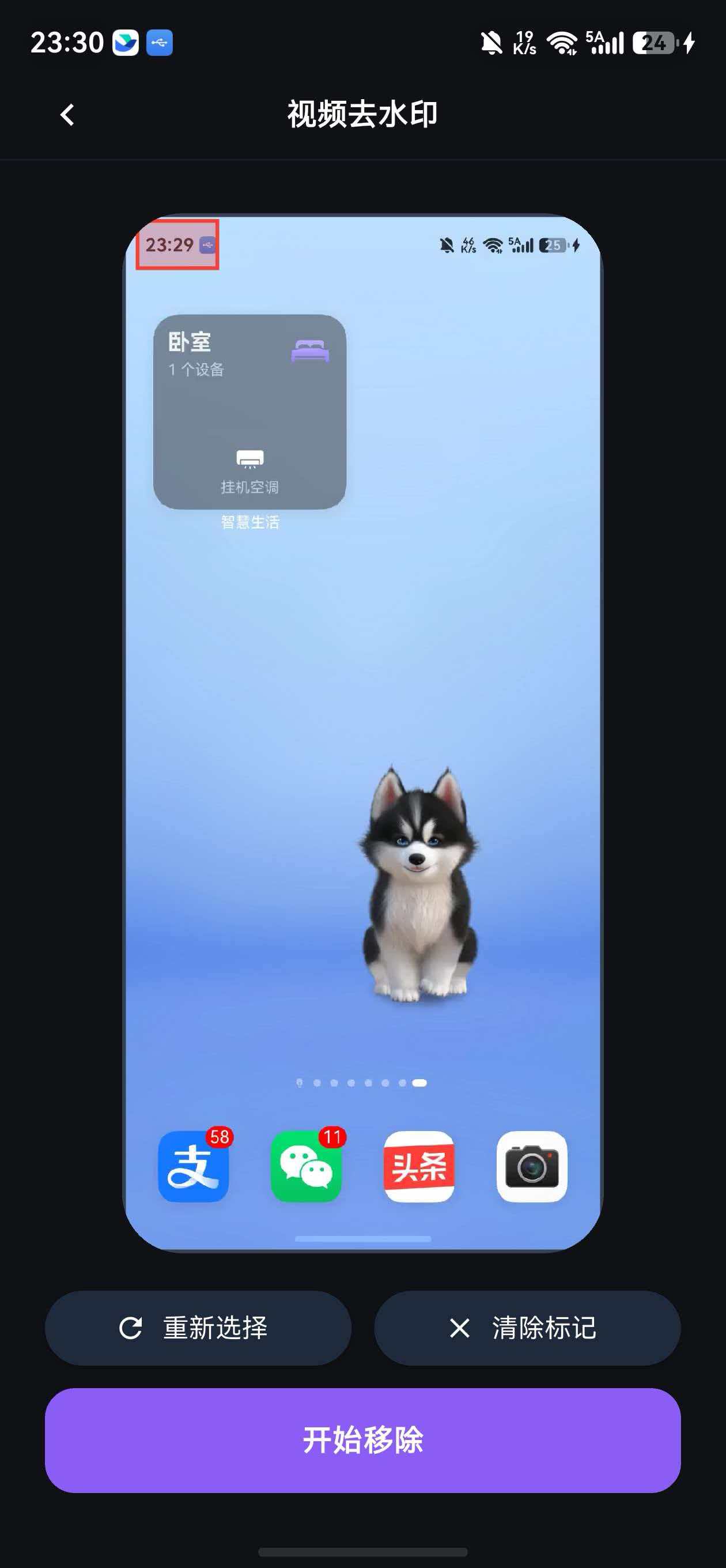
五、结果展示页面
5.1 结果页 UI
// lib/features/video_inpaint/presentation/pages/video_result_page.dart
import 'package:flutter/material.dart';
import 'package:flutter_riverpod/flutter_riverpod.dart';
import 'package:video_player/video_player.dart';
import '../../../../app/app_colors.dart';
import '../../../../shared/widgets/gradient_button.dart';
import '../../models/video_task.dart';
class VideoResultPage extends ConsumerStatefulWidget {
final VideoTask task;
const VideoResultPage({required this.task, super.key});
ConsumerState<VideoResultPage> createState() => _VideoResultPageState();
}
class _VideoResultPageState extends ConsumerState<VideoResultPage> {
VideoPlayerController? _controller;
void initState() {
super.initState();
_initVideoPlayer();
}
Future<void> _initVideoPlayer() async {
if (widget.task.outputFile != null) {
_controller = VideoPlayerController.network(widget.task.outputFile!);
await _controller!.initialize();
await _controller!.setLooping(true);
setState(() {});
}
}
void dispose() {
_controller?.dispose();
super.dispose();
}
Widget build(BuildContext context) {
return Scaffold(
appBar: AppBar(
title: const Text('处理结果'),
),
body: SingleChildScrollView(
padding: const EdgeInsets.all(16),
child: Column(
crossAxisAlignment: CrossAxisAlignment.stretch,
children: [
// 视频预览
if (_controller != null && _controller!.value.isInitialized)
_buildVideoPlayer(),
const SizedBox(height: 24),
// 任务信息
_buildTaskInfo(),
const SizedBox(height: 24),
// 操作按钮
GradientButton(
text: '下载视频',
onPressed: _downloadVideo,
),
const SizedBox(height: 12),
OutlinedButton.icon(
onPressed: () => Navigator.popUntil(context, (route) => route.isFirst),
icon: const Icon(Icons.home),
label: const Text('返回首页'),
style: OutlinedButton.styleFrom(
foregroundColor: AppColors.white,
side: const BorderSide(color: AppColors.gray700),
padding: const EdgeInsets.symmetric(vertical: 16),
),
),
],
),
),
);
}
Widget _buildVideoPlayer() {
return Container(
decoration: BoxDecoration(
color: AppColors.cardDark,
borderRadius: BorderRadius.circular(16),
),
child: ClipRRect(
borderRadius: BorderRadius.circular(16),
child: AspectRatio(
aspectRatio: _controller!.value.aspectRatio,
child: Stack(
alignment: Alignment.center,
children: [
VideoPlayer(_controller!),
// 播放控制
IconButton(
icon: Icon(
_controller!.value.isPlaying
? Icons.pause_circle_filled
: Icons.play_circle_filled,
size: 64,
color: Colors.white.withOpacity(0.8),
),
onPressed: () {
setState(() {
if (_controller!.value.isPlaying) {
_controller!.pause();
} else {
_controller!.play();
}
});
},
),
],
),
),
),
);
}
Widget _buildTaskInfo() {
return Container(
padding: const EdgeInsets.all(16),
decoration: BoxDecoration(
color: AppColors.cardDark,
borderRadius: BorderRadius.circular(12),
),
child: Column(
crossAxisAlignment: CrossAxisAlignment.start,
children: [
Row(
children: [
Icon(Icons.check_circle, color: AppColors.green, size: 24),
const SizedBox(width: 12),
const Text(
'处理完成',
style: TextStyle(
color: AppColors.white,
fontSize: 18,
fontWeight: FontWeight.bold,
),
),
],
),
const SizedBox(height: 16),
_buildInfoRow('任务 ID', widget.task.id),
const Divider(color: AppColors.gray700),
_buildInfoRow('创建时间', _formatDateTime(widget.task.createdAt)),
const Divider(color: AppColors.gray700),
_buildInfoRow('完成时间', _formatDateTime(widget.task.completedAt!)),
const Divider(color: AppColors.gray700),
_buildInfoRow('消耗积分', '3 积分'),
],
),
);
}
Widget _buildInfoRow(String label, String value) {
return Padding(
padding: const EdgeInsets.symmetric(vertical: 8),
child: Row(
mainAxisAlignment: MainAxisAlignment.spaceBetween,
children: [
Text(
label,
style: const TextStyle(
color: AppColors.gray400,
fontSize: 14,
),
),
Text(
value,
style: const TextStyle(
color: AppColors.white,
fontSize: 14,
fontWeight: FontWeight.w500,
),
),
],
),
);
}
String _formatDateTime(DateTime dateTime) {
return '${dateTime.year}-${dateTime.month.toString().padLeft(2, '0')}-${dateTime.day.toString().padLeft(2, '0')} '
'${dateTime.hour.toString().padLeft(2, '0')}:${dateTime.minute.toString().padLeft(2, '0')}';
}
Future<void> _downloadVideo() async {
// 下载逻辑
ScaffoldMessenger.of(context).showSnackBar(
const SnackBar(content: Text('视频已保存到相册')),
);
}
}
本篇完整小结
这篇文章我们完成了:
- ✅ 功能设计和进度管理策略(三阶段进度)
- ✅ 进度模型定义(VideoTaskProgress)
- ✅ 视频上传页面(视频选择 + 预览)
- ✅ 进度跟踪页面(圆形进度指示器 + 轮询机制)
- ✅ 状态管理(VideoInpaintNotifier)
- ✅ UseCase 实现(文件验证 + 业务逻辑)
- ✅ Repository 和 DataSource(API 调用 + 错误处理)
- ✅ 结果展示页面(视频播放 + 任务信息)
关键要点:
- 三阶段进度管理:上传(0-30%)→ 处理(30-90%)→ 完成(90-100%)
- 使用 Timer.periodic 实现轮询机制,每 2 秒检查一次任务状态
- Dio 的 onSendProgress 回调监听上传进度
- 圆形进度指示器提供直观的进度反馈
- 提供取消功能,但提醒用户积分不退还
- 结果页面支持视频预览和下载
进度管理最佳实践:
- 分阶段显示:将长时任务拆分为多个阶段,每个阶段有明确的进度范围
- 实时反馈:通过轮询或 WebSocket 实时更新进度
- 用户提示:在不同阶段显示不同的提示信息,告知用户当前状态
- 取消机制:允许用户取消任务,但要明确告知后果
- 错误处理:处理失败时提供明确的错误信息和重试选项
轮询机制注意事项:
- 轮询间隔不宜过短(建议 2-5 秒),避免服务器压力过大
- 任务完成或失败后及时取消定时器,避免内存泄漏
- 页面销毁时必须取消定时器
- 考虑使用指数退避策略,失败后逐渐增加轮询间隔
性能优化建议:
- 视频上传前进行压缩,减少上传时间
- 使用分片上传,支持断点续传
- 缓存处理结果,避免重复处理
- 使用 WebSocket 替代轮询,减少服务器压力
思考题
- 如何实现更精确的处理进度?(提示:服务器返回实际进度)
- 如果网络中断,如何恢复上传?(提示:分片上传 + 断点续传)
- 如何优化轮询机制,减少服务器压力?(提示:WebSocket 或 Server-Sent Events)
下一篇预告:第11篇 - 积分系统与广告集成

一站式 AI 云服务平台
更多推荐

 7
7 0
0- 0


 已为社区贡献7条内容

所有评论(0)