
【无标题】
重装机甲模型商城——基于 ArkTS 的鸿蒙全功能电商应用深度解析
一、架构总览:一个机甲拼装主题的全栈式移动应用
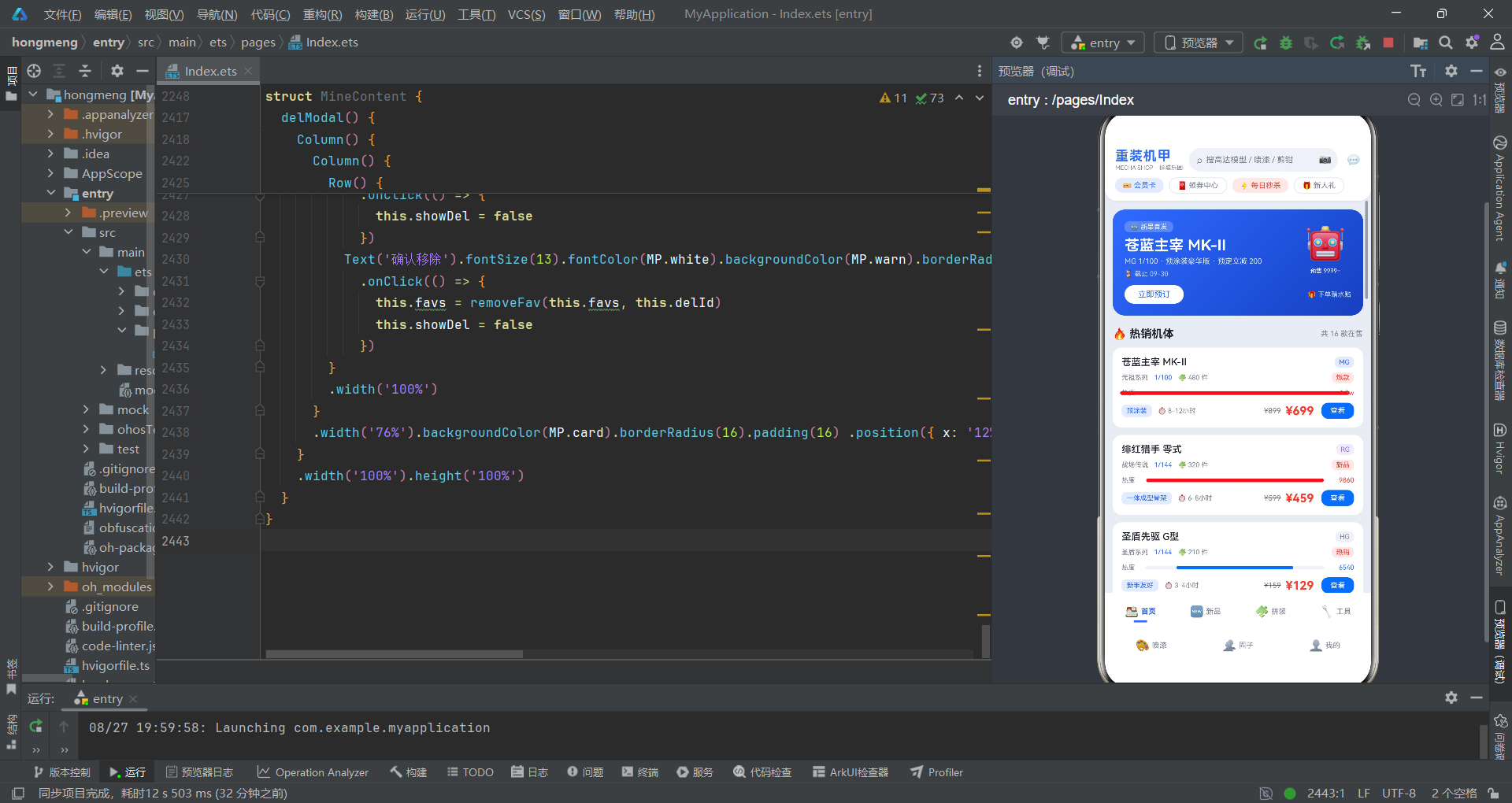
在鸿蒙生态蓬勃发展的今天,ArkTS 声明式 UI 框架以其简洁高效的语法、强大的组件化能力和出色的性能表现,成为了开发者构建跨端应用的首选方案。本文将深入剖析一款名为「重装机甲」的模型商城应用,从接口定义、数据层设计、工具函数封装,到组件架构、状态管理、交互设计,全方位拆解其实现细节与技术亮点。
「重装机甲」是一款以高达/机甲拼装模型为主题的电商与社区融合型应用,涵盖商品浏览、新品预售、拼装教程、工具选购、喷漆配色、圈子社区、个人中心七大核心模块。应用采用机械银、机甲蓝、能源红三色为主视觉体系,整体风格硬朗利落,与机甲文化的科技感、力量感高度契合。
整个应用采用单文件架构设计,将所有业务逻辑与 UI 组件统一组织在一个源文件中。这种方式虽然在大型项目中可能带来维护挑战,但对于功能复杂度适中的应用而言,却能显著降低模块间的耦合成本,提升代码阅读与调试效率。从代码分层角度来看,整个应用可以清晰地划分为以下几个层次:
接口定义层:通过 TypeScript interface 定义了 11 种数据结构类型,为整个应用的数据流转提供了严格的类型契约。
主题配置层:集中管理了调色板常量与各类静态配置选项,实现了样式与业务逻辑的解耦。
数据模型层:以常量数组的形式预置了模拟数据,涵盖热销机体、新品预售、拼装教程、工具商品、喷漆色卡、圈子动态、收藏清单、拼装计划、统计卡片、配色方案十大类数据。
工具函数层:封装了 20 余个纯函数,负责数据转换、状态计算、列表过滤等通用逻辑,遵循函数式编程思想,无副作用、可测试性强。
组件层:由入口组件、头部组件和七个 Tab 页面组件构成,每个组件内部又通过 @Builder 装饰器进一步细分子组件,形成了清晰的组件树结构。
下面是整体架构的流程图:
二、接口定义层:严格的类型契约是健壮应用的基石
2.1 调色板接口——主题系统的类型根基
interface MechaPalette {
  bg: string
  primary: string
  primaryDeep: string
  primarySoft: string
  secondary: string
  secondarySoft: string
  card: string
  cardDeep: string
  text: string
  textSub: string
  line: string
  chip: string
  warn: string
  warnSoft: string
  green: string
  greenSoft: string
  yellow: string
  yellowSoft: string
  purple: string
  purpleSoft: string
  white: string
}
这段代码定义了应用的调色板接口 MechaPalette,它包含了 21 个颜色属性,每个属性都是 string 类型,用于存储十六进制颜色值。这个接口是整个应用主题系统的根基,所有组件的颜色都从这里派生。
bg 代表背景色,是整个应用的底色。primary 和 secondary 分别代表主色和辅助色,是品牌识别的核心。值得注意的是,每个主色系都配套了深色版本和浅色版本,比如 primaryDeep 是主色的深色变体,primarySoft 是主色的浅色柔和版本。这种设计模式在 UI 开发中非常常见,它允许开发者在不同场景下灵活选用合适的色阶,既保证了视觉一致性,又提供了足够的层次感。
card 和 cardDeep 是卡片相关的颜色,前者用于卡片背景,后者用于卡片内部的次级区域。text 和 textSub 分别对应主文字色和次要文字色,形成清晰的文字层级。line 是分割线颜色,chip 是标签/胶囊背景色。
更精妙的是,接口中还定义了 warn、green、yellow、purple 四组功能色,每组都包含主色和柔和色两个版本。这些功能色在不同的业务场景中扮演着重要角色:警告色用于删除、错误等危险操作;绿色用于成功、完成、现货等积极状态;黄色用于限量、警告等需要关注的状态;紫色则用于 RG 级别、特殊标签等场景。
这种「主色系 + 功能色系 + 各档色阶」的调色板设计思路,是现代 UI 设计系统的标准做法。它不仅保证了视觉的统一性,也为后续的主题切换(如深色模式)预留了扩展空间。只需替换调色板常量,就能实现整体主题的一键切换。
2.2 商品数据接口——机甲模型的完整画像
interface MechaItem {
  id: number
  name: string
  series: string
  level: string
  scale: string
  parts: number
  buildTime: string
  price: number
  originPrice: number
  heat: number
  badge: string
  tag: string
  rating: number
  desc: string
}
MechaItem 接口定义了机甲模型商品的数据结构,包含 14 个属性,从多个维度刻画了一个模型商品的完整信息。
id 是唯一标识符,类型为 number,用于列表渲染时的 key 绑定和数据查找。name 是商品名称,series 是所属系列,比如「元祖系列」「战场传说」等,这些系列名称为商品提供了世界观背景,增强了用户的代入感。
level 是模型级别,常见的有 PG、MG、RG、HG 等,代表不同的精度、比例和价格档次。scale 是比例,如 1/100、1/144、1/60 等。parts 是零件数量,类型为 number,这个数值直接反映了模型的复杂度和拼装难度。buildTime 是拼装时长预估,用字符串描述,如「8-12小时」,给用户一个清晰的时间预期。
价格方面,同时定义了 price(现价)和 originPrice(原价),支持划线价展示,这是电商应用的标准配置。heat 是热度值,类型为 number,用于热度排行榜和热度进度条的展示。badge 是角标文字,如「爆款」「新品」「现货」等,用于快速吸引用户注意。tag 是特色标签,如「预涂装」「一体成型骨架」等,突出商品卖点。
rating 是评分,类型为 number,通常是 0-5 之间的小数。desc 是商品描述文案,用于详情页和列表中的简要介绍。
一个设计良好的商品接口,应该同时满足「列表展示」和「详情展示」两种场景的数据需求。从这个角度来看,
MechaItem的设计是相当周全的:列表页需要的名称、级别、系列、价格、角标、标签、热度等字段一应俱全,详情页需要的描述、评分、零件数、拼装时长等信息也都包含在内。
2.3 预售商品接口——定金模式的专属建模
interface PreorderItem {
  id: number
  name: string
  series: string
  version: string
  parts: number
  scale: string
  price: number
  deposit: number
  month: number
  preorders: number
  hot: boolean
  tag: string
  desc: string
}
PreorderItem 是预售商品的接口定义,与普通商品接口相比,它有几个独特的属性。
version 是版本信息,如「普通版」「豪华版」「限定版」,预售商品通常会推出多个版本供用户选择。deposit 是定金金额,这是预售模式的核心概念,用户支付定金后即可锁定价格和库存。
month 是发售月份,类型为 number,表示预计几月发货。preorders 是已预约人数,这个数字可以营造热销氛围,促进用户下单。hot 是一个布尔值,表示是否为热门预售,用于在列表中显示不同的图标和样式。
预售商品接口的设计体现了一个重要的架构原则:不同业务模式的实体应该有独立的数据模型。虽然预售商品和普通商品有很多共通属性,但它们的业务逻辑差异很大,强行共用一个接口只会导致代码中出现大量的条件判断,降低可维护性。
2.4 教程、工具、喷漆、动态等业务接口
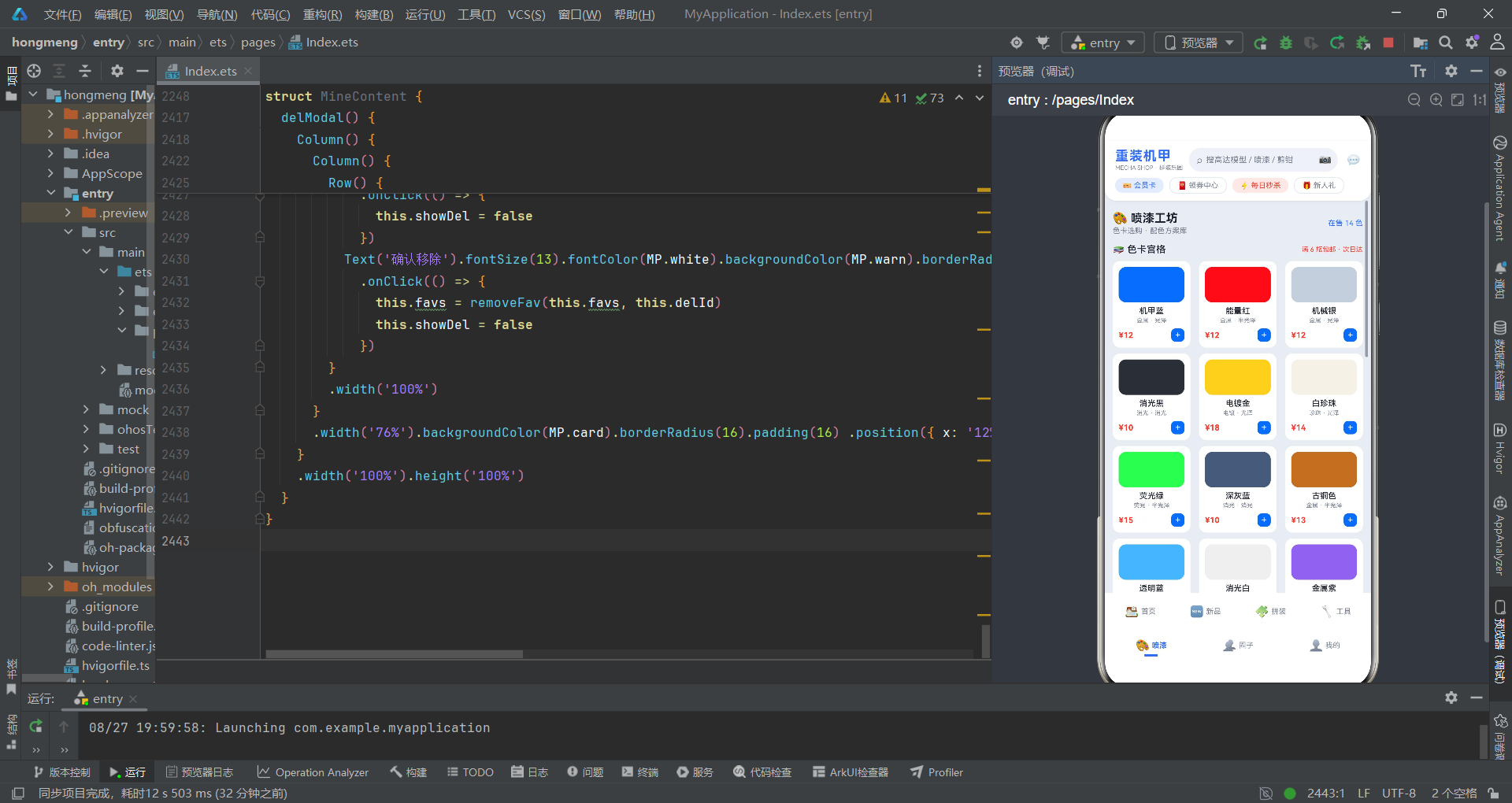
除了上述核心接口外,代码中还定义了 TutorialItem(拼装教程)、ToolItem(工具商品)、PaintItem(喷漆色卡)、FeedItem(圈子动态)、FavItem(收藏项)、BuildPlanItem(拼装计划)、ColorScheme(配色方案)、StatCardItem(统计卡片)等共 11 个接口。
每个接口都针对其业务场景做了精心设计。以 TutorialItem 为例,它包含 steps(总步骤数)、doneSteps(已完成步骤)、status(状态)、hours(耗时)、note(笔记)等字段,完整覆盖了教程进度追踪的需求。
ToolItem 接口则包含了 category(分类)、use(用途)、brand(品牌)、material(材质)、sales(销量)、stock(库存状态)等电商属性,满足工具商城的筛选和展示需求。
FeedItem 接口设计了 player(玩家名)、avatar(头像表情)、model(作品机型)、progress(进度)、emoji(状态表情)、likes(点赞数)、liked(是否已点赞)、tag(话题标签)、comment(内容)等社交属性,支撑起圈子社区的核心功能。
接口定义是整个应用的「骨架」。一个好的接口设计应该做到:命名语义化、字段原子化、类型严格化、结构可扩展。这份代码中的接口设计充分体现了这些原则,每个字段的存在都有其明确的业务意义,没有冗余,也没有明显的缺失。
三、调色板设计:机械银 × 机甲蓝 × 能源红的视觉交响
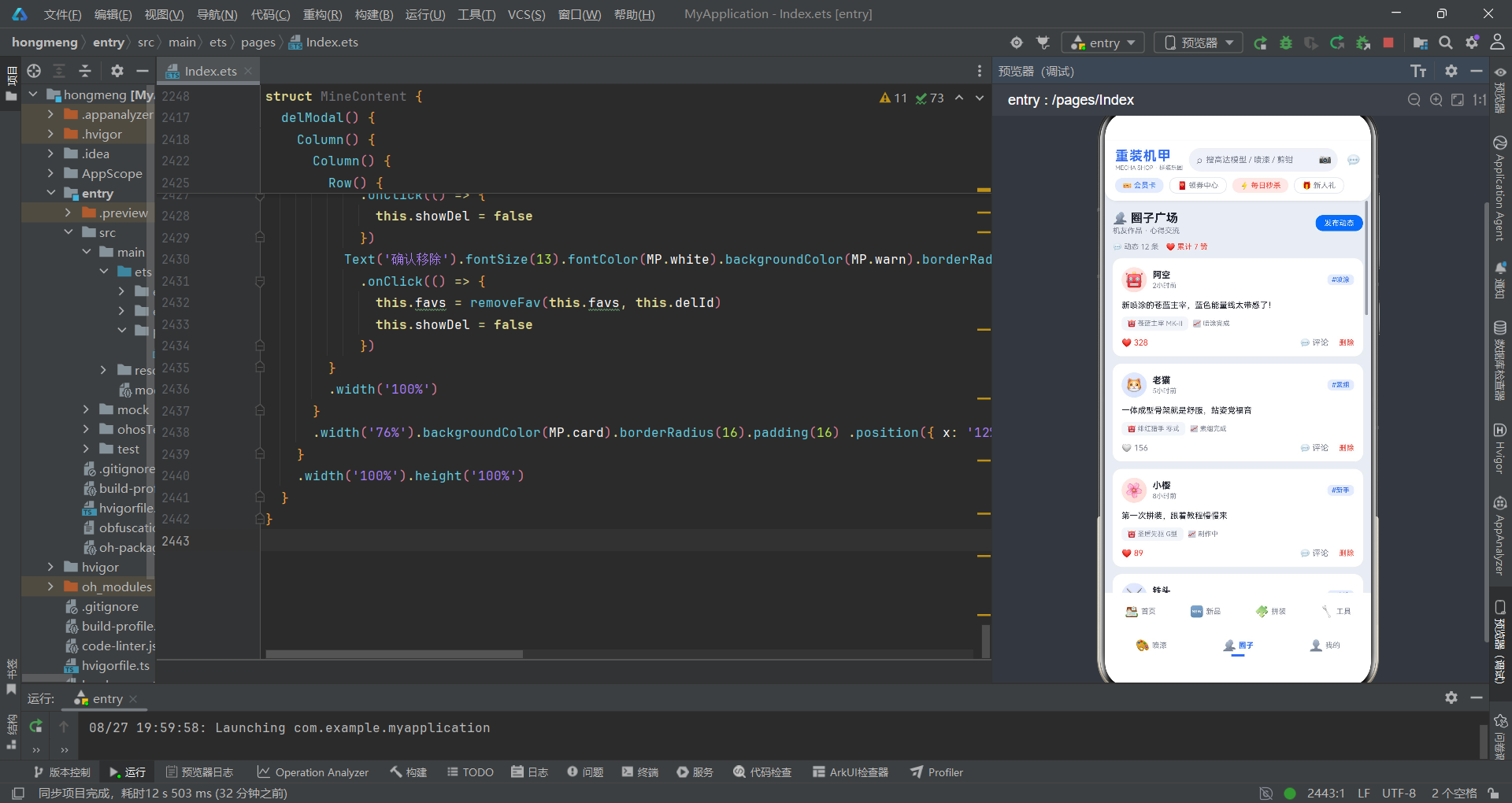
3.1 调色板常量的实现
const MP: MechaPalette = {
  bg: '#E9EDF3',
  primary: '#2F6BFF',
  primaryDeep: '#1E4FD8',
  primarySoft: '#E4EBFF',
  secondary: '#FF3B30',
  secondarySoft: '#FFE8E6',
  card: '#FFFFFF',
  cardDeep: '#F3F6FA',
  text: '#1F2430',
  textSub: '#7A8294',
  line: '#E3E8F0',
  chip: '#EFF2F7',
  warn: '#FF3B30',
  warnSoft: '#FFE8E6',
  green: '#2EAF5F',
  greenSoft: '#E6F7EC',
  yellow: '#FFB800',
  yellowSoft: '#FFF6E0',
  purple: '#8A63E9',
  purpleSoft: '#F0EBFF',
  white: '#FFFFFF'
}
这段代码实现了调色板常量 MP,它是 MechaPalette 接口的具体实例。整个调色板围绕「机械银 × 机甲蓝 × 能源红」的主题展开,构建了一套层次分明、功能齐全的色彩体系。
背景色 bg 选用了 #E9EDF3,这是一种偏冷的浅灰蓝色,既有金属感又不至于太冷峻,为整个应用奠定了科技感的基调。主色 primary 选用 #2F6BFF,一种明亮但不刺眼的蓝色,在 UI 设计中,蓝色通常代表科技、信任、专业,与机甲主题高度契合。辅助色 secondary 选用 #FF3B30,这是一种充满力量感的红色,用于强调价格、角标、警告等需要突出的元素。
每个主色都配套了深色版和柔和版。primaryDeep 是主色的深色版本,用于渐变的末端或需要更深色的场景;primarySoft 是主色的柔和浅色调,用于标签背景、按钮hover态等场景。这种「一主三档」的配色策略,可以在不引入新颜色的前提下,创造出丰富的视觉层次。
文字系统采用了三级灰阶:text(深灰黑 #1F2430)用于标题和正文,textSub(中灰 #7A8294)用于辅助说明和次要信息,配合白色背景,保证了良好的可读性。
功能色方面,绿色 #2EAF5F 用于成功状态、现货标识、已完成等场景;黄色 #FFB800 用于限量标识、评分星级等;紫色 #8A63E9 用于 RG 级别、特殊标签等。每种功能色同样配有柔和背景色版本。
3.2 调色板设计的技术意义
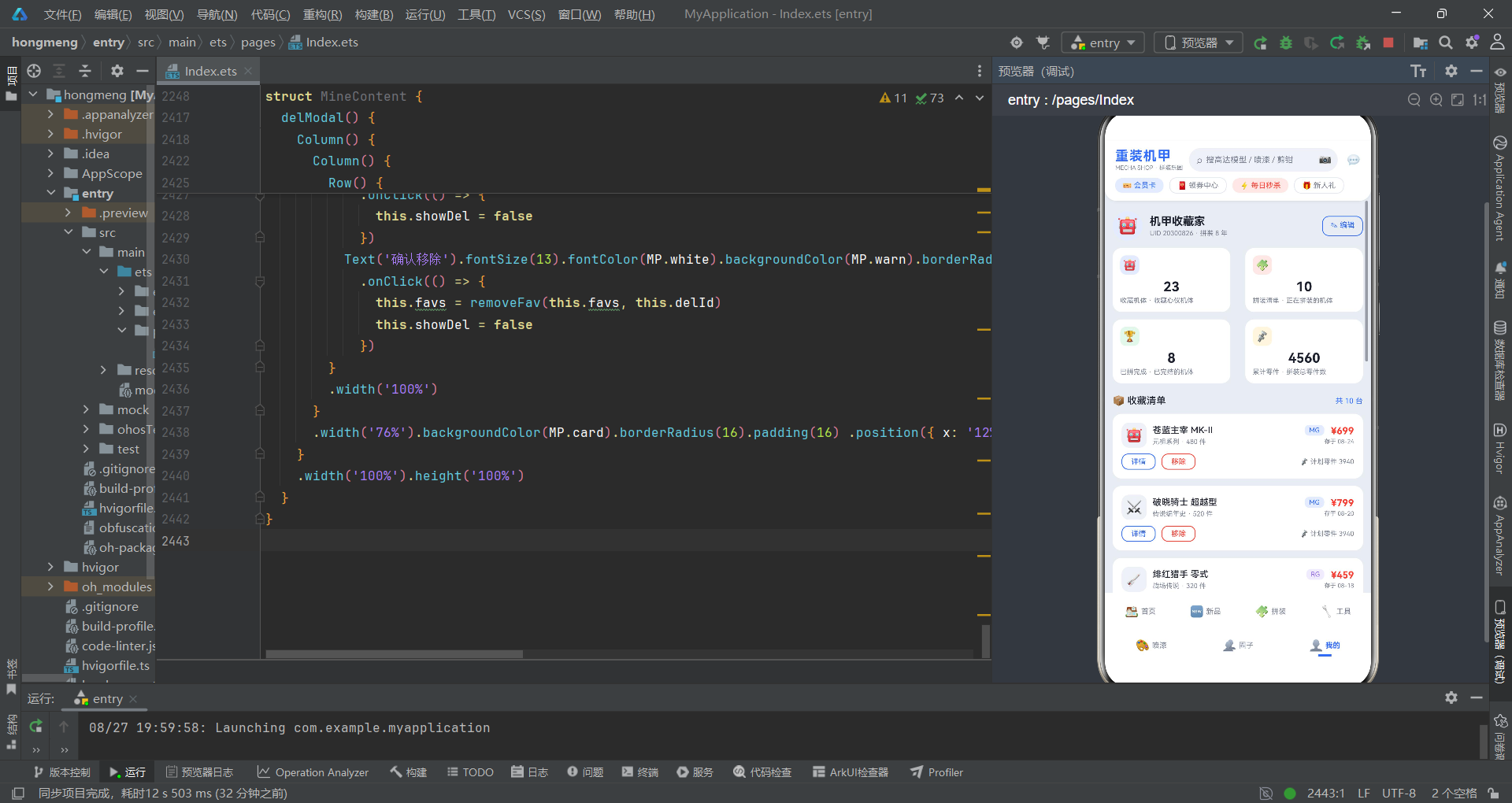
从技术角度来看,将所有颜色集中管理在一个常量对象中有诸多好处。
首先是一致性。所有组件都从同一个调色板取色,避免了各处硬编码颜色值导致的色差问题。无论哪个开发者编写组件,最终呈现的颜色都是统一的。
其次是可维护性。如果产品经理要求调整主色的深浅,或者需要推出深色模式,只需修改这一处常量,整个应用的配色就会同步更新。这种集中式管理大大降低了维护成本。
第三是可扩展性。随着业务发展,可能需要增加新的功能色(比如信息蓝、成功绿的区分更细),只需要在接口和常量中增加新属性即可,不会影响现有代码。
在 ArkTS 开发中,推荐将主题相关的配置(颜色、字体、间距、圆角等)全部抽取到独立的常量文件中,通过统一的命名规范进行管理。这不仅能提升开发效率,还能让应用的视觉风格更加统一专业。
四、数据层设计:十大数据集构建完整的业务数据体系
4.1 热销机体数据 MECHAS
const MECHAS: MechaItem[] = [
  { id: 1, name: '苍蓝主宰 MK-II', series: '元祖系列', level: 'MG', scale: '1/100', parts: 480, buildTime: '8-12小时', price: 699, originPrice: 899, heat: 12800, badge: '爆款', tag: '预涂装', rating: 4.9, desc: '经典机体再版,预涂装内构加可动骨架全面升级' },
  { id: 2, name: '绯红猎手 零式', series: '战场传说', level: 'RG', scale: '1/144', parts: 320, buildTime: '6-8小时', price: 459, originPrice: 599, heat: 9860, badge: '新品', tag: '一体成型骨架', rating: 4.8, desc: '高可动一体骨架,拼装流畅,分色优秀' },
  // ... 共16条数据
]
MECHAS 数组包含了 16 款热销机体数据,每款数据都严格遵循 MechaItem 接口定义。这些数据覆盖了从 HG 入门级到 PG 旗舰级的全价位段,系列涵盖元祖、战场传说、圣盾、传说编年史、无限轨道、铁血战线、幻影战线、宇宙纪元等八大系列。
数据设计上有几个值得关注的细节。一是 badge(角标)的多样性,包括「爆款」「新品」「热销」「现货」「旗舰」等多种类型,配合不同的颜色展示,能有效引导用户注意力。二是 tag(特色标签)的差异化,每款机体都有独特的卖点描述,如「预涂装」「一体成型骨架」「新手友好」「金属成型色」「进阶骨架」等,避免了千篇一律的模板化描述。三是 heat(热度)值的梯度分布,从 2980 到 15200 不等,形成了自然的热度排行榜效果。
4.2 其他核心数据集
除了 MECHAS 之外,代码中还定义了多个业务数据集:
- PREORDERS:新品预售数据,包含 10 款预售机体,覆盖普通版、豪华版、限定版三种版本,发售月份从 9 月到 12 月,模拟了完整的预售排期。
- TUTORIALS:拼装教程数据,包含 12 篇教程,状态涵盖「未开工」「拼装中」「待渗线」「待贴纸」「已完成」五种,每篇教程都有详细的步骤进度和笔记。
- TOOLS:工具商品数据,包含 14 款工具,分为剪钳、笔刀、打磨、镊子、胶水五大类,品牌涵盖王牌工具、精工、神之手、OLFA、田宫、郡士等知名品牌。
- PAINTS:喷漆色卡数据,包含 14 种颜色,类型有金属、消光、电镀、珍珠、荧光、透明等,光泽度有光泽、半光泽、消光三档。
- FEEDS:圈子动态数据,包含 12 条用户动态,每位玩家有不同的头像表情、作品机型、进度状态和内容描述。
- FAVS:收藏清单数据,包含 10 款收藏机体。
- BUILDPLANS:拼装计划数据,包含 10 项计划,每项都有进度百分比、下一步骤、状态等信息。
- STATS:统计卡片数据,包含 4 项统计指标(收藏机体、拼装清单、已拼完成、累计零件)。
- SCHEMES:配色方案数据,包含 5 套保存的配色方案。
这些数据的设计充分体现了「以用户为中心」的产品思维。每个数据集都不是孤立存在的,而是相互关联、相互支撑的。比如收藏的机体可以关联到拼装计划,圈子动态中提到的机型对应到商品库中的具体产品,配色方案关联到喷漆色卡等等。这种数据之间的关联性,为用户提供了连贯的使用体验。
五、工具函数层:纯函数思想的优雅实践
5.1 进度计算与热度展示函数
function progressW(done: number, total: number): string {
  return Math.round(done / total * 100) + '%'
}
progressW 函数接收已完成数量和总数两个参数,返回格式化的百分比字符串。函数内部先计算比例,再用 Math.round 四舍五入取整,最后拼接百分号。这是一个典型的纯函数:输入相同则输出相同,不依赖任何外部状态,也不产生任何副作用。
function heatColor(h: number): string {
  if (h >= 8000) {
    return MP.secondary
  }
  if (h >= 5000) {
    return MP.primary
  }
  return MP.textSub
}
heatColor 函数根据热度值返回对应的颜色。热度大于等于 8000 时返回辅助色(能源红),5000 到 8000 之间返回主色(机甲蓝),低于 5000 返回次要文字色。这种分级映射的设计,让用户可以通过颜色快速感知热度的高低。
function heatText(h: number): string {
  if (h >= 10000) {
    return (h / 10000).toFixed(1) + 'w'
  }
  return h.toString()
}
heatText 函数负责热度值的文本格式化。当热度超过 10000 时,转换为「x.xw」的万单位表示,否则直接返回原始数字的字符串形式。这种数字格式化在电商应用中非常常见,它既能展示大数字的量级感,又不会因为数字太长而破坏布局。
5.2 级别与状态的颜色映射
function levelColor(level: string): string {
  if (level === 'PG') {
    return MP.secondary
  }
  if (level === 'MG') {
    return MP.primary
  }
  if (level === 'RG') {
    return MP.purple
  }
  return MP.textSub
}
levelColor 函数根据模型级别返回对应的文字颜色。PG 级用能源红(最高端),MG 级用机甲蓝(主力级别),RG 级用紫色(精致级别),HG 级用灰色(入门级别)。这种颜色编码方式让用户扫一眼就能分辨出模型的档次。
对应的 levelBg 函数则返回级别的背景色,与文字色配套使用,形成「文字色 + 浅背景色」的标签样式。类似的还有 statusColor/statusBg(状态颜色)、stockColor(库存颜色)、categoryColor(分类颜色)、paintTypeColor(漆类型颜色)等一系列映射函数。
这种「业务枚举值 → 视觉表现」的映射函数,是 UI 开发中非常实用的模式。它将业务规则与视觉呈现解耦,当需要调整某个状态的颜色时,只需修改这一个函数,所有使用该函数的地方都会自动更新。
5.3 列表过滤与数据转换函数
function toolFiltered(list: ToolItem[], cat: string): ToolItem[] {
  if (cat === '全部') {
    return list
  }
  return list.filter((t: ToolItem) => t.category === cat)
}
toolFiltered 函数实现了工具列表的分类筛选。当分类为「全部」时直接返回原列表,否则使用数组的 filter 方法筛选出分类匹配的项。这是函数式编程中非常典型的列表转换操作。
function likeToggle(list: FeedItem[], id: number): FeedItem[] {
  return list.map((f: FeedItem) => {
    if (f.id !== id) {
      return f
    }
    const nf: FeedItem = {
      id: f.id, player: f.player, avatar: f.avatar, model: f.model, progress: f.progress,
      emoji: f.emoji, likes: f.likes + (f.liked ? -1 : 1), liked: !f.liked,
      time: f.time, tag: f.tag, comment: f.comment
    }
    return nf
  })
}
likeToggle 函数实现了点赞/取消点赞的功能。它接收动态列表和目标动态的 id,返回一个新的列表。函数内部使用 map 遍历列表,对非目标项直接返回,对目标项则创建一个新的对象,切换 liked 状态并调整 likes 计数。
这里有一个重要的细节:函数并没有直接修改原数组中的对象,而是创建了全新的对象返回。这种「不可变数据」的操作方式是响应式框架中的最佳实践。因为 ArkTS 的 @State 装饰器依赖数据引用的变化来触发 UI 更新,如果直接修改原对象的属性,可能无法正确触发视图刷新。
在声明式 UI 框架中,状态更新的正确姿势是「替换引用」而非「修改属性」。每次状态变化都应该创建新的对象或数组,让框架能够通过引用对比检测到变化,从而触发重新渲染。
likeToggle函数的实现完美体现了这一原则。
5.4 其他工具函数概览
代码中还包含了多个实用的工具函数:
- compareList:取预售列表的前三项,用于参数对比表。
- firstFour / firstSix:取列表的前 N 项,用于弹窗中的选项展示。
- cellValue:根据字段名返回预售商品的对应值,用于对比表格的行渲染。
- depositTotal:计算定金总额,根据版本不同加价。
- removeFeed / removeFav:删除指定项,返回新数组。
- planTotalParts:计算拼装计划的总零件数。
- stepDone:判断某步骤是否已完成(基于进度百分比)。
- likedCount:统计已点赞的动态数量。
- avgRating:计算工具的平均评分。
- salesText:销量数字格式化(万单位转换)。
- feedGrad:根据动态 id 返回渐变色,实现头像背景的交替效果。
- planOf:根据机体名称查找对应的拼装计划。
这些函数有一个共同的特点:它们都是纯函数。纯函数的好处是可预测、可测试、可组合。同样的输入永远产生同样的输出,不依赖外部状态,也不修改外部变量。这种编程范式使得代码的逻辑更加清晰,调试更加容易,也更有利于单元测试的编写。
六、入口组件与 Tab 导航:双排七 Tab 的架构创新
6.1 Tab 枚举的定义
enum MechaTab {
  HOME = 0,
  NEW = 1,
  BUILD = 2,
  TOOL = 3,
  PAINT = 4,
  CIRCLE = 5,
  MINE = 6
}
代码首先定义了 MechaTab 枚举,为七个 Tab 分别分配了从 0 到 6 的数字编号。使用枚举而非魔法数字,可以大幅提升代码的可读性和可维护性。在后续的逻辑判断中,MechaTab.HOME 显然比数字 0 更清晰易懂。
枚举的命名采用了全大写加下划线的常量命名规范,符合 TypeScript/ArkTS 的编码惯例。每个枚举值都有明确的业务含义,与 Tab 的功能一一对应。
6.2 入口组件的结构
@Entry
@Component
struct MechaApp {
  @State activeTab: number = 0

  build() {
    Column() {
      MechaHeader()
      Stack() {
        if (this.activeTab === MechaTab.HOME) {
          HomeContent()
        } else if (this.activeTab === MechaTab.NEW) {
          NewContent()
        } else if (this.activeTab === MechaTab.BUILD) {
          BuildContent()
        } else if (this.activeTab === MechaTab.TOOL) {
          ToolContent()
        } else if (this.activeTab === MechaTab.PAINT) {
          PaintContent()
        } else if (this.activeTab === MechaTab.CIRCLE) {
          CircleContent()
        } else if (this.activeTab === MechaTab.MINE) {
          MineContent()
        }
      }
      .layoutWeight(1) .width('100%')

      Row() {
        this.tabItem('🏠', '首页', MechaTab.HOME)
        this.tabItem('🆕', '新品', MechaTab.NEW)
        this.tabItem('🧩', '拼装', MechaTab.BUILD)
        this.tabItem('🔧', '工具', MechaTab.TOOL)
      }
      .width('100%') .height(52) .backgroundColor(MP.card) .padding({ left: 4, right: 4, top: 4 })

      Row() {
        this.tabItem('🎨', '喷漆', MechaTab.PAINT)
        this.tabItem('👥', '圈子', MechaTab.CIRCLE)
        this.tabItem('👤', '我的', MechaTab.MINE)
      }
      .width('100%') .height(48) .backgroundColor(MP.card) .padding({ left: 4, right: 4, bottom: 4 })
    }
    .width('100%') .height('100%') .backgroundColor(MP.bg)
  }
MechaApp 是应用的入口组件,使用 @Entry 装饰器标记,表示这是页面的根组件。@Component 装饰器表明这是一个自定义组件。
组件的状态非常简洁,只有一个 @State activeTab: number = 0,用于记录当前激活的 Tab 索引。@State 装饰器是 ArkUI 状态管理的核心,被它装饰的变量发生变化时,会触发组件的重新渲染。
build 方法是组件的 UI 描述函数,返回一个 Column 布局。整个页面从上到下分为三个部分:头部(MechaHeader)、内容区(Stack)、双排 Tab 导航。
内容区使用 Stack 布局,通过 if/else if 条件判断来渲染对应的 Tab 页面组件。Stack 布局的特点是子组件堆叠在一起,配合条件渲染可以实现页面的切换效果。layoutWeight(1) 让内容区占据剩余的全部空间。
6.3 双排 Tab 的创新设计
最具特色的是底部的双排 Tab 导航设计。不同于常见的单排 Tab,这款应用将七个 Tab 分成了两行:
- 第一行(4 个):首页、新品、拼装、工具
- 第二行(3 个):喷漆、圈子、我的
这种双排设计有几个明显的优势。一是解决了 Tab 数量过多的问题,7 个 Tab 如果放在同一行,每个 Tab 的宽度会很窄,图标和文字会显得拥挤。分成两行后,每个 Tab 都有足够的展示空间。二是形成了视觉上的分组,第一行偏向「消费」功能(浏览商品、购买工具),第二行偏向「创作」和「社区」功能(喷漆、圈子、个人中心)。三是在视觉上更有层次感,打破了传统底部导航的单调感。
每个 Tab 项通过 @Builder 装饰的 tabItem 方法构建,这是一种非常优雅的代码复用方式。
6.4 @Builder 装饰的 Tab 项构建函数
  @Builder
  tabItem(icon: string, label: string, tab: number) {
    Column() {
      Row() {
        Text(icon).fontSize(15)
        Text(label).fontSize(10).fontColor(this.activeTab === tab ? MP.primary : MP.textSub) .fontWeight(this.activeTab === tab ? FontWeight.Bold : FontWeight.Normal).margin({ left: 3 })
      }
      .justifyContent(FlexAlign.Center)
      Divider().strokeWidth(3).color(this.activeTab === tab ? MP.primary : 'rgba(0,0,0,0)') .width(18).borderRadius(2).margin({ top: 3 })
    }
    .layoutWeight(1) .justifyContent(FlexAlign.Center)
    .onClick(() => {
      this.activeTab = tab
    })
  }
tabItem 方法使用 @Builder 装饰器标记,可以像内置组件一样在 build 方法中调用。它接收三个参数:icon(图标 emoji)、label(文字标签)、tab(对应的 Tab 枚举值)。
每个 Tab 项的结构是一个 Column,内部包含一个 Row(图标 + 文字)和一个 Divider(底部指示条)。layoutWeight(1) 让每个 Tab 项平分宽度。
激活态的判断通过 this.activeTab === tab 来实现。激活时:文字颜色变为主色、字重加粗、底部指示条显示主色。未激活时:文字为次要色、字重正常、底部指示条透明(rgba(0,0,0,0))。
点击事件 onClick 会更新 activeTab 的值,由于 activeTab 被 @State 装饰,更新后会触发整个组件的重新渲染,从而实现 Tab 切换的视觉效果。
@Builder是 ArkTS 中非常实用的特性,它允许你将可复用的 UI 片段抽取为独立的构建函数,既减少了代码重复,又保持了声明式 UI 的简洁风格。与抽取为独立组件相比,@Builder方法更轻量,适合在同一组件内部复用的小型 UI 片段。
下面是 Tab 导航的状态流转图:
七、头部组件:电商风格的信息聚合
7.1 头部组件的结构
@Component
struct MechaHeader {
  build() {
    Column() {
      Row() {
        Column() {
          Text('重装机甲').fontSize(18).fontWeight(FontWeight.Bold).fontColor(MP.primary).letterSpacing(1)
          Text('MECHA SHOP · 拼装乐园').fontSize(8).fontColor(MP.textSub).margin({ top: 1 })
        }
        .alignItems(HorizontalAlign.Start)
        Row() {
          Text('⌕').fontSize(13).fontColor(MP.textSub)
          Text('搜高达模型 / 喷漆 / 剪钳').fontSize(11).fontColor(MP.textSub).margin({ left: 5 }).maxLines(1) .textOverflow({ overflow: TextOverflow.Ellipsis })
          Column().layoutWeight(1)
          Text('📷').fontSize(14)
        }
        .layoutWeight(1) .height(32) .backgroundColor(MP.chip) .borderRadius(16) .padding({ left: 10, right: 8 }) .margin({ left: 8 })
        Text('💬').fontSize(15).margin({ left: 12 })
      }
      .width('100%') .padding({ left: 14, right: 14, top: 10, bottom: 8 })

      Row() {
        Text('🎫 会员卡').fontSize(10).fontColor(MP.primary).backgroundColor(MP.primarySoft) .borderRadius(9).padding({ left: 10, right: 10, top: 4, bottom: 4 })
        Text('🧧 领券中心').fontSize(10).fontColor(MP.textSub).border({ width: 1, color: MP.line }) .borderRadius(9).padding({ left: 10, right: 10, top: 4, bottom: 4 }).margin({ left: 8 })
        Text('⚡ 每日秒杀').fontSize(10).fontColor(MP.secondary).backgroundColor(MP.secondarySoft) .borderRadius(9).padding({ left: 10, right: 10, top: 4, bottom: 4 }).margin({ left: 8 })
        Text('🎁 新人礼').fontSize(10).fontColor(MP.textSub).border({ width: 1, color: MP.line }) .borderRadius(9).padding({ left: 10, right: 10, top: 4, bottom: 4 }).margin({ left: 8 })
      }
      .width('100%') .padding({ left: 14, right: 14, bottom: 10 })
    }
    .width('100%') .backgroundColor(MP.card) .borderRadius({ bottomLeft: 16, bottomRight: 16 }) .shadow({ radius: 8, color: 'rgba(31,36,48,0.08)', offsetX: 0, offsetY: 3 })
  }
}
MechaHeader 组件负责页面顶部的展示,是典型的电商 App 头部设计。整个头部采用 Column 垂直布局,分为上下两行:第一行是 Logo + 搜索框 + 消息图标,第二行是营销入口标签。
第一行的布局值得仔细分析。最左边是品牌标识,包含主标题「重装机甲」和副标题「MECHA SHOP · 拼装乐园」。主标题使用主色、加粗、18px 字号、1px 字间距,视觉冲击力强;副标题使用次要文字色、8px 极小字号,形成鲜明的层级对比。
中间是搜索框,使用 Row 布局模拟搜索框的外观。搜索图标、占位文字、拍照图标从左到右排列,中间用 Column().layoutWeight(1) 撑开空间。搜索框整体使用浅灰色背景(MP.chip)和 16px 的圆角,高度 32px,是移动端搜索框的标准尺寸。
最右边是消息图标,使用 💬 emoji 代替图标字体,简单直接。
第二行是四个营销入口标签:会员卡、领券中心、每日秒杀、新人礼。这四个标签采用了不同的视觉样式:会员卡使用「主色文字 + 浅主色背景」,每日秒杀使用「辅助色文字 + 浅辅助色背景」,领券中心和新人礼使用「次要文字 + 边框」。这种差异化设计可以突出重点营销活动,引导用户点击。
整个头部使用白色背景,底部有 16px 的圆角和柔和的阴影,营造出「悬浮」在内容之上的视觉效果。这种设计在电商应用中非常流行,既保证了头部的功能性,又不会显得过于厚重。
头部组件虽然代码量不大,但其中蕴含的设计细节非常丰富。从文字层级、间距控制,到颜色运用、圆角阴影,每一个细节都在为整体的用户体验服务。学习优秀的 UI 代码,不仅要学「怎么写」,更要学「为什么这么设计」。
八、首页组件:Banner + 商品列表的经典电商布局
8.1 首页组件的状态管理
@Component
struct HomeContent {
  @State mechas: MechaItem[] = MECHAS
  @State curMecha: MechaItem = MECHAS[0]
  @State showDetail: boolean = false
  @State showQuick: boolean = false
  @State quickCount: number = 1
HomeContent 组件管理着 5 个状态变量。mechas 是商品列表数据,初始值来自 MECHAS 常量。curMecha 是当前查看的商品,用于详情弹窗和快速加购弹窗的数据绑定。showDetail 和 showQuick 是两个布尔状态,分别控制详情弹窗和快速加购弹窗的显示与隐藏。quickCount 是快速加购的数量。
这种状态设计遵循了「单一职责」原则:每个状态变量只负责一件事情。布尔状态控制弹窗的开关,对象状态存储当前操作的数据,数组状态存储列表数据。清晰的状态划分是组件可维护性的重要保障。
8.2 新品 Banner 区域
          Column() {
            Row() {
              Column() {
                Text('🆕 新品首发').fontSize(9).fontColor(MP.white) .backgroundColor('rgba(255,255,255,0.22)').borderRadius(6) .padding({ left: 8, right: 8, top: 2, bottom: 2 })
                Text('苍蓝主宰 MK-II').fontSize(20).fontWeight(FontWeight.Bold).fontColor(MP.white).margin({ top: 6 })
                Text('MG 1/100 · 预涂装豪华版 · 预定立减 200').fontSize(10).fontColor('#DFE8FF').margin({ top: 4 })
                Text('⏳ 截止 09-30').fontSize(9).fontColor('#C6D4FF').margin({ top: 6 })
              }
              .alignItems(HorizontalAlign.Start) .layoutWeight(1)
              Column() {
                Text('🤖').fontSize(44)
                Text('预售 9999+').fontSize(8).fontColor(MP.white).margin({ top: 6 })
              }
              .width(70) .alignItems(HorizontalAlign.Center)
            }
            .width('100%')
            Row() {
              Text('立即预订').fontSize(11).fontColor(MP.primary).backgroundColor(MP.white).borderRadius(13) .padding({ left: 18, right: 18, top: 6, bottom: 6 }).margin({ top: 10 })
                .onClick(() => {
                  this.curMecha = this.mechas[0]
                  this.quickCount = 1
                  this.showQuick = true
                })
              Column().layoutWeight(1)
              Text('🎁 下单赠水贴').fontSize(9).fontColor('#C6D4FF').margin({ top: 10, left: 8 })
            }
            .width('100%')
          }
          .width('94%') .linearGradient({ angle: 135, colors: [['#2F6BFF', 0], ['#1E4FD8', 0.65], ['#1740C0', 1]] }) .borderRadius(16) .padding(16) .margin({ top: 12 })
Banner 区域是首页的视觉焦点,使用了 135 度角的线性渐变背景,从主色 #2F6BFF 渐变到深色 #1740C0,营造出科技感和立体感。
Banner 内部采用 Row 布局,左侧是文字信息,右侧是产品图示(用 emoji 代替)。文字信息分为四层:角标(新品首发)、产品名称(苍蓝主宰 MK-II)、产品卖点(MG 1/100 · 预涂装豪华版 · 预定立减 200)、倒计时(截止 09-30)。四层文字的字号、颜色、间距各不相同,形成了清晰的信息层级。
底部是操作区,左侧是「立即预订」按钮,使用白底主色字的反色设计,在蓝色背景上非常醒目。右侧是「下单赠水贴」的促销信息,增加转化率。
点击「立即预订」按钮会触发三个状态更新:设置当前商品为列表第一个、重置数量为 1、显示快速加购弹窗。
8.3 热销机体列表
          ForEach(this.mechas, (m: MechaItem) => {
            Column() {
              Row() {
                Text(m.name).fontSize(13).fontWeight(FontWeight.Medium).fontColor(MP.text) .layoutWeight(1).maxLines(1).textOverflow({ overflow: TextOverflow.Ellipsis })
                Text(m.level).fontSize(9).fontColor(levelColor(m.level)) .backgroundColor(levelBg(m.level)).borderRadius(6) .padding({ left: 6, right: 6, top: 2, bottom: 2 })
              }
              .width('100%')
              Row() {
                Text(m.series).fontSize(9).fontColor(MP.textSub)
                Text(m.scale).fontSize(9).fontColor(MP.primary).margin({ left: 8 })
                Text('🧩 ' + m.parts + ' 件').fontSize(9).fontColor(MP.textSub).margin({ left: 8 })
                Column().layoutWeight(1)
                Text(m.badge).fontSize(9).fontColor(MP.secondary).backgroundColor(MP.secondarySoft) .borderRadius(6).padding({ left: 6, right: 6, top: 2, bottom: 2 })
              }
              .width('100%') .margin({ top: 6 })

              Row() {
                Text('热度').fontSize(9).fontColor(MP.textSub).width(32)
                Stack() {
                  Column().width('100%').height(5).backgroundColor(MP.chip).borderRadius(3)
                  Column().width(progressW(m.heat, 10000)).height(5) .backgroundColor(heatColor(m.heat)).borderRadius(3)
                }
                .layoutWeight(1) .height(5)
                Text(heatText(m.heat)).fontSize(9).fontColor(heatColor(m.heat)).width(40).textAlign(TextAlign.End)
              }
              .width('100%') .margin({ top: 8 })

              Row() {
                Text(m.tag).fontSize(9).fontColor(MP.primary).backgroundColor(MP.primarySoft) .borderRadius(6).padding({ left: 7, right: 7, top: 3, bottom: 3 })
                Text('⏱ ' + m.buildTime).fontSize(9).fontColor(MP.textSub).margin({ left: 8 })
                Column().layoutWeight(1)
                Text('¥' + m.originPrice).fontSize(10).fontColor(MP.textSub) .decoration({ type: TextDecorationType.LineThrough })
                Text('¥' + m.price).fontSize(16).fontWeight(FontWeight.Bold).fontColor(MP.secondary).margin({ left: 6 })
                Text('查看').fontSize(10).fontColor(MP.white).backgroundColor(MP.primary).borderRadius(9) .padding({ left: 12, right: 12, top: 5, bottom: 5 }).margin({ left: 10 })
                  .onClick(() => {
                    this.curMecha = m
                    this.showDetail = true
                  })
              }
              .width('100%') .margin({ top: 8 })
            }
            .width('94%') .backgroundColor(MP.card) .borderRadius(12) .padding(12) .margin({ top: 10 })
          }, (m: MechaItem) => m.id.toString())
商品列表使用 ForEach 组件进行循环渲染,这是 ArkTS 中列表渲染的标准方式。ForEach 接收三个参数:数据源数组、渲染函数、键生成函数。键生成函数返回 m.id.toString(),确保每个列表项都有唯一的标识,优化渲染性能。
每个商品卡片是一个 Column,内部包含四行内容:
第一行:商品名称 + 级别标签。名称使用 layoutWeight(1) 占据剩余空间,maxLines(1) 和 textOverflow 配合实现单行省略。级别标签使用前面介绍的 levelColor 和 levelBg 函数动态设置颜色。
第二行:系列 + 比例 + 零件数 + 角标。系列和零件数使用次要文字色,比例使用主色突出,角标使用辅助色背景。
第三行:热度进度条。这是一个非常有特色的设计。左侧是「热度」标签,中间是进度条,右侧是热度数值。进度条使用 Stack 布局实现:底层是灰色背景条,上层是根据热度值计算宽度的彩色进度条。颜色通过 heatColor 函数动态确定,数值通过 heatText 函数格式化。
第四行:特色标签 + 拼装时长 + 价格 + 查看按钮。价格区使用了「划线原价 + 红色现价」的经典电商设计,突出优惠力度。「查看」按钮点击后设置当前商品并打开详情弹窗。
这个商品卡片的信息密度很高,但通过合理的布局分层和颜色运用,用户可以快速获取关键信息。从上到下的视觉流是:名称(是什么)→ 级别/系列(什么档次)→ 热度(有多火)→ 价格/标签(值不值)。这种信息排列顺序符合用户的购买决策心理。
8.4 详情弹窗与快速加购弹窗
首页组件包含两个弹窗:详情弹窗(detailModal)和快速加购弹窗(quickModal)。两个弹窗都使用 Stack + 条件渲染的方式实现。
弹窗的实现模式是统一的:外层是一个全屏的半透明遮罩(modalOverlay),内层是居中显示的内容卡片。遮罩层使用 rgba(0,0,0,0.5) 的半透明黑色,点击遮罩可以关闭弹窗。内容卡片使用 position 定位和 zIndex 层级控制来居中显示。
详情弹窗中展示了商品的完整信息,包括:图标、名称、级别、评分、角标、描述、参数网格(系列、级别、比例、零件数、拼装时长、热度)、价格信息,以及快速加购和立即购买按钮。
快速加购弹窗则更加轻量,主要用于快速选择数量后加入购物车。弹窗中包含商品信息、数量选择器(减号 / 数字 / 加号)、优惠信息、合计金额和确认加购按钮。
数量选择器的实现很有代表性:
          Text('−').fontSize(16).fontColor(MP.text).backgroundColor(MP.chip).borderRadius(8) .width(30).height(30).textAlign(TextAlign.Center)
            .onClick(() => {
              if (this.quickCount > 1) {
                this.quickCount -= 1
              }
            })
          Text(this.quickCount + '').fontSize(13).fontColor(MP.text).width(40).textAlign(TextAlign.Center)
          Text('+').fontSize(16).fontColor(MP.white).backgroundColor(MP.primary).borderRadius(8) .width(30).height(30).textAlign(TextAlign.Center)
            .onClick(() => {
              if (this.quickCount < 9) {
                this.quickCount += 1
              }
            })
减号按钮使用灰色背景,加号按钮使用主色背景,形成视觉上的主次区分。点击事件中加入了边界判断:数量不能小于 1,不能大于 9。这种边界检查是交互设计中的基本素养,可以防止用户输入异常值。
弹窗是移动端应用中非常常见的交互模式。在 ArkTS 中实现弹窗,推荐使用
Stack布局配合条件渲染的方式,因为这种方式最简单直接,且性能良好。需要注意的是,弹窗内容卡片一定要设置足够高的zIndex,确保它能显示在其他内容之上。
九、新品预售组件:对比表格与多级弹窗的实战
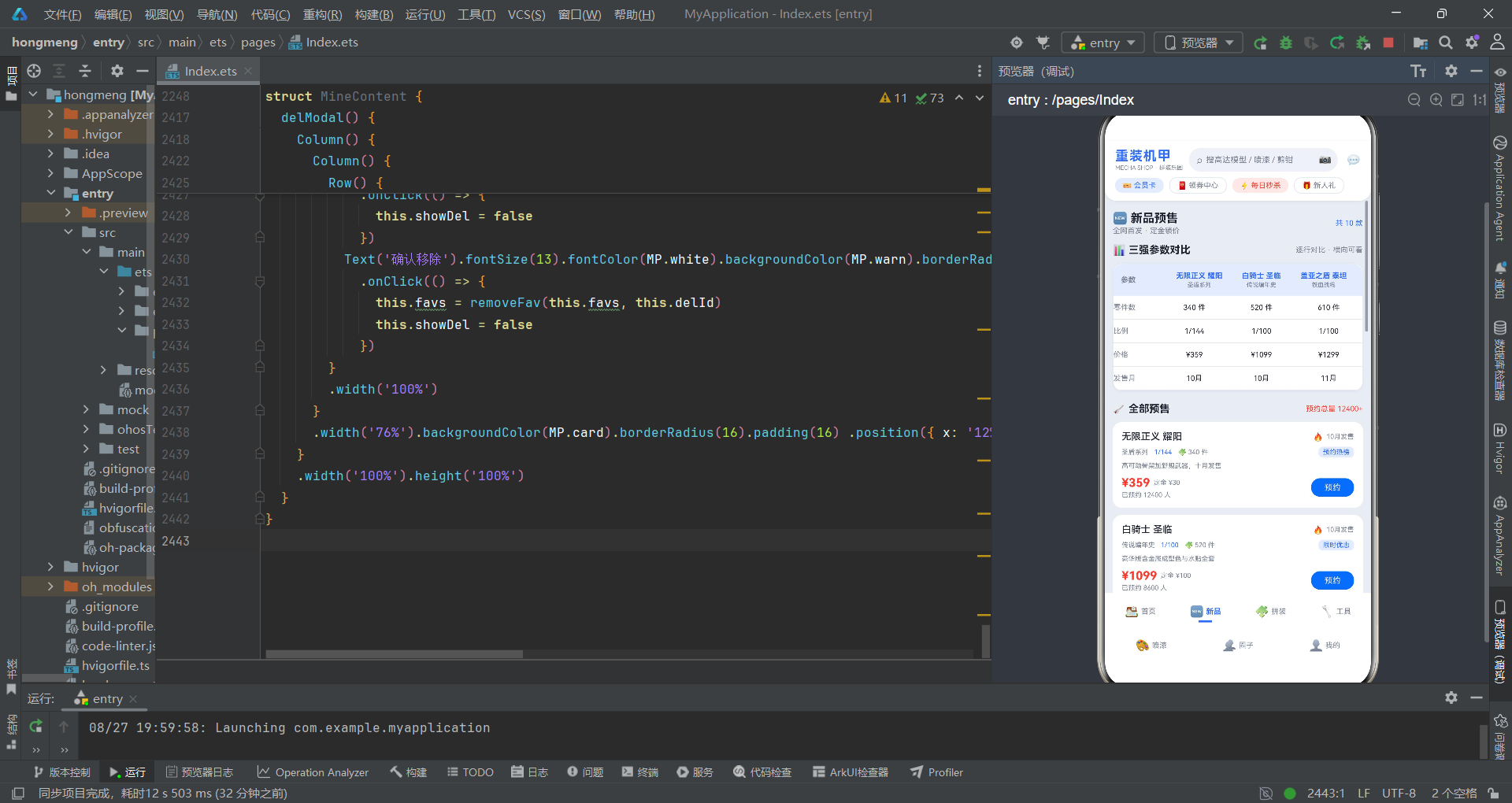
9.1 三强参数对比表
          Column() {
            Row() {
              Text('参数').fontSize(10).fontWeight(FontWeight.Bold).fontColor(MP.textSub).width(64)
              ForEach(compareList(this.preorders), (p: PreorderItem) => {
                Column() {
                  Text(p.name).fontSize(10).fontWeight(FontWeight.Bold).fontColor(MP.primary) .maxLines(1).textOverflow({ overflow: TextOverflow.Ellipsis })
                  Text(p.series).fontSize(8).fontColor(MP.textSub).margin({ top: 2 })
                }
                .layoutWeight(1) .alignItems(HorizontalAlign.Center)
              }, (p: PreorderItem) => p.id.toString())
            }
            .width('100%') .padding(10) .backgroundColor(MP.primarySoft) .borderRadius({ topLeft: 12, topRight: 12 })

            this.compareRow('零件数', 'parts')
            this.compareRow('比例', 'scale')
            this.compareRow('价格', 'price')
            this.compareRow('发售月', 'month')
          }
          .width('94%') .backgroundColor(MP.card) .border({ width: 1, color: MP.line }) .borderRadius(12) .margin({ top: 10 }) .shadow({ radius: 6, color: 'rgba(47,107,255,0.08)', offsetX: 0, offsetY: 2 })
新品页面最有特色的是「三强参数对比」表格。它取预售列表的前三项(通过 compareList 函数),横向排列进行参数对比。表头使用浅主色背景,表格主体使用白色卡片加边框,整体风格清晰专业。
表格的每一行通过 compareRow 构建函数生成,它接收行标签和字段名两个参数,内部通过 cellValue 函数根据字段名获取对应的值。这种「数据驱动」的表格渲染方式非常灵活,如果需要增加新的对比维度,只需要新增一行调用即可。
表格还添加了淡淡的蓝色阴影(rgba(47,107,255,0.08)),与主色相呼应,提升了整体的精致感。
9.2 预约弹窗的表单设计
预约弹窗(preModal)是新品页面的核心交互组件,包含了丰富的表单元素:
- 选择型号:横向排列的选项按钮(前四款预售商品)
- 选择版本:普通版 / 豪华版 / 限定版
- 数量选择:加减按钮 + 数字显示
- 到货提醒方式:APP推送 / 短信 / 电话
所有选项都采用了「选中填充主色,未选中填充灰色」的统一交互模式。这种模式在移动端非常流行,因为它比下拉选择更直观、操作更快捷。
表单的底部显示预计金额,通过 depositTotal 函数计算总价。函数会根据版本的不同加价:普通版不加价,豪华版加 100,限定版加 300,然后乘以数量。
9.3 到货提醒设置弹窗
提交预约后,会弹出「到货提醒设置」弹窗(remindModal),让用户设置提醒的详细参数。这个弹窗包含三组选项:
- 提醒方式:APP推送 / 短信 / 电话
- 提醒时机:到货后 / 预售开启 / 补货时
- 到货短信开关:开启 / 关闭
每一组选项都是独立的状态变量(remWay、remTime、remToggle),互不干扰。用户可以自由组合这些选项,形成个性化的提醒策略。
这种「主弹窗 + 次级弹窗」的多级弹窗设计,在复杂表单场景中非常实用。它将一个大的表单拆分成多个步骤,每一步只聚焦少量信息,降低了用户的认知负荷。同时,分步提交的方式也让用户的操作路径更加清晰。
十、拼装教程组件:进度追踪与笔记系统
10.1 教程列表的进度可视化
          ForEach(this.tutorials, (t: TutorialItem) => {
            Column() {
              Row() {
                Text(t.name).fontSize(13).fontWeight(FontWeight.Medium).fontColor(MP.text) .layoutWeight(1).maxLines(1).textOverflow({ overflow: TextOverflow.Ellipsis })
                Text(t.status).fontSize(9).fontColor(statusColor(t.status)) .backgroundColor(statusBg(t.status)).borderRadius(6) .padding({ left: 6, right: 6, top: 2, bottom: 2 })
              }
              .width('100%')
              Row() {
                Text(t.series + ' · ' + t.model).fontSize(9).fontColor(MP.textSub)
                Text('⏱ ' + t.hours + ' 小时').fontSize(9).fontColor(MP.textSub).margin({ left: 8 })
                Text('📅 ' + t.updated).fontSize(9).fontColor(MP.textSub).margin({ left: 8 })
              }
              .width('100%') .margin({ top: 5 })

              Row() {
                Text('进度').fontSize(9).fontColor(MP.textSub).width(32)
                Stack() {
                  Column().width('100%').height(7).backgroundColor(MP.chip).borderRadius(4)
                  Column().width(progressW(t.doneSteps, t.steps)).height(7) .backgroundColor(statusColor(t.status)).borderRadius(4)
                }
                .layoutWeight(1) .height(7)
                Text(t.doneSteps + '/' + t.steps + ' 步').fontSize(9).fontColor(statusColor(t.status)) .width(52).textAlign(TextAlign.End)
              }
              .width('100%') .margin({ top: 8 })

              Text('📝 ' + t.note).fontSize(9).fontColor(MP.textSub).width('100%') .maxLines(1).textOverflow({ overflow: TextOverflow.Ellipsis }).margin({ top: 6 })

              Row() {
                Text('编辑进度').fontSize(10).fontColor(MP.primary).border({ width: 1, color: MP.primary }) .borderRadius(10).padding({ left: 12, right: 12, top: 5, bottom: 5 })
                  .onClick(() => {
                    this.curT = t
                    this.proStep = t.doneSteps
                    this.proHours = t.hours.toString()
                    this.proNote = ''
                    this.showProg = true
                  })
                Text('记笔记').fontSize(10).fontColor(MP.white).backgroundColor(MP.primary).borderRadius(10) .padding({ left: 12, right: 12, top: 5, bottom: 5 }).margin({ left: 8 })
                  .onClick(() => {
                    this.noteTut = 0
                    this.noteStep = ''
                    this.noteText = ''
                    this.noteTag = 0
                    this.showNote = true
                  })
                Column().layoutWeight(1)
                Text('查看全文 ›').fontSize(10).fontColor(MP.textSub)
              }
              .width('100%') .margin({ top: 8 })
            }
            .width('94%') .backgroundColor(MP.card) .borderRadius(12) .padding(12) .margin({ top: 10 })
          }, (t: TutorialItem) => t.id.toString())
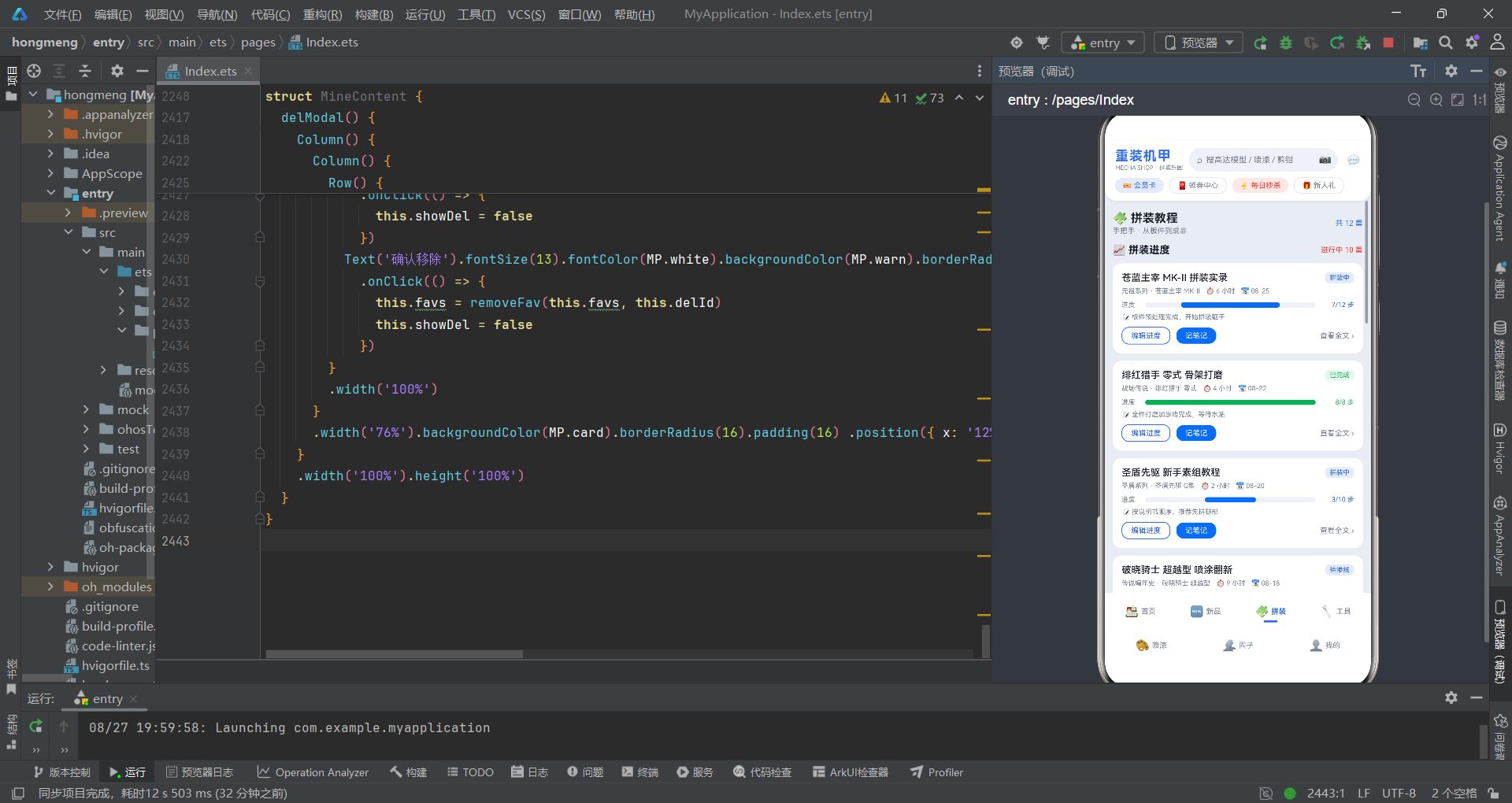
拼装教程列表是整个应用中「工具属性」最强的部分。每个教程卡片都展示了丰富的进度信息,帮助用户追踪自己的拼装进度。
最醒目的是进度条,它比首页的热度条更粗(7px vs 5px),因为进度是这个页面的核心信息。进度条的颜色通过 statusColor 函数动态变化:已完成是绿色,进行中是蓝色,未开工是灰色。这种颜色编码让用户一眼就能看出每篇教程的状态。
进度条右侧显示「已完成步数/总步数」的具体数字,比单纯的百分比更直观。底部还有一行笔记摘要,展示当前的拼装笔记。
每个卡片有两个主要操作:「编辑进度」和「记笔记」。编辑进度按钮使用描边样式(边框 + 文字同色),记笔记按钮使用填充样式(主色背景),视觉上有明确的主次之分。
进度可视化是效率工具类应用的核心竞争力。一个好的进度展示设计,应该同时满足「快速感知整体进度」和「精确了解当前状态」两个需求。这段代码中的进度条 + 步数数字 + 状态标签的组合,就是一个很好的范例。
10.2 进度编辑弹窗与笔记弹窗
进度编辑弹窗(progModal)允许用户更新拼装进度,包含以下元素:
- 当前步骤的加减调整器
- 拼装状态选择(未开工 / 拼装中 / 待渗线 / 待贴纸 / 已完成)
- 累计耗时输入框
- 备注文本域
拼装状态选项使用 Flex({ wrap: FlexWrap.Wrap }) 布局,当选项数量较多时会自动换行,避免了横向溢出。这是 ArkTS 中处理多选项布局的常用技巧。
笔记弹窗(noteModal)则用于记录拼装过程中的心得体会。它包含:
- 关联教程选择
- 步骤序号输入
- 笔记标签选择(配色灵感 / 水贴技巧 / 工具心得 / 避坑指南)
- 笔记内容文本域
标签系统的设计很有价值,它让用户的笔记可以被分类管理,后续可以按标签筛选和检索。这对于重度拼装爱好者来说,是一个非常实用的功能。
十一、喷漆工坊组件:色卡宫格与配色方案管理
11.1 色卡宫格布局
          Flex({ wrap: FlexWrap.Wrap, justifyContent: FlexAlign.SpaceBetween }) {
            ForEach(PAINTS, (p: PaintItem) => {
              Column() {
                Column() {}.width('100%').height(48).borderRadius(10).backgroundColor(p.color)
                Text(p.name).fontSize(11).fontWeight(FontWeight.Medium).fontColor(MP.text).margin({ top: 5 })
                Text(p.type + ' · ' + p.gloss).fontSize(8).fontColor(MP.textSub).margin({ top: 2 })
                Row() {
                  Text('¥' + p.price).fontSize(11).fontWeight(FontWeight.Bold).fontColor(MP.secondary)
                  Column().layoutWeight(1)
                  Text('+').fontSize(13).fontColor(MP.white).backgroundColor(MP.primary).borderRadius(6) .width(18).height(18).textAlign(TextAlign.Center)
                }
                .width('100%').margin({ top: 6 })
              }
              .width('31%').backgroundColor(MP.card).borderRadius(10).padding(8).margin({ top: 8 })
            }, (p: PaintItem) => p.id.toString())
          }
          .width('94%')
喷漆页面的色卡宫格是视觉效果最出色的部分之一。它使用 Flex 的 Wrap 模式实现了自动换行的三列宫格布局,每个色卡占 31% 的宽度,三列之间自然留出间距。
每个色卡的顶部是一个 48px 高的色块,直接使用漆的颜色填充,直观地展示颜色效果。色块下方是颜色名称、类型和光泽度信息。底部是价格和加号按钮,加号按钮使用主色填充的小方块,暗示「加入购物车」的操作。
这种「视觉先行」的色卡设计非常适合喷漆颜料这类产品,因为颜色本身就是最重要的商品信息。用户可以快速扫过色卡,找到自己感兴趣的颜色。
11.2 配色方案的增删管理
配色方案库是喷漆页面的另一大亮点。用户可以保存自己调配的配色方案,每个方案包含主色、点缀色、适用机体和备注信息。
新建方案弹窗(saveModal)的表单设计非常完整:
- 方案名称输入框
- 适用机体选择
- 主色选择(带颜色预览的色卡选项)
- 点缀色选择
- 备注文本域
颜色选择的交互设计很有特色。每个选项不是简单的文字,而是一个「小圆点 + 色值文字」的组合,小圆点展示实际颜色,文字显示十六进制色值。这种设计既直观又专业,适合对颜色有精准要求的用户。
保存方案的逻辑也很清晰:
            this.schemes = this.schemes.concat([{
              id: this.schemes.length + 1,
              name: this.sName === '' ? '未命名方案' : this.sName,
              main: SCHEME_MAINS[this.sMain],
              accent: SCHEME_ACCENTS[this.sAccent],
              model: SCHEME_MODELS[this.sModel],
              note: this.sNote === '' ? '暂未填写备注' : this.sNote,
              saved: '08-26',
              count: 1
            }])
使用 concat 方法创建新数组(而不是 push 修改原数组),遵循了不可变数据的原则。同时对空值做了默认处理:名称为空时显示「未命名方案」,备注为空时显示「暂未填写备注」。这种细节处理体现了对用户体验的关注。
删除方案则使用了二次确认弹窗(delModal),防止用户误操作。删除按钮使用警告色(红色),与保存操作的主色(蓝色)形成鲜明对比。
十二、圈子广场组件:社交动态的点赞与发布
12.1 动态 Feed 流
          ForEach(this.feeds, (f: FeedItem) => {
            Column() {
              Row() {
                Text(f.avatar).fontSize(20).width(34).height(34).borderRadius(17).textAlign(TextAlign.Center) .linearGradient({ angle: 135, colors: feedGrad(f.id) })
                Column() {
                  Text(f.player).fontSize(12).fontWeight(FontWeight.Bold).fontColor(MP.text)
                  Text(f.time).fontSize(9).fontColor(MP.textSub).margin({ top: 2 })
                }
                .alignItems(HorizontalAlign.Start).margin({ left: 8 }).layoutWeight(1)
                Text(f.tag).fontSize(9).fontColor(MP.primary).backgroundColor(MP.primarySoft) .borderRadius(6).padding({ left: 6, right: 6, top: 2, bottom: 2 })
              }
              .width('100%')
              Text(f.comment).fontSize(11).fontColor(MP.text).width('100%').lineHeight(17).margin({ top: 8 })
              Row() {
                Text('🤖 ' + f.model).fontSize(9).fontColor(MP.textSub).backgroundColor(MP.cardDeep) .borderRadius(6).padding({ left: 8, right: 8, top: 4, bottom: 4 })
                Text('📈 ' + f.progress).fontSize(9).fontColor(MP.textSub).margin({ left: 6 })
              }
              .width('100%').margin({ top: 8 })
              Row() {
                Text((f.liked ? '❤️' : '🤍') + ' ' + f.likes).fontSize(11) .fontColor(f.liked ? MP.secondary : MP.textSub)
                  .onClick(() => {
                    this.feeds = likeToggle(this.feeds, f.id)
                  })
                Column().layoutWeight(1)
                Text('💬 评论').fontSize(11).fontColor(MP.textSub)
                Text('删除').fontSize(10).fontColor(MP.warn).margin({ left: 14 }).onClick(() => {
                  this.delId = f.id
                  this.showDel = true
                })
              }
              .width('100%').margin({ top: 10 })
            }
            .width('94%').backgroundColor(MP.card).borderRadius(12).padding(12).margin({ top: 10 })
          }, (f: FeedItem) => f.id.toString())
圈子页面的动态 Feed 流是典型的社交应用布局。每条动态的结构从上到下依次是:用户信息区、动态内容区、标签区、操作区。
用户信息区的头像设计很有特色。它使用 emoji 作为头像,背景是渐变色。渐变色通过 feedGrad 函数根据动态 id 的奇偶性来决定:偶数 id 是蓝色系渐变,奇数 id 是红色系渐变。这种交替效果让列表更加生动活泼,避免了单调。
动态内容区是纯文字,设置了 17px 的行高,保证阅读舒适度。标签区展示作品机型和进度状态,机型使用深灰色背景的胶囊样式,突出展示。
操作区包含点赞、评论和删除三个操作。点赞按钮是最核心的交互:点击后切换心形图标(❤️/🤍)和颜色,同时更新点赞数。点赞功能通过 likeToggle 工具函数实现,该函数会返回一个全新的数组,确保响应式更新正常工作。
社交 Feed 流的设计关键在于「信息层级」和「交互便捷性」。用户的头像和名称是最醒目的,然后是内容正文,最后是操作按钮。点赞按钮放在最左边且面积最大,符合大多数用户的使用习惯。
12.2 发布动态弹窗
发布动态弹窗(pubModal)提供了完整的动态发布表单:
- 机体选择
- 进度选择(素组完成 / 喷涂完成 / 改造中 / 制作中)
- 标签选择(#晒作品 / #素组 / #喷涂 / #旧化 / #改造)
- 内容文本域
所有选项都使用 Flex 换行布局,确保在不同屏幕宽度下都能正常显示。标签使用 hashtag 格式(#xxx),符合社交平台的通用惯例。
删除动态同样使用了二次确认弹窗,与其他删除操作保持一致的交互模式。
十三、工具商城组件:分类筛选与对比功能
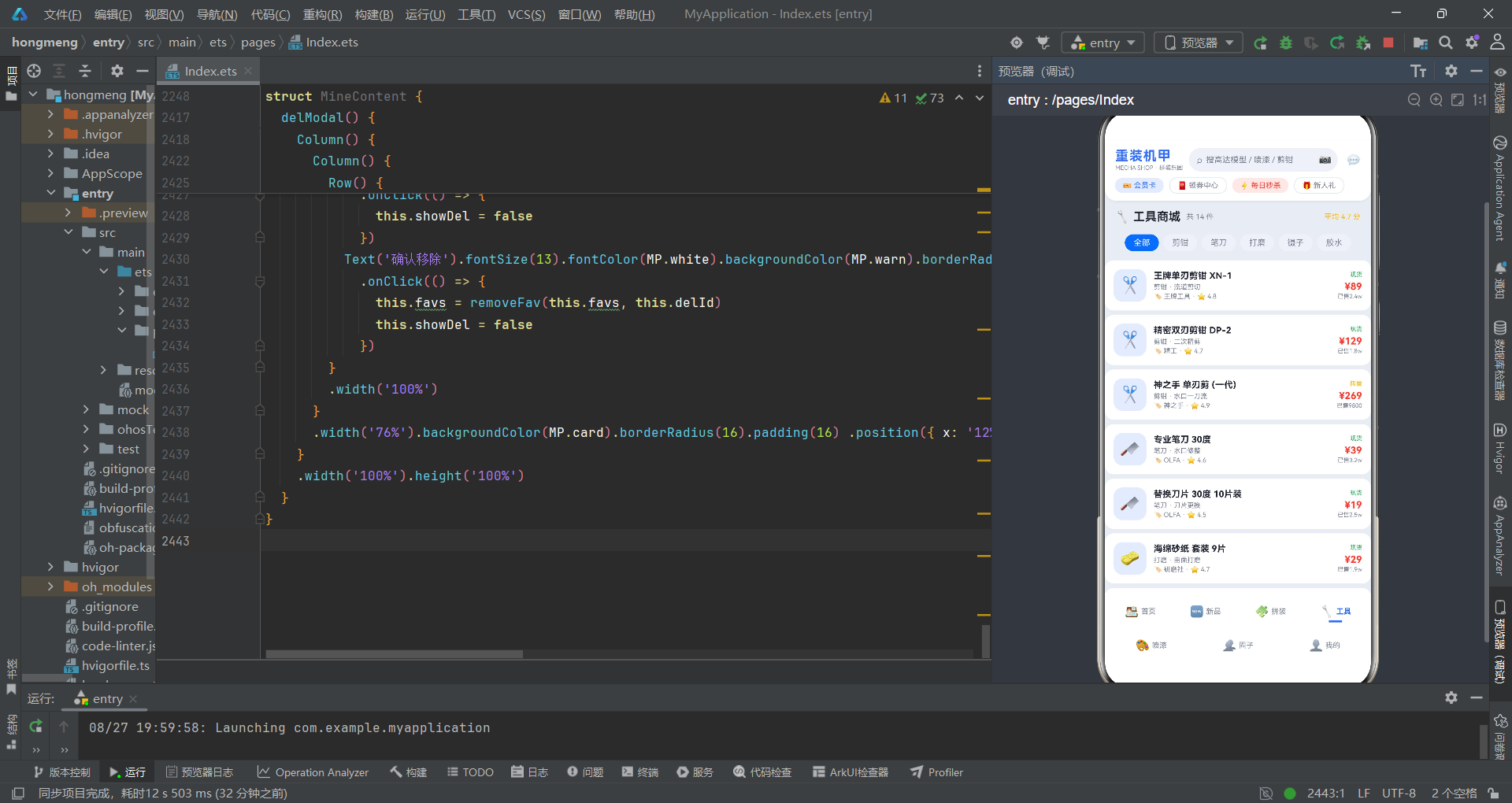
13.1 横向滚动的分类筛选栏
        Scroll() {
          Row() {
            ForEach(TOOL_CATS, (c: string) => {
              if (this.filter === c) {
                Text(c).fontSize(11).fontColor(MP.white).backgroundColor(MP.primary)
                  .padding({ left: 12, right: 12, top: 5, bottom: 5 }).borderRadius(14)
                  .margin({ left: 3, right: 3 })
              } else {
                Text(c).fontSize(11).fontColor(MP.textSub).backgroundColor(MP.chip)
                  .padding({ left: 12, right: 12, top: 5, bottom: 5 }).borderRadius(14)
                  .margin({ left: 3, right: 3 })
                  .onClick(() => { this.filter = c })
              }
            }, (c: string) => c)
          }
          .padding({ left: 8, right: 8 })
        }
        .scrollable(ScrollDirection.Horizontal).scrollBar(BarState.Off).height(36)
工具页面的顶部是一个横向滚动的分类筛选栏。筛选栏包含 6 个分类:全部、剪钳、笔刀、打磨、镊子、胶水。
实现方式是将一个 Row 放入 Scroll 中,设置 scrollable(ScrollDirection.Horizontal) 实现横向滚动。scrollBar(BarState.Off) 隐藏滚动条,让界面更简洁。
选中态和未选中态的样式差异明显:选中项使用「主色背景 + 白色文字」,未选中项使用「灰色背景 + 次要文字色」。用户可以清晰地知道当前在哪个分类下。
点击分类标签会更新 filter 状态,下方的列表会通过 toolFiltered 函数实时过滤显示对应分类的工具。
13.2 工具列表与三级弹窗体系
工具列表采用横向排列的卡片样式,每个工具项左侧是图标(使用不同的 emoji 区分类别),中间是名称/分类/品牌信息,右侧是库存/价格/销量信息。点击整个卡片可以打开详情弹窗。
工具页面的弹窗体系是所有页面中最复杂的,包含三级弹窗:
第一级:工具详情弹窗(toolDetailModal)
展示工具的完整信息,包括名称、分类、评分、品牌、材质、用途、库存、销量、价格等。底部有「对比」和「加入清单」两个按钮。
第二级:工具对比弹窗(compareModal)
将当前工具与另一款工具(代码中固定为 TOOLS[1])进行参数对比。对比项包括品牌、材质、用途等,使用两行并排的布局,方便用户横向比较。
第三级:加入清单弹窗(addListModal)
操作成功后的反馈弹窗,显示「已加入工具清单」的提示,并提供「继续逛逛」和「查看清单」两个操作选项。
三级弹窗体系的设计体现了用户操作路径的递进关系:浏览 → 查看详情 → 对比 → 加入清单。每一步都有明确的出口和入口,用户可以自由地前进和后退。这种层层递进的交互设计,让复杂的功能变得清晰易懂。
十四、我的页面组件:数据统计与收藏管理
14.1 用户信息与统计卡片
          Flex({ wrap: FlexWrap.Wrap, justifyContent: FlexAlign.SpaceBetween }) {
            ForEach(STATS, (s: StatCardItem) => {
              Column() {
                Row() {
                  Text(s.icon).fontSize(14).width(26).height(26).backgroundColor(s.color) .borderRadius(8).textAlign(TextAlign.Center)
                  Column().layoutWeight(1)
                }
                .width('100%')
                Text(s.value.toString()).fontSize(18).fontWeight(FontWeight.Bold).fontColor(MP.text).margin({ top: 6 })
                Text(s.name + ' · ' + s.sub).fontSize(9).fontColor(MP.textSub).width('100%') .maxLines(1).textOverflow({ overflow: TextOverflow.Ellipsis }).margin({ top: 3 })
              }
              .width('47%').backgroundColor(MP.card).borderRadius(12).padding(10).margin({ top: 10 })
            }, (s: StatCardItem) => s.id.toString())
          }
          .width('94%')
「我的」页面顶部是用户信息栏,展示头像、昵称、UID 和拼装入坑年限。下方是四个统计卡片,以 2×2 的宫格形式展示:
- 收藏机体:23 台(本周 +3)
- 拼装清单:10 项(进行中 7)
- 已拼完成:8 台(本月 +2)
- 累计零件:4560 件(比上月 +12%)
每个统计卡片都有独特的背景色(通过 s.color 字段控制),与图标的颜色相呼应。卡片的大数字使用 18px 加粗字体,视觉冲击力强,用户可以快速获取核心数据。
卡片下方的小字包含统计名称和说明,以及趋势信息(如「本周 +3」「比上月 +12%」)。这种「主数据 + 趋势」的设计,可以让用户不仅知道当前的数值,还能了解变化方向。
14.2 收藏清单与详情弹窗
收藏清单展示了用户收藏的所有机体,每个收藏项包含图标、名称、级别、系列、零件数、价格和保存日期。操作按钮有「详情」和「移除」两个。
详情弹窗(detailModal)不仅展示收藏机体的基本信息,还关联显示了对应的拼装计划信息,包括拼装进度、下一步骤、更新时间等。这种跨数据模块的关联展示,让信息更加聚合,用户无需在不同页面间切换。
拼装进度的展示使用了与拼装教程页面相同的进度条样式,保持了视觉一致性。进度值直接使用百分比数值(如 this.curPlan().progress + '%'),因为进度数据本身就是百分比格式。
「我的」页面是用户数据的聚合中心。一个设计良好的个人中心页面,应该能让用户快速了解自己的整体情况,并且方便地跳转到各个功能模块。这段代码通过统计卡片 + 收藏清单 + 拼装计划关联的组合,很好地实现了这一目标。
十五、核心技术点总结对比
15.1 组件与装饰器对比
| 技术点 | 作用 | 使用场景 | 代码示例 |
|---|---|---|---|
@Entry |
标记页面入口组件 | 页面根组件 | @Entry struct MechaApp {} |
@Component |
标记自定义组件 | 可复用的 UI 单元 | @Component struct MechaHeader {} |
@State |
声明响应式状态 | 组件内部状态管理 | @State activeTab: number = 0 |
@Builder |
声明 UI 构建函数 | 组件内可复用的 UI 片段 | @Builder tabItem() {} |
Column |
垂直布局容器 | 上下排列的元素 | Column() { ... } |
Row |
水平布局容器 | 左右排列的元素 | Row() { ... } |
Stack |
堆叠布局容器 | 层叠元素(如弹窗) | Stack() { ... } |
Flex |
弹性布局容器 | 需要换行的布局 | Flex({ wrap: FlexWrap.Wrap }) {} |
ForEach |
列表循环渲染 | 数组数据的列表展示 | ForEach(list, (item) => { ... }) |
Scroll |
滚动容器 | 可滚动的内容区域 | Scroll() { ... }.scrollable(ScrollDirection.Vertical) |
15.2 布局组件特性对比
| 布局组件 | 主轴方向 | 是否可滚动 | 子元素排列方式 | 适用场景 |
|---|---|---|---|---|
| Column | 垂直 | 否 | 从上到下依次排列 | 页面整体结构、卡片内容 |
| Row | 水平 | 否 | 从左到右依次排列 | 横向信息栏、按钮组 |
| Stack | 无(堆叠) | 否 | 子元素层叠,后写的在上层 | 弹窗、遮罩、进度条 |
| Flex | 可配置 | 否 | 支持换行和多种对齐方式 | 标签云、宫格布局 |
| Scroll | 可配置 | 是 | 包裹单列内容,超出滚动 | 长列表、长页面 |
15.3 状态管理模式对比
| 模式 | 适用场景 | 特点 | 代码中的例子 |
|---|---|---|---|
| 布尔状态控制显隐 | 弹窗、抽屉、展开收起 | 简单直接,两种状态 | showDetail、showQuick |
| 索引状态控制选中 | Tab、选项卡、分类筛选 | 多选项中选一个 | activeTab、filter、preModel |
| 数组状态管理列表 | 商品列表、动态列表 | 支持增删改查操作 | mechas、feeds、favs |
| 对象状态存储详情 | 当前选中的商品、教程 | 存储结构化数据 | curMecha、curT、selectedTool |
| 数值状态控制数量 | 购买数量、步骤数 | 支持加减操作 | quickCount、proStep、preCount |
安装DevEco Studio程序

选择目标安装目录:

设置环境变量,但是需要重启一下:

新建一个空白模板:

设置API为24的模板项目:
初始化项目,自动下载相关依赖:

完整代码:
// ============================================================
// 主题:机械银 #E9EDF3 × 机甲蓝 #2F6BFF × 能源红 #FF3B30
// 7 Tab 双排:首页 / 新品 / 拼装 / 工具 / 喷漆 / 圈子 / 我的
// ============================================================
// ---------- 接口定义 ----------
interface MechaPalette {
bg: string
primary: string
primaryDeep: string
primarySoft: string
secondary: string
secondarySoft: string
card: string
cardDeep: string
text: string
textSub: string
line: string
chip: string
warn: string
warnSoft: string
green: string
greenSoft: string
yellow: string
yellowSoft: string
purple: string
purpleSoft: string
white: string
}
interface MechaItem {
id: number
name: string
series: string
level: string
scale: string
parts: number
buildTime: string
price: number
originPrice: number
heat: number
badge: string
tag: string
rating: number
desc: string
}
interface PreorderItem {
id: number
name: string
series: string
version: string
parts: number
scale: string
price: number
deposit: number
month: number
preorders: number
hot: boolean
tag: string
desc: string
}
interface TutorialItem {
id: number
name: string
series: string
model: string
steps: number
doneSteps: number
status: string
hours: number
note: string
updated: string
}
interface ToolItem {
id: number
name: string
category: string
use: string
price: number
rating: number
brand: string
material: string
sales: number
stock: string
}
interface PaintItem {
id: number
code: string
name: string
color: string
type: string
gloss: string
price: number
volume: string
usage: string
desc: string
}
interface FeedItem {
id: number
player: string
avatar: string
model: string
progress: string
emoji: string
likes: number
liked: boolean
time: string
tag: string
comment: string
}
interface FavItem {
id: number
name: string
series: string
level: string
price: number
saved: string
icon: string
parts: number
}
interface BuildPlanItem {
id: number
name: string
series: string
progress: number
nextStep: string
status: string
updated: string
parts: number
}
interface ColorScheme {
id: number
name: string
main: string
accent: string
model: string
note: string
saved: string
count: number
}
interface StatCardItem {
id: number
name: string
value: number
unit: string
icon: string
trend: string
sub: string
color: string
}
// ---------- 调色板(机械银 × 机甲蓝 × 能源红) ----------
const MP: MechaPalette = {
bg: '#E9EDF3',
primary: '#2F6BFF',
primaryDeep: '#1E4FD8',
primarySoft: '#E4EBFF',
secondary: '#FF3B30',
secondarySoft: '#FFE8E6',
card: '#FFFFFF',
cardDeep: '#F3F6FA',
text: '#1F2430',
textSub: '#7A8294',
line: '#E3E8F0',
chip: '#EFF2F7',
warn: '#FF3B30',
warnSoft: '#FFE8E6',
green: '#2EAF5F',
greenSoft: '#E6F7EC',
yellow: '#FFB800',
yellowSoft: '#FFF6E0',
purple: '#8A63E9',
purpleSoft: '#F0EBFF',
white: '#FFFFFF'
}
// ---------- 数据:首页热销机体 ----------
const MECHAS: MechaItem[] = [
{ id: 1, name: '苍蓝主宰 MK-II', series: '元祖系列', level: 'MG', scale: '1/100', parts: 480, buildTime: '8-12小时', price: 699, originPrice: 899, heat: 12800, badge: '爆款', tag: '预涂装', rating: 4.9, desc: '经典机体再版,预涂装内构加可动骨架全面升级' },
{ id: 2, name: '绯红猎手 零式', series: '战场传说', level: 'RG', scale: '1/144', parts: 320, buildTime: '6-8小时', price: 459, originPrice: 599, heat: 9860, badge: '新品', tag: '一体成型骨架', rating: 4.8, desc: '高可动一体骨架,拼装流畅,分色优秀' },
{ id: 3, name: '圣盾先驱 G型', series: '圣盾系列', level: 'HG', scale: '1/144', parts: 210, buildTime: '3-4小时', price: 129, originPrice: 159, heat: 6540, badge: '热销', tag: '新手友好', rating: 4.7, desc: '入门首选,配件丰富,支持换装玩法' },
{ id: 4, name: '破晓骑士 超越型', series: '传说编年史', level: 'MG', scale: '1/100', parts: 520, buildTime: '10-14小时', price: 799, originPrice: 999, heat: 15200, badge: '爆款', tag: '金属成型色', rating: 4.9, desc: '金属成型色板件,附带专属武器架' },
{ id: 5, name: '极光先锋 ν-7', series: '无限轨道', level: 'RG', scale: '1/144', parts: 410, buildTime: '8-10小时', price: 529, originPrice: 699, heat: 11200, badge: '热销', tag: '进阶骨架', rating: 4.8, desc: '精细分件与蚀刻片,细节控首选' },
{ id: 6, name: '雷霆重装 重武装', series: '铁血战线', level: 'MG', scale: '1/100', parts: 560, buildTime: '12-16小时', price: 899, originPrice: 1199, heat: 8300, badge: '新品', tag: '重型武器', rating: 4.7, desc: '全装备重型武器挂载,魄力十足' },
{ id: 7, name: '月光幻影 幻影机', series: '幻影战线', level: 'HG', scale: '1/144', parts: 260, buildTime: '4-6小时', price: 159, originPrice: 199, heat: 4210, badge: '现货', tag: '透明件', rating: 4.6, desc: '大面积透明件,喷涂改造潜力大' },
{ id: 8, name: '赤焰暴风 台风式', series: '宇宙纪元', level: 'RG', scale: '1/144', parts: 380, buildTime: '7-9小时', price: 489, originPrice: 619, heat: 7700, badge: '热销', tag: '火焰涂装', rating: 4.7, desc: '火焰纹样预涂装,把玩手感优秀' },
{ id: 9, name: '夜鹰隐形 影武者', series: '幻影战线', level: 'MG', scale: '1/100', parts: 490, buildTime: '9-12小时', price: 729, originPrice: 899, heat: 5600, badge: '现货', tag: '暗黑配色', rating: 4.6, desc: '黑金配色,附披风与忍者武器组' },
{ id: 10, name: '冰川壁垒 堡垒型', series: '铁血战线', level: 'HG', scale: '1/144', parts: 290, buildTime: '5-7小时', price: 189, originPrice: 239, heat: 3320, badge: '现货', tag: '加厚装甲', rating: 4.5, desc: '重型装甲设计,适合旧化改造练习' },
{ id: 11, name: '翡翠射击 狙击型', series: '圣盾系列', level: 'RG', scale: '1/144', parts: 350, buildTime: '7-9小时', price: 469, originPrice: 599, heat: 6100, badge: '热销', tag: '长距离狙击', rating: 4.7, desc: '附长管狙击炮与展开式装甲' },
{ id: 12, name: '钢铁巨人 格斗型', series: '元祖系列', level: 'MG', scale: '1/100', parts: 610, buildTime: '14-18小时', price: 999, originPrice: 1299, heat: 7200, badge: '新品', tag: '联动关节', rating: 4.8, desc: '全身联动关节,格斗姿态极限可动' },
{ id: 13, name: '幻影疾风 高速型', series: '宇宙纪元', level: 'HG', scale: '1/144', parts: 230, buildTime: '3-5小时', price: 139, originPrice: 179, heat: 2980, badge: '现货', tag: '喷射背包', rating: 4.5, desc: '高速飞行形态,附大型喷射背包' },
{ id: 14, name: '苍穹守护 守护型', series: '传说编年史', level: 'RG', scale: '1/144', parts: 430, buildTime: '9-11小时', price: 559, originPrice: 719, heat: 8900, badge: '爆款', tag: '大翅膀', rating: 4.8, desc: '可展开巨翼,光翼特效件还原' },
{ id: 15, name: '星海指挥官 指挥官', series: '无限轨道', level: 'MG', scale: '1/100', parts: 500, buildTime: '10-14小时', price: 779, originPrice: 969, heat: 9300, badge: '热销', tag: '指挥舱', rating: 4.7, desc: '指挥官专用配色,附大型指挥天线' },
{ id: 16, name: '深渊领主 深海型', series: '铁血战线', level: 'PG', scale: '1/60', parts: 820, buildTime: '20-30小时', price: 1599, originPrice: 1999, heat: 4100, badge: '旗舰', tag: '全可动', rating: 4.9, desc: 'PG级深海重装,液压杆联动细节' }
]
// ---------- 数据:新品预售 ----------
const PREORDERS: PreorderItem[] = [
{ id: 1, name: '无限正义 耀阳', series: '圣盾系列', version: '普通版', parts: 340, scale: '1/144', price: 359, deposit: 30, month: 10, preorders: 12400, hot: true, tag: '预约热榜', desc: '高可动骨架加新规武器,十月发售' },
{ id: 2, name: '白骑士 圣临', series: '传说编年史', version: '豪华版', parts: 520, scale: '1/100', price: 1099, deposit: 100, month: 10, preorders: 8600, hot: true, tag: '限时优惠', desc: '豪华版含金属成型色与水贴全套' },
{ id: 3, name: '盖亚之盾 泰坦', series: '铁血战线', version: '普通版', parts: 610, scale: '1/100', price: 1299, deposit: 100, month: 11, preorders: 7200, hot: true, tag: '预约热榜', desc: '泰坦级重武装,附专属展示底座' },
{ id: 4, name: '星尘号 舰长机', series: '宇宙纪元', version: '限定版', parts: 760, scale: '1/60', price: 1899, deposit: 200, month: 12, preorders: 5300, hot: true, tag: '限定发售', desc: '限定版含发光灯组与金属铭牌' },
{ id: 5, name: '绯影 疾风改', series: '幻影战线', version: '普通版', parts: 310, scale: '1/144', price: 329, deposit: 30, month: 9, preorders: 9800, hot: true, tag: '人气回归', desc: '人气机体疾风改版,新增武装' },
{ id: 6, name: '寒霜 冰晶型', series: '战场传说', version: '普通版', parts: 380, scale: '1/144', price: 429, deposit: 30, month: 10, preorders: 6800, hot: false, tag: '预约中', desc: '冰晶配色,透明特效件丰富' },
{ id: 7, name: '王权 王者机', series: '无限轨道', version: '豪华版', parts: 560, scale: '1/100', price: 1199, deposit: 100, month: 12, preorders: 6100, hot: false, tag: '预约中', desc: '王者涂装,附王冠与披风' },
{ id: 8, name: '龙骑 裂空型', series: '元祖系列', version: '普通版', parts: 480, scale: '1/100', price: 899, deposit: 50, month: 11, preorders: 8800, hot: true, tag: '预约热榜', desc: '龙骑形态可变形,双形态玩法' },
{ id: 9, name: '猎空 疾电', series: '宇宙纪元', version: '普通版', parts: 280, scale: '1/144', price: 299, deposit: 30, month: 9, preorders: 10400, hot: true, tag: '人气回归', desc: '高速型机体,入门玩家也友好' },
{ id: 10, name: '终焉 灭世机', series: '传说编年史', version: '限定版', parts: 890, scale: '1/60', price: 2399, deposit: 300, month: 12, preorders: 4600, hot: false, tag: '限定发售', desc: '终焉主题,全身发光件加亚克力地台' }
]
// ---------- 数据:拼装教程 ----------
const TUTORIALS: TutorialItem[] = [
{ id: 1, name: '苍蓝主宰 MK-II 拼装实录', series: '元祖系列', model: '苍蓝主宰 MK-II', steps: 12, doneSteps: 7, status: '拼装中', hours: 6, note: '板件预处理完成,开始拼装躯干', updated: '08-25' },
{ id: 2, name: '绯红猎手 零式 骨架打磨', series: '战场传说', model: '绯红猎手 零式', steps: 8, doneSteps: 8, status: '已完成', hours: 4, note: '全件打磨加渗线完成,等待水贴', updated: '08-22' },
{ id: 3, name: '圣盾先驱 新手素组教程', series: '圣盾系列', model: '圣盾先驱 G型', steps: 10, doneSteps: 3, status: '拼装中', hours: 2, note: '按说明书顺序,推荐先拼腿部', updated: '08-20' },
{ id: 4, name: '破晓骑士 超越型 喷涂翻新', series: '传说编年史', model: '破晓骑士 超越型', steps: 15, doneSteps: 5, status: '待渗线', hours: 9, note: '白色改喷珍珠白,分件遮盖中', updated: '08-18' },
{ id: 5, name: '极光先锋 蚀刻片改造', series: '无限轨道', model: '极光先锋 ν-7', steps: 9, doneSteps: 9, status: '待贴纸', hours: 7, note: '蚀刻片改造完成,准备上水贴', updated: '08-15' },
{ id: 6, name: '雷霆重装 武器涂装练习', series: '铁血战线', model: '雷霆重装 重武装', steps: 11, doneSteps: 2, status: '拼装中', hours: 3, note: '先喷涂武器组,练习干扫旧化', updated: '08-12' },
{ id: 7, name: '月光幻影 透明件打磨', series: '幻影战线', model: '月光幻影 幻影机', steps: 7, doneSteps: 1, status: '未开工', hours: 0, note: '透明件抛光教程,先做好防护', updated: '08-10' },
{ id: 8, name: '赤焰暴风 火焰涂装还原', series: '宇宙纪元', model: '赤焰暴风 台风式', steps: 13, doneSteps: 6, status: '拼装中', hours: 5, note: '火焰渐变色喷涂,三分区遮盖', updated: '08-08' },
{ id: 9, name: '夜鹰隐形 黑金配色方案', series: '幻影战线', model: '夜鹰隐形 影武者', steps: 10, doneSteps: 10, status: '已完成', hours: 8, note: '黑金配色完成,作品已上传圈子', updated: '08-05' },
{ id: 10, name: '冰川壁垒 旧化改造', series: '铁血战线', model: '冰川壁垒 堡垒型', steps: 9, doneSteps: 4, status: '拼装中', hours: 4, note: '渍洗加掉漆效果,生锈色打底', updated: '08-02' },
{ id: 11, name: '翡翠射击 狙击炮上色', series: '圣盾系列', model: '翡翠射击 狙击型', steps: 8, doneSteps: 8, status: '待贴纸', hours: 6, note: '狙击炮渐变上色完成', updated: '07-30' },
{ id: 12, name: '钢铁巨人 联动关节调校', series: '元祖系列', model: '钢铁巨人 格斗型', steps: 14, doneSteps: 3, status: '拼装中', hours: 5, note: '联动关节先装油,手感更顺', updated: '07-28' }
]
// ---------- 数据:工具 ----------
const TOOLS: ToolItem[] = [
{ id: 1, name: '王牌单刃剪钳 XN-1', category: '剪钳', use: '流道剪切', price: 89, rating: 4.8, brand: '王牌工具', material: '高碳钢', sales: 23500, stock: '现货' },
{ id: 2, name: '精密双刃剪钳 DP-2', category: '剪钳', use: '二次精剪', price: 129, rating: 4.7, brand: '精工', material: '粉末钢', sales: 18200, stock: '现货' },
{ id: 3, name: '神之手 单刃剪 (一代)', category: '剪钳', use: '水口一刀流', price: 269, rating: 4.9, brand: '神之手', material: 'SKD-11', sales: 9800, stock: '限量' },
{ id: 4, name: '专业笔刀 30度', category: '笔刀', use: '水口修整', price: 39, rating: 4.6, brand: 'OLFA', material: '不锈钢', sales: 32100, stock: '现货' },
{ id: 5, name: '替换刀片 30度 10片装', category: '笔刀', use: '刀片更换', price: 19, rating: 4.5, brand: 'OLFA', material: '不锈钢', sales: 25400, stock: '现货' },
{ id: 6, name: '海绵砂纸 套装 9片', category: '打磨', use: '曲面打磨', price: 29, rating: 4.7, brand: '研磨社', material: '氧化铝', sales: 18700, stock: '现货' },
{ id: 7, name: '电动打磨笔 3档调速', category: '打磨', use: '快速打磨', price: 159, rating: 4.4, brand: '博之', material: '金属机身', sales: 4200, stock: '现货' },
{ id: 8, name: '水砂纸 1500-2000目', category: '打磨', use: '精细打磨', price: 15, rating: 4.6, brand: '3M', material: '碳化硅', sales: 26800, stock: '现货' },
{ id: 9, name: '弯头镊子 2支装', category: '镊子', use: '贴纸水贴', price: 25, rating: 4.5, brand: '田宫', material: '防磁', sales: 15600, stock: '现货' },
{ id: 10, name: '精细镊子 AA-1', category: '镊子', use: '细小零件', price: 45, rating: 4.7, brand: '神之手', material: '防磁精磨', sales: 8700, stock: '现货' },
{ id: 11, name: '速干胶水 蓝瓶', category: '胶水', use: '瞬间粘合', price: 18, rating: 4.6, brand: '田宫', material: '氰基丙烯酸', sales: 41200, stock: '现货' },
{ id: 12, name: '流缝胶 绿盖', category: '胶水', use: '无缝处理', price: 35, rating: 4.8, brand: '田宫', material: '塑料溶解型', sales: 39800, stock: '现货' },
{ id: 13, name: '溜缝胶 黄盖', category: '胶水', use: '板件粘合', price: 32, rating: 4.6, brand: '郡士', material: '低气味', sales: 22300, stock: '现货' },
{ id: 14, name: '液态胶水 笔型', category: '胶水', use: '精准点胶', price: 49, rating: 4.7, brand: '郡士', material: '笔刷头', sales: 12900, stock: '现货' }
]
// ---------- 数据:喷漆色卡 ----------
const PAINTS: PaintItem[] = [
{ id: 1, code: 'C-01', name: '机甲蓝', color: '#2F6BFF', type: '金属', gloss: '光泽', price: 12, volume: '10ml', usage: '主色喷涂', desc: '多面骨架与装甲主色' },
{ id: 2, code: 'C-02', name: '能量红', color: '#FF3B30', type: '金属', gloss: '半光泽', price: 12, volume: '10ml', usage: '点缀色', desc: '喷口与警示细节' },
{ id: 3, code: 'C-03', name: '机械银', color: '#C6CFDC', type: '金属', gloss: '光泽', price: 12, volume: '10ml', usage: '内构涂装', desc: '骨架与关节金属银' },
{ id: 4, code: 'C-04', name: '消光黑', color: '#2B2F36', type: '消光', gloss: '消光', price: 10, volume: '10ml', usage: '打底', desc: '高光件打底防透' },
{ id: 5, code: 'C-05', name: '电镀金', color: '#FFD24D', type: '电镀', gloss: '光泽', price: 18, volume: '10ml', usage: '点缀色', desc: '徽章与天线电镀金' },
{ id: 6, code: 'C-06', name: '白珍珠', color: '#F4F1E8', type: '珍珠', gloss: '光泽', price: 14, volume: '10ml', usage: '外甲', desc: '珍珠白外甲喷涂' },
{ id: 7, code: 'C-07', name: '荧光绿', color: '#7CFF6B', type: '荧光', gloss: '半光泽', price: 15, volume: '10ml', usage: '特效件', desc: '荧光特效件涂装' },
{ id: 8, code: 'C-08', name: '深灰蓝', color: '#4A5A78', type: '消光', gloss: '消光', price: 10, volume: '10ml', usage: '外甲', desc: '深灰蓝分色外甲' },
{ id: 9, code: 'C-09', name: '古铜色', color: '#B87333', type: '金属', gloss: '半光泽', price: 13, volume: '10ml', usage: '旧化', desc: '干扫与旧化练习' },
{ id: 10, code: 'C-10', name: '透明蓝', color: '#66B3FF', type: '透明', gloss: '光泽', price: 14, volume: '10ml', usage: '光翼', desc: '透明光翼渐变蓝' },
{ id: 11, code: 'C-11', name: '消光白', color: '#EFEFEF', type: '消光', gloss: '消光', price: 10, volume: '10ml', usage: '外甲', desc: '白件消光统一质感' },
{ id: 12, code: 'C-12', name: '金属紫', color: '#8A63E9', type: '金属', gloss: '光泽', price: 14, volume: '10ml', usage: '点缀色', desc: '高光点缀金属紫' },
{ id: 13, code: 'C-13', name: '暖棕', color: '#8A5A3B', type: '消光', gloss: '消光', price: 10, volume: '10ml', usage: '旧化', desc: '渍洗旧化与泥土效果' },
{ id: 14, code: 'C-14', name: '荧光橙', color: '#FF8A3D', type: '荧光', gloss: '半光泽', price: 15, volume: '10ml', usage: '警示色', desc: '警示标识与喷口' }
]
// ---------- 数据:圈子动态 ----------
const FEEDS: FeedItem[] = [
{ id: 1, player: '阿空', avatar: '🤖', model: '苍蓝主宰 MK-II', progress: '喷涂完成', emoji: '🦾', likes: 328, liked: true, time: '2小时前', tag: '#喷涂', comment: '新喷涂的苍蓝主宰,蓝色能量线太带感了!' },
{ id: 2, player: '老猫', avatar: '🐱', model: '绯红猎手 零式', progress: '素组完成', emoji: '🚀', likes: 156, liked: false, time: '5小时前', tag: '#素组', comment: '一体成型骨架就是舒服,站姿党福音' },
{ id: 3, player: '小樱', avatar: '🌸', model: '圣盾先驱 G型', progress: '制作中', emoji: '🧩', likes: 89, liked: true, time: '8小时前', tag: '#新手', comment: '第一次拼装,跟着教程慢慢来' },
{ id: 4, player: '铁头', avatar: '⚔️', model: '破晓骑士 超越型', progress: '改造中', emoji: '🔥', likes: 421, liked: true, time: '昨天', tag: '#改造', comment: '加了蚀刻片和磁吸灯组,夜战版破晓!' },
{ id: 5, player: '云玩家', avatar: '☁️', model: '极光先锋 ν-7', progress: '素组完成', emoji: '✨', likes: 267, liked: false, time: '昨天', tag: '#素组', comment: '蚀刻片细节拉满,RG天花板' },
{ id: 6, player: '高达痴', avatar: '🛠️', model: '雷霆重装 重武装', progress: '喷涂完成', emoji: '💥', likes: 398, liked: true, time: '前天', tag: '#喷涂', comment: '重武装全弹发射模式,火力全开' },
{ id: 7, player: '白兔', avatar: '🐇', model: '月光幻影 幻影机', progress: '制作中', emoji: '🌙', likes: 67, liked: false, time: '2天前', tag: '#新手', comment: '透明件处理中,教程很有用' },
{ id: 8, player: '阿杰', avatar: '🎯', model: '赤焰暴风 台风式', progress: '喷涂完成', emoji: '🎨', likes: 302, liked: true, time: '2天前', tag: '#喷涂', comment: '火焰渐变喷涂,帅到犯规' },
{ id: 9, player: '老K', avatar: '🐺', model: '夜鹰隐形 影武者', progress: '改造中', emoji: '🥷', likes: 245, liked: false, time: '3天前', tag: '#改造', comment: '披风加装内藏磁铁,可拆可装' },
{ id: 10, player: '冰冰', avatar: '❄️', model: '冰川壁垒 堡垒型', progress: '旧化完成', emoji: '🧊', likes: 178, liked: true, time: '3天前', tag: '#旧化', comment: '第一次旧化练习,渍洗翻车两次' },
{ id: 11, player: '绿萝', avatar: '🌿', model: '翡翠射击 狙击型', progress: '素组完成', emoji: '🎯', likes: 134, liked: false, time: '4天前', tag: '#素组', comment: '狙击炮展开形态太霸气' },
{ id: 12, player: '大圣', avatar: '🐒', model: '钢铁巨人 格斗型', progress: '制作中', emoji: '👊', likes: 209, liked: true, time: '4天前', tag: '#制作', comment: '联动关节活动范围惊人' }
]
// ---------- 数据:我的 ----------
const FAVS: FavItem[] = [
{ id: 1, name: '苍蓝主宰 MK-II', series: '元祖系列', level: 'MG', price: 699, saved: '08-24', icon: '🤖', parts: 480 },
{ id: 2, name: '破晓骑士 超越型', series: '传说编年史', level: 'MG', price: 799, saved: '08-20', icon: '⚔️', parts: 520 },
{ id: 3, name: '绯红猎手 零式', series: '战场传说', level: 'RG', price: 459, saved: '08-18', icon: '🚀', parts: 320 },
{ id: 4, name: '极光先锋 ν-7', series: '无限轨道', level: 'RG', price: 529, saved: '08-15', icon: '✨', parts: 410 },
{ id: 5, name: '赤焰暴风 台风式', series: '宇宙纪元', level: 'RG', price: 489, saved: '08-12', icon: '🎨', parts: 380 },
{ id: 6, name: '雷霆重装 重武装', series: '铁血战线', level: 'MG', price: 899, saved: '08-08', icon: '💥', parts: 560 },
{ id: 7, name: '深渊领主 深海型', series: '铁血战线', level: 'PG', price: 1599, saved: '08-05', icon: '🌊', parts: 820 },
{ id: 8, name: '月光幻影 幻影机', series: '幻影战线', level: 'HG', price: 159, saved: '08-01', icon: '🌙', parts: 260 },
{ id: 9, name: '翡翠射击 狙击型', series: '圣盾系列', level: 'RG', price: 469, saved: '07-28', icon: '🎯', parts: 350 },
{ id: 10, name: '星海指挥官 指挥官', series: '无限轨道', level: 'MG', price: 779, saved: '07-25', icon: '🛸', parts: 500 }
]
const BUILDPLANS: BuildPlanItem[] = [
{ id: 1, name: '苍蓝主宰 MK-II', series: '元祖系列', progress: 58, nextStep: '躯干组装', status: '拼装中', updated: '08-25', parts: 480 },
{ id: 2, name: '绯红猎手 零式', series: '战场传说', progress: 100, nextStep: '全部完成', status: '已完成', updated: '08-22', parts: 320 },
{ id: 3, name: '圣盾先驱 G型', series: '圣盾系列', progress: 30, nextStep: '腿部组装', status: '拼装中', updated: '08-20', parts: 210 },
{ id: 4, name: '破晓骑士 超越型', series: '传说编年史', progress: 33, nextStep: '分件喷涂', status: '待渗线', updated: '08-18', parts: 520 },
{ id: 5, name: '极光先锋 ν-7', series: '无限轨道', progress: 100, nextStep: '水贴完成', status: '待贴纸', updated: '08-15', parts: 410 },
{ id: 6, name: '月光幻影 幻影机', series: '幻影战线', progress: 14, nextStep: '板件处理', status: '拼装中', updated: '08-10', parts: 260 },
{ id: 7, name: '夜鹰隐形 影武者', series: '幻影战线', progress: 100, nextStep: '作品上传', status: '已完成', updated: '08-05', parts: 490 },
{ id: 8, name: '冰川壁垒 堡垒型', series: '铁血战线', progress: 44, nextStep: '旧化喷涂', status: '拼装中', updated: '08-02', parts: 290 },
{ id: 9, name: '翡翠射击 狙击型', series: '圣盾系列', progress: 100, nextStep: '全部完成', status: '待贴纸', updated: '07-30', parts: 350 },
{ id: 10, name: '钢铁巨人 格斗型', series: '元祖系列', progress: 21, nextStep: '关节调校', status: '拼装中', updated: '07-28', parts: 610 }
]
const STATS: StatCardItem[] = [
{ id: 1, name: '收藏机体', value: 23, unit: '台', icon: '🤖', trend: '本周 +3', sub: '收藏心仪机体', color: '#E4EBFF' },
{ id: 2, name: '拼装清单', value: 10, unit: '项', icon: '🧩', trend: '进行中 7', sub: '正在拼装的机体', color: '#FFE8E6' },
{ id: 3, name: '已拼完成', value: 8, unit: '台', icon: '🏆', trend: '本月 +2', sub: '已完结的机体', color: '#E6F7EC' },
{ id: 4, name: '累计零件', value: 4560, unit: '件', icon: '🔩', trend: '比上月 +12%', sub: '拼装总零件数', color: '#FFF6E0' }
]
const SCHEMES: ColorScheme[] = [
{ id: 1, name: '苍穹蓝金', main: '#2F6BFF', accent: '#FFD24D', model: '苍蓝主宰 MK-II', note: '蓝金撞色,金属感强', saved: '08-20', count: 3 },
{ id: 2, name: '赤焰黑红', main: '#FF3B30', accent: '#1F2430', model: '赤焰暴风 台风式', note: '黑红高对比,适合近战', saved: '08-18', count: 5 },
{ id: 3, name: '夜鹰黑金', main: '#1F2430', accent: '#FFD24D', model: '夜鹰隐形 影武者', note: '低调奢华黑金配', saved: '08-12', count: 2 },
{ id: 4, name: '幻影紫白', main: '#8A63E9', accent: '#F4F1E8', model: '月光幻影 幻影机', note: '紫白透明件呼应', saved: '08-05', count: 4 },
{ id: 5, name: '冰晶蓝白', main: '#66B3FF', accent: '#EFEFEF', model: '冰川壁垒 堡垒型', note: '冰晶透明件专用', saved: '07-30', count: 1 }
]
// ---------- 静态配置(弹框选项) ----------
const TOOL_CATS: string[] = ['全部', '剪钳', '笔刀', '打磨', '镊子', '胶水']
const PROG_STATES: string[] = ['未开工', '拼装中', '待渗线', '待贴纸', '已完成']
const NOTE_TAGS: string[] = ['配色灵感', '水贴技巧', '工具心得', '避坑指南']
const SCHEME_MODELS: string[] = ['苍蓝主宰 MK-II', '破晓骑士 超越型', '赤焰暴风 台风式', '夜鹰隐形 影武者']
const SCHEME_MAINS: string[] = ['#2F6BFF', '#FF3B30', '#FFB800', '#2EAF5F', '#8A63E9', '#1F2430']
const SCHEME_ACCENTS: string[] = ['#FFD24D', '#7CFF6B', '#FF8A3D', '#66B3FF', '#C6CFDC']
const PUB_MODELS: string[] = ['苍蓝主宰 MK-II', '绯红猎手 零式', '破晓骑士 超越型', '月光幻影 幻影机']
const PUB_PROGRESS: string[] = ['素组完成', '喷涂完成', '改造中', '制作中']
const PUB_TAGS: string[] = ['#晒作品', '#素组', '#喷涂', '#旧化', '#改造']
const PUBLIC_OPTS: string[] = ['公开', '仅好友']
const PRE_VERSIONS: string[] = ['普通版', '豪华版', '限定版']
const REMIND_WAYS: string[] = ['APP推送', '短信', '电话']
const REMIND_TIMES: string[] = ['到货后', '预售开启', '补货时']
const TOGGLE_OPTS: string[] = ['开启', '关闭']
const BUILD_LISTS: string[] = ['主力拼装台', '涂装完成区', '待素组']
const STEP_NAMES: string[] = ['头部', '躯干', '四肢', '背包', '武器架']
// ---------- 全局纯函数 ----------
function progressW(done: number, total: number): string {
return Math.round(done / total * 100) + '%'
}
function heatColor(h: number): string {
if (h >= 8000) {
return MP.secondary
}
if (h >= 5000) {
return MP.primary
}
return MP.textSub
}
function heatText(h: number): string {
if (h >= 10000) {
return (h / 10000).toFixed(1) + 'w'
}
return h.toString()
}
function levelColor(level: string): string {
if (level === 'PG') {
return MP.secondary
}
if (level === 'MG') {
return MP.primary
}
if (level === 'RG') {
return MP.purple
}
return MP.textSub
}
function levelBg(level: string): string {
if (level === 'PG') {
return MP.secondarySoft
}
if (level === 'MG') {
return MP.primarySoft
}
if (level === 'RG') {
return MP.purpleSoft
}
return MP.chip
}
function statusColor(s: string): string {
if (s === '已完成') {
return MP.green
}
if (s === '拼装中' || s === '待贴纸' || s === '待渗线') {
return MP.primary
}
return MP.textSub
}
function statusBg(s: string): string {
if (s === '已完成') {
return MP.greenSoft
}
if (s === '拼装中' || s === '待贴纸' || s === '待渗线') {
return MP.primarySoft
}
return MP.chip
}
function stockColor(stock: string): string {
if (stock === '现货') {
return MP.green
}
if (stock === '限量') {
return MP.yellow
}
return MP.secondary
}
function categoryColor(cat: string): string {
if (cat === '剪钳') {
return MP.primary
}
if (cat === '笔刀') {
return MP.secondary
}
if (cat === '打磨') {
return MP.purple
}
if (cat === '镊子') {
return MP.green
}
return MP.yellow
}
function paintTypeColor(t: string): string {
if (t === '金属' || t === '电镀') {
return MP.primary
}
if (t === '荧光') {
return MP.secondary
}
if (t === '珍珠') {
return MP.purple
}
return MP.textSub
}
function toolFiltered(list: ToolItem[], cat: string): ToolItem[] {
if (cat === '全部') {
return list
}
return list.filter((t: ToolItem) => t.category === cat)
}
function compareList(list: PreorderItem[]): PreorderItem[] {
return list.slice(0, 3)
}
function firstFour(list: PreorderItem[]): PreorderItem[] {
return list.slice(0, 4)
}
function firstSix(list: TutorialItem[]): TutorialItem[] {
return list.slice(0, 6)
}
function cellValue(p: PreorderItem, field: string): string {
if (field === 'parts') {
return p.parts + ' 件'
}
if (field === 'scale') {
return p.scale
}
if (field === 'price') {
return '¥' + p.price
}
if (field === 'month') {
return p.month + '月'
}
return ''
}
function depositTotal(base: number, version: number, count: number): number {
let add: number = 0
if (version === 1) {
add = 100
}
if (version === 2) {
add = 300
}
return (base + add) * count
}
function likeToggle(list: FeedItem[], id: number): FeedItem[] {
return list.map((f: FeedItem) => {
if (f.id !== id) {
return f
}
const nf: FeedItem = {
id: f.id, player: f.player, avatar: f.avatar, model: f.model, progress: f.progress,
emoji: f.emoji, likes: f.likes + (f.liked ? -1 : 1), liked: !f.liked,
time: f.time, tag: f.tag, comment: f.comment
}
return nf
})
}
function removeFeed(list: FeedItem[], id: number): FeedItem[] {
return list.filter((f: FeedItem) => f.id !== id)
}
function removeFav(list: FavItem[], id: number): FavItem[] {
return list.filter((f: FavItem) => f.id !== id)
}
function planTotalParts(list: BuildPlanItem[]): number {
let t: number = 0
list.forEach((b: BuildPlanItem) => {
t += b.parts
})
return t
}
function stepDone(progress: number, idx: number): boolean {
return progress >= (idx + 1) * 20
}
function likedCount(list: FeedItem[]): number {
let c: number = 0
list.forEach((f: FeedItem) => {
if (f.liked) {
c += 1
}
})
return c
}
function avgRating(list: ToolItem[]): string {
let t: number = 0
list.forEach((x: ToolItem) => {
t += x.rating
})
return (Math.round(t / list.length * 10) / 10).toFixed(1)
}
function salesText(n: number): string {
if (n >= 10000) {
return (n / 10000).toFixed(1) + 'w'
}
return n.toString()
}
function feedGrad(id: number): Array<[string, number]> {
if (id % 2 === 0) {
return [['#E4EBFF', 0], ['#D6E2FF', 1]]
}
return [['#FFE8E6', 0], ['#FFD9D4', 1]]
}
function planOf(name: string): BuildPlanItem {
let list: BuildPlanItem[] = BUILDPLANS.filter((b: BuildPlanItem) => b.name === name)
if (list.length > 0) {
return list[0]
}
return BUILDPLANS[0]
}
// ---------- Tab 枚举 ----------
enum MechaTab {
HOME = 0,
NEW = 1,
BUILD = 2,
TOOL = 3,
PAINT = 4,
CIRCLE = 5,
MINE = 6
}
// ---------- 入口 ----------
@Entry
@Component
struct MechaApp {
@State activeTab: number = 0
build() {
Column() {
MechaHeader()
Stack() {
if (this.activeTab === MechaTab.HOME) {
HomeContent()
} else if (this.activeTab === MechaTab.NEW) {
NewContent()
} else if (this.activeTab === MechaTab.BUILD) {
BuildContent()
} else if (this.activeTab === MechaTab.TOOL) {
ToolContent()
} else if (this.activeTab === MechaTab.PAINT) {
PaintContent()
} else if (this.activeTab === MechaTab.CIRCLE) {
CircleContent()
} else if (this.activeTab === MechaTab.MINE) {
MineContent()
}
}
.layoutWeight(1) .width('100%')
Row() {
this.tabItem('🏠', '首页', MechaTab.HOME)
this.tabItem('🆕', '新品', MechaTab.NEW)
this.tabItem('🧩', '拼装', MechaTab.BUILD)
this.tabItem('🔧', '工具', MechaTab.TOOL)
}
.width('100%') .height(52) .backgroundColor(MP.card) .padding({ left: 4, right: 4, top: 4 })
Row() {
this.tabItem('🎨', '喷漆', MechaTab.PAINT)
this.tabItem('👥', '圈子', MechaTab.CIRCLE)
this.tabItem('👤', '我的', MechaTab.MINE)
}
.width('100%') .height(48) .backgroundColor(MP.card) .padding({ left: 4, right: 4, bottom: 4 })
}
.width('100%') .height('100%') .backgroundColor(MP.bg)
}
@Builder
tabItem(icon: string, label: string, tab: number) {
Column() {
Row() {
Text(icon).fontSize(15)
Text(label).fontSize(10).fontColor(this.activeTab === tab ? MP.primary : MP.textSub) .fontWeight(this.activeTab === tab ? FontWeight.Bold : FontWeight.Normal).margin({ left: 3 })
}
.justifyContent(FlexAlign.Center)
Divider().strokeWidth(3).color(this.activeTab === tab ? MP.primary : 'rgba(0,0,0,0)') .width(18).borderRadius(2).margin({ top: 3 })
}
.layoutWeight(1) .justifyContent(FlexAlign.Center)
.onClick(() => {
this.activeTab = tab
})
}
}
// ---------- 头部:拼重装电商风(静态无动画) ----------
@Component
struct MechaHeader {
build() {
Column() {
Row() {
Column() {
Text('重装机甲').fontSize(18).fontWeight(FontWeight.Bold).fontColor(MP.primary).letterSpacing(1)
Text('MECHA SHOP · 拼装乐园').fontSize(8).fontColor(MP.textSub).margin({ top: 1 })
}
.alignItems(HorizontalAlign.Start)
Row() {
Text('⌕').fontSize(13).fontColor(MP.textSub)
Text('搜高达模型 / 喷漆 / 剪钳').fontSize(11).fontColor(MP.textSub).margin({ left: 5 }).maxLines(1) .textOverflow({ overflow: TextOverflow.Ellipsis })
Column().layoutWeight(1)
Text('📷').fontSize(14)
}
.layoutWeight(1) .height(32) .backgroundColor(MP.chip) .borderRadius(16) .padding({ left: 10, right: 8 }) .margin({ left: 8 })
Text('💬').fontSize(15).margin({ left: 12 })
}
.width('100%') .padding({ left: 14, right: 14, top: 10, bottom: 8 })
Row() {
Text('🎫 会员卡').fontSize(10).fontColor(MP.primary).backgroundColor(MP.primarySoft) .borderRadius(9).padding({ left: 10, right: 10, top: 4, bottom: 4 })
Text('🧧 领券中心').fontSize(10).fontColor(MP.textSub).border({ width: 1, color: MP.line }) .borderRadius(9).padding({ left: 10, right: 10, top: 4, bottom: 4 }).margin({ left: 8 })
Text('⚡ 每日秒杀').fontSize(10).fontColor(MP.secondary).backgroundColor(MP.secondarySoft) .borderRadius(9).padding({ left: 10, right: 10, top: 4, bottom: 4 }).margin({ left: 8 })
Text('🎁 新人礼').fontSize(10).fontColor(MP.textSub).border({ width: 1, color: MP.line }) .borderRadius(9).padding({ left: 10, right: 10, top: 4, bottom: 4 }).margin({ left: 8 })
}
.width('100%') .padding({ left: 14, right: 14, bottom: 10 })
}
.width('100%') .backgroundColor(MP.card) .borderRadius({ bottomLeft: 16, bottomRight: 16 }) .shadow({ radius: 8, color: 'rgba(31,36,48,0.08)', offsetX: 0, offsetY: 3 })
}
}
// ---------- Tab1 首页:新品 banner + 热销机体列表 ----------
@Component
struct HomeContent {
@State mechas: MechaItem[] = MECHAS
@State curMecha: MechaItem = MECHAS[0]
@State showDetail: boolean = false
@State showQuick: boolean = false
@State quickCount: number = 1
build() {
Stack() {
Scroll() {
Column() {
Column() {
Row() {
Column() {
Text('🆕 新品首发').fontSize(9).fontColor(MP.white) .backgroundColor('rgba(255,255,255,0.22)').borderRadius(6) .padding({ left: 8, right: 8, top: 2, bottom: 2 })
Text('苍蓝主宰 MK-II').fontSize(20).fontWeight(FontWeight.Bold).fontColor(MP.white).margin({ top: 6 })
Text('MG 1/100 · 预涂装豪华版 · 预定立减 200').fontSize(10).fontColor('#DFE8FF').margin({ top: 4 })
Text('⏳ 截止 09-30').fontSize(9).fontColor('#C6D4FF').margin({ top: 6 })
}
.alignItems(HorizontalAlign.Start) .layoutWeight(1)
Column() {
Text('🤖').fontSize(44)
Text('预售 9999+').fontSize(8).fontColor(MP.white).margin({ top: 6 })
}
.width(70) .alignItems(HorizontalAlign.Center)
}
.width('100%')
Row() {
Text('立即预订').fontSize(11).fontColor(MP.primary).backgroundColor(MP.white).borderRadius(13) .padding({ left: 18, right: 18, top: 6, bottom: 6 }).margin({ top: 10 })
.onClick(() => {
this.curMecha = this.mechas[0]
this.quickCount = 1
this.showQuick = true
})
Column().layoutWeight(1)
Text('🎁 下单赠水贴').fontSize(9).fontColor('#C6D4FF').margin({ top: 10, left: 8 })
}
.width('100%')
}
.width('94%') .linearGradient({ angle: 135, colors: [['#2F6BFF', 0], ['#1E4FD8', 0.65], ['#1740C0', 1]] }) .borderRadius(16) .padding(16) .margin({ top: 12 })
Row() {
Text('🔥 热销机体').fontSize(15).fontWeight(FontWeight.Bold).fontColor(MP.text)
Column().layoutWeight(1)
Text('共 ' + this.mechas.length + ' 款在售').fontSize(10).fontColor(MP.textSub)
}
.width('94%') .margin({ top: 16 })
ForEach(this.mechas, (m: MechaItem) => {
Column() {
Row() {
Text(m.name).fontSize(13).fontWeight(FontWeight.Medium).fontColor(MP.text) .layoutWeight(1).maxLines(1).textOverflow({ overflow: TextOverflow.Ellipsis })
Text(m.level).fontSize(9).fontColor(levelColor(m.level)) .backgroundColor(levelBg(m.level)).borderRadius(6) .padding({ left: 6, right: 6, top: 2, bottom: 2 })
}
.width('100%')
Row() {
Text(m.series).fontSize(9).fontColor(MP.textSub)
Text(m.scale).fontSize(9).fontColor(MP.primary).margin({ left: 8 })
Text('🧩 ' + m.parts + ' 件').fontSize(9).fontColor(MP.textSub).margin({ left: 8 })
Column().layoutWeight(1)
Text(m.badge).fontSize(9).fontColor(MP.secondary).backgroundColor(MP.secondarySoft) .borderRadius(6).padding({ left: 6, right: 6, top: 2, bottom: 2 })
}
.width('100%') .margin({ top: 6 })
Row() {
Text('热度').fontSize(9).fontColor(MP.textSub).width(32)
Stack() {
Column().width('100%').height(5).backgroundColor(MP.chip).borderRadius(3)
Column().width(progressW(m.heat, 10000)).height(5) .backgroundColor(heatColor(m.heat)).borderRadius(3)
}
.layoutWeight(1) .height(5)
Text(heatText(m.heat)).fontSize(9).fontColor(heatColor(m.heat)).width(40).textAlign(TextAlign.End)
}
.width('100%') .margin({ top: 8 })
Row() {
Text(m.tag).fontSize(9).fontColor(MP.primary).backgroundColor(MP.primarySoft) .borderRadius(6).padding({ left: 7, right: 7, top: 3, bottom: 3 })
Text('⏱ ' + m.buildTime).fontSize(9).fontColor(MP.textSub).margin({ left: 8 })
Column().layoutWeight(1)
Text('¥' + m.originPrice).fontSize(10).fontColor(MP.textSub) .decoration({ type: TextDecorationType.LineThrough })
Text('¥' + m.price).fontSize(16).fontWeight(FontWeight.Bold).fontColor(MP.secondary).margin({ left: 6 })
Text('查看').fontSize(10).fontColor(MP.white).backgroundColor(MP.primary).borderRadius(9) .padding({ left: 12, right: 12, top: 5, bottom: 5 }).margin({ left: 10 })
.onClick(() => {
this.curMecha = m
this.showDetail = true
})
}
.width('100%') .margin({ top: 8 })
}
.width('94%') .backgroundColor(MP.card) .borderRadius(12) .padding(12) .margin({ top: 10 })
}, (m: MechaItem) => m.id.toString())
Text('💡 每单附赠水贴一套 · 满 199 包邮 · 支持7天无理由').fontSize(10).fontColor(MP.textSub) .width('94%').margin({ top: 14, bottom: 16 })
}
.width('100%')
}
.scrollable(ScrollDirection.Vertical) .width('100%') .height('100%')
if (this.showDetail) {
this.detailModal()
}
if (this.showQuick) {
this.quickModal()
}
}
.width('100%') .height('100%')
}
@Builder
modalOverlay(onClose: () => void) {
Column() .width('100%') .height('100%') .backgroundColor('rgba(0,0,0,0.5)')
.onClick(() => {
onClose()
})
}
@Builder
paramCell(label: string, value: string) {
Column() {
Text(label).fontSize(9).fontColor(MP.textSub)
Text(value).fontSize(12).fontWeight(FontWeight.Medium).fontColor(MP.text).margin({ top: 4 })
}
.layoutWeight(1) .alignItems(HorizontalAlign.Center) .backgroundColor(MP.chip) .borderRadius(10) .padding({ top: 10, bottom: 10 })
}
@Builder
detailModal() {
Column() {
this.modalOverlay(() => {
this.showDetail = false
})
Column() {
Row() {
Text('🤖 机体详情').fontSize(16).fontWeight(FontWeight.Bold).fontColor(MP.text)
Column().layoutWeight(1)
Text('✕').fontSize(16).fontColor(MP.textSub).onClick(() => {
this.showDetail = false
})
}
.width('100%') .padding({ bottom: 12 })
Row() {
Text('🧩').fontSize(30).width(52).height(52).backgroundColor(MP.primarySoft) .borderRadius(12).textAlign(TextAlign.Center)
Column() {
Text(this.curMecha.name).fontSize(15).fontWeight(FontWeight.Bold).fontColor(MP.text)
Row() {
Text(this.curMecha.level).fontSize(9).fontColor(levelColor(this.curMecha.level)) .backgroundColor(levelBg(this.curMecha.level)).borderRadius(6) .padding({ left: 6, right: 6, top: 2, bottom: 2 })
Text('⭐ ' + this.curMecha.rating.toFixed(1)).fontSize(10).fontColor(MP.yellow).margin({ left: 8 })
Text(this.curMecha.badge).fontSize(9).fontColor(MP.secondary).backgroundColor(MP.secondarySoft) .borderRadius(6).padding({ left: 6, right: 6, top: 2, bottom: 2 }).margin({ left: 8 })
}
.width('100%') .margin({ top: 5 })
}
.alignItems(HorizontalAlign.Start) .layoutWeight(1) .margin({ left: 10 })
}
.width('100%')
Text(this.curMecha.desc).fontSize(10).fontColor(MP.textSub).width('100%').margin({ top: 10 })
Text('📐 参数网格').fontSize(11).fontWeight(FontWeight.Bold).fontColor(MP.text).width('100%').margin({ top: 12 })
Row() {
this.paramCell('系列', this.curMecha.series)
this.paramCell('级别', this.curMecha.level)
}
.width('100%') .margin({ top: 6 })
Row() {
this.paramCell('比例', this.curMecha.scale)
this.paramCell('零件数', this.curMecha.parts + ' 件')
}
.width('100%') .margin({ top: 6 })
Row() {
this.paramCell('拼装时长', this.curMecha.buildTime)
this.paramCell('热度', heatText(this.curMecha.heat))
}
.width('100%') .margin({ top: 6 })
Divider().color(MP.line).margin({ top: 12 })
Row() {
Column() {
Text('¥' + this.curMecha.price).fontSize(18).fontWeight(FontWeight.Bold).fontColor(MP.secondary)
Text('¥' + this.curMecha.originPrice).fontSize(9).fontColor(MP.textSub) .decoration({ type: TextDecorationType.LineThrough }).margin({ top: 1 })
}
.alignItems(HorizontalAlign.Start)
Column().layoutWeight(1)
Text('快速加购').fontSize(12).fontColor(MP.primary).border({ width: 1, color: MP.primary }) .borderRadius(16).padding({ left: 14, right: 14, top: 7, bottom: 7 })
.onClick(() => {
this.quickCount = 1
this.showDetail = false
this.showQuick = true
})
Text('立即购买').fontSize(12).fontColor(MP.white).backgroundColor(MP.primary).borderRadius(16) .padding({ left: 16, right: 16, top: 7, bottom: 7 }).margin({ left: 8 })
}
.width('100%') .margin({ top: 12 })
}
.width('80%') .backgroundColor(MP.card) .borderRadius(16) .padding(16) .position({ x: '10%', y: '18%' }) .zIndex(999)
}
.width('100%') .height('100%')
}
@Builder
quickModal() {
Column() {
this.modalOverlay(() => {
this.showQuick = false
})
Column() {
Row() {
Text('🛒 快速加购').fontSize(16).fontWeight(FontWeight.Bold).fontColor(MP.text)
Column().layoutWeight(1)
Text('✕').fontSize(16).fontColor(MP.textSub).onClick(() => {
this.showQuick = false
})
}
.width('100%') .padding({ bottom: 12 })
Row() {
Text('🧩').fontSize(26).width(44).height(44).backgroundColor(MP.primarySoft) .borderRadius(10).textAlign(TextAlign.Center)
Column() {
Text(this.curMecha.name).fontSize(13).fontWeight(FontWeight.Medium).fontColor(MP.text)
Text(this.curMecha.series + ' · ' + this.curMecha.level + ' · ' + this.curMecha.scale) .fontSize(9).fontColor(MP.textSub).margin({ top: 3 })
Text('🔥 ' + this.curMecha.tag).fontSize(9).fontColor(MP.primary).margin({ top: 3 })
}
.alignItems(HorizontalAlign.Start) .layoutWeight(1) .margin({ left: 10 })
}
.width('100%')
Divider().color(MP.line).margin({ top: 12 })
Row() {
Text('数量').fontSize(12).fontColor(MP.text)
Column().layoutWeight(1)
Text('−').fontSize(16).fontColor(MP.text).backgroundColor(MP.chip).borderRadius(8) .width(30).height(30).textAlign(TextAlign.Center)
.onClick(() => {
if (this.quickCount > 1) {
this.quickCount -= 1
}
})
Text(this.quickCount + '').fontSize(13).fontColor(MP.text).width(40).textAlign(TextAlign.Center)
Text('+').fontSize(16).fontColor(MP.white).backgroundColor(MP.primary).borderRadius(8) .width(30).height(30).textAlign(TextAlign.Center)
.onClick(() => {
if (this.quickCount < 9) {
this.quickCount += 1
}
})
}
.width('100%') .margin({ top: 12 })
Row() {
Text('优惠').fontSize(12).fontColor(MP.text)
Column().layoutWeight(1)
Text('满 199 包邮 · 下单赠水贴').fontSize(10).fontColor(MP.primary).backgroundColor(MP.primarySoft) .borderRadius(8).padding({ left: 8, right: 8, top: 3, bottom: 3 })
}
.width('100%') .margin({ top: 12 })
Divider().color(MP.line).margin({ top: 12 })
Row() {
Text('合计').fontSize(12).fontColor(MP.textSub)
Column().layoutWeight(1)
Text('¥' + (this.curMecha.price * this.quickCount)) .fontSize(19).fontWeight(FontWeight.Bold).fontColor(MP.secondary)
}
.width('100%')
Text('确认加购').fontSize(14).fontColor(MP.white).backgroundColor(MP.primary).borderRadius(20) .padding({ left: 44, right: 44, top: 9, bottom: 9 }).margin({ top: 14 })
.onClick(() => {
this.showQuick = false
})
}
.width('80%') .backgroundColor(MP.card) .borderRadius(16) .padding(16) .position({ x: '10%', y: '18%' }) .zIndex(999)
}
.width('100%') .height('100%')
}
}
// ---------- Tab2 新品:预售列表 + 参数对比表 ----------
@Component
struct NewContent {
@State preorders: PreorderItem[] = PREORDERS
@State showPre: boolean = false
@State showRemind: boolean = false
@State preModel: number = 0
@State preVersion: number = 0
@State preCount: number = 1
@State preRemind: number = 0
@State remModel: number = 0
@State remWay: number = 0
@State remTime: number = 0
@State remToggle: number = 0
build() {
Stack() {
Scroll() {
Column() {
Row() {
Column() {
Text('🆕 新品预售').fontSize(16).fontWeight(FontWeight.Bold).fontColor(MP.text)
Text('全网首发 · 定金锁价').fontSize(10).fontColor(MP.textSub).margin({ top: 2 })
}
.alignItems(HorizontalAlign.Start)
Column().layoutWeight(1)
Text('共 ' + this.preorders.length + ' 款').fontSize(10).fontColor(MP.primary)
}
.width('94%') .margin({ top: 14 })
Row() {
Text('📊 三强参数对比').fontSize(14).fontWeight(FontWeight.Bold).fontColor(MP.text)
Column().layoutWeight(1)
Text('逐行对比 · 横向可看').fontSize(10).fontColor(MP.textSub)
}
.width('94%') .margin({ top: 12 })
Column() {
Row() {
Text('参数').fontSize(10).fontWeight(FontWeight.Bold).fontColor(MP.textSub).width(64)
ForEach(compareList(this.preorders), (p: PreorderItem) => {
Column() {
Text(p.name).fontSize(10).fontWeight(FontWeight.Bold).fontColor(MP.primary) .maxLines(1).textOverflow({ overflow: TextOverflow.Ellipsis })
Text(p.series).fontSize(8).fontColor(MP.textSub).margin({ top: 2 })
}
.layoutWeight(1) .alignItems(HorizontalAlign.Center)
}, (p: PreorderItem) => p.id.toString())
}
.width('100%') .padding(10) .backgroundColor(MP.primarySoft) .borderRadius({ topLeft: 12, topRight: 12 })
this.compareRow('零件数', 'parts')
this.compareRow('比例', 'scale')
this.compareRow('价格', 'price')
this.compareRow('发售月', 'month')
}
.width('94%') .backgroundColor(MP.card) .border({ width: 1, color: MP.line }) .borderRadius(12) .margin({ top: 10 }) .shadow({ radius: 6, color: 'rgba(47,107,255,0.08)', offsetX: 0, offsetY: 2 })
Row() {
Text('🚀 全部预售').fontSize(14).fontWeight(FontWeight.Bold).fontColor(MP.text)
Column().layoutWeight(1)
Text('预约总量 ' + this.preorders[0].preorders + '+').fontSize(10).fontColor(MP.secondary)
}
.width('94%') .margin({ top: 16 })
ForEach(this.preorders, (p: PreorderItem, idx: number) => {
Column() {
Row() {
Text(p.name).fontSize(13).fontWeight(FontWeight.Medium).fontColor(MP.text) .layoutWeight(1).maxLines(1).textOverflow({ overflow: TextOverflow.Ellipsis })
Text(p.hot ? '🔥' : '📅').fontSize(11)
Text(p.month + '月发售').fontSize(9).fontColor(MP.textSub).margin({ left: 4 })
}
.width('100%')
Row() {
Text(p.series).fontSize(9).fontColor(MP.textSub)
Text(p.scale).fontSize(9).fontColor(MP.primary).margin({ left: 8 })
Text('🧩 ' + p.parts + ' 件').fontSize(9).fontColor(MP.textSub).margin({ left: 8 })
Column().layoutWeight(1)
Text(p.tag).fontSize(9).fontColor(MP.primary).backgroundColor(MP.primarySoft) .borderRadius(6).padding({ left: 6, right: 6, top: 2, bottom: 2 })
}
.width('100%') .margin({ top: 6 })
Text(p.desc).fontSize(9).fontColor(MP.textSub).width('100%').margin({ top: 6 })
Row() {
Column() {
Row() {
Text('¥' + p.price).fontSize(16).fontWeight(FontWeight.Bold).fontColor(MP.secondary)
Text(' 定金 ¥' + p.deposit).fontSize(9).fontColor(MP.textSub).margin({ left: 2 })
}
Text('已预约 ' + p.preorders + ' 人').fontSize(9).fontColor(MP.textSub).margin({ top: 2 })
}
.alignItems(HorizontalAlign.Start)
Column().layoutWeight(1)
Text('预约').fontSize(11).fontColor(MP.white).backgroundColor(MP.primary).borderRadius(12) .padding({ left: 18, right: 18, top: 6, bottom: 6 })
.onClick(() => {
this.preModel = idx
this.preVersion = 0
this.preCount = 1
this.preRemind = 0
this.showPre = true
})
}
.width('100%') .margin({ top: 8 })
}
.width('94%') .backgroundColor(MP.card) .borderRadius(12) .padding(12) .margin({ top: 10 })
}, (p: PreorderItem) => p.id.toString())
Text('💡 定金可退 · 尾款到货付清 · 支持分期').fontSize(10).fontColor(MP.textSub) .width('94%').margin({ top: 14, bottom: 16 })
}
.width('100%')
}
.scrollable(ScrollDirection.Vertical) .width('100%') .height('100%')
if (this.showPre) {
this.preModal()
}
if (this.showRemind) {
this.remindModal()
}
}
.width('100%') .height('100%')
}
@Builder
modalOverlay(onClose: () => void) {
Column() .width('100%') .height('100%') .backgroundColor('rgba(0,0,0,0.5)')
.onClick(() => {
onClose()
})
}
@Builder
compareRow(label: string, field: string) {
Row() {
Text(label).fontSize(10).fontColor(MP.textSub).width(64)
ForEach(compareList(this.preorders), (p: PreorderItem) => {
Text(cellValue(p, field)).fontSize(10).fontColor(MP.text).layoutWeight(1).textAlign(TextAlign.Center)
}, (p: PreorderItem) => p.id.toString())
}
.width('100%') .padding({ top: 10, bottom: 10 })
Divider().color(MP.line)
}
@Builder
preModal() {
Column() {
this.modalOverlay(() => {
this.showPre = false
})
Column() {
Row() {
Text('📝 新品预约').fontSize(16).fontWeight(FontWeight.Bold).fontColor(MP.text)
Column().layoutWeight(1)
Text('✕').fontSize(16).fontColor(MP.textSub).onClick(() => {
this.showPre = false
})
}
.width('100%') .padding({ bottom: 12 })
Text('选择型号').fontSize(11).fontColor(MP.textSub).width('100%')
Row() {
ForEach(firstFour(this.preorders), (p: PreorderItem, idx: number) => {
Text(p.name).fontSize(9).fontColor(this.preModel === idx ? MP.white : MP.text) .backgroundColor(this.preModel === idx ? MP.primary : MP.chip).borderRadius(8) .padding({ left: 8, right: 8, top: 5, bottom: 5 }).margin({ right: 6 })
.onClick(() => {
this.preModel = idx
})
}, (p: PreorderItem) => p.id.toString())
}
.width('100%') .margin({ top: 6 })
Text('选择版本').fontSize(11).fontColor(MP.textSub).width('100%').margin({ top: 10 })
Row() {
ForEach(PRE_VERSIONS, (v: string, idx: number) => {
Text(v).fontSize(10).fontColor(this.preVersion === idx ? MP.white : MP.text) .backgroundColor(this.preVersion === idx ? MP.primary : MP.chip).borderRadius(9) .padding({ left: 12, right: 12, top: 5, bottom: 5 }).margin({ right: 6 })
.onClick(() => {
this.preVersion = idx
})
}, (v: string) => v)
}
.width('100%') .margin({ top: 6 })
Row() {
Text('数量').fontSize(12).fontColor(MP.text)
Column().layoutWeight(1)
Text('−').fontSize(16).fontColor(MP.text).backgroundColor(MP.chip).borderRadius(8) .width(30).height(30).textAlign(TextAlign.Center)
.onClick(() => {
if (this.preCount > 1) {
this.preCount -= 1
}
})
Text(this.preCount + ' 台').fontSize(13).fontColor(MP.text).width(48).textAlign(TextAlign.Center)
Text('+').fontSize(16).fontColor(MP.white).backgroundColor(MP.primary).borderRadius(8) .width(30).height(30).textAlign(TextAlign.Center)
.onClick(() => {
if (this.preCount < 5) {
this.preCount += 1
}
})
}
.width('100%') .margin({ top: 12 })
Text('到货提醒方式').fontSize(11).fontColor(MP.textSub).width('100%').margin({ top: 10 })
Row() {
ForEach(REMIND_WAYS, (r: string, idx: number) => {
Text(r).fontSize(10).fontColor(this.preRemind === idx ? MP.white : MP.text) .backgroundColor(this.preRemind === idx ? MP.primary : MP.chip).borderRadius(9) .padding({ left: 12, right: 12, top: 5, bottom: 5 }).margin({ right: 6 })
.onClick(() => {
this.preRemind = idx
})
}, (r: string) => r)
}
.width('100%') .margin({ top: 6 })
Divider().color(MP.line).margin({ top: 12 })
Row() {
Text('预计金额').fontSize(12).fontColor(MP.textSub)
Column().layoutWeight(1)
Text('¥' + depositTotal(this.preorders[this.preModel].price, this.preVersion, this.preCount)) .fontSize(18).fontWeight(FontWeight.Bold).fontColor(MP.secondary)
}
.width('100%')
Row() {
Text('取消').fontSize(13).fontColor(MP.textSub).border({ width: 1, color: MP.line }) .borderRadius(18).padding({ left: 24, right: 24, top: 8, bottom: 8 }).margin({ top: 14 })
.onClick(() => {
this.showPre = false
})
Text('提交预约').fontSize(13).fontColor(MP.white).backgroundColor(MP.primary).borderRadius(18) .padding({ left: 24, right: 24, top: 8, bottom: 8 }).margin({ top: 14, left: 10 })
.onClick(() => {
this.showPre = false
this.showRemind = true
})
}
.width('100%')
}
.width('80%') .backgroundColor(MP.card) .borderRadius(16) .padding(16) .position({ x: '10%', y: '18%' }) .zIndex(999)
}
.width('100%') .height('100%')
}
@Builder
remindModal() {
Column() {
this.modalOverlay(() => {
this.showRemind = false
})
Column() {
Row() {
Text('🔔 到货提醒设置').fontSize(16).fontWeight(FontWeight.Bold).fontColor(MP.text)
Column().layoutWeight(1)
Text('✕').fontSize(16).fontColor(MP.textSub).onClick(() => {
this.showRemind = false
})
}
.width('100%') .padding({ bottom: 12 })
Row() {
Text('提醒机型').fontSize(12).fontColor(MP.text)
Column().layoutWeight(1)
Text(this.preorders[this.preModel].name + ' · ' + PRE_VERSIONS[this.preVersion]) .fontSize(11).fontColor(MP.primary)
}
.width('100%')
Text('提醒方式').fontSize(11).fontColor(MP.textSub).width('100%').margin({ top: 12 })
Row() {
ForEach(REMIND_WAYS, (r: string, idx: number) => {
Text(r).fontSize(10).fontColor(this.remWay === idx ? MP.white : MP.text) .backgroundColor(this.remWay === idx ? MP.primary : MP.chip).borderRadius(9) .padding({ left: 12, right: 12, top: 5, bottom: 5 }).margin({ right: 6 })
.onClick(() => {
this.remWay = idx
})
}, (r: string) => r)
}
.width('100%') .margin({ top: 6 })
Text('提醒时机').fontSize(11).fontColor(MP.textSub).width('100%').margin({ top: 10 })
}
}
十六、全文总结
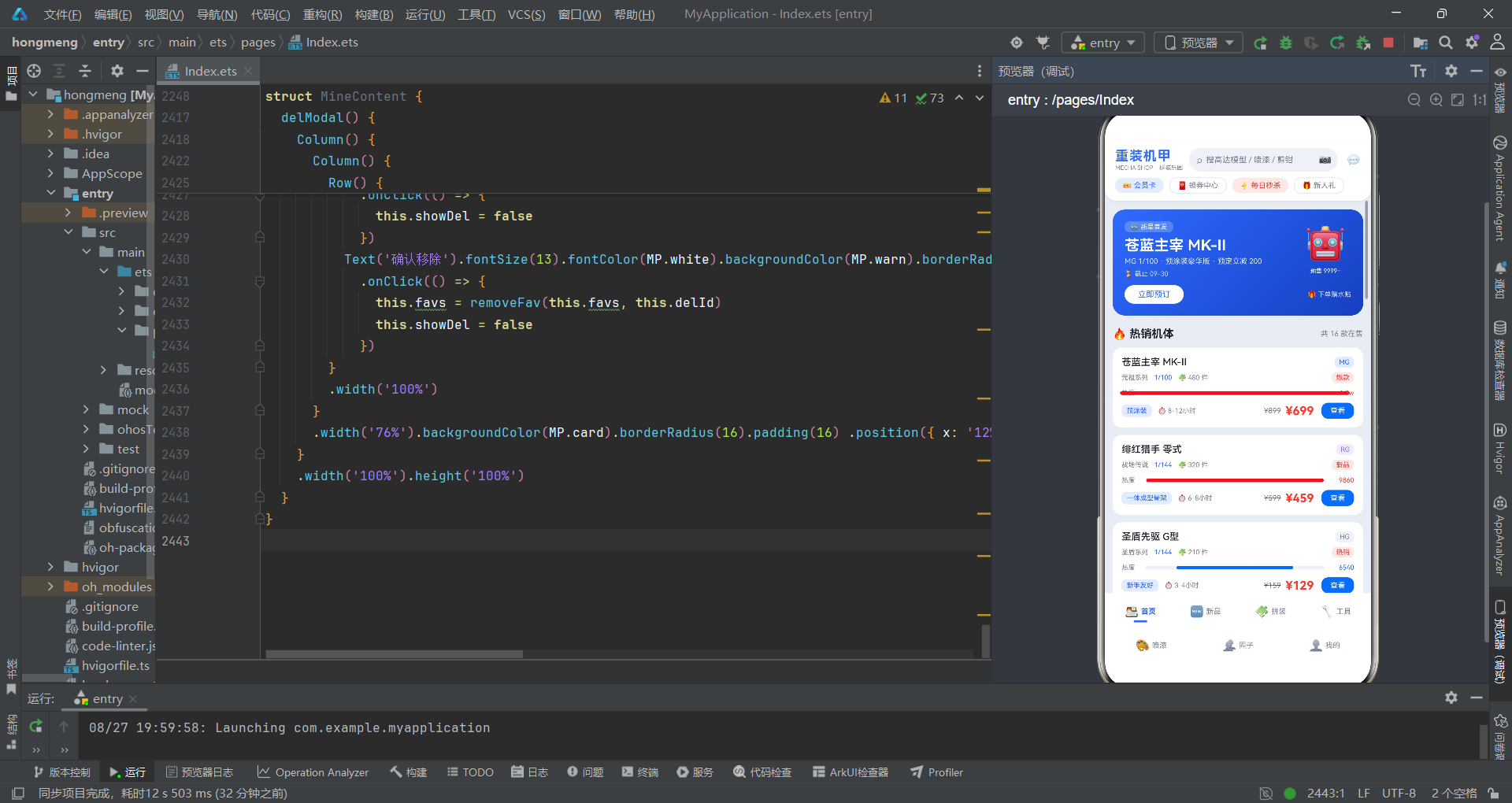
这款「重装机甲」模型商城应用,是 ArkTS 声明式 UI 开发的优秀实践范例。从代码架构到交互设计,从数据建模到视觉呈现,都体现了相当高的完成度。
从架构层面来看,应用采用了清晰的分层设计。接口定义层为整个应用提供了严格的类型契约,确保了数据在各层之间流转的安全性。主题配置层将颜色和样式集中管理,实现了视觉的一致性和可维护性。数据模型层预置了丰富的模拟数据,覆盖了七大业务模块的全部数据需求。工具函数层封装了大量通用逻辑,遵循纯函数思想,保证了代码的可测试性和可复用性。组件层则采用了「页面组件 + 子组件 + @Builder 构建函数」的三级组织方式,既保证了组件的独立性,又避免了过度拆分带来的复杂度。
从技术实现层面来看,应用充分利用了 ArkTS 框架的核心特性。@State 装饰器实现了简洁高效的状态管理,@Builder 装饰器实现了 UI 片段的灵活复用,ForEach 组件实现了数据驱动的列表渲染,Stack + 条件渲染实现了弹窗等浮层效果。布局方面,Column、Row、Flex、Stack、Scroll 五大布局组件各司其职,组合起来可以应对几乎所有的 UI 布局需求。
从产品设计层面来看,应用的功能覆盖非常全面。七个 Tab 页面涵盖了电商(首页、新品、工具)、工具(拼装教程、喷漆工坊)、社交(圈子)、个人(我的)四大类功能,形成了完整的用户闭环。用户可以在应用中浏览商品、学习教程、选购工具和颜料、分享作品、管理收藏和拼装进度。这种「电商 + 工具 + 社区」的产品模式,在垂直领域应用中非常有代表性。

一站式 AI 云服务平台
更多推荐
 0
0 0
0- 0


 已为社区贡献1条内容

所有评论(0)