
鸿蒙实战:分布式数据对象实现本地、网络视频跨端迁移续播
本文介绍了在HarmonyOS中实现本地视频跨设备续播的分布式数据对象与资产同步方案。通过分布式数据对象自动同步播放状态,结合资产同步能力实现大文件传输,解决了传统want.param方案无法传输大文件的痛点。文章详细说明了环境要求、项目结构,并提供了核心代码实现,包括数据模型定义、文件处理工具类等关键模块。该方案支持相册视频自动迁移,播放进度无缝衔接,为HarmonyOS应用提供了高效的多设备协
附完整源码:DistributedObjectDemo
前一篇《用 want.param 实现网络视频播放器跨端迁移续播》解决了在线视频的进度迁移,但本地视频文件(相册中的 MP4、拍摄的视频)动辄几十 MB,无法通过 want.param 传输。HarmonyOS 提供了分布式数据对象 + 资产同步能力,让大文件也能像普通变量一样自动跨设备迁移。
本文通过完整的代码示例,手把手教你实现视频跨端续播本地资产同步的核心要点,在文章最后附上踩坑经验以及分布式数据对象完整使用流程总结。
一、方案决策:什么时候用资产同步?
| 场景 | 推荐方案 | 原因 |
|---|---|---|
| 在线视频(URL + 进度 + 音量) | want.param |
数据量小,即时传输 |
| 本地视频文件(MP4)+ 进度 | 分布式数据对象 + 资产同步 | 文件本身被系统自动迁移,无需手动处理传输 |
| 本地视频 + 字幕文件 | 资产数组(Assets) | 支持多个文件同时迁移 |
资产同步的优势:
- 系统自动完成文件传输、校验、暂存
- 迁移后目标端自动获得视频资源uri。
- 与播放状态(进度、音量)在同一个对象中同步,无需额外逻辑
二、环境要求与权限
| 条件 | 说明 |
|---|---|
| SDK要求 | HarmonyOS API 12 及以上(资产数组需要 API 20) |
| 设备要求 | 双端 HarmonyOS 5.0+ |
| 账号要求 | 双端登录同一华为账号 |
| 网络要求 | 双端打开 WLAN 和蓝牙 |
| 系统设置 | 开启“设置 > 多设备协同 > 接续” |
| 应用安装 | 双端安装同一签名应用 |
自 API12 起,无需申请
ohos.permission.DISTRIBUTED_DATASYNC权限,但是分布式数据对象API会提示你申请权限,无需关心。本应用最低支持 API12,因此忽略权限申请步骤,但需在module.json5中声明网络权限咱也支持网络视频。
三、项目结构
VideoContinuationDemo/
├── entry/
│   ├── src/
│   │   ├── main/
│   │   │   ├── ets/
│   │   │   │   ├── entryability/
│   │   │   │   │   └── EntryAbility.ets   # 接续核心(资产同步)
│   │   │   │   ├── pages/
│   │   │   │   │   └── Index.ets          # 播放页面
│   │   │   │   ├── model/
│   │   │   │   │   └── VideoData.ets      # 数据模型
│   │   │   │   ├── controller/
│   │   │   │   │   └── AvPlayerController.ets  # 播放控制器
│   │   │   │   ├── utils/
│   │   │   │   │   └── FileHelper.ets     # 文件工具
│   │   │   │   └── constants/
│   │   │   │       └── CommonConstants.ets
│   │   │   └── resources/
│   │   └── module.json5
│   └── build-profile.json5
├── AppScope/
└── ...
四、核心代码实现
4.1 数据模型
model/VideoData.ets
import { commonType } from '@kit.ArkData';

export interface PlayState {
  videoUrl?: string;                // 在线视频 URL 或 fd:// 地址
  assets?: commonType.Assets;       // 本地视频资产数组(支持多文件)
  positionMs?: number;
  isPaused?: boolean;
  volume?: number;
}
4.2 文件辅助工具
重点:从本地选择视频我们拿到的uri是file:// 播放器media.AVPlayer是不支持的。需要转换成fd://${fd}才可以读取资源。
utils/FileHelper.ets
import { common } from '@kit.AbilityKit';
import { fileIo as fs, fileUri } from '@kit.CoreFileKit';
import { photoAccessHelper } from '@kit.MediaLibraryKit';
import { BusinessError } from '@kit.BasicServicesKit';
import { commonType } from '@kit.ArkData';
import { Logger } from './Logger';

const TAG = 'FileHelper';

export class FileHelper {
  // 从相册选择视频,返回原始 URI
  static async pickVideoRawUri(context: common.UIAbilityContext): Promise<string | null> {
    try {
      const photoSelectOptions = new photoAccessHelper.PhotoSelectOptions();
      photoSelectOptions.MIMEType = photoAccessHelper.PhotoViewMIMETypes.VIDEO_TYPE;
      photoSelectOptions.maxSelectNumber = 1;
      const photoPicker = new photoAccessHelper.PhotoViewPicker();
      const result = await photoPicker.select(photoSelectOptions);
      const uri = result.photoUris[0];
      if (!uri) return null;
      Logger.info(TAG, `Selected video raw URI: ${uri}`);
      return uri;
    } catch (err) {
      const error = err as BusinessError;
      Logger.error(TAG, `pickVideoRawUri failed: ${error.code}, ${error.message}`);
      return null;
    }
  }

  /**
   * 根据原始 URI 生成 fd:// 格式的 URL,用于直接播放
   */
  static async getFdUrlFromRawUri(rawUri: string): Promise<string | null> {
    try {
      const file = fs.openSync(rawUri, fs.OpenMode.READ_ONLY);
      const fd = file.fd;
      const fdUrl = `fd://${fd}`;
      Logger.info(TAG, `Generated fdUrl: ${fdUrl}`);
      return fdUrl;
    } catch (err) {
      const error = err as BusinessError;
      Logger.error(TAG, `getFdUrlFromRawUri failed: ${error.code}, ${error.message}`);
      return null;
    }
  }

  /**
   * 将媒体库 URI 复制到分布式目录并返回完整的 Asset 对象(仅在迁移时调用)
   */

  static async copyToDistributedDir(context: common.UIAbilityContext, srcUri: string): Promise<commonType.Asset | null> {
    try {
      const distDir = context.distributedFilesDir;
      const fileName = srcUri.substring(srcUri.lastIndexOf('/') + 1);
      const destPath = `${distDir}/${fileName}`;

      // 如果目标文件已存在,直接返回 Asset(避免重复复制)
      if (fs.accessSync(destPath)) {
        Logger.info(TAG, `File already exists: ${destPath}`);
        const stat = fs.statSync(destPath);
        const destUri = fileUri.getUriFromPath(destPath);
        return {
          name: fileName,
          uri: destUri,
          path: destPath,
          createTime: stat.ctime.toString(),
          modifyTime: stat.mtime.toString(),
          size: stat.size.toString(),
        };
      }

      // 1. 打开源文件(只读)
      const srcFile = fs.openSync(srcUri, fs.OpenMode.READ_ONLY);
      // 2. 创建目标文件(读写)
      const destFile = fs.openSync(destPath, fs.OpenMode.READ_WRITE | fs.OpenMode.CREATE);
      // 3. 获取源文件大小
      const srcStat = fs.statSync(srcUri);
      const totalSize = srcStat.size;
      const bufferSize = 64 * 1024; // 64KB 缓冲区
      let copied = 0;

      while (copied < totalSize) {
        const buffer = new ArrayBuffer(bufferSize);
        const readLen = fs.readSync(srcFile.fd, buffer);
        if (readLen <= 0) break;
        // 写入目标文件
        fs.writeSync(destFile.fd, buffer.slice(0, readLen));
        copied += readLen;
      }

      // 4. 关闭文件
      fs.closeSync(srcFile);
      fs.closeSync(destFile);

      // 5. 获取目标文件状态并构造 Asset
      const stat = fs.statSync(destPath);
      const destUri = fileUri.getUriFromPath(destPath);
      const asset: commonType.Asset = {
        name: fileName,
        uri: destUri,
        path: destPath,
        createTime: stat.ctime.toString(),
        modifyTime: stat.mtime.toString(),
        size: stat.size.toString(),
      };
      Logger.info(TAG, `Copied to distributed dir: ${destPath}, size=${stat.size}`);
      return asset;
    } catch (err) {
      const error = err as BusinessError;
      Logger.error(TAG, `copyToDistributedDir failed: ${error.code}, ${error.message}`);
      return null;
    }
  }
}
4.3 播放控制器
重点:在上一篇文章中只做了网络视频播放没有测试出啥问题,当播放本地视频的时候出现了两个问题
- 调整进度后直接又回退到原始进度,解决方法通过 seek 方法设置
SeekMode.SEEK_CLOSEST。 - 滑动进度条增加拖动状态、如果拖动的时候不屏蔽
onProgress回调中赋值,进度会来回跳动。 - 更换url前执行
await this.avPlayer.reset();重置视频播放器,而不是直接销毁在重建提高性能。
import { media } from '@kit.MediaKit';
import { BusinessError } from '@kit.BasicServicesKit';
import { Logger } from '../utils/Logger';

const TAG = 'AvPlayerController';

export class AvPlayerController {
  private avPlayer?: media.AVPlayer;
  private surfaceId?: string;
  private onProgressCb?: (pos: number, dur: number) => void;
  private onStateChangeCb?: (state: string) => void;
  private isPrepared: boolean = false;
  private pendingVolume?: number;

  constructor() {}

  async init(surfaceId: string): Promise<void> {
    this.surfaceId = surfaceId;
    try {
      this.avPlayer = await media.createAVPlayer();
      this.setupListeners();
    } catch (error) {
      Logger.error(TAG, `init failed: ${JSON.stringify(error)}`);
      throw new Error(String(error));
    }
  }

  private setupListeners(): void {
    if (!this.avPlayer) return;

    this.avPlayer.on('stateChange', (state: string) => {
      Logger.info(TAG, `State: ${state}`);
      if (state === 'initialized') {
        if (this.surfaceId && this.avPlayer) {
          this.avPlayer.surfaceId = this.surfaceId;
          Logger.info(TAG, `SurfaceId set: ${this.surfaceId}`);
        }
        this.prepare();
      }
      if (state === 'prepared') {
        this.isPrepared = true;
        if (this.pendingVolume !== undefined) {
          this.setVolume(this.pendingVolume);
          this.pendingVolume = undefined;
        }
      }
      if (state === 'error') {
        this.isPrepared = false;
      }
      this.onStateChangeCb?.(state);
    });

    this.avPlayer.on('timeUpdate', (time: number) => {
      if (this.onProgressCb && this.avPlayer && this.isPrepared) {
        this.onProgressCb(time, this.avPlayer.duration);
      }
    });


    this.avPlayer.on('error', (err: BusinessError) => {
      Logger.error(TAG, `Error: ${err.code}, ${err.message}`);
      this.isPrepared = false;
    });
  }

  onStateChange(cb: (state: string) => void): void {
    this.onStateChangeCb = cb;
  }

  onProgress(cb: (pos: number, dur: number) => void): void {
    this.onProgressCb = cb;
  }

  offStateChange(): void {
    this.onStateChangeCb = undefined;
  }

  async setUrl(url: string): Promise<void> {
    if (!this.avPlayer) throw new Error('Player not init');
    try {
      await this.avPlayer.reset();
      this.avPlayer.url = url;
      Logger.info(TAG, `URL set: ${url}`);
    } catch (error) {
      Logger.error(TAG, `setUrl failed: ${JSON.stringify(error)}`);
      throw new Error(String(error));
    }
  }
  private async prepare(): Promise<void> {
    if (this.avPlayer) {
      try {
        await this.avPlayer.prepare();
      } catch (error) {
        Logger.error(TAG, `prepare failed: ${JSON.stringify(error)}`);
      }
    }
  }

  async play(): Promise<void> {
    if (!this.avPlayer || !this.isPrepared) {
      Logger.warn(TAG, 'play() ignored: not prepared');
      return;
    }
    try {
      await this.avPlayer.play();
    } catch (e) {
      Logger.error(TAG, `play error: ${e}`);
    }
  }

  async pause(): Promise<void> {
    if (!this.avPlayer) return;
    try {
      await this.avPlayer.pause();
    } catch (e) {
      Logger.error(TAG, `pause error: ${e}`);
    }
  }

  seek(ms: number,mode: media.SeekMode = media.SeekMode.SEEK_CLOSEST): void {
    if (!this.avPlayer || !this.isPrepared) return;
    this.avPlayer.seek(ms,mode);
    Logger.info(TAG, `seek called: ${ms}`);
  }

  setVolume(vol: number): void {
    let rawVol = Math.min(15, Math.max(0, vol));
    if (!this.avPlayer) return;
    const normalized = rawVol / 15;
    if (!this.isPrepared) {
      this.pendingVolume = rawVol;
      Logger.info(TAG, `Volume deferred: ${rawVol}`);
      return;
    }
    try {
      this.avPlayer.setVolume(normalized);
      Logger.info(TAG, `Volume set: ${rawVol} -> ${normalized}`);
    } catch (e) {
      Logger.error(TAG, `volume error: ${e}`);
    }
  }

  release(): void {
    if (this.avPlayer) {
      this.avPlayer.off('error');
      this.avPlayer.off('timeUpdate');
      this.avPlayer.off('stateChange');
      this.avPlayer.release()
    }
    this.avPlayer = undefined;
    this.pendingVolume = undefined;
    this.onStateChangeCb = undefined;
    this.onProgressCb = undefined;
  }
}
4.4 接续核心,资产迁移 EntryAbility
entryability/EntryAbility.ets
import { AbilityConstant, UIAbility, Want } from '@kit.AbilityKit';
import { window } from '@kit.ArkUI';
import { distributedDataObject, commonType } from '@kit.ArkData';
import { BusinessError } from '@kit.BasicServicesKit';
import { Logger } from '../utils/Logger';
import { PlayState } from '../model/VideoData';
import { FileHelper } from '../utils/FileHelper';

const TAG = 'EntryAbility';
let globalDataObject: distributedDataObject.DataObject;

export default class EntryAbility extends UIAbility {
  private storage: LocalStorage = new LocalStorage();

  async onCreate(want: Want, launchParam: AbilityConstant.LaunchParam): Promise<void> {
    if (launchParam.launchReason === AbilityConstant.LaunchReason.CONTINUATION) {
      Logger.info(TAG, 'onCreate: continuation, will restore');
      await this.restoreFromContinuation(want);
    } else {
      Logger.info(TAG, `onCreate: launchReason=${launchParam.launchReason}`);
    }
    this.handleNormalLaunch(want, launchParam);
  }

  onDestroy(): void {
    globalDataObject?.off('status');
  }
  onNewWant(want: Want, launchParam: AbilityConstant.LaunchParam): void {
    if (launchParam.launchReason === AbilityConstant.LaunchReason.CONTINUATION) {
      Logger.info(TAG, 'onNewWant: continuation, will restore');
      this.restoreFromContinuation(want);
    }
    this.handleNormalLaunch(want, launchParam);
  }

  private handleNormalLaunch(want: Want, launchParam: AbilityConstant.LaunchParam): void {
    if (launchParam.launchReason === AbilityConstant.LaunchReason.PREPARE_CONTINUATION) {
      Logger.info(TAG, 'Quick start: app prepared');
      this.storage.setOrCreate('quickStartLoading', true);
      return;
    }
    try {
      this.context.restoreWindowStage(this.storage);
      Logger.info(TAG, 'restoreWindowStage success');
    } catch (error) {
      Logger.error(TAG, `restoreWindowStage failed: ${error}`);
    }
  }

  // 源端:保存迁移数据
  async onContinue(wantParam: Record<string, Object>): Promise<AbilityConstant.OnContinueResult> {
    Logger.info(TAG, 'onContinue called');
    try {
      const state = AppStorage.get<PlayState>('currentPlayState');
      if (!state) {
        Logger.info(TAG, 'onContinue: no currentPlayState, skip');
        return AbilityConstant.OnContinueResult.AGREE;
      }
      Logger.info(TAG, `onContinue: currentPlayState = ${JSON.stringify(state)}`);

      let isAsset = false;
      let assetUri: string | undefined;

      // 判断是否有本地资产:assets 数组存在且第一个元素有 path
      if (state.assets && state.assets.length > 0 && state.assets[0].path) {
        isAsset = true;
        const srcPath = state.assets[0].path; // 原始媒体库路径
        Logger.info(TAG, `onContinue: asset path = ${srcPath}`);
        const newAsset = await FileHelper.copyToDistributedDir(this.context, srcPath);
        if (newAsset) {
          assetUri = newAsset.uri;
          Logger.info(TAG, `onContinue: asset copied, new uri = ${assetUri}`);
        } else {
          Logger.error(TAG, 'onContinue: copyToDistributedDir failed');
          return AbilityConstant.OnContinueResult.AGREE;
        }
      }

      // 构建要传输的基础数据
      const source: PlayState = {
        positionMs: state.positionMs,
        isPaused: state.isPaused,
        volume: state.volume,
        videoUrl: isAsset ? undefined : state.videoUrl, // 本地资产时 videoUrl 留空
      };
      Logger.info(TAG, `onContinue: source = ${JSON.stringify(source)}`);
      globalDataObject = distributedDataObject.create(this.context, source);

      if (isAsset && assetUri) {
        await globalDataObject.setAsset('assets', assetUri);
        Logger.info(TAG, `onContinue: setAsset assets = ${assetUri}`);
      }

      const sessionId = distributedDataObject.genSessionId();
      wantParam.distributedSessionId = sessionId;
      Logger.info(TAG, `onContinue: generated sessionId = ${sessionId}`);
      await globalDataObject.setSessionId(sessionId);
      await globalDataObject.save(wantParam.targetDevice as string);

      Logger.info(TAG, `onContinue success, sessionId=${sessionId}, isAsset=${isAsset}`);
      return AbilityConstant.OnContinueResult.AGREE;
    } catch (err) {
      const error = err as BusinessError;
      Logger.error(TAG, `onContinue error: ${error.code}, ${error.message}`);
      return AbilityConstant.OnContinueResult.AGREE;
    }
  }

  // 目标端:恢复数据
  private async restoreFromContinuation(want: Want): Promise<void> {
    const sessionId = want.parameters?.distributedSessionId as string;
    if (!sessionId) {
      Logger.warn(TAG, 'No sessionId in continuation');
      return;
    }
    Logger.info(TAG, `restoreFromContinuation: sessionId=${sessionId}`);

    // 定义一个空的数据结构
    const emptyState: PlayState = {
      videoUrl: undefined,
      positionMs: undefined,
      isPaused: undefined,
      volume: undefined,
      assets: undefined,
    };
    globalDataObject = distributedDataObject.create(this.context, emptyState);
    Logger.info(TAG, 'Created empty distributed object');

    try {
      globalDataObject.on('status', (sessionId: string, networkId: string, status: string) => {
        Logger.info(TAG, `Status event: status=${status}, networkId=${networkId}`);
        if (status === 'restored') {
          Logger.info(TAG, '=== Data restored, extracting ===');
          const videoUrlValue = globalDataObject['videoUrl'] as string | undefined;
          const positionMsValue = globalDataObject['positionMs'] as number | undefined;
          const isPausedValue = globalDataObject['isPaused'] as boolean | undefined;
          const volumeValue = globalDataObject['volume'] as number | undefined;
          const assetsValue = globalDataObject['assets'] as commonType.Assets | undefined;

          Logger.info(TAG, `Restored: videoUrl=${videoUrlValue}, positionMs=${positionMsValue}, isPaused=${isPausedValue}, volume=${volumeValue}`);
          if (assetsValue && assetsValue.length > 0) {
            Logger.info(TAG, `Asset restored: uri=${assetsValue[0].uri}, name=${assetsValue[0].name}, size=${assetsValue[0].size}`);
          } else {
            Logger.warn(TAG, 'No assets found in restored data');
          }

          const restored: PlayState = {
            videoUrl: videoUrlValue,
            positionMs: positionMsValue,
            isPaused: isPausedValue,
            volume: volumeValue,
          };
          if (assetsValue) {
            restored.assets = assetsValue;
          }
          Logger.info(TAG, `Final restored PlayState: ${JSON.stringify(restored)}`);
          AppStorage.setOrCreate('restoredPlayState', restored);
          AppStorage.setOrCreate('isContinuation', true);
          this.storage.setOrCreate('quickStartLoading', false);
          // 系统会自己清理,或者每次恢复完数据自己清理也行但是不要在onDestroy中清理,访问到undefined直接报错。
          globalDataObject?.off('status');
        }
      });
    } catch (error) {
      const err = error as BusinessError;
      Logger.error(TAG, `Failed to register status listener: ${err.code}, ${err.message}`);
      return;
    }

    try {
      await globalDataObject.setSessionId(sessionId);
      Logger.info(TAG, `Restore: joined session ${sessionId}`);
    } catch (error) {
      const err = error as BusinessError;
      Logger.error(TAG, `Failed to setSessionId: ${err.code}, ${err.message}`);
    }
  }

  onWindowStageCreate(windowStage: window.WindowStage): void {
    windowStage.loadContent('pages/Index').catch((err: Error) => {
      Logger.error(TAG, `Load content failed: ${JSON.stringify(err)}`);
    });
  }
}
4.5 播放页面(Index.ets)
完整代码从工程中看吧,代码有点多只做核心展示pages/Index.ets
@Entry
@Component
struct Index {
  @StorageLink('currentPlayState') currentPlayState: PlayState = {
    videoUrl: CommonConstants.DEFAULT_VIDEO_URL,
    positionMs: 0,
    isPaused: false,
    volume: CommonConstants.DEFAULT_VOLUME,
  };
  @StorageLink('restoredPlayState') restoredPlayState: PlayState | null = null;
  @StorageLink('isContinuation') isContinuation: boolean = false;
  @StorageLink('quickStartLoading') quickStartLoading: boolean = false;

  @State duration: number = 0;
  @State isFileMigrating: boolean = false;
  private isDragging: boolean = false;
  private player: AvPlayerController = new AvPlayerController();
  private xcController: XComponentController = new XComponentController();

  private pendingRestore: boolean = false;
  private restorePosition: number = 0;
  private restorePaused: boolean = false;
  private isPrepared: boolean = false;

  aboutToAppear(): void {
    if (this.quickStartLoading) {
      AppStorage.setOrCreate('quickStartLoading', false);
    }
    if (this.isContinuation && this.restoredPlayState) {
      // 接续恢复,显示“正在迁移文件”提示
      this.isFileMigrating = true;
      this.currentPlayState = this.restoredPlayState;
      this.pendingRestore = true;
      this.restorePosition = this.restoredPlayState.positionMs ?? 0;
      this.restorePaused = this.restoredPlayState.isPaused ?? false;
      this.isContinuation = false;
      this.restoredPlayState = null;
      Logger.info(TAG, `Restore pending: pos=${this.restorePosition}, paused=${this.restorePaused}`);
      if (this.isPrepared) {
        Logger.info(TAG, 'Player already prepared, seeking immediately');
        this.player.seek(this.restorePosition);
        if (!this.restorePaused) {
          this.player.play();
        }
        this.pendingRestore = false;
        this.isFileMigrating = false; // 立即完成,隐藏提示
      }
    }
  }

  private onXComponentLoad(): void {
    if (this.isPrepared) return;
    this.isPrepared = true;
    this.initPlayer();
  }

  private async initPlayer(): Promise<void> {
    try {
      const surfaceId = this.xcController.getXComponentSurfaceId();
      if (!surfaceId) {
        Logger.error(TAG, 'surfaceId is empty');
        return;
      }
      await this.player.init(surfaceId);

      let playUrl = '';
      if (this.currentPlayState.assets && this.currentPlayState.assets.length > 0) {
        const uri = this.currentPlayState.assets[0].uri;
        const fdUrl = await FileHelper.getFdUrlFromRawUri(uri);
        if (fdUrl) {
          playUrl = fdUrl;
        }
      } else if (this.currentPlayState.videoUrl) {
        playUrl = this.currentPlayState.videoUrl;
      } else {
        Logger.error(TAG, 'No playable video source');
        return;
      }

      await this.player.setUrl(playUrl);

      this.player.onStateChange((state) => {
        if (state === 'prepared') {
          if (this.pendingRestore) {
            Logger.info(TAG, `Seeking to ${this.restorePosition}`);
            this.player.seek(this.restorePosition);
            this.player.setVolume(this.currentPlayState.volume ?? 0);
            setTimeout(() => {
              if (!this.restorePaused) {
                this.player.play();
              }
              this.pendingRestore = false;
              this.isFileMigrating = false; // 迁移完成,隐藏提示
            }, 300);
          } else {
            this.player.play();
          }
        }
        if (state === 'paused') {
          this.currentPlayState.isPaused = true;
        }
        if (state === 'playing') {
          this.currentPlayState.isPaused = false;
        }
        if (state === 'completed') {
          this.currentPlayState.isPaused = true;
          this.currentPlayState.positionMs = 0;
        }
      });

      this.player.onProgress((pos, dur) => {
        if (!this.isDragging) {
          this.currentPlayState.positionMs = pos;
          this.duration = dur;
          AppStorage.setOrCreate('currentPlayState', this.currentPlayState);
        }
      });

    } catch (err) {
      Logger.error(TAG, `Init player failed: ${JSON.stringify(err)}`);
    }
  }

  // 选择本地视频
  private async onSelectLocalVideo() {
    const context = getContext(this) as common.UIAbilityContext;
    const rawUri = await FileHelper.pickVideoRawUri(context);
    if (!rawUri) return;
    const fdUrl = await FileHelper.getFdUrlFromRawUri(rawUri);
    if (!fdUrl) return;

    const fileName = rawUri.substring(rawUri.lastIndexOf('/') + 1);
    const asset: commonType.Asset = {
      name: fileName,
      uri: fdUrl,
      path: rawUri,
      createTime: '',
      modifyTime: '',
      size: '',
    };

    this.currentPlayState = {
      videoUrl: fdUrl,
      assets: [asset],
      positionMs: 0,
      isPaused: false,
      volume: CommonConstants.DEFAULT_VOLUME,
    };
    AppStorage.setOrCreate('currentPlayState', this.currentPlayState);
    this.pendingRestore = false;
    await this.player.setUrl(fdUrl);
  }

  // 播放网络视频
  private async onPlayNetworkVideo() {
    const networkUrl = CommonConstants.DEFAULT_VIDEO_URL;
    this.currentPlayState = {
      videoUrl: networkUrl,
      assets: undefined,
      positionMs: 0,
      isPaused: false,
      volume: CommonConstants.DEFAULT_VOLUME,
    };
    AppStorage.setOrCreate('currentPlayState', this.currentPlayState);
    this.pendingRestore = false;
    await this.player.setUrl(networkUrl);
  }

  aboutToDisappear(): void {
    this.player.release();
  }

  build(){

  }
4.6 配置文件 module.json5
{
  "module": {
    "abilities": [
      {
        "name": "EntryAbility",
        "continuable": true,
        "continueType": ["EntryAbility_ContinueQuickStart"],
        // ...
      }
    ],
    "requestPermissions": [
      {
        "name": "ohos.permission.INTERNET"
      }
    ],

  }
}
五、效果展示
- 手机端在播放网络视频
- 源端(平板):从相册选择一个本地视频,播放到某个进度后暂停。
- 触发迁移:在任务中心(多任务界面)点击应用卡片右下角的迁移图标,选择目标设备(手机)。
- 目标端(手机):应用自动打开,视频从相同的进度、相同的音量、相同的暂停状态继续播放。
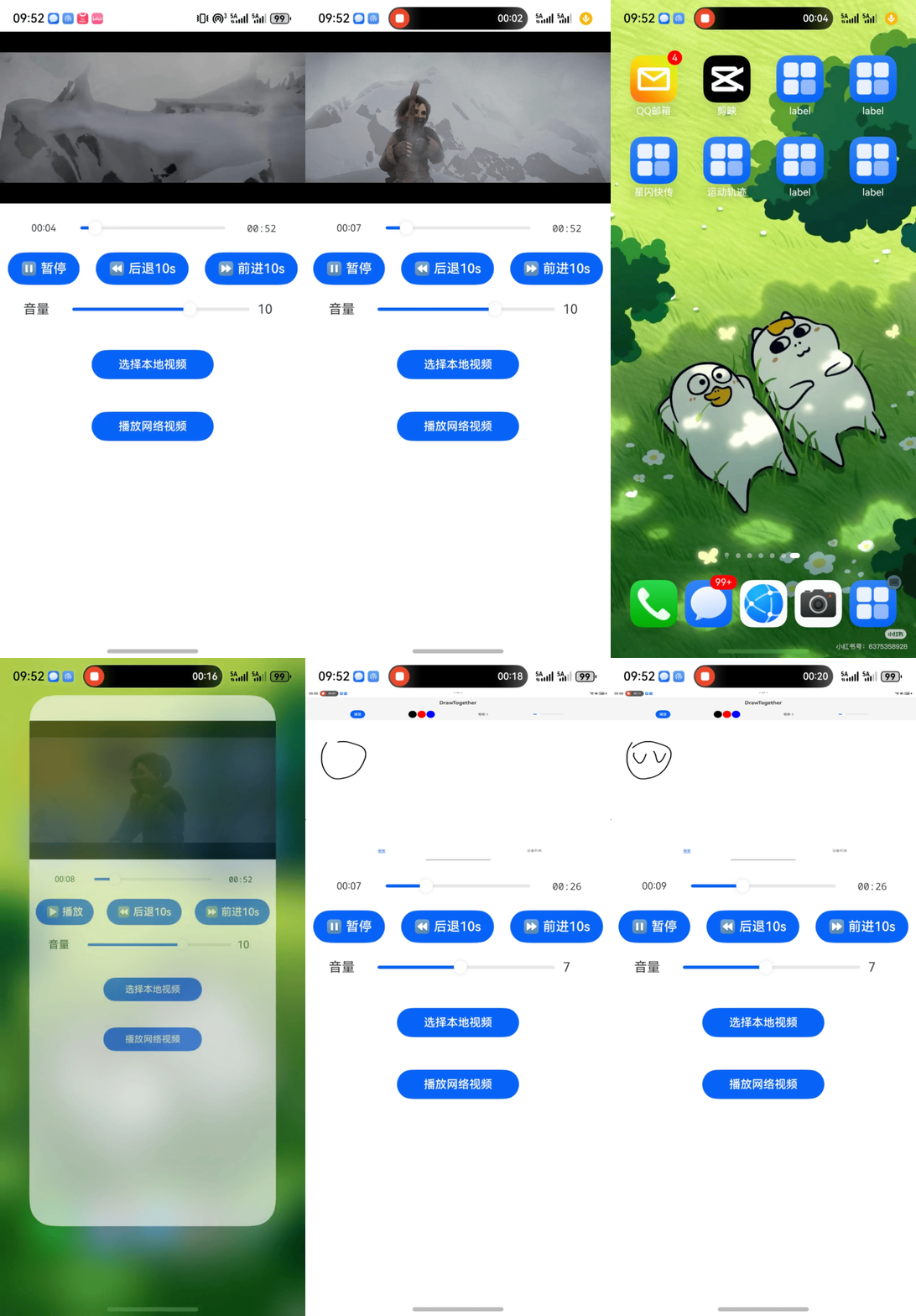
如果是大文件迁移一定要加个正在迁移提示,不然还以为视频播放出bug了呢。
六、踩坑经验
1. 资产文件必须在分布式目录下才能被迁移
- 现象:源端
onContinue成功,但目标端收不到文件,restored事件中assets为空。 - 解决:在
onContinue中调用FileHelper.copyToDistributedDir将文件复制或写入到context.distributedFilesDir,并使用返回的 Asset 对象设置资产字段。
2. 接收端必须创建一个空数据结构或者对象
- 现象:目标端数据被本地默认值覆盖,没有从源端同步。
- 解决:创建分布式对象时,将所有需要同步的属性显式设为
undefined(如emptyState: PlayState = { videoUrl: undefined, ... })。
3. 本地视频 seek 后进度回退
- 现象:迁移后进度条显示正确,但播放时从 0 开始;或者拖动进度条回弹。
- 解决:在
seek方法中指定SeekMode.SEEK_CLOSEST(或SEEK_PREV_SYNC),默认不传可能导致关键帧定位不准。seek(ms: number, mode: media.SeekMode = media.SeekMode.SEEK_CLOSEST)
4. 进度条拖动时被 timeUpdate 覆盖
- 现象:拖动进度条时,滑块被播放器的实时进度拉回原位置。
- 解决:使用
isDragging标志,在Slider.onChange的Begin阶段设为true,End阶段设为false,并在onProgress回调中判断!isDragging时才更新positionMs。
5. setAsset 传递字符串 URI,而非 Asset 对象
- 现象:目标端收到的
assets字段变成了数组,而非单个 Asset。 - 解决:
globalDataObject.setAsset('assets', assetUri)的第二个参数应该是字符串 URI,而不是 Asset 对象。目标端会自动将其还原为 Asset 数组。
6. onContinue 未调用
- 原因:
module.json5中未配置continuable: true或continueType缺失。 - 解决:添加配置,并确保双端登录同一华为账号、WLAN 和蓝牙开启、系统设置中开启“接续”。
7. status 监听器不可在 onDestroy 中清理
- 现象:迁移完成后关闭应用(或应用被系统回收),在
onDestroy中调用globalDataObject.off('status')导致应用崩溃。 - 原因:
globalDataObject可能在 Ability 销毁前已被系统释放,调用off会访问非法。 - 解决:在
restored状态下,处理完数据后立即调用globalDataObject.off('status')移除监听,不要依赖 Ability 生命周期,或者不写由系统自行管理。
七、分布式数据对象使用步骤总结
7.1 完整使用流程
| 角色 | 步骤 | API | 说明 |
|---|---|---|---|
| 源端 | 1 | distributedDataObject.create(context, source) |
创建分布式对象,source 为包含基础数据的普通对象 |
| 2 | dataObject.setAsset(key, uri) |
如果有本地文件资产,单独设置资产字段(uri 为字符串) |
|
| 3 | distributedDataObject.genSessionId() |
生成唯一的会话 ID | |
| 4 | wantParam['customSessionKey'] = sessionId |
将 sessionId 存入 wantParam,必须使用自定义 key(避免与系统保留的 sessionId 冲突) |
|
| 5 | dataObject.setSessionId(sessionId) |
激活分布式对象,加入会话 | |
| 6 | dataObject.save(targetDeviceId) |
将数据持久化到目标设备 | |
| 目标端 | 1 | 从 want.parameters 取出 sessionId |
例如 want.parameters['customSessionKey'] |
| 2 | distributedDataObject.create(context, emptyObject) |
创建空对象,所有需要同步的属性必须显式设为 undefined |
|
| 3 | dataObject.on('status', callback) |
注册状态监听,等待 status === 'restored' |
|
| 4 | dataObject.setSessionId(sessionId) |
加入同一个会话,触发数据同步 | |
| 5 | 在 restored 回调中从 dataObject 读取属性 |
例如 dataObject['videoUrl']、dataObject['assets'] |
7.2 资产同步的关键细节
- 资产文件必须位于分布式目录:源端在调用
setAsset之前,需将本地文件复制到context.distributedFilesDir(或确保文件已在此目录下),并获取其标准 URI(file://格式)。目标端收到资产后,系统会自动将文件下载到本地分布式目录,并通过assets[0].uri提供可访问的 URI。 setAsset的第二个参数是字符串 URI,不是 Asset 对象:常见错误是传入完整的Asset对象,导致目标端收到的资产变成数组而非单个对象。正确做法:const assetObj = await copyToDistributedDir(...); await dataObject.setAsset('assets', assetObj.uri); // 传递字符串 URI- 接收端资产字段会自动转为数组:即使源端只设置了一个资产,目标端读取
dataObject['assets']得到的也是一个数组(commonType.Assets)。因此页面中应使用assets[0]?.uri获取播放地址。
7.4 sessionId 传递注意事项
- 不能使用
wantParam['sessionId']:系统可能占用sessionId字段,必须使用自定义 key,如'distributedSessionId'或'dataSessionId'。 - 目标端必须从
want.parameters中读取相同的 key:两端 key 必须完全一致。
7.5 性能与限制
- 每个分布式数据对象大小限制:跨端迁移场景下不超过 150KB(资产文件不计入此限制)。
- 单个应用最多可创建 16 个分布式数据对象实例。
- 最多支持 3 台设备同时数据协同。
7.6 调试建议
- 在源端
onContinue和目标端restored回调中打印详细日志,确认数据是否成功传递。 - 检查
module.json5中是否配置continuable: true。 - 确认设备满足接续环境要求:同一华为账号、WLAN+蓝牙开启、系统设置中开启“接续”。
如果你的应用只需要迁移在线视频的播放进度,请参考上一篇《用 want.param 实现视频播放器跨端迁移续播》,实现更简单、迁移更快。
如果觉得本文对你有帮助,请点赞、收藏、转发,如果有错误、工程有问题请联系我!

一站式 AI 云服务平台
更多推荐

 2
2 0
0- 0


 已为社区贡献2条内容

所有评论(0)