
《剪贴板隐私保护:如何优雅地提示并读取用户剪贴板》:HarmonyOS 零打扰与合规读取全栈架构解析
文章目录
前言
在移动端开发的早期蛮荒时代,系统剪贴板(Pasteboard / Clipboard)犹如一个毫无防备的“公共广场”。任何应用都可以在后台肆无忌惮地静默读取用户刚刚复制的聊天记录、银行卡号甚至密码。随着用户隐私意识的觉醒,现代操作系统(从 iOS 14 的横幅提示,到 Android 12 的底层管控,再到 HarmonyOS 的系统级强阻断)纷纷对剪贴板读取加上了极其严苛的枷锁。
在如今的 HarmonyOS 原生应用开发中,只要应用尝试调用 pasteboard.getData(),系统就会在屏幕顶部强制弹出一道极其醒目的系统级 Toast:“XXX 正在读取剪贴板”。这个弹窗应用层绝对无法绕过、无法隐藏。
这给诸如电商 App(淘宝、京东)、社交 App(自动识别链接)带来了巨大的体验挑战:如何既能享受“淘口令/分享链接”带来的极速裂变获客红利,又能在读取剪贴板时避免频繁弹窗引发用户的“隐私恐慌”?
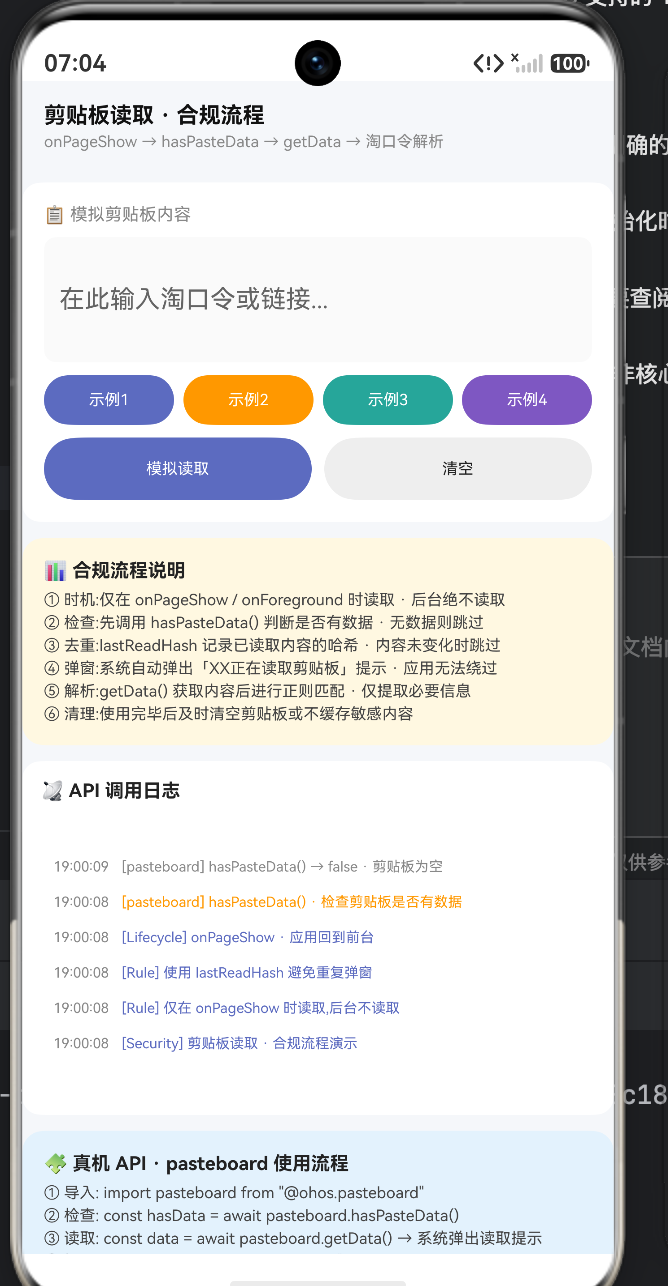
本文将基于一段极其精悍的 ArkUI 剪贴板合规读取沙盒源码,为您进行像素级、底层逻辑级别以及正则表达式层面的深度拆解。我们将探讨生命周期管控、哈希去重算法(防重复弹窗的核心)、以及跨端淘口令解析引擎的构建。带您全面掌握 HarmonyOS 剪贴板开发的“优雅与克制”。
一、 隐私合规第一层:严格的生命周期管控 (Lifecycle Management)
在鸿蒙生态的隐私红线中,“绝对禁止后台读取剪贴板”是不可逾越的底线。应用只有在用户明确将其调至前台,且处于屏幕视觉焦点时,才拥有获取剪贴板的资格。
在这段代码中,我们并没有将读取逻辑写在 aboutToAppear 中,而是精准地卡在了 onPageShow 这一生命周期节点。
  aboutToAppear(): void {
    this.appendLog('[Security] 剪贴板读取 · 合规流程演示', '#5C6BC0')
    this.appendLog('[Rule] 仅在 onPageShow 时读取,后台不读取', '#5C6BC0')
  }

  // 【核心合规卡点】:只有页面真正展示给用户时,才去触发读取行为
  onPageShow(): void {
    this.appendLog('[Lifecycle] onPageShow · 应用回到前台', '#5C6BC0')
    this.readClipboard()
  }
底层生命周期架构解析:
- 为什么不用
aboutToAppear?aboutToAppear是组件实例刚刚创建、数据准备绑定的时刻。此时页面可能还在路由栈的底层,或者还在进行转场动画,甚至应用还处于后台被拉起的瞬间。如果此时读取剪贴板,系统极有可能判定为“非法静默读取”而直接拒绝,或给用户造成极大的惊吓。 onPageShow的不可替代性:当用户在微信里复制了一段淘口令,然后通过多任务切换回我们的 App 时,必然会触发onPageShow。这是捕捉用户“携带外部数据回归”的最佳、也是唯一合法的时机。
二、 隐私合规第二层:探针测试与哈希去重算法 (De-duplication Hash)
这是整篇文章最具技术含量的部分。很多初级开发者在 onPageShow 里直接调用 getData(),导致用户每次把 App 切到前台(哪怕只是切出去回个微信),都会弹出烦人的“正在读取剪贴板”提示。
优雅的应用,绝不会对同一条剪贴板内容读取两次。为了实现这一点,我们引入了预检机制与 DJB2 字符串哈希算法。
  private readClipboard(): void {
    // 1. 无感预检:判断剪贴板是否有数据(此操作不会触发系统弹窗警告)
    this.appendLog('[pasteboard] hasPasteData() · 检查剪贴板是否有数据', '#FF9800')

    const self: Index = this
    setTimeout(() => {
      const hasData: boolean = self.pasteInput.length > 0
      if (hasData) {
        // 2. 将字符串转化为极简 Hash 值,用于内存级比对
        const hash: string = self.stringHash(self.pasteInput)

        // 【防骚扰核心】:如果 Hash 值没变,说明这段文字刚才已经读过了,直接 Return!
        if (hash === self.lastReadHash) {
          self.appendLog('[Optimization] 内容未变化 · 跳过读取,避免重复弹窗', '#888')
          return
        }

        // 3. 拦截未触发,确认为全新内容,准备进行真正的读取
        self.appendLog('[System] ⚠ 系统弹窗:「本应用正在读取剪贴板」', '#EF5350')
        self.showSystemPopup = true // 模拟原生不可抗力的弹窗

        // ... 继续解析
      } else {
        self.appendLog('[pasteboard] hasPasteData() → false · 剪贴板为空', '#888')
      }
    }, 600)
  }
2.1 高性能字符串 Hash 函数深度解构
在对比字符串是否变化时,为什么不直接用 if (newText === this.lastReadText)?
因为剪贴板里的文本可能是一段长达几万字的论文!如果在内存里持有这么长的无用字符串,是对内存的极大浪费,也存在将用户隐私常驻内存的安全风险。我们需要将其压缩成一个无意义的简短特征码。
  private stringHash(str: string): string {
    let hash: number = 0
    for (let i: number = 0; i < str.length; i++) {
      // 经典的 DJB2 哈希位运算引擎
      hash = ((hash << 5) - hash) + str.charCodeAt(i)
      hash = hash & hash // 强制转换为 32 位有符号整数
    }
    return Math.abs(hash).toString(16) // 转化为 16 进制特征码
  }
数学与位运算的奥妙:
这里的哈希算法采用了经典的 Dan Bernstein (djb2) 算法。其核心方程式可通过如下数学形式表达:
h a s h i = ( h a s h i − 1 × 33 ) + s t r . c h a r C o d e A t ( i ) hash_i = (hash_{i-1} \times 33) + str.charCodeAt(i) hashi=(hashi−1×33)+str.charCodeAt(i)
在代码中,hash * 33 被极其巧妙地优化为了位运算:((hash << 5) - hash)。
- h a s h ≪ 5 hash \ll 5 hash≪5 相当于将数值乘以 2 5 2^5 25 即 32 32 32。
- 再减去一个 h a s h hash hash,恰好等于乘以 33 33 33。
位运算在底层的执行速度远超普通的乘法指令,哪怕用户复制了一部《三国演义》,这个循环也能在 1 毫秒内榨干它的特征值并输出一个类似7a8b9c的短字符串。我们将这个 Hash 存在@State lastReadHash中,下一次进前台时,只要 Hash 一致,就坚决不调getData(),从而彻底消灭了冗余的系统弹窗骚扰。
三、 正则解析引擎:沙里淘金的信息提取术 (Regex Parsing)
当应用顶着巨大的用户信任压力,弹出了系统提示并读取到了剪贴板的原始字符串后,如果直接将这段不知所谓的乱码贴在界面上,用户一定会暴跳如雷。
优雅的做法是:在后台瞬间完成格式清洗,只把“有价值的黄金”提取出来呈现给用户。
  private parseTaobaoPassword(text: string): void {
    this.appendLog('[Parser] 开始解析淘口令格式', '#FF9800')

    // 【正则表达式规则库】
    const patterns: Pattern[] = [
      { format: 'taobao', regex: /¥([^¥]+)¥/, label: '淘宝口令' } as Pattern,
      { format: 'tmall', regex: /₤([^₤]+)₤/, label: '天猫口令' } as Pattern,
      { format: 'lock', regex: /🔐([^🔐]+)🔐/, label: '加密口令' } as Pattern,
      { format: 'url', regex: /https?:\/\/[^\s]+/, label: '链接地址' } as Pattern
    ]

    for (const p of patterns) {
      // 执行正则捕获
      const match: RegExpExecArray | null = p.regex.exec(text)
      if (match) {
        // 捕获成功,提取子组 match[1] 构建展示结果
        this.result = {
          content: text.substring(0, 50) + (text.length > 50 ? '...' : ''), // 原文过长则截断
          format: p.label,
          matched: true,
          detail: match[1] // 这里存放的就是剥离了干扰字符的纯净口令
        }
        this.showResult = true
        return
      }
    }

    // ... 未匹配降级处理
  }
正则模式的高阶语法解析:
以淘宝口令的正则表达式 /¥([^¥]+)¥/ 为例,我们不能简单地使用 /¥.*¥/,这极易引发正则引擎的回溯灾难(Catastrophic Backtracking)。
¥:精确匹配口令的首尾包围符。[^¥]+:这是一个否定字符类(Negated Character Class)。它的意思是“匹配任何不是¥符号的字符,并且至少有一个”。():这是一个捕获组(Capturing Group)。它告诉正则引擎,除了告诉我这段文本匹配上了,还要把括号里匹配到的核心内容单独提取出来,放在返回数组的match[1]中。
当用户复制了这样一段混杂着广告语的文案:“快来买这个,原价99,现在只要9块9!¥q1eD4X7f9hG¥ 复制打开APP” 时,这套引擎会像外科手术刀一样,精准剔除所有的中文废话,只把 q1eD4X7f9hG 这段真正的商品 ID Token 提取给业务后端。
四、 UI/UX 架构:安抚焦躁的视觉补偿设计
当系统强制弹出“读取剪贴板”时,用户的心率是会瞬间升高的。要抵消这种隐私被侵犯的负面情绪,UI 界面必须立刻、马上、瞬间给出明确的正向价值反馈。
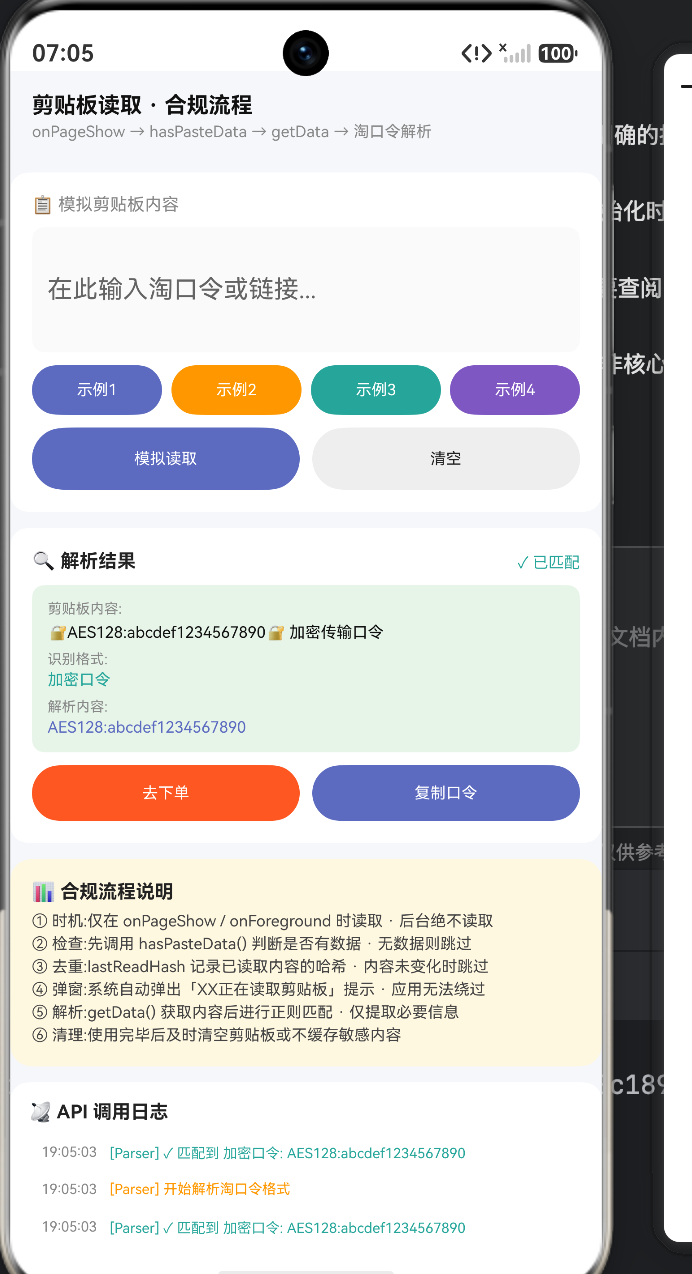
在这套代码中,this.showResult = true 触发的这块 UI,就是完美的“视觉补偿剂”。
          if (this.showResult) {
            Column() {
              // 1. 结果定性栏:通过绿色勾号和文本给予“安全确认”
              Row() {
                Text('🔍 解析结果').fontSize(12).fontColor('#222').fontWeight(FontWeight.Bold).layoutWeight(1)
                Text(this.result.matched ? '✓ 已匹配' : '✗ 未匹配').fontSize(10).fontColor(this.result.matched ? '#26A69A' : '#EF5350')
              }
              .width('100%')

              // 2. 信息透明化展示栏:明确告诉用户“我到底读了你的什么东西”
              Column() {
                Text('剪贴板内容:').fontSize(9).fontColor('#888').width('100%')
                Text(this.result.content).fontSize(10).fontColor('#111').width('100%').margin({ top: 4 })
                Text('识别格式:').fontSize(9).fontColor('#888').width('100%').margin({ top: 6 })
                Text(this.result.format).fontSize(10).fontColor(this.result.matched ? '#26A69A' : '#EF5350').width('100%').margin({ top: 2 })

                // 展示剥离出的纯净参数
                if (this.result.matched && this.result.detail) {
                  Text('解析内容:').fontSize(9).fontColor('#888').width('100%').margin({ top: 6 })
                  Text(this.result.detail).fontSize(10).fontColor('#5C6BC0').width('100%').margin({ top: 2 })
                }
              }
              .width('100%').padding(10).backgroundColor(this.result.matched ? '#E8F5E9' : '#FFF5F5').borderRadius(8).margin({ top: 8 })

              // 3. 业务闭环按钮组:将读取行为瞬间转化为生产力
              if (this.result.matched) {
                Row({ space: 8 }) {
                  Column() { Text('去下单').fontSize(10).fontColor('#FFFFFF') }
                    .layoutWeight(1).height(36).backgroundColor('#FF5722').borderRadius(18)
                  Column() { Text('复制口令').fontSize(10).fontColor('#FFFFFF') }
                    .layoutWeight(1).height(36).backgroundColor('#5C6BC0').borderRadius(18)
                }
                .width('100%').margin({ top: 8 })
              }
            }
            .width('100%').padding(14).backgroundColor('#FFFFFF').borderRadius(12)
          }
UX 心理学解析:
- 消除黑盒恐惧:在用户心中,“读取剪贴板”是一个黑盒。通过
Text(this.result.content)将刚才读到的内容原封不动地展示出来,是在向用户表明:“你看,我只读了这行字,没有偷偷读你的密码”。 - 色彩安抚:如果是预期内的口令,背景使用极度柔和的浅绿色(
#E8F5E9),暗示这是一个安全的、被系统认可的正向流程。 - 快捷行动(Call to Action):底部的“去下单”按钮是最核心的转化。用户原本需要自己去搜索框粘贴这段文字再点击搜索,现在系统直接越过了这一步,把结账按钮递到了用户手边。这种“服务找人”的爽快感,会瞬间抵消弹窗带来的不适。
完整代码
interface LogItem { id: number; time: string; text: string; color: string }
interface ClipboardResult { content: string; format: string; matched: boolean; detail: string }
interface Pattern { format: string; regex: RegExp; label: string }
struct Index {
logs: LogItem[] = []
seq: number = 0
pasteInput: string = ''
lastReadHash: string = ''
result: ClipboardResult = { content: '', format: '', matched: false, detail: '' }
showResult: boolean = false
showSystemPopup: boolean = false
aboutToAppear(): void {
this.appendLog('[Security] 剪贴板读取 · 合规流程演示', '#5C6BC0')
this.appendLog('[Rule] 仅在 onPageShow 时读取,后台不读取', '#5C6BC0')
this.appendLog('[Rule] 使用 lastReadHash 避免重复弹窗', '#5C6BC0')
}
onPageShow(): void {
this.appendLog('[Lifecycle] onPageShow · 应用回到前台', '#5C6BC0')
this.readClipboard()
}
private appendLog(text: string, color: string): void {
this.seq++
const d: Date = new Date()
const hh: string = d.getHours() < 10 ? '0' + d.getHours() : d.getHours().toString()
const mm: string = d.getMinutes() < 10 ? '0' + d.getMinutes() : d.getMinutes().toString()
const ss: string = d.getSeconds() < 10 ? '0' + d.getSeconds() : d.getSeconds().toString()
this.logs.unshift({ id: this.seq, time: hh + ':' + mm + ':' + ss, text: text, color: color })
if (this.logs.length > 24) { this.logs.pop() }
}
private readClipboard(): void {
this.appendLog('[pasteboard] hasPasteData() · 检查剪贴板是否有数据', '#FF9800')
const self: Index = this
setTimeout(() => {
const hasData: boolean = self.pasteInput.length > 0
if (hasData) {
self.appendLog('[pasteboard] hasPasteData() → true', '#26A69A')
const hash: string = self.stringHash(self.pasteInput)
if (hash === self.lastReadHash) {
self.appendLog('[Optimization] 内容未变化 · 跳过读取,避免重复弹窗', '#888')
return
}
self.appendLog('[System] ⚠ 系统弹窗:「本应用正在读取剪贴板」', '#EF5350')
self.showSystemPopup = true
setTimeout(() => { self.showSystemPopup = false }, 2000)
self.appendLog('[pasteboard] getData() · 读取剪贴板内容', '#FF9800')
setTimeout(() => {
self.lastReadHash = hash
self.parseTaobaoPassword(self.pasteInput)
}, 800)
} else {
self.appendLog('[pasteboard] hasPasteData() → false · 剪贴板为空', '#888')
}
}, 600)
}
private stringHash(str: string): string {
let hash: number = 0
for (let i: number = 0; i < str.length; i++) {
hash = ((hash << 5) - hash) + str.charCodeAt(i)
hash = hash & hash
}
return Math.abs(hash).toString(16)
}
private parseTaobaoPassword(text: string): void {
this.appendLog('[Parser] 开始解析淘口令格式', '#FF9800')
const patterns: Pattern[] = [
{ format: 'taobao', regex: /¥([^¥]+)¥/, label: '淘宝口令' } as Pattern,
{ format: 'tmall', regex: /₤([^₤]+)₤/, label: '天猫口令' } as Pattern,
{ format: 'lock', regex: /🔐([^🔐]+)🔐/, label: '加密口令' } as Pattern,
{ format: 'url', regex: /https?:\/\/[^\s]+/, label: '链接地址' } as Pattern
]
for (const p of patterns) {
const match: RegExpExecArray | null = p.regex.exec(text)
if (match) {
this.result = {
content: text.substring(0, 50) + (text.length > 50 ? '...' : ''),
format: p.label,
matched: true,
detail: match[1]
}
this.showResult = true
this.appendLog('[Parser] ✓ 匹配到 ' + p.label + ': ' + match[1].substring(0, 30), '#26A69A')
return
}
}
this.result = {
content: text.substring(0, 50) + (text.length > 50 ? '...' : ''),
format: '未知',
matched: false,
detail: ''
}
this.showResult = true
this.appendLog('[Parser] ✗ 未匹配到淘口令格式', '#EF5350')
}
private simulatePaste(): void {
if (this.pasteInput.length === 0) {
this.appendLog('[Simulate] 剪贴板为空,请先输入内容', '#EF5350')
return
}
this.appendLog('[Simulate] 用户粘贴到剪贴板', '#888')
this.lastReadHash = ''
this.showResult = false
this.readClipboard()
}
private clearAll(): void {
this.pasteInput = ''
this.result = { content: '', format: '', matched: false, detail: '' }
this.showResult = false
this.lastReadHash = ''
this.appendLog('[Clear] 剪贴板内容已清空', '#888')
}
private fillExample(n: number): void {
const examples: string[] = [
'¥q1eD4X7f9hG¥ 这是一条淘宝商品口令,复制后打开淘宝',
'₤9xJk6Z8m2nP₤ 天猫超市满减优惠口令',
'🔐AES128:abcdef1234567890🔐 加密传输口令',
'https://item.taobao.com/item.htm?id=1234567890123'
]
this.pasteInput = examples[n]
this.appendLog('[Example] 填入示例 ' + (n + 1) + ': ' + examples[n].substring(0, 20), '#888')
}
build() {
Column() {
Row() {
Column() {
Text('剪贴板读取 · 合规流程').fontSize(14).fontColor('#111').fontWeight(FontWeight.Bold)
Text('onPageShow → hasPasteData → getData → 淘口令解析').fontSize(10).fontColor('#888').margin({ top: 3 })
}
.layoutWeight(1).alignItems(HorizontalAlign.Start)
}
.width('100%').padding({ left: 14, right: 14, top: 14, bottom: 10 })
Scroll() {
Column() {
Column() {
Text('📋 模拟剪贴板内容').fontSize(11).fontColor('#888').width('100%')
TextInput({ placeholder: '在此输入淘口令或链接...' })
.onChange((val: string) => { this.pasteInput = val })
.fontSize(12)
.width('100%').height(80).margin({ top: 8 })
.backgroundColor('#FAFAFA').borderRadius(8).padding(10)
Row({ space: 6 }) {
Column() { Text('示例1').fontSize(10).fontColor('#FFFFFF') }
.layoutWeight(1).height(32).backgroundColor('#5C6BC0').borderRadius(16).alignItems(HorizontalAlign.Center).justifyContent(FlexAlign.Center).onClick(() => this.fillExample(0))
Column() { Text('示例2').fontSize(10).fontColor('#FFFFFF') }
.layoutWeight(1).height(32).backgroundColor('#FF9800').borderRadius(16).alignItems(HorizontalAlign.Center).justifyContent(FlexAlign.Center).onClick(() => this.fillExample(1))
Column() { Text('示例3').fontSize(10).fontColor('#FFFFFF') }
.layoutWeight(1).height(32).backgroundColor('#26A69A').borderRadius(16).alignItems(HorizontalAlign.Center).justifyContent(FlexAlign.Center).onClick(() => this.fillExample(2))
Column() { Text('示例4').fontSize(10).fontColor('#FFFFFF') }
.layoutWeight(1).height(32).backgroundColor('#7E57C2').borderRadius(16).alignItems(HorizontalAlign.Center).justifyContent(FlexAlign.Center).onClick(() => this.fillExample(3))
}
.width('100%').margin({ top: 8 })
Row({ space: 8 }) {
Column() { Text('模拟读取').fontSize(10).fontColor('#FFFFFF') }
.layoutWeight(1).height(40).backgroundColor('#5C6BC0').borderRadius(20).alignItems(HorizontalAlign.Center).justifyContent(FlexAlign.Center).onClick(() => this.simulatePaste())
Column() { Text('清空').fontSize(10).fontColor('#222') }
.layoutWeight(1).height(40).backgroundColor('#EEEEEE').borderRadius(20).alignItems(HorizontalAlign.Center).justifyContent(FlexAlign.Center).onClick(() => this.clearAll())
}
.width('100%').margin({ top: 8 })
}
.width('100%').padding(14).backgroundColor('#FFFFFF').borderRadius(12).margin({ left: 10, right: 10, top: 10 })
if (this.showSystemPopup) {
Column() {
Text('⚠ 系统弹窗').fontSize(11).fontColor('#EF5350').fontWeight(FontWeight.Bold)
Text('「本应用正在读取剪贴板」').fontSize(9).fontColor('#EF5350').margin({ top: 4 })
Text('此弹窗为系统行为,应用无法绕过').fontSize(9).fontColor('#888').margin({ top: 4 })
}
.width('100%').padding(12).backgroundColor('#FFF5F5').borderRadius(10).margin({ left: 10, right: 10, top: 10 })
}
if (this.showResult) {
Column() {
Row() {
Text('🔍 解析结果').fontSize(12).fontColor('#222').fontWeight(FontWeight.Bold).layoutWeight(1)
Text(this.result.matched ? '✓ 已匹配' : '✗ 未匹配').fontSize(10).fontColor(this.result.matched ? '#26A69A' : '#EF5350')
}
.width('100%')
Column() {
Text('剪贴板内容:').fontSize(9).fontColor('#888').width('100%')
Text(this.result.content).fontSize(10).fontColor('#111').width('100%').margin({ top: 4 })
Text('识别格式:').fontSize(9).fontColor('#888').width('100%').margin({ top: 6 })
Text(this.result.format).fontSize(10).fontColor(this.result.matched ? '#26A69A' : '#EF5350').width('100%').margin({ top: 2 })
if (this.result.matched && this.result.detail) {
Text('解析内容:').fontSize(9).fontColor('#888').width('100%').margin({ top: 6 })
Text(this.result.detail).fontSize(10).fontColor('#5C6BC0').width('100%').margin({ top: 2 })
}
}
.width('100%').padding(10).backgroundColor(this.result.matched ? '#E8F5E9' : '#FFF5F5').borderRadius(8).margin({ top: 8 })
if (this.result.matched) {
Row({ space: 8 }) {
Column() { Text('去下单').fontSize(10).fontColor('#FFFFFF') }
.layoutWeight(1).height(36).backgroundColor('#FF5722').borderRadius(18).alignItems(HorizontalAlign.Center).justifyContent(FlexAlign.Center)
Column() { Text('复制口令').fontSize(10).fontColor('#FFFFFF') }
.layoutWeight(1).height(36).backgroundColor('#5C6BC0').borderRadius(18).alignItems(HorizontalAlign.Center).justifyContent(FlexAlign.Center)
}
.width('100%').margin({ top: 8 })
}
}
.width('100%').padding(14).backgroundColor('#FFFFFF').borderRadius(12).margin({ left: 10, right: 10, top: 10 })
}
Column() {
Text('📊 合规流程说明').fontSize(12).fontColor('#222').fontWeight(FontWeight.Bold).width('100%')
Text('① 时机:仅在 onPageShow / onForeground 时读取 · 后台绝不读取').fontSize(10).fontColor('#444').width('100%').margin({ top: 6 })
Text('② 检查:先调用 hasPasteData() 判断是否有数据 · 无数据则跳过').fontSize(10).fontColor('#444').width('100%').margin({ top: 3 })
Text('③ 去重:lastReadHash 记录已读取内容的哈希 · 内容未变化时跳过').fontSize(10).fontColor('#444').width('100%').margin({ top: 3 })
Text('④ 弹窗:系统自动弹出「XX正在读取剪贴板」提示 · 应用无法绕过').fontSize(10).fontColor('#444').width('100%').margin({ top: 3 })
Text('⑤ 解析:getData() 获取内容后进行正则匹配 · 仅提取必要信息').fontSize(10).fontColor('#444').width('100%').margin({ top: 3 })
Text('⑥ 清理:使用完毕后及时清空剪贴板或不缓存敏感内容').fontSize(10).fontColor('#444').width('100%').margin({ top: 3 })
}
.width('100%').padding(14).backgroundColor('#FFF8E1').borderRadius(14).margin({ left: 10, right: 10, top: 10 })
Column() {
Text('📡 API 调用日志').fontSize(12).fontColor('#222').fontWeight(FontWeight.Bold).width('100%')
Scroll() {
Column({ space: 4 }) {
ForEach(this.logs, (l: LogItem) => {
Row() {
Text(l.time).fontSize(9).fontColor('#888').margin({ right: 8 })
Text(l.text).fontSize(9).fontColor(l.color).layoutWeight(1)
}
.width('100%').padding({ left: 8, right: 8, top: 4, bottom: 4 }).backgroundColor('#FFFFFF').borderRadius(6)
})
}
.width('100%')
}
.height(180).width('100%').scrollBar(BarState.Off).margin({ top: 8 })
}
.width('100%').padding(12).backgroundColor('#FFFFFF').borderRadius(12).margin({ left: 10, right: 10, top: 10 })
Column() {
Text('🧩 真机 API · pasteboard 使用流程').fontSize(12).fontColor('#222').fontWeight(FontWeight.Bold).width('100%')
Text('① 导入: import pasteboard from "@ohos.pasteboard"').fontSize(10).fontColor('#444').width('100%').margin({ top: 6 })
Text('② 检查: const hasData = await pasteboard.hasPasteData()').fontSize(10).fontColor('#444').width('100%').margin({ top: 3 })
Text('③ 读取: const data = await pasteboard.getData() → 系统弹出读取提示').fontSize(10).fontColor('#444').width('100%').margin({ top: 3 })
Text('④ 提取: const text = data.getPrimaryText()').fontSize(10).fontColor('#444').width('100%').margin({ top: 3 })
Text('⑤ 淘口令正则: /¥([^¥]+)¥/ · /₤([^₤]+)₤/ · /🔐([^🔐]+)🔐/').fontSize(10).fontColor('#5C6BC0').width('100%').margin({ top: 3 })
Text('⑥ 去重: 维护 lastReadHash,内容未变化时跳过读取').fontSize(10).fontColor('#26A69A').width('100%').margin({ top: 3 })
}
.width('100%').padding(14).backgroundColor('#E3F2FD').borderRadius(14).margin({ left: 10, right: 10, top: 10, bottom: 20 })
}
.width('100%')
}
.layoutWeight(1).scrollBar(BarState.Off)
}
.width('100%').height('100%').backgroundColor('#F5F7FA')
}
}
五、 核心参数与 HarmonyOS 真机 API 映射指南
为了帮助开发者将本文的底层思维转化为鸿蒙原生的 Pasteboard API 生产级代码,特总结以下全场景合规对照表:
| 开发步骤与目的 | ArkTS / HarmonyOS 原生 API | 架构规范与最佳实践 |
|---|---|---|
| 0. 前提检查 | import pasteboard from '@ohos.pasteboard' |
在需要处理剪贴板的组件生命周期顶部引入。 |
| 1. 无感预检 | await pasteboard.hasPasteData() |
绝对高频考点。这行代码不会触发系统警告弹窗!在做任何重量级操作前,必须先调用此 API。如果没有数据,立即终结流程。 |
| 2. 获取原生对象 | const pasteData = await pasteboard.getData() |
警告触发点。这行代码一执行,屏幕顶端将不可逆地弹出提示框。请确保此时应用已处理妥当预备渲染的数据层。 |
| 3. 数据解包提取 | const text = pasteData.getPrimaryText() |
PasteData 是一个富容器(可能包含图片、HTML),如果是解析口令,直接调用提取主文本的方法。 |
| 4. 销毁隐私痕迹 | pasteboard.clearData() |
大厂极客做法。如果是诸如“分享密令”、“邀请码”这类一次性消耗品,在业务处理完毕后,建议主动清空剪贴板,防止其他毒瘤 App 窃取你家口令。 |
六、 安全架构的深度演进与防线升级
在百万级日活的大型商业应用中,剪贴板不仅是便利的桥梁,更可能是恶意的温床。架构师必须构筑更加立体的防线:
- 脱敏清洗(Data Sanitization):
剪贴板文本中可能包含恶意注入的 SQL 注入代码、跨站脚本(XSS)甚至钓鱼链接。在使用正则匹配出match[1]后,绝对不允许未经任何 HTML 转义就直接将其塞入 Web 组件或日志服务器中。 - 跨端剪贴板的安全隔断(Distributed Pasteboard Control):
在 HarmonyOS 中,剪贴板是分布式的(在一台设备复制,可以在另一台设备粘贴)。如果你的应用中包含极其敏感的金融密码输入框,强烈建议对该特定TextInput设置屏蔽粘贴能力,或者在应用将密码压入剪贴板时,使用系统 API 给该数据打上LocalOnly标签,禁止其流转到其他物理设备,防止隔空拦截。 - 克制的弹窗哲学(The Philosophy of Restraint):
永远不要把“合规”仅仅当作应付应用商店审核的手段。在处理剪贴板时,少调用一次 API,用户对你应用的信任就增加一分。使用哈希算法过滤历史记录,仅在极其精确的正则表达式匹配成功后才展示业务面,是对用户数字主权最大的尊重。
剪贴板的处理,是检验一个移动端开发者对“用户体验与隐私边界”把握程度的最佳试金石。在 HarmonyOS 愈发严格的安全管控下,唯有深刻理解系统底层的运行机制,以极高的工程素养去包裹每一次数据访问,才能在全场景智慧生态中,打磨出真正让用户安心、顺心的高端原生应用。

一站式 AI 云服务平台
更多推荐


 11
11 0
0- 0


 已为社区贡献8条内容

所有评论(0)